Data Query Language (DQL)
The heart of both delightql and SQL is the query expression, also called a table expression. A query expression is a unit of code that returns exactly one table. Here, table is synonymous with predicate or relation, regardless of whether the data is persisted via CREATE TABLE. More typically, these results are anonymous and ephemeral – the output of execution within the REPL.
The majority of delightql lives in this section; mastering it is prerequisite to understanding DDL and DML.
A query’s meaning is identical to the table it produces. This substitutability is key to composability: through subqueries and CTEs, query expressions become recursively inductive to any depth. Delightql encourages a particular style of composition – pipelining a relation through transformations, left to right, with consistent associativity and scoping.
Basics: Comments, Strings, and Semicolons
Unlike SQL, delightql uses the double forward slash // for comments. The double hyphen -- is not a valid comment in delightql and will fail to parse.
Delightql only uses double quotes " to delimit a string in code. The single quote is not an optional syntax for strings. The backtick is used for stropping identifiers.
The semicolon ; is so pervasive in other programming languages that this reference must make this the first syntactic clarification: semicolons in delightql are NOT statement separators. Instead they are the special operator UNION CORRESPONDING and are covered in the section on set operators.
employee_2024(*) as x ;
  employee_2025(*) as y
// the above UNIONs the two tables
// with null padding for unshared
// columns
All reserved words
Delightql has very few keywords. They are
asnotandorintruefalsenullof– only for pivotsgroups– only for window functionsrows– only for window functionshas– only for tree group destructuringascandascending– only in order bydescanddescending– only in order by
Case insensitivity
Delightql is case-insensitive. In contrast to Prolog, where capitalization distinguishes variables from atoms. The following all refer to the same identifier:
employee_idEmployee_IdEMPLOYEE_ID
Stropping
Names containing characters outside the bare identifier shape (spaces, for instance) are delimited with backticks: `employee Id`. Keyword spellings do not require stropping in identifier positions: from(*) may name a table, and as:(x) may name a function. Keywords still perform their grammatical roles where an operator or literal is expected.
From
Every delightql query begins with a source: one or more tables from which to draw data. SQL calls this selection In contrast to Codd’s original paper, where selection (σ) denoted row filtering–what SQL now calls WHERE., but we will call this access or sourcing.
All Columns
* The glob * in argument position requests all columns from a table – equivalent to SELECT * FROM employee. This is the most common way to source data in delightql.
Argumentative Access
Arguments within the functor bring columns into scope by position.
employee(employee_id  , last_name ,
         first_name   , title    , reports_to,
         birth_date   , hire_date , address, city,
         state       , country  , postal_code,
         phone       , fax      , email )
This binds each identifier to the column at that ordinal position in the table definition. The arity must match exactly – if employee has 15 columns, the functor must have 15 arguments.
The identifiers you choose become the column names in scope of the position having the identifier.
This makes argumentative access error-prone for wide tables. When arity exceeds a handful of columns, prefer the glob employee(*) and use the columns by name (see All Columns).
Aliasing a Table
The as keyword assigns an alias to a table. Once aliased, columns must be accessed through the alias – the original table name leaves scope.
Aliases are often a convenience, but become necessary in contexts like self-joins.
Table Namespacing
A dot-prefixed identifier namespaces the table. Here, partner_sale_2025_07_31 lives within the namespace etl. What this namespace represents – schema in some databases, database in others – is implementation-dependent.
The namespace is the entire syntax before the dot and may include nesting using ::. Namespaces are nested like file-system folders.
mount!("etl.sqlite", "client1::production::etl")(*)
client1::production::etl.partner_sale_2025_07_31(*) as s
In the above example, client1::production::etl is the namespace where client1 contains production which contains etl.
Namespaces are elements of the delightql runtime. The delightql programmer chooses the hierarchy and maps these to source structures. For more information, see the namespacing section of DDL.
Anonymous Table
The underscore functor _( ) declares a table inline, with literal values. Commas separate columns. This is equivalent to:
The underscore is the FULL sigil – a name for “no name.” The name FULL plays against NULL: where NULL matches nothing and has null potency, FULL matches everything and is full of potential.
Note the two anonymous tables in play: the inline table declared with _( ) and the result table returned by the query itself. The term anonymous table in this reference denotes the former – tables whose values are defined inline and whose names are discarded. An anonymous table is a query-mode construct, despite its syntactic resemblance to assertion-mode fact instantiation.
Stacked Notation and Multiple Rows
Multiple rows are expressed with the SEMI-OR sigil ;, a disjunction operator:
Semicolon binds looser than comma, so rows stack naturally without parentheses. This stacked notation appears throughout delightql – anywhere multiple clauses or rows would otherwise require repeating functor syntax. Stacked notation is essentially syntactic sugar: it reduces redundant functor notation in both assertion mode and anonymous tables. See the glossary for examples.
Naming the Columns of Anonymous Tables
The columns in the examples so far have been positional – they have ordinal positions but no names. Delightql allows positional-only access, but also provides syntax for naming columns.
The ATOP sigil @ separates column names (comma-delimited) from the stacked data that follows. This three-row, two-column table now has columns named first and second.
ATOP has an alternate form: three or more dashes. The following are all equivalent:
@---------------------------------
The dashed form enables formatted table literals:
_(
 id,first_name   , last_name , email
 ----------------------------------------------------
 0,"Gusti"       , "Parlor"  , "[email protected]"  ;
 1,"Diane-marie" , "McHenry" , "[email protected]"  ;
 2,"Ced"         , "Mainds"  , "[email protected]" ;
 3,"Bren"        , "Berndsen", "[email protected]"
)
Sparse Anonymous Tables
When most columns in a wide anonymous table are NULL, data rows become verbose and error-prone. Sparse columns solve this: mark optional columns with ? in the header, then fill only the ones you need per row.
_(column, type, nullable?, default?, check?, primary_key?, unique?
  ---------------------------------------------------------------
  "id",     "INT",    _(primary_key @ "true") ;
  "name",   "TEXT" ;
  "email",  "TEXT",   _(unique @ "true") ;
  "salary", "DECIMAL",_(check @ "salary>0"))
Columns without ? are positional – every row must supply them, in order. Columns with ? are sparse – unfilled sparse columns default to NULL. If sparse columns are used, they must come after the required columns.
Sparse fills
A sparse fill uses anonymous table syntax _(col @ val) to assign a value to a named sparse column. Fills appear after the positional values in a data row:
_(column, type, nullable?, primary_key?
  -------------------------------------
  // Single fill
  "id", "INT", _(primary_key @ "true") ;

  // Multiple separate fills
  "id", "INT", _(primary_key @ "true"), _(nullable @ "false") ;

  // Combined fill: multiple sparse columns in one expression
  "id", "INT", _(primary_key, nullable @ "true", "false"))
In a combined fill, column names and values are matched positionally: primary_key gets "true", nullable gets "false".
No fills
When a row supplies no fills, all sparse columns are NULL:
This is equivalent to _(a, b, c @ 1, null, null; 2, null, null; 3, null, null).
All sparse
A table may have no positional columns at all:
Higher-Order Predicates
Delightql supports higher-order predicates–predicates that accept tables (or scalars) as parameters and return a table. SQL calls these table-valued functions. Defining higher-order rules is covered in the DDL section. Given this definition:
clean_contacts(T(*))( * ) :-
  T(*)
    |> $(trim:())( last_name, first_name)
    |> $(lower:())( email)
    |> -( fax)
a query passes it a table:
Here, clean_contacts is a higher-order predicate that takes employee(*) as its parameter.
The transpiled SQL depends on how the predicate was defined. With the definition given, the query clean_contacts(employee(*))(*) produces:
select
    employee_id,
    trim(last_name)    as last_name,
    trim(first_name)   as first_name,
    title,
    reports_to,
    birth_date,
    hire_date,
    address,
    city,
    state,
    country,
    postal_code,
    phone,
    lower(email)      as email
from employee;
Higher-order predicates are structurally typed by the columns they reference. This resembles duck typing: delightql has no formal type layer, but detects which columns the predicate body requires. Any table providing those columns is a valid argument. In this example, any table with last_name, first_name, email, and fax qualifies:
The pipeline form, explained in Higher-Order Pipes, is equivalent:
Order By
Delightql, like SQL, has order by. The ORDER-BY operator is an octothorpe-prefixed functor #() applied after a pipe:
Columns appear in the SQL in the order given. Collation modifiers work as in SQL–with keywords:
Order Byhas no meaning in pure relational algebra, where relations are unordered sets. SQL has never been true to theory; delightql is equally cavalier. To admit order-by as a first-class relational operator, delightql takes two positions:
- Relations are ordered sequences of tuples, not sets. A sequence captures this notion.
- A parametric mechanism maps domain orderings onto tuple orderings. We can imagine every tuple contains a hidden column
#. Absent an explicit ordering, this column holds arbitrary values. Givenorder by my_column, the tuples reorder and # recalculates accordingly.
Limit
Limit the number of tuples returned using the TUPLE-ORDINAL sigil # in a predicate position:
Read this as: “all columns of customer where the implicit row ordinal is less than 20.”
Limit affects only cardinality, not schema.
Order of operations matters. Delightql evaluates left to right, so these two queries differ:
Projection
Projection retains a subset of columns from a relation. In SQL, this is the list between SELECT and FROM.
Project Retain
The R-PIPE |> passes a relation to the PROJECT operator ( ). Columns listed inside are retained; all others are discarded.
The pipe creates a scope barrier for the relation being projected: only its projected columns continue forward. Inside an interior relation, bindings from the enclosing scope remain accessible; they are not part of the local interface this projection replaces.
Projections can be chained:
select first_name from employee;
-- -- optimized from:
-- select first_name
--   from (
--     select
--       first_name,
--       last_name
--     from Employee);
Delightql (and SQL optimizers) will simplify redundant intermediate projections. But scope is enforced at each step–this will not work:
After line 2, only last_name exists in the piped relation.
Rename
Rename a column during projection with as:
Generalized Projection
Columns can be transformed during projection using domain functions:
Note the colon in upper:(name). This distinguishes functions from relations – foo(A,B) is a relation; foo:(A) is a function.
Aggregate functions are not permitted in projection. See the sections on
distinctandgroup byfor aggregate usage. Delightql will reject known aggregates, but cannot detect user-defined aggregates–these will transpile as if scalar.
Other functions – ‘case’, ‘case select’, concatenation, windowing/analytic functions, and operators – are covered in the function chapter of this reference.
Argumentative Projection
Columns can be projected by position using argumentative access. The FULL sigil _ discards unwanted positions:
Only the first two columns are retained; the rest are projected away. The identifiers employee_id and last_name name the columns in the result – matching the underlying column names here, though positional access can also rename by using a different identifier.
As with argumentative positional access, this notation is brittle for wide tables – prefer named projection when arity exceeds a handful of columns (see Argumentative Positional Access).
Project Out
The PROJECT-OUT operator -(◌) subtracts columns from a relation:
select
    employee_id,
    last_name,
    first_name,
    title,
    reports_to,
    --  birth_date, -- column projected out
    hire_date,
    address,
    city,
    state,
    country,
    postal_code,
    phone,
    fax
    -- Email -- column projected out
from employee;
All columns except birth_date and email are retained. This is particularly useful for wide tables where listing retained columns would be tedious.
Map Covering
The MAP-COVER operator $( · )( · ) applies a function across specified columns while preserving all others:
select
employee_id,
upper(last_name) as last_name,
upper(first_name) as first_name,
upper(title) as title,
reports_to,
birth_date,
hire_date,
address,
upper(city) as city,
state,
country,
postal_code,
phone,
fax,
email
from employee;
The first parentheses contain the function; the second lists the target columns. The function upper:() is written with its argument row open – the column value lands in the row’s final argument, the same landing a function pipe takes. For a unary function the final argument is the only one; for max:(0) the column value lands after the written 0, as max(0, value). Write @ where the value must land elsewhere.
Map covering:
- Applies the function to each listed column
- Renames results to their original column names
- Passes through unlisted columns unchanged
- Preserves column ordinality
Because unlisted columns pass through, transformations can be chained:
employee(*)
  |> $(upper:())( last_name, first_name, title, city)
|> $(date:())( birth_date, hire_date)
Composing functions. When multiple functions apply to the same columns, three options exist:
Chained covers (repetitive but clear):
Containment composition using F-PARAM @ as a placeholder:
Both produce:
select
    employee_id,
    trim(upper(last_name))  as  last_name,
    trim(upper(first_name)) as  first_name,
    title,
    reports_to,
    birth_date,
    hire_date,
    address,
    city,
    state,
    country,
    postal_code,
    phone,
    fax,
    email
from employee;
Basic Dimension Covering
The BASIC-COVER operator $$( ) transforms individual columns without the curried function syntax:
select
    employee_id,
    last_name,
    first_name,
    title,
    reports_to,
    birth_date,
    hire_date,
    address,
    city,
    upper(state) as state,
    country,
    postal_code,
    '--------' as Phone,
    fax,
    email
from employee;
Each transformed column requires an as modifier – this identifies which columns are being replaced. Unlisted columns pass through in their original ordinality. Referencing a nonexistent column is an error.
Conditional Covering (If-Only)
The IF-ONLY sigil | constrains which rows a cover applies to. Rows not matching the predicate pass through unchanged.
Map-cover with if-only:
SELECT
  employee_id,
  CASE
    WHEN title = 'IT Staff' THEN upper(
      last_name
    )
    ELSE last_name
  END AS last_name,
  CASE
    WHEN title = 'IT Staff' THEN upper(
      first_name
    )
    ELSE first_name
  END AS first_name,
  title,
  reports_to,
  birth_date,
  hire_date,
  address,
  city,
  state,
  country,
  postal_code,
  phone,
  fax,
  email
FROM employee;
The predicate follows the column list, separated by |. This mirrors the aggregate if-only count:(col | pred) – the | always sits between the operands and the condition.
Without if-only, the function applies to all rows. With if-only, the function applies only to matching rows; non-matching rows retain their original values.
Basic-cover with if-only:
select
    employee_id,
    last_name,
    first_name,
    title,
    reports_to,
    birth_date,
    hire_date,
    address,
    city,
    state,
    country,
    postal_code,
    case when title = 'IT Staff'
         then 'REDACTED' else phone end as phone,
    case when title = 'IT Staff'
         then '---' else Fax end        as Fax,
    email
from employee;
The predicate goes at the end of the item list, after the last as target.
Composability. If-only composes with callable nesting and chaining:
If-only is syntactic sugar over CASE expressions. The equivalent without if-only:
employee(*)
  |> $$( _:(title = "IT Staff" -> upper:(last_name);  _ -> last_name)  as last_name,
         _:(title = "IT Staff" -> upper:(first_name); _ -> first_name) as first_name)
Regular Expression Column Addressing
A regular expression can select columns by name pattern:
The pattern matches anywhere in a column’s name, and it ignores case, as a column reference does: (Birth_Date) and /BIRTH/ both find birth_date. The regex applies only to column names, not namespaces or indexes.
To match case exactly, add the flag c after the closing slash:
Every column in the example database is lowercase, so /date/c still finds birth_date and hire_date, while /Date/c finds nothing and refuses.
c is the only flag. /date/i refuses, because ignoring case is already the default. Ignoring case applies inside character classes too, so /^[A-Z]/ matches birth_date, while /^[A-Z]/c matches nothing here.
The pattern language is a small subset of POSIX basic regular expressions: ^ and $ anchor, . matches any character, * repeats, [...] is a character class, and \+ and \? repeat one-or-more and zero-or-one. There are no groups and no alternation.
Positions. A regex stands wherever a list of columns is enumerated: PROJECT-IN ( ), PROJECT-OUT -( ), the second parentheses of MAP-COVER, the source of a RENAME-COVER *(/date/ as :"d_{@}"), GROUP-MODULO keys, function arguments, and record members. A project-in that matches no column refuses; a project-out may match none.
It cannot:
- Be followed by
as; rename the matched columns with a name template - Stand as a single value: an operand, a function-pipe step, or a slot
- Add columns in EMBED
+( ), since it names only columns that already exist
Rename Cover
The RENAME-COVER operator *( ) renames specified columns while passing all others through:
select
    track_id,
    name as track_name,
    album_id,
    media_type_id,
    genre_id,
    composer,
    milliseconds,
    bytes,
    unit_price
from track;
Rename cover preserves column count and column ordinality – only the names change.
Embedding
The EMBED operator +( ) adds a new column to a relation, placed after existing columns:
This is equivalent to |> (*, expr as name). The embed syntax makes the intent explicit: the relation is unchanged except for the added column.
Map Embedding
The EMBED-MAP operator +$( )( ) applies a function across columns and creates new columns from the results (rather than replacing the originals):
invoice(*)
  |> +$(tidy:() as :"tidy_{@}")( /^billing_/ )
  |> +$(label:() as :"label_{@}")( /^billing_/ )
SELECT
  invoice_id,
  customer_id,
  invoice_date,
  billing_address,
  billing_city,
  billing_state,
  billing_country,
  billing_postal_code,
  total,
  trim(coalesce(billing_address, '')) AS tidy_billing_address,
  trim(coalesce(billing_city, '')) AS tidy_billing_city,
  trim(coalesce(billing_state, '')) AS tidy_billing_state,
  trim(coalesce(billing_country, '')) AS tidy_billing_country,
  trim(coalesce(billing_postal_code, '')) AS tidy_billing_postal_code,
  upper(trim(coalesce(billing_address, ''))) AS label_billing_address,
  upper(trim(coalesce(billing_city, ''))) AS label_billing_city,
  upper(trim(coalesce(billing_state, ''))) AS label_billing_state,
  upper(trim(coalesce(billing_country, ''))) AS label_billing_country,
  upper(trim(coalesce(billing_postal_code, ''))) AS label_billing_postal_code
FROM invoice;
The first parentheses contain the function and an as qualifier with an F-STRING. The F-PARAM sigil @ stands in for the column name, generating tidy_billing_address, tidy_billing_city, etc. The second parentheses specify the target columns–here, all columns matching /^billing_/.
Unlike MAP-COVER, which replaces columns in place, EMBED-MAP preserves the originals and appends the transformed columns.
Projection Summary
The operators introduced so far are all unary – they transform a single relation. The following qualities characterize their behavior:
- Column Cardinality Preserved: The number of columns remains unchanged.
- Column Ordinality Preserved: Columns retain their relative order, with no intercalation of new columns among existing ones.
- Column Names Preserved: Existing columns keep their names (new columns do not affect this).
- Table Cardinality Preserved: The number of rows remains unchanged.
- Table Ordinality Preserved: Rows retain their order.
A quality is marked Y only if it holds under all circumstances; N if any case violates it.
( ) |
-( ) |
$( )( ) |
$$( ) |
|
|---|---|---|---|---|
| Project | Project Out | Map Cover | Basic Map Cover | |
| Column Ordinality Preserved | N | Y | Y | Y |
| Column Cardinality Preserved | N | N | Y | Y |
| Column Names Preserved | N | Y | Y | Y |
| Table Cardinality Preserved | Y | Y | Y | Y |
| Table Ordinality Preserved | Y | Y | Y | Y |
Preservation properties of Project, ProjectOut, MapCover, and BasicMapCover
*( ) |
#( ) |
%( ) |
|
|---|---|---|---|
| Rename | Order By | Group Modulo | |
| Column Ordinality Preserved | Y | Y | N |
| Column Cardinality Preserved | Y | Y | N |
| Column Names Preserved | N | Y | N |
| Table Cardinality Preserved | Y | Y | N |
| Table Ordinality Preserved | Y | N | N* |
Preservation properties of Rename, OrderBy, and GroupModulo
+( ) |
+$( ) |
|
|---|---|---|
| Embed | Map Embed | |
| Column Ordinality Preserved | Y | Y |
| Column Cardinality Preserved | N | N |
| Column Names Preserved | Y | Y |
| Table Cardinality Preserved | Y | Y |
| Table Ordinality Preserved | Y | Y |
Preservation properties of Embed and MapEmbed
One operator stands apart: GROUP-MODULO %( ) preserves none of these qualities unconditionally. It captures both DISTINCT and GROUP BY, and is the subject of the next chapter.
Distinct and Group By
Distinct and group by are congruent operations. Their similarity is often a source of confusion:
select
  title
from employee
  group by title;

-- Produces the same result as:

select
  distinct title
from employee;
Delightql reflects this congruence with unified syntax.
Distinct
The GROUP-MODULO operator %( ) returns distinct combinations of the specified columns:
Multiple columns return distinct combinations:
To deduplicate all columns – converting a multiset (bag) into a set:
Group By
Group by extends distinct with aggregation. The AGG-AND sigil ~> separates grouping columns (left) from reduced columns (right):
select
  billing_country,  -- grouping column
  count(*),        -- reduced column
  sum(total)       -- reduced column
from invoice
  group by billing_country;
Grouping columns may be expressions:
select
  total > 10 as high_low, -- grouping column
  upper(billing_country),  -- grouping column
  count(*),    -- reduced column
  avg(total)   -- reduced column
from invoice
  group by upper(billing_country), (total > 10) ;
Group Delegates
A group delegate is a principled mechanism for choosing one value among many during group reduction. The group delegate generalizes the aggregate functions max() and min() by allowing the user to choose their own ordering criteria. The group delegate is a function in unfamiliar clothing.
The group delegate may be found in reduction place. A column parenthesisized and then postfixed by the F-OVER sigil <~ followed by an explicit ordering criteria.
With an empty ordering (bare <~) the delegate row is arbitrary:
track(*)
  |> %(genre_id
        ~> count:(*) as n,
        (name as longest) <~ #(milliseconds desc),
        (name as arbitrary)<~ )
Some Sql vendors implement this functionality directly with dedicated syntax – the DISTINCT ON syntax.
Whole-Group Aggregate Functions
To aggregate without grouping, omit the grouping columns:
The GROUP-PIPE ~> provides a shorter form for a single aggregate:
Note. The GROUP-PIPE is different from the AGG-AND. This form replaces the |> pipe. It is pure sugar.
Internal Distinct
Some aggregates accept a distinct modifier on their input. The INNER-MODULO sigil % prefixes the column:
select
  country,
  count(distinct city),
  count(distinct support_rep_id)
from customer
  group by country;
Filter Clauses
The IF-ONLY sigil | constrains which values enter an aggregate:
customer(*)
  |>  %( country ~>
         count:(%city) ,
         count:(%support_rep_id),
         count:(last_name | length:(last_name) > 7)
            as long_lastname_count)
For dialects supporting FILTER:
select
  country,
  count(distinct city),
  count(distinct support_rep_id),
  count(last_name)
    filter
      (where length(last_name) > 7) as long_lastname_count
from customer
  group by country;
For dialects without FILTER, delightql emits a CASE expression:
select
  country,
  count(distinct city),
  count(distinct support_rep_id),
  count(case when length(last_name) > 7
            then last_name else null end) as long_lastname_count
from customer
  group by country;
Having
Filter on reduced columns by placing a predicate after the group by:
Read this as: “group customers by country, count each group, then keep only groups with more than 4 rows.”
Why does SQL have both WHERE and HAVING?
SQL has an implicit order of operations.
WHEREfilters rows before grouping;HAVINGfilters groups after aggregation. The two keywords signal this distinction. For a historical reflection on this issue, see .The abstraction is leaky – most programmers soon recognize that
HAVINGis equivalent to wrapping in a subquery and filtering withWHERE:SELECT country, count(*) AS customer_count FROM customer GROUP BY country HAVING count(*) > 4; -- equivalent to: SELECT * FROM ( SELECT country, count(*) AS customer_count FROM customer GROUP BY country ) WHERE customer_count > 4;Because delightql has explicit order of operations, no separate syntax is needed. The predicate simply follows the group by:
Placing the filter earlier would be an error,
customer_countdoes not exist until after the aggregation.
Where
Selection (σ in Codd’s relational algebra, WHERE in SQL) filters rows without changing schema. SQL’s use of “select” for projection is unfortunate – Codd used “select” for row filtering. Delightql follows Codd’s terminology.
Delightql uses the comma (conjunction) to attach predicates to relations. This is the same syntax as joins and comes directly from Prolog.
Domain Predicates
Multiple predicates conjoin naturally:
Scope restricts commutativity. Predicates can only reference columns already in scope. This is invalid:
// WONT WORK because total is not yet in scope
customer(*),
total > 10,
trim:(lower:(billing_country))="usa",
invoice(*)
But once columns are in scope, predicates may be reordered:
  invoice(*), total > 10,
    trim:(lower:(billing_country))="usa"
// commutativity allowed when all LVars are in scope
invoice(*),
trim:(lower:(billing_country))="usa",
total > 10
Null-safe vs Null-dangerous equality. Delightql reserves the = sigil for the SQL comparison operator IS NOT DISTINCT FROM. To use the traditional (dangerous) equality in SQL, use +sql_eq(x,y).
select * from invoice
  where total > 10
    and trim(lower(billing_country))
      IS NOT DISTINCT FROM 'usa'
    and billing_state='CA';
Three-Valued Logic
Null has been with databases since the very beginning and so has the debate about its semantics and danger.
SQL provides ‘good enough’ semantics for its usage in the set operations of distinct, grouping, union and intersect, but it can be a foot-gun in other circumstances.
The simplest display of its behavior below:
select
    null=null,
    null is null,
    null is not null,
    1=null,
    1 is null,
    1 is not null,
    1 in (select null union all select 2),
    1 not in (select null union select 2),
    1 in (select null union all select 1),
    1 not in (select null union select 1)
;
shows many odd results
| Sigil | Name | SQL Equivalent |
|---|---|---|
= |
NULL-SAFE-GROUND-EQ | IS NOT DISTINCT FROM |
== |
does NOT exist | |
> |
GROUND-GT | > |
< |
GROUND-LT | < |
>= |
GROUND-GTE | >= |
<= |
GROUND-LTE | <= |
!= |
NULL-SAFE-NOT-EQ | IS DISTINCT FROM |
Infix domain predicates
If a programmer requires the use of the traditional Sql = they can use the named functor: +sql_eq(left,right). Likewise, for SQL’s != there is +sql_ne(left,right)
The row-correspondence exception.
The table above describes local value tests – conditions comparing values within one row or against a ground term. An ordinary comparison matching two relation row occurrences uses SQL
=, whether the matches feed a multiplying join, an EXISTS/NOT EXISTS, or a correlated scalar subquery.
IS NOT DISTINCT FROMin correspondence would treat NULL as a matchable value and can explode cardinality. Suppressing the extra rows with EXISTS does not make that correspondence correct.Joins establish structural correspondence – “these rows belong together.” NULL means absence, and absence does not make a correspondence. Filters test value equality, where null-safety matters because rows should not silently disappear.
SQL clause placement is not the equality rule: a correlated EXISTS often has an inner WHERE, and still matches two row occurrences. A local
inner.x = nullbeside its correlation stays null-safe.There is no
cardinality/nulljoingate. If an absent key has a real matchable meaning, first map both sides to an explicit non-NULL key and match those keys. The NULL itself never establishes correspondence.
Argumentative Grounding
When using argumentative functor notation, a ground term in argument position induces selection:
All argumentative grounding uses null-safe equality.
The grounded column (artist_id IS NOT DISTINCT FROM 22) filters rows and is excluded from projection. Multiple grounds compound:
SELECT album_id
FROM album
WHERE
  title IS NOT DISTINCT FROM 'Coda'
  AND artist_id IS NOT DISTINCT FROM 22;
Any domain expression that reduces to a ground term may also be used in argumentative position:
select
  album_id
from album where title IS NOT DISTINCT FROM upper('iv') and artist_id IS NOT DISTINCT FROM (20+2);
The Prolog heritage is evident in this syntax and extends to joins – covered in a later section.
Semi-Joins and Anti-Joins
Semi-joins (∃ or ⋉) and anti-joins (∄ or ▷) test for existence without contributing columns. They ask “can you prove this?” rather than “give me this data.”
The PROVE sigil + prefixes a semi-join:
SELECT *
FROM employee AS e
WHERE
  EXISTS (
    SELECT 1
    FROM customer
    WHERE
      support_rep_id = e.employee_id
  );
The DISPROVE sigil \+ prefixes an anti-join: This syntax comes directly from Prolog’s negation-as-failure.
select
  *
from employee e
  where not exists (select 1 from customer
                      where support_rep_id = e.employee_id);
The join condition(s) appears inside the parentheses – this is called interior notation. The relation is tested for provability, not joined for data. The correlated row match still has join equality: two NULL keys do not correspond. + and \+ change how matching rows are observed, not how they match. A comparison confined to one interior row, such as customer.support_rep_id = null, remains a local null-safe test.
The in Predicate
Syntactic sugar provides the familiar form:
Both ask whether the customer’s state corresponds to one candidate. With these non-NULL constants, the filtering SQL can be written:
The unsugared form generalizes to multi-column comparisons:
SELECT *
FROM customer
WHERE
  ('USA' = country
  AND 'CA' = state)
  OR ('USA' = country
  AND 'TX' = state)
  OR ('Canada' = country
  AND 'ON' = state);
+_ is an existential observer of the same anonymous table an unmarked comma member would join. When a column from one row is matched to a candidate row, NULL never establishes correspondence, even under +. For example, _(a @ null), +_(a @ null) has no answer. A wholly ground null in (null) is a local value test instead and remains true.
Relational in
The literal form tests candidates in a fixed list. The relational form tests candidate rows from a query. Both are existence observations over the ordinary row-correspondence match, not a promise to emit SQL’s three-valued IN (SELECT ...).
The right-hand side is any DQL relation (a table access, a pipe chain, or an anonymous table):
SELECT * FROM customer
  WHERE EXISTS (SELECT 1 FROM employee AS e
                WHERE e.employee_id = customer.support_rep_id);
When the relation already has exactly one column, projection is unnecessary:
WITH support_rep AS (SELECT DISTINCT support_rep_id FROM customer)
SELECT * FROM employee
  WHERE EXISTS (SELECT 1 FROM support_rep AS r
                WHERE r.support_rep_id = employee.employee_id);
Tuple relational in
Multi-column matching extends the tuple in syntax ((x,y) in (1,2;3,4)) to relations. The relation must produce exactly as many columns as the left-hand tuple:
SELECT * FROM customer
  WHERE EXISTS (SELECT 1 FROM employee AS e
                WHERE e.city = customer.city
                  AND e.country = customer.country);
Negation: not in
SELECT * FROM employee
  WHERE NOT EXISTS (SELECT 1 FROM employee AS m
                    WHERE m.reports_to = employee.employee_id);
The negative form is anti-existence, not SQL NOT IN: a NULL candidate does not poison a nonmatching probe. A NULL employee key corresponds to no candidate key, including another NULL; positive in then fails and negative not in succeeds for that row. A wholly ground test such as null in (null) is a local null-safe value comparison and succeeds.
Arity rule
The relation must produce exactly as many columns as the left side has elements – one for a scalar, N for an N-tuple. A mismatch is a compile-time error.
Relation to semi-joins
Relational
inis syntactic sugar over the semi-join notation introduced above.col in R(|> (c))desugars to+R(, col = c);col not in R(|> (c))desugars to\+R(, col = c).
Inverted In
The anonymous semi-join syntax permits an inversion – ground the header, vary the rows:
This asks: “does ‘Dublin’ appear in any of these columns?” The columns become the rows of the anonymous table; the constant becomes the match target. Because 'Dublin' is non-NULL, SQL = is a result-equivalent filter here. Grounding a candidate’s header to NULL is instead a local null-safe test.
SQL supports Inverted In
Though it might be a revelation to some – including the author! – the inverted in is standard SQL and is fully supported by all dialects:
Similarly, to test if one column equals any of several others:
Here city is supplied by the customer row and each candidate is an anonymous-table row. + keeps or drops the customer depending on whether such a row corresponds; it does not turn NULL-to-NULL into a match. A wholly ground anonymous test still follows the local ground-value law.
Sigma Predicates
Predicates can be defined and reused. A sigma predicate is a rule that expands into selection criteria: Defining sigma predicates is covered in DDL.
 no_data("NA";"N/A";"UNKNOWN")

 empty(column) :- null=column
 empty(column) :- trim:(column)=""
 empty(column) :- +no_data(upper:(column))
Use with semi-join or anti-join syntax:Delightql applies De Morgan’s laws, distributing negation across disjunctive clauses.
WITH no_data(value) AS (VALUES ('NA'), ('N/A'), ('UNKNOWN'))
SELECT *
FROM customer
WHERE
  (company IS NULL
    OR trim(company) IS NOT DISTINCT FROM ''
    OR EXISTS (SELECT 1 FROM no_data WHERE upper(company) = no_data.value)
  ) IS NOT TRUE
  AND (state IS NULL
    OR trim(state) IS NOT DISTINCT FROM ''
    OR EXISTS (SELECT 1 FROM no_data WHERE upper(state) = no_data.value)
  ) IS NOT TRUE;
Like and Between
SQL’s LIKE and BETWEEN have special syntax. Delightql maps functor notation to these constructs:
The above delightql transpiles to the following Sql.
select
  *
from track
  where
    (name like '%Love%') is true and
    (milliseconds between 120000 and 600000) is not true;
To match a value against several patterns at once, like_any takes the value, then &, then the patterns as rows. Under + it keeps the rows whose value matches at least one pattern; under \+, the rows whose value matches none:
It is equivalent to:
select *
from customer
where not exists (
  select 1
  from (select '%.com' as pattern union all select '%.org') as p
  where email like p.pattern
);
The patterns can be any one-column relation — +like_any(email, domains(*))(*). Without the + it joins instead of filtering: each row gains the pattern it matched, once per match. A NULL value matches no pattern.
Disjunction
Two syntaxes express OR:
Keyword form (recommended). The or keyword binds predicates within a sigma clause:
invoice(*)
  , trim:(lower:(billing_country)) = "usa"
        or total > 10
  , billing_state != "CA"
  |> %( billing_country
          ~>
        count:(*) as invoice_count,
        avg:(total) )
Sigil form. The SEMI-OR sigil ; requires parentheses to capture scope:
invoice(*)
  , (trim:(lower:(billing_country)) = "usa"
        ; total > 10 )
  , billing_state != "CA"
  |> %( billing_country
          ~>
        count:(*) as invoice_count,
        avg:(total) )
Prefer the keyword form – it reads more clearly and avoids parenthesis errors. See “Precedence and Scoping” for details.
Join
Joins extend a relation’s schema by combining columns from multiple sources. Every join is a filtered cross product – the join condition determines which pairings survive.
Delightql evaluates joins left to right. Each table must be in scope before its columns can be referenced.
Cross Join
Two relations joined with no condition produce a Cartesian product. The resulting cardinality is the product of both input cardinalities. This is rarely intended.
Inner Join
The join condition follows the tables it correlates. Multiple conditions conjoin naturally:
customer(*), employee(*),
  customer.support_rep_id = employee.employee_id,
  customer.country = employee.country
Scope is left to right. This is an error:
USING Shorthand
The .(cols) operator specifies USING columns:
Multiple columns are comma-separated:
USING and explicit ON differ operationally: USING retains one copy of the matched column; ON retains both.
USING may combine with explicit conditions:
ON vs WHERE Inference
For inner joins, the placement of conditions in ON versus WHERE is semantically equivalent. For outer joins, it differs: ON conditions govern the match while preserving nulls; WHERE conditions filter the result and eliminate nulls.
Delightql infers placement from column references:
- Condition references multiple tables →
ON - Condition references one table →
WHERE
artist(*), album?(*),
  artist.artist_id = album.artist_id,   // two tables → ON
  album.title = "Greatest Hits"       // one table → WHERE
SELECT * FROM artist
  LEFT OUTER JOIN album
    ON artist.artist_id = album.artist_id
WHERE album.title = 'Greatest Hits';
The multi-table condition (artist.artist_id = album.artist_id) becomes the join’s ON clause. The single-table condition (album.title = 'Greatest Hits') becomes a WHERE filter – artists with no albums, or with no album of that title, are excluded.
To keep every artist while matching only albums of that title, constrain the albums before the join: filter them in a stage of their own and make that stage the optional member.
Multi-Table Joins
Joins chain left to right. Each table enters scope upon appearance:
SELECT * FROM invoice
  JOIN invoice_line USING (invoice_id)
  JOIN track USING (track_id)
WHERE invoice.invoice_date > '2025-01-01';
After the third table, columns from all three are in scope.
Self-Join
Aliases distinguish multiple references to the same table:
employee(*) as e, employee(*) as mgr, e.reports_to = mgr.employee_id
  |> (e.last_name as employee, mgr.last_name as Manager)
SELECT e.last_name AS employee, mgr.last_name AS Manager
FROM employee e
  JOIN employee mgr ON e.reports_to = mgr.employee_id;
Argumentative Join
Shared identifiers across functors induce join conditions – Prolog-style unification:
SELECT album.album_id, album.title, album.artist_id, artist.name
FROM album
  JOIN artist ON album.artist_id = artist.artist_id;
The variable artist_id appears in both functors, unifying the columns.
Multi-table example:
artist(artist_id, name),
  similar_artist(artist_id, similar_id, score),
  artist(similar_id, similar_name),
  score > 0.85
  |> (name, similar_name)
Argumentative joins are idiomatic in Prolog. Delightql supports them but recommends .(cols) or explicit conditions for wide tables where positional notation becomes error-prone.
Outer Joins
The OUTER-IND sigil ? marks a relation as optional – it may contribute nulls when no match exists.
Left outer (right table optional):
Right outer (left table optional):
Full outer (either optional):
Outer joins work with explicit conditions:
Lateral Joins
Correlated subqueries that return multiple columns use interior relation syntax. See Interior Relations.
ER-Context Joins
When join relationships are defined via ER-context-rules (see DDL):
customer(*) & invoice(*) :-
  customer(*), invoice(*), customer.customer_id = invoice.customer_id

invoice(*) & invoice_line(*) :-
  invoice(*), invoice_line(*), invoice.invoice_id = invoice_line.invoice_id

invoice_line(*) & track(*) :-
  invoice_line(*), track(*), invoice_line.track_id = track.track_id
the & and && operators provide concise join syntax:
Equivalent to:
The & operator performs direct lookup; && finds a path through the ER-graph:
ER-context joins compose with all other features – filters, projections, aggregations, additional explicit joins.
For defining ER-rules and contexts, see DDL: ER-Context Rules.
Domain Functions
Functions on domains are ordinary functions–what most programming languages simply call “functions.” The qualifier “on domains” distinguishes them from functions on relations (table-valued functions, covered elsewhere). Here, “domain” means data type: the addition function + in SELECT Salary + bonus FROM employee expects numeric operands.
SQL provides several syntaxes for functions: standard functor notation, infix operators, and CASE expressions. This section covers how to call domain functions in delightql. For defining functions, see Function Definition.
Domain functions can appear anywhere a column is valid – they are substitutable for the value they compute:
- During projection, as a transformation of a column
- During selection, as a transformation prior to comparison
- During grouping, as a transformation prior to grouping
- During aggregation, as a reduction of multiple values
Delightql’s default function syntax incorporates a colon: foo:(x) rather than foo(x). This functional functor notation distinguishes functions from relations. Delightql’s syntax derives from Prolog, where foo(x,y) denotes a relation. Functional functor notation marks the subset of relations that are functions – mappings that return exactly one value per input.
Standard Function Invocation
Three functions appear in two contexts:
length:()in a predicate (sigma clause)trim:()andupper:()in an embed, using containment composition
The colon signals to both compiler and programmer that the functor returns a domain value, not a relation.
Function Pipe Composition
The F-PIPE sigil >> composes functions left to right:
employee(*), length:(last_name) > 5
  |> +( last_name >> upper:() >> trim:() as capitalized_last_name)
The pipe begins with a domain expression (a column, literal, or function call). Each subsequent function is in curried form. The piped value fills the final argument unless an explicit @ places it elsewhere.
When the value belongs in a different argument position, use the F-PARAM sigil @:
The LAMBDA sigil :( ) creates an inline function. The @ marks where the piped value is placed.
employee(*), length:(last_name) > 5
    |> +(  birth_date >> strftime:("%Y",@) >> :( @ + 2) as birth_year_plus_two,
           birth_date >> strftime:("%Y",@) >> abs:() as abs_of_birth_year)
A lambda has an alternate spelling where a programmer may name the parameter coming in:
employee(*), length:(last_name) > 5
    |> +(  birth_date >> strftime:("%Y") >> :(|bday| bday + 2) as birth_year_plus_two,
           birth_date >> strftime:("%Y") >> abs:() as abs_of_birth_year)
Use the LAMBDA-PARAM | | to capture and name the input variable as the named parameter.
Domain Operators
Delightql supports standard arithmetic operators:
| Sigil | Name | Arity |
|---|---|---|
* |
OP-MULT | Binary |
+ |
OP-PLUS | Binary |
- |
OP-MINUS | Binary |
- |
OP-NEGATIVE | Unary |
/ |
OP-DIV | Binary |
% |
OP-MODULO | Binary |
Arithmetic domain operators
No implicit precedence. Delightql requires explicit parentheses when mixing operators. There is no PEMDAS. See “Order of Operations” for the conventional rules delightql declines to adopt. This is a deliberate design choice favoring clarity over convention.
_(first,second,third @ 1.3,20,30)
    |> ( 1 + (first / third),
        -third / ((first * second) / 23.33),
        (third % 11) - 42)
select
  1+(first/third),
  -third / ((first*second)/23.33),
  (third % 11) - 42
from (select 1.3 as first, 20 as second, 30 as third);
--  1.04333333333333|-26.9192307692308|-34
Case Simple
SQL’s CASE expression serves as a switch statement. Delightql represents it as what it is: a function, and therefore a relation.
select
  *,
  case title
    when 'IT Manager' then 'tech'
    when 'IT Staff' then 'tech'
    else 'other'
  end as kind
from employee;
The ANON-FUNC sigil _:( ) creates an anonymous case function. The F-AND sigil -> separates input patterns (left) from output values (right). The SEMI-OR sigil ; separates cases. The header title @ binds the input to the title column.
This is stacked notation applied to functions: the -> acts as a special comma that declares a functional dependency – columns left of the arrow are inputs, columns right are outputs.
Named case functions. The same notation defines reusable functions in assertion mode:
title_kind(
  title        -> kind
  ------------------
  "IT Manager" -> "tech";
  "IT Staff"   -> "tech";
  _            -> "other"
)

?- _(title @ "IT Staff"; "Sales Manager")
  |> +(  title_kind:(title) as kind )
The predicate title_kind is both a table (two columns, three rows) and a function (input determines output). The -> tells the compiler which column is the input when invoked as a function.
Without ->, the predicate is valid but not callable as a function:
//WILL NOT WORK!! (at least if you want to use it for function calls)
//    .. it is a perfectly acceptable predicate
title_kind("IT Manager"    , "tech")
title_kind("IT Staff"      , "tech")
title_kind("Sales Manager" , "other")
Prolog calls these input/output declarations modes or adornments. Delightql’s -> serves the same purpose: columns left of the arrow must be instantiated inputs.
Case Search Function
Case search evaluates conditions rather than matching values. Two syntaxes exist.
Condition-first notation uses -> pointing to the return value:
invoice(*)
    |> %(  _:( total > 15              ->  "A";
            total > 10, total <= 15  ->  "B";
            total > 5,  total <= 10  ->  "C";
            total > 2,  total <= 5   ->  "D";
            _                        ->  "F") as tier
            ~> count:(*) )
    |>  #(tier)
Conditions can be conjoined with , (and). For disjunction, use the keyword or:
invoice(*)
    |> %(  _:( total > 15  or billing_country = "USA" -> "A";
              total > 10, total <= 15                -> "B";
              total > 5,  total <= 10                -> "C";
              total > 2,  total <= 5                 -> "D";
              _                                      -> "F") as tier
            ~> count:(*) )
    |>  #(tier)
Like SQL’s CASE, the first matching clause wins.
customer(*)
    |> (  first_name,
          last_name,
          country,
          _:(
             country in ("USA";"Canada"), state in ("CA";"BC") -> "north america west";
             country in ("USA";"Canada")                        -> "north america";
             country in ("Brazil";"Argentina";"Chile")          -> "south america";
             country in ("Spain";"Portugal")                    -> "iberia"
          ) as region )
    |>  #(first_name,last_name)
Format Function and Strings
Format strings interpolate column values into text. The F-STRING sigil : prefixes a string literal:
select
    invoice_id,
    customer_id,
    invoice_date,
    billing_address,
    billing_city,
    billing_state,
    billing_country,
    billing_postal_code,
    total,
    billing_city || ', ' || billing_country || ' billed $' || total as readable
from invoice;
Braces { } enclose column names. Format strings also permit the usage of the following escape sequences:
| escape sequence | meaning |
|---|---|
\n |
newline |
\t |
tab |
\\ |
backslash |
\q |
single quote (') |
\Q |
double quote (") |
Strings in delightql are only double-quoted. Any double-quoted string without a colon is a raw string and accepts neither interpolation nor escape sequences. Delightql also uses the triple-double-quotes to make for easier embedding of double quotes. These too may be used as string interpolators with a preceding colon.
_(1) |> ("""
  This is a banner and
  has no \n as a newline escape
  but the ones you typed are
  there because they are the bytes
  you typed
  """)
_(1) |> (:"""
  This is a banner and
  HAS the \n as a newline escape
  AND the ones you typed are
  there because they are the bytes
  you typed.  Also, you can type a
  double-quote as " or \Q and a
  single-quote as ' or \q
  """)
Citations and Symbols
Citations and symbols are thematically related. They roughly correspond to constant and symbols in other languages.
Citations
A citation is a special calling syntax for any function of zero arity.
This calling syntax makes the invocation look like a global variable or a constant. The only reason for using this calling syntax is to emphasize the global nature of the citation. A function with zero arguments is usually effectively a constant.
Symbols
A symbol is special syntax for a string.
Unlike a citation which requires a definition to use, a symbol is self-denoting and can be called wherever a string is used. When a symbol is written out it immediately treats the symbol as a string.
Symbols have one more special property: they only allow identifiers or functor syntax after the ::
::identifier::functor(a,b)
Delightql uses symbols wherever strings requiring special semantics are needed.
Window/Analytic Functions
Window functions combine aggregation with per-row results. They aggregate over a dynamic window but return one value per row – still scalar functions by definition. Array languages are the closest analog in other programming paradigms.
invoice(*)
    |> (invoice_id,
        customer_id,
        total,
        dense_rank:( <~ %(customer_id),#(total)) as ranking )
SELECT
  invoice_id,
  customer_id,
  total,
  dense_rank() OVER (
    PARTITION BY
      customer_id
    ORDER BY total
  ) AS ranking
FROM invoice;
The F-OVER sigil <~ introduces the window specification. Everything before <~ is passed to the function; everything after defines the window frame.
Window specification syntax. Comma-separated, all optional:
%( )– partition clause (one allowed)#( )– order clause (one allowed)rows(from, to),range(from, to), orgroups(from, to)– frame specification (one allowed)
Frame Bounds:
| Syntax | Meaning |
|---|---|
. |
current row |
_ |
unbounded |
+n |
n following |
-n |
n preceding |
Window frame bound syntax
Examples:
invoice(*)
    |> (invoice_id, customer_id, total,
        ntile:( 10  <~  %(customer_id),#(total desc), groups(_,_))      as g_all,
        ntile:( 10  <~  %(customer_id),#(total desc), groups(+1,_))     as g_after,
        ntile:( 10  <~  %(customer_id),#(total desc), rows(-1,.))       as r_prev,
        ntile:( 10  <~  %(customer_id),#(total desc), rows(_,-(2*2)))   as r_upto,
        ntile:( 10  <~  %(customer_id),#(total desc), range(.,+(2*2)) ) as rg)
select invoice_id, customer_id, total,
  ntile(10) over
    ( partition by customer_id order by total desc
      groups between
        unbounded preceding and unbounded following) as g_all,
  ntile(10) over
    ( partition by customer_id order by total desc
      groups between 1 following and unbounded following) as g_after,
  ntile(10) over
    ( partition by customer_id order by total desc
      rows between 1 preceding and current row) as r_prev,
  ntile(10) over
    ( partition by customer_id order by total desc
      rows between unbounded preceding and (2*2) preceding) as r_upto,
  ntile(10) over
    ( partition by customer_id order by total desc
      range between current row and (2*2) following) as rg
from invoice;
Default window. For an empty window specification, use <~ with nothing following:
Scalar Subquery
Scalar subqueries return a single value (one row, one column) usable anywhere a column is valid. Delightql transforms a relation into a scalar subquery by postfixing its name with : and using interior notation.
Uncorrelated. The subquery is independent of the outer query:
select
  invoice_id,
  billing_country,
  total,
  (select avg(total) from invoice) as avg_total
from invoice;
The F-COLON sigil : after the relation name signals a scalar subquery. The interior notation–here ~> avg:(total) – must produce exactly one row and one column.
Correlated. The subquery references values from the outer query. Use an explicit condition to correlate on a column:
invoice(*) as i
    |> (invoice_id,
        billing_country,
        total,
        invoice:( ~> avg:(total)) as avg_total,
        invoice:( , billing_country = i.billing_country ~> avg:(total)) as avg_total_in_country)
select
  invoice_id,
  billing_country,
  total,
  (select avg(total) from invoice) as avg_total,
  (select avg(total) from invoice
      where billing_country = i.billing_country) as avg_total_in_country
from invoice i;
Context-Aware Functions
A context-aware function closes over columns from its invocation context rather than receiving them as explicit parameters.
Context-aware functions are defined with .. in their signature:
// only works within the context of a
//  relation that has 'billing_city' and 'Total' columns

cost_of_living:( .. ) :-
  _:(  billing_city in ("Mountain View";"Boston";"New York")
          -> total*0.8;
      billing_city in ("Fort Worth"; "Tucson")
          -> total*1.45;
      _ -> total)
and called with it:
The UP-CONTEXT sigil .. signals that the function references columns from the surrounding scope. It is required – a reminder that the function is never truly nullary.
This function can be invoked on any relation with billing_city and total columns – the free variables in its body. These columns are bound at the call site, not passed explicitly.
Context-aware functions have no SQL counterpart; they are expanded inline during transpilation.
Boolean Expressions as Columns
Predicates – what delightql calls sigma clauses – can appear in column position, returning boolean values. Some SQL dialects lack a boolean type; these transpile to 1 and 0.
invoice(*)
    |> +( billing_country="USA"
            and billing_state!="CA"
                AS usa_outside_ca,
          billing_country="USA"
                AS usa,
          total > 15
            or invoice_date >= "2025-01-01"
                AS big_or_recent,
          billing_state!="CA"
                AS outside_ca)
  select
    *,
    billing_country is not distinct from 'USA'
      and billing_state is distinct from 'CA' as usa_outside_ca,
    billing_country is not distinct from 'USA' as usa,
    total > 15 or invoice_date >= '2025-01-01' as big_or_recent,
    billing_state is distinct from 'CA' as outside_ca
  from invoice;
Compound predicates must use keywords (and, or) rather than sigils ( , , ;) when appearing as column expressions.
Existence tests. Semi-joins and anti-joins also return booleans when used in column position:
employee(*)
 |> +( +customer(,
         customer.support_rep_id
          =employee.employee_id),
      \+ customer(,
         customer.support_rep_id
          =employee.employee_id),
      +between(hire_date,"2002-01-01","2002-12-31"))
  select
    *,
    --
    exists (select 1 from customer
      where customer.support_rep_id=employee.employee_id),
    --
    not exists (select 1 from customer
      where customer.support_rep_id=employee.employee_id),
    --
    hire_date between '2002-01-01' and '2002-12-31'
  from employee;
Compound Data Constructors
The enclyphs { } and [ ] construct compound data–records and tuples. They are functions, though they look like syntax. Their behavior depends on context:
| Position | { } |
[ ] |
|---|---|---|
| Scalar (non-reduction) | interior record | interior tuple |
Aggregate (after ~>) |
table of records | table of tuples |
Compound data constructor behavior by position
// scalar constructors
employee(*) |>
  ( [last_name,first_name] as interior_tuple )
employee(*) |>
  ( {last_name,first_name} as interior_record )

// aggregate constructors
employee(*)
  |> %( title
        ~>
      [last_name,first_name] as table_of_tuples )
employee(*)
  |> %( title
        ~>
      { last_name,first_name } as table_of_records )
These constructors transpile to JSON in most SQL dialects. SQLite and Postgres both provide JSON as a data type with supporting functions. See SQLite JSON1. But the concept is not about JSON per se but about nested structure.
The compound data types introduced here provide groundwork for pivots, melts, and tree grouping (see Pivot and Melt and Tree Groups). Programmers needing arbitrary JSON manipulation can call SQL’s JSON functions directly:
json_array:(last_name, first_name).
Scalar Interior Record
The INTERIOR-RECORD enclyph { } creates a nested row addressable by name:
| title | name |
| General Manager | {"last_name":"Adams","first_name":"Andrew"} |
| Sales Manager | {"last_name":"Edwards","first_name":"Nancy"} |
Scalar interior record result
Column names become keys. To specify different keys:
Access nested fields with JSON-access notation (see next section).
employee(*)
  |> (title ,
      { "first_name": first_name ,
        "last_name" : last_name} as name  )
|> ( title, name:{.first_name})
with
_cpr0 as (
select
title,
json_object('first_name',first_name,
'last_name' ,last_name) as name
from employee)
select
title,
name ->> "$.first_name" as first_name
from _cpr0;
Aggregate Interior Record
In a reduction position, { } collects multiple records into a table:
| title | name |
|---|---|
|
|
|
|
The outer [ ] in the JSON represents multiplicity – a list of rows. The interior table has a uniform schema of named columns represented as objects.
Scalar Interior Tuple
The INTERIOR-TUPLE enclyph [ ] creates a nested row addressable by position:
| title | name |
| General Manager | ["Adams","Andrew"] |
| Sales Manager | ["Edwards","Nancy"] |
Scalar interior tuple result
Access elements by index:
Aggregate Interior Tuple
In a reduction position, [ ] collects multiple tuples into a table:
| title | name |
|---|---|
| IT Staff | |
| Sales Support Agent | |
JSON’s [ ] does double duty here: the outer brackets indicate multiple rows; the inner brackets indicate tuples. This is a syntactic limitation of JSON, not a semantic ambiguity. If JSON had a distinct tuple syntax – perhaps parentheses – this overloading would not exist.
Nesting
The power of these constructors emerges when nested:
customer(*)
~> { country ,
"people_by_state":
~>{ state ,
"people" : ~>{first_name, last_name} } }
as people_by_state_within_country
This tree-structured output is covered in detail in the Tree Groups section.
Compound Data Pathing
Once compound data has been constructed, access its contents via pathing syntax.
Array access. Name the column, followed by a colon, the { } enclyph, and a 0-indexed position:
Record access. Name the column, followed by a colon, the { } enclyph, and a dot-prefixed key:
employee(*)
  |> (title ,
      { "first_name": first_name ,
        "last_name" : last_name} as name  )
  |> ( title, name:{.first_name})
Nested access. Chain steps with dots to descend into nested structures:
employee(*)
  |> ( {last_name, "hardcoded" : [ 1,"x"] } as packet)
  |> ( packet:{.hardcoded.1})
// returns "x" for as many records as there are employees
_(x @ [ 1 , 2 , {"hardcoded" : {"deeper": [ 2 , 3]}}]) as named_anon_table
  |> (x:{.2.hardcoded.deeper.0})
Uniform dot notation. Unlike most languages, delightql does not alternate between .key and [index] when pathing. All steps – whether into a record or an array – use dot separation: key.1.nested.0 rather than key[1].nested[0].
Addressing Columns by Index
Named columns are preferred for clarity, but some schemas resist naming–wide CSVs, auto-generated headers, legacy tables with hundreds of columns. For these, delightql provides index notation.
select
    employee_id, -- at position 1
    last_name,   -- at position 2
    first_name   -- at position 3
from employee;
The INDEX enclyph | | encloses an integer literal (no expressions). Indices are 1-based; negative indices count from the end.
Indexing conventions. Column indices are 1-based, following SQL’s ORDER BY 1 convention. Array pathing is 0-based, following JSON/JavaScript convention. The first column is
|1|; the first array element is[0].
Column Ranges
A COLUMN RANGE |start:end| selects a contiguous slice of columns by position. Both bounds are inclusive and 1-based.
Either bound may be omitted. An open start means “from the first column”; an open end means “through the last column”:
Negative indices count from the end, following the same convention as single ordinals:
SELECT customer_id, first_name, last_name, company, address, city, state, country,
       postal_code, phone, fax, email
FROM customer;
Ranges can be scoped to a table alias, just like single ordinals:
Ranges compose with other operators. For example, EMBED-MAP can apply a function across a range of columns:
| Syntax | Meaning |
|---|---|
|1:3| |
Columns 1 through 3 |
|5:| |
Column 5 through last |
|:3| |
First through column 3 |
|-3:-1| |
Third-to-last through last |
|:-2| |
First through second-to-last |
c|1:3| |
Columns 1–3 of alias c |
Column range syntax summary
When ranges break down. The same caveats as single ordinals apply: schema changes silently shift what a range covers. Prefer named columns for stable queries; reserve ranges for exploration and hostile schemas.
Index notation works with PROJECT-OUT, RENAME-COVER, MAP-COVER, GROUP-MODULO, and other operators:
Scoped Index Notation
In joins, indices can be scoped to a table alias:
customer(*) as c,
employee(*) as e, e.employee_id=c.support_rep_id
|> ( |12| as email,
c|1| as customer_id,
e|-1| as rep_email)
Unscoped indices refer to the total column order across all joined tables. The following addressing schemes are available:
| Scheme | Example | Meaning |
|---|---|---|
| Total | |14| |
14th column overall |
| Total reverse | |-5| |
5th from end overall |
| Scoped | e|1| |
1st column of e |
| Scoped reverse | e|-1| |
Last column of e |
| Named | e.email |
By name |
Index addressing schemes
When index notation breaks down. Total indexing across joins depends on column counts and join order. For this reason, it’s probably wise to reserve index notation for exploration, and managing hostile schemas.
Reposition Operator
The REPOSITION operator *[column as position] moves columns to specific positions without removing any columns.
SELECT unit_price, invoice_line_id, invoice_id, track_id, quantity FROM invoice_line;
-- Before: (invoice_line_id, invoice_id, track_id, unit_price, Quantity)
-- After: (unit_price, invoice_line_id, invoice_id, track_id, Quantity)
The column unit_price moves to position 1; all other columns shift to accommodate.
Positive and Negative Positions
Positions are 1-indexed. Negative positions count from the end:
| Position | Meaning |
|---|---|
1 |
First |
2 |
Second |
-1 |
Last |
-2 |
Second-to-last |
Position meanings for the reposition operator
Moves invoice_line_id to the last position:
Before: (invoice_line_id, invoice_id, track_id, unit_price, quantity)
After: (invoice_id, track_id, unit_price, quantity, invoice_line_id)
Multiple Repositions
Multiple columns can be repositioned in a single operation:
Before: (invoice_line_id, invoice_id, track_id, unit_price, quantity)
After: (unit_price, quantity, invoice_line_id, invoice_id, track_id)
Columns are placed in the order specified; remaining columns fill the gaps.
Common Expressions
Delightql has multiple forms of common expression: the traditional common table expression, and multiple varieties of delightql-specific common function expression (higher and lower order).
Common Table Expressions
Create a common table expression (CTE) by naming a functor with a glob, followed by a :, also known as SHADOW-NECK, followed by the query that is assigned to that name. This syntax is called pre-labeling.
Once, a common table expression is defined, it is sufficient to query from that as if it were a table.
An alternate syntax, called post-labeling, allows the CTE to be named after the query by postfixing a valid query with the SHADOW-NECK : and a simple identifier:
Note: post-labeling can only be used on lower-order relational predicates. Common function expressions and higher-order CTEs must be pre-labeled.
These syntaxes may be intermixed:
us_customers(*): customer(*), country = "USA"
invoice(*), total > 15 : big_invoices
us_customers(*), big_invoices(*.(customer_id))
WITH "us_customers" AS (
SELECT *
FROM "customer"
WHERE "country" IS NOT DISTINCT FROM 'USA'
),
"big_invoices" AS (
SELECT *
FROM "invoice"
WHERE "total" > 15
)
SELECT *
FROM "us_customers"
JOIN "big_invoices" USING ("customer_id");
Common Function Expressions
Create common function expressions (CFEs) – functions whose name is created for the duration of the query – by pre-labeling with a functional functor. A functional functor is a functor with a colon separating the identifier from the opening parenthesis. The SHADOW-NECK separates the functional functor on the left from any valid domain expression on the right. CFEs may only be created by pre-labeling.
enweirden:(total) :
total >> :(@ - 5) >> max:(0) >> min:(10)
invoice(*) |> (enweirden:(total) as silly, total)
CTEs and CFEs may be intermixed:
double:(x) : (x * 2)
invoice(*), total > 5 : over_five
triple:(y) : (y * 3)
mid_range(*): over_five(*), total < 10
mid_range(*)
|> ( invoice_id,
billing_city,
total,
double:(total) as doubled,
total >> double:() >> double:() as quadrupled,
triple:(total) as tripled,
double:(triple:(total)) as sextupled)
WITH over_five AS (
SELECT
*
FROM invoice
WHERE total > 5
),
mid_range AS (
SELECT
*
FROM over_five
WHERE total < 10
)
SELECT
invoice_id,
billing_city,
total,
(total * 2) AS doubled,
((total * 2) * 2) AS quadrupled,
(total * 3) AS tripled,
((total * 3) * 2) AS sextupled
FROM
mid_range;
Clause-local parameters
A value function’s clauses bind actuals by argument position. Each clause chooses its own scalar names; arity, roles and context capture must agree. This applies to common functions and consulted functions alike.
The results are 101 and 30. The guard and computation in each clause use that clause’s names. Scalar parameter metadata identifies argument positions.
Recursive Common Table Expressions
A common table expression becomes recursive when one of its defining clauses references the CTE being defined. Delightql detects this self-reference and emits WITH RECURSIVE.
Sequence generation:
WITH RECURSIVE nums(n) AS (
SELECT 1 AS n
UNION ALL
SELECT n + 1 FROM nums WHERE n < 100
)
SELECT sum(n) FROM nums;
The first clause seeds the CTE with 1. The second clause references nums and increments until the condition fails. This is the standard pattern: base case, then recursive case with termination condition.
Multiple clauses accumulate:
Non-recursive CTEs can have multiple clauses that combine via UNION ALL:
customer(*) |> (first_name, last_name) : names
employee(*) |> (first_name, last_name) : names
names(*)
When any clause references the CTE name, the entire CTE becomes recursive:
Here, two anchor clauses (starting at 1 and 100) seed the recursion. Both sequences grow until reaching 200.
Common Higher-order Table Expressions
Higher-order expressions may be used as common expressions.
above(amt,I(*))(*) : I(*), $.amt<total
below(amt,I(*))(*) : I(*), $.amt>total
mark_as(l,I(*))(*) : I(*) ~> count:(*) as count |> +($.l as label)
invoice(*)
|> above(1)(*)
|> below(5)(*)
: one_to_five
invoice(*)
|> above(5)(*)
|> below(10)(*)
: five_to_ten
invoice(*)
|> above(10)(*)
: ten_up
one_to_five(|>mark_as("one_to_five")(*)) ;
ten_up(|>mark_as("ten_up")(*)) ;
five_to_ten(|>mark_as("five_to_ten")(*))
Recursion
A common higher-order expression may reference itself. Its head declares the name before any clause body is read, so a clause can call the expression it belongs to. A self-reference with the same arguments is a fixpoint, exactly as it is for the same rule written in a rules file: the clauses without a self-reference are the anchor, the others are applied to the previous iteration’s rows until none are produced, and the clauses accumulate by UNION ALL.
reports_to(boss)(employee_id) : employee(*), employee_id = $.boss
reports_to(boss)(employee_id) :
employee(*) as e,
reports_to($.boss)(*) as r,
e.reports_to = r.employee_id
|> (e.employee_id)
reports_to(2)(*)
The argument selects one fixpoint and stays fixed while it runs: reports_to(2) inside its own body reads the rows found so far for employee 2. The rules of recursion are the ones in the Recursion in Rules chapter, whichever form the definition is written in:
- A base clause comes first. A self-reference before any base clause refuses as
semantic/recursion/anchor_first. - A self-reference with a different argument refuses as
semantic/recursion/parameter-widening. State that changes from step to step belongs in the relation’s columns, asvdoes below. - A clause references the expression at most once (
semantic/recursion/nonlinear).
The argument may be any value, including a column of the caller’s rows, and the expression may be handed to another rule as a rule value; it recurses the same way in every position.
n:(x | (x % 2) = 0) : x / 2
n:(x) : (3 * x) + 1
collatz(s)(*) : _(v @ $.s)
collatz(s)(*) : collatz($.s)(*), v != 1 |> (n:(v) as v)
collatz(10)(*)
The badge % after the name makes the clauses accumulate by UNION instead, as it does on a rule: a row already found is not found again, so a traversal over a cycle ends. Every clause wears the same badge.
edge(*) : _(src, dst @ "a", "b"; "b", "a"; "b", "c")
reach%(s)(node) : _(node @ $.s)
reach%(s)(node) :
reach($.s)(*),
edge(*) as e,
e.src = node
|> (e.dst as node)
reach("a")(*)
Common Sigma Expressions
Sigma predicates may be defined as common expressions for use in the query.
Like rule-defined sigma predicates, the common sigma expressions are detected by the compiler via classification of the clause body – the expression defines a sigma expression when the body (inclusive of all clauses if applicable) is a scalar predicate.
SELECT
anon_1.x AS x
FROM (
SELECT -1 AS x
UNION ALL
SELECT 5
UNION ALL
SELECT 11
) AS anon_1
WHERE ((anon_1.x < 0 OR anon_1.x > 10)) IS TRUE;
Tree Groups
Tree grouping transforms flat relations into nested JSON structures. Each nesting level corresponds to a GROUP BY – the tree’s shape reflects the grouping hierarchy.
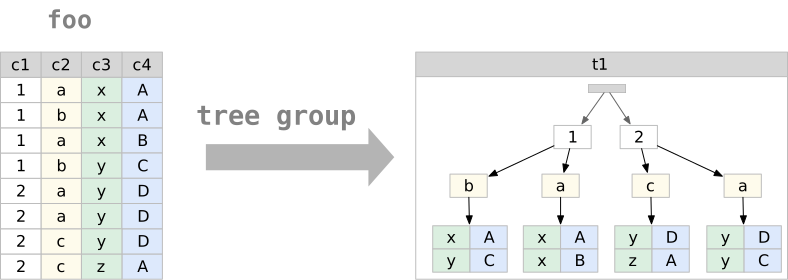 Delightql provides this capability through compound data constructors (
{ }, [ ]) used in reduction positions. The resulting JSON is not general-purpose – it maps relations to a tree normal form where each level represents a distinct grouping context.
Two forms exist:
- Data-oriented: produces arrays of objects; grouping columns become object fields
- Metadata-oriented: produces objects with data values as keys; a single column’s values become the key names
Full JSON functionality remains available through the target SQL’s native functions (json_object, json_array, etc.).
Compound Data Constructors (Recap)
| Constructor | Scalar Position | Aggregate Position |
|---|---|---|
{ } |
Record (string-indexed) | Table of records |
[ ] |
Tuple (numeric-indexed) | Table of tuples |
Compound data constructors by position (recap)
Aggregation boundaries and computed members
After ~>, {…} and […] are collecting aggregates. Grouping keys to the left select their input groups; explicit keys do not turn a collector into a scalar summary record. Ordinary scalar expressions may occur in its members:
An ordinary aggregate inside a collected row refuses, with or without keys:
Write sibling aggregates, or explicitly stage the first result:
invoice(*) |> %(billing_country ~> { invoice_id, total } as items, sum:(total) as revenue)
invoice(*) |> %(billing_country ~> sum:(total) as revenue) ~> { billing_country, revenue } as report
A window expression supplies one value per input row and therefore composes inside a collector, including through scalar expressions:
Its meaning agrees with computing running in an earlier embed stage and then collecting {invoice_id, running}. Required SQL stages realize the authored window; they do not invent grouping keys. Nested tree grouping retains its explicit hierarchy, as described below.
Tree Group Syntax
Nested tree groups are created by nesting compound constructors with ~> introducing each level:
Reading the syntax. The ~> marks tree group boundaries. Columns between a ~> and either the next ~> or a closing enclyph (}, ], )) belong to that level’s group:
employee(*)
// level 1 level 2 L2 end L1 end
// start start
// ↳ ↳ ↱ ↱
~> { title, "people": ~> {first_name, last_name}, city }
titleandcitybelong to level 1 (the top-level tree group)first_nameandlast_namebelong to level 2 (nested within level 1)
The grouping is hierarchical: level 2 groups are computed within each distinct combination of level 1 columns.
Terminology
- tree group: The set of columns whose distinct combinations form one level of the tree
- tree group variables: The columns belonging to a tree group
- nested tree group: A tree group inside another tree group
- tree group induction: Using a compound constructor in reduction position to create an interior table
Data-Oriented Tree Grouping
Data-oriented tree grouping uses ~> followed by a compound constructor. Within each stated group it collects objects or tuples from the input rows. Nested boundaries state the grouping hierarchy; a flat collector does not deduplicate its members merely because their values agree.
Simple example:
The tree grouping variables above are city alone. Within each of these groups {title, state} do not require distinctness.
Simple example:
Returns one row containing an array of all {title, state} combinations. No grouping variables mean this is a whole-group tree group and the number of rows in the starting table will equal the number of rows in the array.
Nested example:
Returns a single-row, single-column table:
| people_by_title_and_city |
|---|
|
Transpilation. Tree grouping uses JSON aggregation functions as intermediates:
SELECT
json_group_array(
json_object(
'title', title,
'city', city,
'people', people
)
) AS people_by_title_and_city
FROM (
SELECT
title,
city,
json_group_array(
json_object('first_name', first_name, 'last_name', last_name)
) AS people
FROM employee
GROUP BY title, city
);
The nested GROUP BY mirrors the nested ~>. Each tree group level becomes a subquery with its own grouping and JSON aggregation. The JSON functions are implementation details – the result is a standard column containing structured data.
Three-level example:
customer(*)
~> { country,
"customers_by_city":
~> { city,
"customers": ~> {first_name, last_name} } }
as customers_by_city_within_country
Groups first by country, then within each country by city, then collects customers within each city.
Sibling tree groups:
Multiple nested groups at the same level share their parent’s context but are otherwise independent:
customer(*)
~> { country,
"customers_by_city": ~> { city, "customers": ~> {first_name, last_name} },
"reps": ~> [support_rep_id] }
as nested_with_siblings
The customers_by_city and reps tree groups are siblings – both nested within country, neither containing the other.
Sibling tree groups share their parent’s context but aggregate independently. The relationship between siblings—which customer had which support rep – is not preserved. This is inherent to the structure: siblings represent independent projections of the grouped data. Trees with siblings satisfy TNF-G but not TNF-R; they cannot round-trip losslessly. (See Appendix A.)
Metadata-Oriented Tree Grouping
Metadata-oriented tree grouping elevates data values to JSON keys. A column’s distinct values become the keys of a single object rather than elements of an array.
The syntax uses :~> after a bare identifier:
The result is an interior record (one object), not an interior table (array of objects):
{
"General Manager": [
{ "first_name": "Andrew", "last_name": "Adams" }
],
"IT Manager": [
{ "first_name": "Michael", "last_name": "Mitchell" }
],
"IT Staff": [
{ "first_name": "Robert", "last_name": "King" },
{ "first_name": "Laura", "last_name": "Callahan" }
],
"Sales Manager": [
{ "first_name": "Nancy", "last_name": "Edwards" }
],
"Sales Support Agent": [
{ "first_name": "Jane", "last_name": "Peacock" },
{ "first_name": "Margaret", "last_name": "Park" },
{ "first_name": "Steve", "last_name": "Johnson" }
]
}
Distinguishing syntax:
- Normal keys are quoted strings:
"people": - Metadata keys are bare identifiers followed by
:~>:title: ~>
Restriction: Only one column can serve as a metadata key per level – the object can have only one set of keys. This constraint reflects JSON’s structure: two metadata-keyed objects with the same key type would create ambiguous destructuring. Metadata-oriented trees satisfy TNF-M. (See Appendix A.)
Within a regular group by:
Returns one row per city, each containing an object keyed by title.
Tree Distinction
Tree structures can serve as grouping columns, enabling aggregation alongside hierarchical output:
invoice(*)
|> %( { billing_country,
"invoices": ~> {invoice_id, invoice_date},
billing_city } as invoices_by_country_and_city
~>
sum:(total), count:(*) )
Other grouping columns may stand beside the tree. Each one splits the groups further, so every tree holds only its own group’s rows – here, one tree per country, city and customer:
invoice(*)
|> %( { billing_country, "invoices": ~> {invoice_id, invoice_date}, billing_city } as tree,
customer_id
~>
sum:(total), count:(*) )
Tree Destructuring
Tree destructuring is the inverse of tree grouping – it flattens nested JSON back into rows.
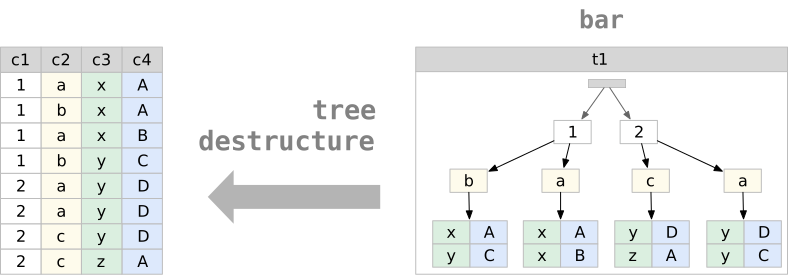
The TREE-UNIFY sigil ~= matches a JSON column against a destructuring pattern:
partner_sale(*)
, payload ~= { partner_order,
"buyer": { email, country },
"items": ~> { track_id, price, quantity } }
|> -(payload)
The pattern syntax mirrors construction syntax. Each ~> level multiplies rows – the result is the Cartesian product of all nested arrays.
Array vs object matching:
// Matches an ARRAY of objects -- multiplies rows by array length
partner_sale(*) |> (sale_id, payload:{.items} as items)
, items ~= ~> { track_id, quantity }
// Matches a single OBJECT -- extracts fields, no multiplication
partner_sale(*) |> (sale_id, payload:{.buyer} as buyer)
, buyer ~= { email, country }
The ~> in destructuring means “iterate over this array,” just as in construction it means “aggregate into this array.”
Renaming during destructuring:
The string key matches the JSON; the identifier after : names the output column:
partner_sale(*)
, payload ~= { partner_order,
"buyer": { email, country },
"items": lines }
|> -(payload)
Here "items" matches the JSON key; lines becomes the column name. The lines column contains the nested array as-is, not destructured.
Staged destructuring:
Destructure incrementally by chaining ~= operations:
partner_sale(*)
, payload ~= {partner_order, "items": lines}
, lines ~= ~> {track_id, price, quantity}
|> -(payload)
The first ~= extracts partner_order and keeps lines as a JSON array. The second destructures lines into individual rows. Stop at any level to preserve nested structure.
Metadata-oriented destructuring:
The :~> syntax works symmetrically – object keys become column values:
Given payout, an object keyed by country codes, this extracts the key into a country column; _ disregards the amount under each key.
Binding semantics:
Column names in the pattern match JSON keys by name. If the pattern says email and the JSON has "email", they bind. A mismatched name produces nulls – there is no compile-time validation against JSON structure.
Pathing in Tree Patterns
Destructuring patterns support direct pathing, eliminating the need to match intermediate structure. The pathing syntax (.path.to.field) reaches into nested JSON without declaring every level.
Basic pathing:
The path .config.server.port extracts the value directly.
Pathing in destructuring:
Instead of matching the full structure:
Path directly to what you need:
Pathing with rename:
Combine pathing with as to name the output column:
partner_sale(*) |> (sale_id, payload:{.items} as items)
, items ~= ~> {
track_id,
.rights.territories as territories
}
Mixed matching and pathing:
Structural matching and pathing can combine in a single pattern:
Here partner_order and payout match top-level keys directly; the .buyer.* paths reach into nested structure.
Pathing in projection:
Pathing works outside destructuring patterns, in normal projection:
_(json @ {"name": "app", "scripts": {"dev": "next dev", "build": "next build"}})
|> ({
"name": json:{.name},
"scripts": json:{.scripts}
})
Interior Drill-Down
Tree destructuring with ~= requires the user to spell out the interior schema – every level of nesting must be declared in the pattern. When the schema is statically known (tree groups from a view, CTE, or inline query), .column(*) provides a shorter, self-documenting alternative.
Syntax. .column_name(*) as a suffix on any relation expression. The (*) means “all columns of the interior relation.” Argumentative access is also supported: .entities(name, type) binds the interior relation’s columns positionally, with the arity of the interior — the same Prolog-style relation access as employees(id, name). It is relation access, never a projection list: to keep a subset of a wider interior, expand with (*) and project ordinarily, or use brace narrowing. The operator is chainable: .entities(*).columns(*).
Context carry-forward. Outer columns remain available after a drill-down. .entities(*) produces entity-level columns plus all columns from the enclosing level, minus the exploded column itself. This is lateral-join semantics – each interior row inherits the context of its parent row.
Cardinality. Expansion is correlated: each parent row contributes one output row per row of ITS interior, so the total is the sum over parent rows of cardinality(r.t). Duplicate interior rows are preserved. A NULL or empty interior IS empty — it contributes ZERO rows, in every expansion form; interior expansion is not an outer join, and a parent with no children vanishes rather than surviving as a row of NULL children. (This is the expansion half of the round-trip law: construction elides all-NULL contributor rows to [], and [] expands to nothing.)
Post-pipe narrowing. The same parenthesized access in post-pipe position performs the SAME correlated expansion and retains only the interior heading:
// expand staff; keep City beside each child
employee(*) |> %(city ~> {last_name, title} as staff).staff(*)
// the same expansion; keep only staff's columns
employee(*) |> %(city ~> {last_name, title} as staff) |> .staff(*)
// argumentative narrowing (positional bind)
employee(*) |> %(city ~> {last_name, title} as staff) |> .staff(name, title)
The two forms agree on row count, duplicate multiplicity, parent/child correspondence, and empty/NULL interiors; they differ only in retained context — … |> .staff(*) is exactly ….staff(*) |> (staff.*). Parenthesized access — postfix or post-pipe, glob or argumentative — requires a statically known tree-group interior; over external JSON every parenthesized form is refused, because the compiler cannot discover keys at runtime and plan a heading from them. External JSON narrows with braces, whose members are the programmer’s static heading witness (declared fields become the planned columns; extra runtime keys never do; a missing declared key yields NULL without suppressing the row).
Example – CTE drill-down:
This produces one row per person, with country carried forward from the grouping level.
Example – chained drill-down:
Each .name(*) step explodes one level of nesting. Columns from all prior levels remain available for filtering.
Equivalence with ~=. The same query written both ways:
// Drill-down form:
main::(*) |> (entities) .entities(*)
// Equivalent ~= form:
main::(*)
, entities ~= ~> {name, type, doc, "columns": ~> {col_name, col_type, col_pos}}
|> -(entities)
The drill-down form does not require the user to know the interior schema.
Narrowing
The ~= operator and interior drill-down both carry context forward – outer columns survive into the result. This is the correct default for relational composition, but it requires projecting out the intermediate columns when they are no longer needed:
partner_sale(*), payload ~= {.items} |> -(payload)
, items ~= ~> {.track_id, .price, .quantity} |> -(items)
When the intent is to drill into a column, extract fields, and discard everything else, the .column{...} operator expresses this more efficiently:
Each step replaces the current row with the destructured result.
When to use which.
| Form | Carries context | Use case |
|---|---|---|
~= pattern |
Yes | General relational destructuring; join with outer columns |
.col(*) |
Yes | Drill-down when schema is known; outer columns needed |
|> .col(*) |
No | Same expansion as drill-down, interior heading only (schema-known) |
.col{...} |
No | Navigate into nested JSON; only interior fields matter — and the REQUIRED form for external JSON (static heading witness) |
Example – partner sale items:
The path extraction payload:{.items} pulls the items array out of the top-level object; then .items{...} iterates and extracts fields. The result is a flat table with track_id, price, and quantity columns – no intermediate columns to clean up.
Null Elision in Tree Groups
When an outer join feeds into a tree group, the join pads unmatched rows with NULLs. In a flat relation this is the only way to represent “no match” – NULL serves as a sentinel for absence. Trees have no such limitation: an empty array [] directly represents “no children.”
Tree groups decode this flat-world encoding. When all value columns in a contributing row are NULL, the row is elided from the array. The result is [], not [{"col": null, ...}].
Example:
parents(*) : _(id, name ---- 1, "Alice"; 2, "Bob"; 3, "Charlie")
children(*) : _(parent_id, toy ---- 1, "doll"; 1, "ball"; 2, "car")
parents(*), children?(*), parents.id = children.parent_id
|> %(name ~> {toy} as toys)
Charlie has no children. The outer join produces (3, "Charlie", NULL). Without null elision, the tree group would produce:
| name | toys |
|---|---|
| Alice | [{“toy”:“doll”},{“toy”:“ball”}] |
| Bob | [{“toy”:“car”}] |
| Charlie | [{“toy”:null}] |
With null elision:
| name | toys |
|---|---|
| Alice | [{“toy”:“doll”},{“toy”:“ball”}] |
| Bob | [{“toy”:“car”}] |
| Charlie | [] |
Scope. Null elision applies to both forms:
~> {a, b, c}– curly (object) tree groups~> [a, b, c]– bracket (tuple) tree groups
The elision rule. A row is elided when every value column in the constructor is NULL. If any value column is non-null, the row is preserved. This means a row like {"name": "Alice", "age": null} survives – only fully-null rows (the signature of outer-join padding) are dropped.
Parent entity preservation. Null elision never removes the parent entity. Charlie still appears in the result – only the contents of the nested array change (from [{"toy":null}] to []). The GROUP BY produces a row for Charlie’s grouping key; the aggregate column becomes an empty array rather than an array containing a null-valued object.
Round-trip behavior. Destructuring an empty array produces zero rows. After null elision, destructuring Charlie’s [] eliminates Charlie from the flat result – which is the same behavior as an inner join.
Set Operators
SQL’s set operators UNION, INTERSECT and EXCEPT all operate on union-compatible schemas with ordinality-based matching. This means that to use these operators in SQL you need to arrange an enumeration of columns from each table via position and type only, and that the number of columns must be the same.
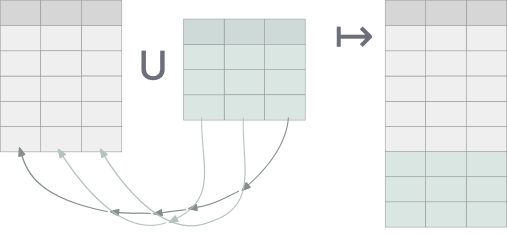
It is a somewhat interesting corner of SQL as nowhere else (with the exception of the occasional group by 2) does SQL use the ordinality of a relation’s columns.
Delightql, of course, supports all of these operators but opens up the door to other functionality by
- relaxing the same number requirement and permitting ragged unions and intersects
- having a preference for naming-based access
To make this more concrete, consider delightql’s UNION CORRESPONDING:
The semicolon sigil ; of UNION CORRESPONDING separates two tables much like a comma would for joining. With this operator columns are matched by their names and a super set of both tables’ columns are synthesized.
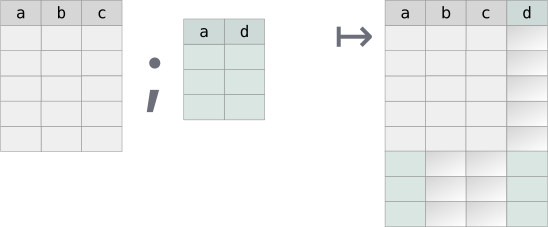
Delightql re-introducesThe SQL standard actually defines a CORRESPONDING BY clause (SQL-92 (ISO/IEC 9075:1992)) that can be used with INTERSECT, UNION, and EXCEPT, though, as usual, few actually implemented it. It’s even a reserved word. this CORRESPONDING name-based alignment mode as an alternative to SQL’s normal UNION-like ordinal alignment. Delightql prefers name-based alignment but still offers ordinal alignment for backwards compatibility.
Delightql’s UNION-like operators are the following:
| Mode | Sigil | Alignment | Schema requirement |
|---|---|---|---|
| Corresponding | ; |
By name | Any (NULL-padded) |
| Smart | |;| |
By name | Identical names and same column count |
| Positional | || |
By ordinal | Same column count |
Set operator alignment modes
Union All Corresponding (;)
Aligns by name, NULL-padding missing columns. Output schema: first relation’s columns, then non-overlapping columns from the second.This is closer in definition to OUTER UNION. The few SQLs that implement UNION ALL CORRESPONDING do so by outputting the intersection of the two column sets, instead of the union of the two column sets that delightql favors.
| a | b | c | d |
|---|---|---|---|
| 1 | 2 | 3 | NULL |
| 4 | 5 | 6 | NULL |
| 10 | 20 | NULL | foo |
| 40 | 50 | NULL | bar |
Union All Corresponding is a ragged union.
Smart Union All (|;|)
Aligns by name, but requires both relations to have identical column count and names. Unlike SQL’s UNION/UNION-ALL position is irrelevant. The resulting schema is adopted from the first relation:
SELECT
genre_id, name
FROM genre_2024
UNION ALL
SELECT
genre_id, name -- genre_2025 stores (name, genre_id)
FROM genre_2025;
Positional (Traditional) Union All (||)
Aligns by position. Requires identical column count. Useful for intentional realignment.The below example uses interior relations to shape each relation prior to the UNION ALL.:
Set Semantics vs Multiset Semantics
All of delightql set operators are actually multiset operators inasmuch as they preserve duplicates. In other words, all set operators are ALL-flavored.
If set semantics are required, use DISTINCT ALL via |> %(*).
SELECT
genre_id, name
FROM genre_2024
UNION --- NOT UNION ALL
SELECT
genre_id, name
FROM genre_2025;
which is equivalent to
SELECT DISTINCT * FROM
(SELECT
genre_id, name
FROM genre_2024
UNION ALL
SELECT
genre_id, name
FROM genre_2025)
;
Intersects via correlation
Having introduced the operators above, one would assume that a new sigil for intersects is in the offing. Instead delightql chooses to reuse the same syntax for correlations to represent a statement of which columns to intersect on.
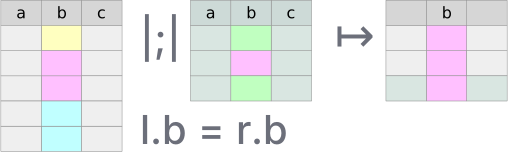
After any union-flavored multiset operator, conjoin a condition that correlates the previous relations together. From such a union an intersection results:
SQL’s INTERSECT only matches on the entire tuple, it lacks an INTERSECT ON/BY parameterization. Delightql’s correlation syntax lets you choose which columns to match on – a per-column intersection that SQL cannot express without rewriting the query as a pair of EXISTS subqueries.
Correlation syntax matches alignment mode
The correlation condition should use the same addressing schema as the alignment:
- Name-based modes (
;,|;|) use name-based correlation:x.col = y.colorx.* = y.* - Positional mode (
||) uses positional correlation:x|1| = y|1|orx|*| = y|*|
The full-tuple shorthand x.* = y.* means “match on all column names that appear in both x and y.” Columns present on only one side are ignored for matching. Under |;| this distinction is moot since the schemas are identical. Under ; the schemas may be different, and matching on the intersection of names is the only natural reading.
The positional shorthand x|*| = y|*| means “match on all column positions.”
| DQL | Equivalent SQL concept |
|---|---|
|
INTERSECT ALL CORRESPONDING |
|
INTERSECT ALL (name safe) |
|
INTERSECT ALL (positional, = SQL’s |
|
Per-column intersection (positional, no SQL equivalent) |
|
Per-column intersection (no SQL equivalent) |
To belabor a point, intersection re-purposes correlation syntax that is seen most often with joins to be useful for intersection. To see the difference between a join and an intersection look at how the two tables prior are combined:
| Correlation as JOIN ON | Correlation as INTERSECT ON |
|---|---|
|
|
, between the two tables produces a join (rows are paired). |
|;| between the two tables produces an intersection (rows are filtered). |
Equality and NULL-safety. The
=in both columns above looks identical, but the compilation differs. In join position (left column),=compiles to SQL=– NULLs do not match, because NULL-to-NULL matching in a join can explode row counts . In set correlation position (right column),=compiles toIS NOT DISTINCT FROM– NULLs match. This is safe because set correlation filters viaEXISTS, which tests for the presence of a matching row without multiplying output.How intersection is executed in SQL.
Example:
SELECT customer_id, first_name, last_name, company, address, city, state, country, postal_code, phone, fax, email, support_rep_id, NULL, NULL, NULL, NULL, NULL FROM customer AS c WHERE EXISTS (SELECT 1 FROM ( SELECT employee_id, last_name, first_name, title, reports_to, birth_date, hire_date, address, city, state, country, postal_code, phone, fax, email FROM employee AS e ) AS t1 WHERE c.city IS NOT DISTINCT FROM t1.city) UNION ALL SELECT NULL, first_name, last_name, NULL, address, city, state, country, postal_code, phone, fax, email, NULL, employee_id, title, reports_to, birth_date, hire_date FROM employee AS e WHERE EXISTS (SELECT 1 FROM ( SELECT customer_id, first_name, last_name, company, address, city, state, country, postal_code, phone, fax, email, support_rep_id FROM customer AS c ) AS t0 WHERE t0.city IS NOT DISTINCT FROM e.city)
Minus (Except)
Minus returns rows from the first relation that have no match in the second. A single operator - aligns by name:
Rows in genre_2024 with no corresponding row (by name) in genre_2025: Rock And Roll and Easy Listening, although genre_2025 stores its columns in the other order. Schemas must align – if column names differ, rename first:
Interior Relations and Lateral Joins
Interior relations unify EXISTS, NOT EXISTS, scalar subqueries, and lateral joins under one syntax.
An interior relation is a query continuation inside a functor’s parentheses:
Query Continuation
A query continuation extends a complete query rightward.
users(*)‸ , age<50‸ |> (department)‸After
users(*), the continuation, age>50 |> (department)is valid becauseusers(*)alone is already meaningful. Likewise,|> (department)is valid becauseusers(*), age>50is already meaningful.
Interior relations appear wherever tables are allowed. When uncorrelated, they’re equivalent to exterior execution:
Consider positional union all || where interiority crafts the proper alignment and projection:
Interior relations are used in the following:
- scalar subqueries (regardless of correlation)
EXISTSandNOT EXISTS- simple shadowing subqueries
- correlated (non-scalar) subqueries – i.e. lateral joins
Scalar subqueries
Scalar subqueries use interior notation:
invoice(*) as i
|> (invoice_id,
billing_country,
total,
invoice:( ~> avg:(total)) as avg_total,
invoice:( , billing_country=i.billing_country
~> avg:(total)) as avg_total_in_country)
In the above example, two query continuations started with ~> and , execute an uncorrelated and correlated scalar subquery respectively.
EXISTS and NOT EXISTS
The + and \+ prefixes with interior notation create (NOT) EXISTS:
album(*), track(*),
album.album_id = track.album_id,
\+invoice_line(, track.track_id = invoice_line.track_id)
The EXISTS observer asks whether a row matched; it does not change the matching condition. A comparison between an inner and an enclosing row uses correspondence equality (= in SQL), including when the same interior is observed as a scalar subquery. A local test within the inner row keeps its ordinary null-safe meaning.
Simple Shadowing
Uncorrelated interior relations are simple shadowing – useful for reshaping before set operations:
but especially for set operators:
employee_2024(; employee_2025(*)) as staff,
customer(*), staff.employee_id=customer.support_rep_id
|> (staff.last_name,customer.email)
Correlated Table (Lateral Join)
Any table with interiority and correlation to other tables in the same query is a lateral join.
Lateral joins may be broken down into three sub-types:
- simple
- aggregate
- top-N
Simple Lateral. A join without aggregation or limits. Replaces multiple scalar subqueries; rarely advantageous over a regular join.
invoice(*) ,
customer(, c.customer_id=invoice.customer_id
|> (last_name,first_name,email)) as c
|> (invoice.*,last_name,first_name,email)
SELECT invoice.*, last_name , first_name , email
FROM invoice
INNER JOIN (
SELECT last_name , first_name , email ,
customer_id -- promote out of subquery for joining
FROM customer
) AS c ON c.customer_id = invoice.customer_id;
Aggregate Lateral. Replaces multiple aggregate scalar subqueries. Advantageous when the aggregate key matches the join key.
customer(*) as c,
invoice(, invoice.customer_id = c.customer_id |>
%(customer_id
~> sum:(total) as total_spent,
count:(*) as invoice_count))
SELECT
*
FROM customer AS c
INNER JOIN (
SELECT customer_id , sum(total) AS total_spent, count(*) AS invoice_count
FROM invoice
GROUP BY customer_id
) AS invoice
ON invoice.customer_id = c.customer_id;
Top-N Lateral. Returns the top N correlated rows per outer row, avoiding explicit window functions.
SELECT *
FROM customer AS c
JOIN (SELECT
invoice_id, customer_id, invoice_date, billing_address,
billing_city, billing_state, billing_country,
billing_postal_code, total
FROM (SELECT
invoice_id, customer_id, invoice_date, billing_address,
billing_city, billing_state, billing_country,
billing_postal_code, total,
ROW_NUMBER() OVER (
PARTITION BY
customer_id
ORDER BY total DESC
) AS __dql_rn
FROM invoice) AS invoices_with_rn
WHERE
invoices_with_rn.__dql_rn <= 3) AS invoice
ON invoice.customer_id = c.customer_id;
Note how the windowing function above partitions by the correlation join condition.
Summary
The below diagram describes the hierarchy of all places where delightql uses interiority.
Only the tree labeled interior relations consists of expressions that are used as actual relations/tables.
Interiority:
├── interior relations:
│ ├── correlated (lateral):
│ │ ├── top-N
│ │ ├── simple/multi
│ │ └── aggregate
│ └── uncorrelated
├── (not) exists
└── scalar subqueries
├── correlated
└── uncorrelated
Higher-Order Pipes
The R-PIPE |> passes a relation into a unary operator:
Delightql’s built-in pipe unary operators – projection, distinct, group by – have dedicated syntax:
customer(*) |> ( last_name )
customer(*) |> -( first_name, last_name )
customer(*) |> +( length:(last_name) as length_last_name )
customer(*) |> %( first_name, last_name )
customer(*) |> %( country ~> count:(*) )
Higher-order predicats are programmer-defined rules that can appear as the pipe target. Given this example definition in assertion mode:
summarize(T(*))(*) :-
T(*)
|> %( ~> count:(%composer) as distinct_composer_count,
count:(%genre_id) as distinct_genre_count,
count:(*) as total_count,
avg:(milliseconds) as average_milliseconds )
a pipe can target it:
The expression track(*) |> summarize(*) expands to:
track(*)
|> %( ~> count:(%composer) as distinct_composer_count,
count:(%genre_id) as distinct_genre_count,
count:(*) as total_count,
avg:(milliseconds) as average_milliseconds )
Piped vs. Direct Invocation
Given this definition:
clean_employees(T(*))(*) :-
T(*)
|> $(trim:())(last_name, first_name)
|> $(date:())(birth_date, hire_date)
Higher-order predicates can be invoked directly, passing full functor expressions:
This is equivalent to:
Direct invocation accepts any relation expression, including filters and projections:
Higher-order parameters are passed by reference: their invocation preserves the written relation without evaluation.
The piped form’s advantage is composability with other pipe operators:
Multi-Parameter Piped Invocation
When the piped relation is not the last parameter, use @ (the f-param placeholder) to mark where it goes – borrowing function-pipe syntax:
// Definition: scalar second, table first
tagged(T(*),label)(*) : T(*) |> +($.label as tag)
// Piped with @:
customer(*) |> tagged(@,"vip")(*)
Pivot and Melt
Melting and pivoting are inverse transformations between two table shapes containing the same data. The “long skinny” table stores attributes as data – normalized, often resembling key-value pairs. The “short wide” table lifts attributes to metadata – they become column names. 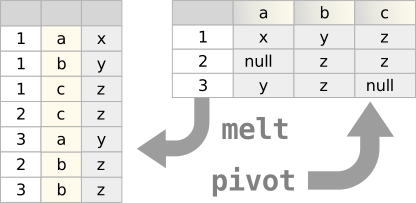
Both transformations are possible in pure SQL given:
- Support for compound data (JSON objects, arrays)
- Ability to join against compound data (
unnest,json_each) - For pivoting: attribute values must be known at query-write time to become column names
Melt
Melting normalizes denormalized data. A common case: data transfers between organizations where a single row contains multiple relations.
Consider customer with three contact columns that should be normalized into separate rows:
customer(*), _( Contact, Channel, channel_number
-------------------------------
phone, "phone", 1;
fax, "fax", 2;
email, "email", 3 )
|> (customer_id, channel_number, Channel, Contact)
The anonymous table (lines 1–5) maps each source column set to a row. Joining it to customer with no condition produces one output row per contact channel per customer – three times the original cardinality. The projection (line 6) retains only the normalized columns.
The transpiled SQL:
SELECT
customer_id,
CASE arm.i WHEN 0 THEN 1 WHEN 1 THEN 2 WHEN 2 THEN 3 END AS channel_number,
CASE arm.i WHEN 0 THEN 'phone' WHEN 1 THEN 'fax' WHEN 2 THEN 'email' END AS Channel,
CASE arm.i WHEN 0 THEN phone WHEN 1 THEN fax WHEN 2 THEN email END AS Contact
FROM customer
CROSS JOIN (
SELECT 0 AS i
UNION ALL SELECT 1
UNION ALL SELECT 2
) AS arm;
Pivot
Pivoting is a GROUP BY that rotates row-oriented data into columns. The group key defines the entity; an attribute column becomes column names; a value column fills them.
Given invoice totals summed per year and billing country (lines 3–4 of the query below):
| year | billing_country | sales |
|---|---|---|
| 2021 | Brazil | 37.62 |
| 2021 | Canada | 57.42 |
| 2021 | France | 35.64 |
| 2021 | Germany | 53.46 |
| 2021 | USA | 103.95 |
| 2022 | Brazil | 41.6 |
| 2022 | Canada | 76.26 |
| 2022 | France | 39.6 |
| 2022 | Germany | 25.74 |
| 2022 | USA | 102.98 |
Sales per year and billing country (first two years)
A pivot on billing_country produces:
| year | USA | Canada | France | Brazil | Germany |
|---|---|---|---|---|---|
| 2021 | 103.95 | 57.42 | 35.64 | 37.62 | 53.46 |
| 2022 | 102.98 | 76.26 | 39.6 | 41.6 | 25.74 |
| 2023 | 103.01 | 55.44 | 42.61 | 19.8 | 48.57 |
| 2024 | 127.98 | 42.57 | 36.66 | 53.46 | 18.81 |
| 2025 | 85.14 | 72.27 | 40.59 | 37.62 | 9.9 |
Pivoted result – countries become columns
invoice(*),
billing_country in ("USA"; "Canada"; "France"; "Brazil"; "Germany")
|> %(strftime:("%Y", invoice_date) as year, billing_country
~> round:(sum:(total), 2) as sales)
|> %( year
~>
sales of billing_country )
- Line 5:
yeardefines the entity (group key), determining output cardinality - Line 2: the
inclause constrains which attribute values become columns - Line 7:
sales of billing_countryrotates values into attribute-named columns
The in clause is required. Pivoting has compile-time semantics – the output schema is determined by the query, not the data. Without a fixed set of attribute values, the column names would be unknowable.
The transpiled SQL:
WITH _preagg_invoice AS (
SELECT
strftime('%Y', invoice_date) AS year,
billing_country,
round(sum(total), 2) AS sales
FROM invoice
WHERE billing_country IN ('USA', 'Canada', 'France', 'Brazil', 'Germany')
GROUP BY strftime('%Y', invoice_date), billing_country
)
SELECT
year,
max(CASE WHEN billing_country = 'USA' THEN sales END) AS USA,
max(CASE WHEN billing_country = 'Canada' THEN sales END) AS Canada,
max(CASE WHEN billing_country = 'France' THEN sales END) AS France,
max(CASE WHEN billing_country = 'Brazil' THEN sales END) AS Brazil,
max(CASE WHEN billing_country = 'Germany' THEN sales END) AS Germany
FROM _preagg_invoice
GROUP BY year;
Multiple Value Columns
A second aggregate, count:(*) as invoices, counts each cell’s invoices. Multiple of clauses pivot additional columns:
| year | USA | Canada | … | USA_invoices | Canada_invoices | … |
|---|---|---|---|---|---|---|
| 2021 | 103.95 | 57.42 | 17 | 10 | ||
| 2022 | 102.98 | 76.26 | 18 | 12 | ||
| 2023 | 103.01 | 55.44 | 19 | 11 | ||
| 2024 | 127.98 | 42.57 | 21 | 9 | ||
| 2025 | 85.14 | 72.27 | 16 | 14 |
Pivot with multiple value columns
invoice(*),
billing_country in ("USA"; "Canada"; "France"; "Brazil"; "Germany")
|> %(strftime:("%Y", invoice_date) as year, billing_country
~> round:(sum:(total), 2) as sales, count:(*) as invoices)
|> %( year
~>
sales of billing_country,
invoices of :"{billing_country}_invoices" )
Lines 7–8 introduce two pivot column sets. The second uses a format function to distinguish column names (USA_invoices, Canada_invoices, etc.). When pivoting multiple value columns, the attribute expression after of must differ – here, billing_country versus :"{billing_country}_invoices".
Pivot Syntax
The of keyword rotates values into attribute-named columns. The grammar:
The attribute column must be constrained by an in clause. When pivoting multiple value columns, each of expression must produce distinct column names – hence the format string option.
Meta-ize Operator
The meta-ize operator reifies a relation’s schema as a relation – each column becomes a row. Where * inside a functor returns all data rows, ^ returns all columns as rows of metadata.
Schema as Relation (^)
This returns one row per column in album:
| scope | column_name | ordinal |
|---|---|---|
| album | album_id | 1 |
| album | title | 2 |
| album | artist_id | 3 |
Output of album(^)
The ^ operator belongs to the unary continuation operator family – unary operators that transform table access:
| Operator | Meaning |
|---|---|
* |
Qualify column names (data access) |
.* |
Unqualified columns (natural join candidate) |
.(cols) |
USING semantics on specific columns |
^ |
Column metadata as rows |
Table continuation operators
These operators compose freely: album(*.(artist_id)) means “qualified + USING on artist_id.”
Postfix Form
album(^) is sugar for album() ^. The postfix form works on any relational expression, not just base tables:
// schema of a projection (2 rows)
album(*) |> (title, artist_id) ^
// schema of a join
album(*), artist(*.(artist_id)) ^
// schema of an aggregation
album(*) |> %(artist_id ~> count:(*) as n) ^
The postfix ^ applies to the entire expression to its left, returning its schema as a relation.
Composability
Because ^ produces a regular relation, all DQL operations apply – filtering, projection, pipes, joins, and set operators:
// columns shared between two tables
customer(^) as x |;| employee(^) as y, x.column_name = y.column_name
The output of
^is itself a relation with a fixed schema (scope, column_name, ordinal). Applying^to a^result would return the schema of the metadata relation – three rows describing scope, column_name, ordinal themselves.