Data Query Language (DQL)
The heart of both delightql and SQL is the query expression, also called a table expression. A query expression is a unit of code that returns exactly one table. Here, table is synonymous with predicate or relation, regardless of whether the data is persisted via CREATE TABLE. More typically, these results are anonymous and ephemeral – the output of execution within the REPL.
The majority of delightql lives in this section; mastering it is prerequisite to understanding DDL and DML.
A query’s meaning is identical to the table it produces. This substitutability is key to composability: through subqueries and CTEs, query expressions become recursively inductive to any depth. Delightql encourages a particular style of composition that will become evident within a few pages – pipelining a relation through transformations, left to right, with consistent associativity and scoping.
From
Every delightql query begins with a source: one or more tables from which to draw data. SQL calls this selection In contrast to Codd’s original paper, where selection (σ) denoted row filtering–what SQL now calls WHERE., but we will call this access or sourcing.
All Columns
employee(*)
* The glob * in argument position requests all columns from a table – equivalent to SELECT * FROM employee. This is the most common way to source data in delightql.
Argumentative Access
Arguments within the functor bring columns into scope by position.
employee(EmployeeId  , LastName ,
         FirstName   , Title    , ReportsTo,
         BirthDate   , HireDate , Address, City,
         State       , Country  , PostalCode,
         Phone       , Fax      , Email )
This binds each identifier to the column at that ordinal position in the table definition. The arity must match exactly – if employee has 15 columns, the functor must have 15 arguments.
The identifiers you choose become the column names in scope of the position having the identifier.
employee(a, b,  c,  d,
        e,   f, g,   h, i,
        j,  k,   l, m,   n,  o )
This makes argumentative access error-prone for wide tables. Prefer named access (covered later) when arity exceeds a handful of columns.
Case insensitivity
Delightql is case-insensitive. In contrast to Prolog, where capitalization distinguishes variables from atoms. The following all refer to the same identifier:
employeeidEmployeeIdEMPLOYEEID
Stropping
When a name collides with a keyword or contains illegal characters (spaces, for instance), delimit it with backticks: `Employee Id`.
Aliasing a Table
employee(*) as e
The as keyword assigns an alias to a table. Once aliased, columns must be accessed through the alias – the original table name leaves scope.
select * from employee as e;
Aliases are often a convenience, but become necessary in contexts like self-joins.
Table Namespacing
hr.employee(*) as e
A dot-prefixed identifier namespaces the table. Here, employee lives within the namespace hr. What this namespace represents – schema in some databases, database in others – is implementation-dependent.
select * from hr.employee as e;
The namespace is the entire syntax before the dot and may include nesting using ::. Namespaces are nested like file-system folders.
client1::production::hr.employee(*) as e
In the above example, client1::production::hr is the namespace where client1 contains production which contains hr.
Namespaces are elements of the delightql runtime. The delightql programmer chooses the hierarchy and maps these to source structures. For more information, see the namespacing section of DDL.
Anonymous Table
_(1,2,3)
The underscore functor _( ) declares a table inline, with literal values. Commas separate columns. This is equivalent to:
select 1,2,3;

select * from (values (1,2,3));
The underscore is the FULL sigil – a name for “no name.” The name FULL plays against NULL: where NULL matches nothing and has null potency, FULL matches everything and is full of potential.
Note the two anonymous tables in play: the inline table declared with _( ) and the result table returned by the query itself. The term anonymous table in this reference denotes the former – tables whose values are defined inline and whose names are discarded. An anonymous table is a query-mode construct, despite its syntactic resemblance to assertion-mode fact instantiation.
Stacked Notation and Multiple Rows
Multiple rows are expressed with the SEMI-OR sigil ;, a disjunction operator:
_(1,2;10,20)
select 1,2
  UNION ALL
select 10,20;
Semicolon binds looser than comma, so rows stack naturally without parentheses. This stacked notation appears throughout delightql – anywhere multiple clauses or rows would otherwise require repeating functor syntax. Stacked notation is essentially syntactic sugar: it reduces redundant functor notation in both assertion mode and anonymous tables. See the glossary for examples.
Naming the Columns of Anonymous Tables
The columns in the examples so far have been positional – they have ordinal positions but no names. Delightql allows positional-only access, but also provides syntax for naming columns.
_( first, second @ 1,2;10,20;100,200)
select 1 as first ,2 as second
  UNION ALL
select 10,20
  UNION ALL
select 100,200;
The ATOP sigil @ separates column names (comma-delimited) from the stacked data that follows. This three-row, two-column table now has columns named first and second.
ATOP has an alternate form: three or more dashes. The following are all equivalent:
@---------------------------------
The dashed form enables formatted table literals:
_(
 id,first_name   , last_name , email
 ----------------------------------------------------
 0,"Gusti"       , "Parlor"  , "[email protected]"  ;
 1,"Diane-marie" , "McHenry" , "[email protected]"  ;
 2,"Ced"         , "Mainds"  , "[email protected]" ;
 3,"Bren"        , "Berndsen", "[email protected]"
)
Sparse Anonymous Tables
When most columns in a wide anonymous table are NULL, data rows become verbose and error-prone. Sparse columns solve this: mark optional columns with ? in the header, then fill only the ones you need per row.
_(column, type, nullable?, default?, check?, primary_key?, unique?
  ---------------------------------------------------------------
  "id",     "INT",    _(primary_key @ "true") ;
  "name",   "TEXT" ;
  "email",  "TEXT",   _(unique @ "true") ;
  "salary", "DECIMAL",_(check @ "salary>0"))
Columns without ? are positional – every row must supply them, in order. Columns with ? are sparse – unfilled sparse columns default to NULL. If sparse columns are used, they must come after the required columns.
Sparse fills
A sparse fill uses anonymous table syntax _(col @ val) to assign a value to a named sparse column. Fills appear after the positional values in a data row:
// Single fill
"id", "INT", _(primary_key @ "true")

// Multiple separate fills
"id", "INT", _(primary_key @ "true"), _(nullable @ "false")

// Combined fill: multiple sparse columns in one expression
"id", "INT", _(primary_key, nullable @ "true", "false")
In a combined fill, column names and values are matched positionally: primary_key gets "true", nullable gets "false".
No fills
When a row supplies no fills, all sparse columns are NULL:
_(a, b?, c?
  --------
  1 ;
  2 ;
  3)
This is equivalent to _(a, b, c @ 1, null, null; 2, null, null; 3, null, null).
All sparse
A table may have no positional columns at all:
_(x?, y?
  ------
  _(x @ 1) ;
  _(y @ 2) ;
  _(x, y @ 3, 4))
Higher-Order Predicates
Delightql supports higher-order predicates–predicates that accept tables (or scalars) as parameters and return a table. SQL calls these table-valued functions.
clean_employees(hr.employee(*))(*)
Here, clean_employees is a higher-order predicate that takes hr.employee(*) as its parameter.
The transpiled SQL depends on how the predicate was defined. Defining higher-order rules is covered in the DDL section. Given this definition:
clean_employees(T(*))( * ) :-
  T(*) as t
    |> $(trim:())( t.LastName, t.FirstName)
    |> $(to_iso:())( t.BirthDate, t.HireDate)
    |> -( SSN)
the query clean_employees(hr.employee(*))(*) produces:
select
    EmployeeId,
    trim(LastName)    as LastName,
    trim(FirstName)   as FirstName,
    Title,
    ReportsTo,
    to_iso(BirthDate) as BirthDate,
    to_iso(HireDate)  as HireDate,
    Address,
    City,
    State,
    Country,
    PostalCode,
    Phone,
    Fax,
    Email
from employee;
Higher-order predicates are structurally typed by the columns they reference. This resembles duck typing: delightql has no formal type layer, but detects which columns the predicate body requires. Any table providing those columns is a valid argument. In this example, any table with LastName, FirstName, BirthDate, HireDate, and SSN qualifies:
clean_employees(batch.employee_2019(*))(*)
The pipeline form (covered later) is equivalent:
batch.employee_2019(*)
    |> clean_employees(*)
Order By
Delightql, like SQL, has order by. The ORDER-BY operator is an octothorpe-prefixed functor #() applied after a pipe:
employee(*)
    |>  #(FirstName,LastName)
select
  *
from employee order by FirstName, LastName;
Columns appear in the SQL in the order given. Collation modifiers work as in SQL–with keywords:
employee(*)
    |>  #(Salary descending,LastName ascending)
select
  *
from employee order by Salary desc, LastName asc;
Order Byhas no meaning in pure relational algebra, where relations are unordered sets. SQL has never been true to theory; delightql is equally cavalier. To admit order-by as a first-class relational operator, delightql takes two positions:
- Relations are ordered sequences of tuples, not sets. A sequence captures this notion.
- A parametric mechanism maps domain orderings onto tuple orderings. We can imagine every tuple contains a hidden column
#. Absent an explicit ordering, this column holds arbitrary values. Givenorder by my_column, the tuples reorder and # recalculates accordingly.
Limit
Limit the number of tuples returned using the TUPLE-ORDINAL sigil # in a predicate position:
employee(*) , # < 20
select * from employee limit 20;
Read this as: “all columns of employee where the implicit row ordinal is less than 20.”
Limit affects only cardinality, not schema.
Order of operations matters. Delightql evaluates left to right, so these two queries differ:
employee(*), department(*.(DepartmentName)), #<20
select
  *
from employee join department using(DepartmentName)
  limit 20;
employee(*), #<20, department(*.(DepartmentName))
select
  *
from (select * from employee limit 20)
  join department using(DepartmentName);
Projection
Projection retains a subset of columns from a relation. In SQL, this is the list between SELECT and FROM.
Project Retain
employee(*)
  |>  (FirstName , LastName)
select
  FirstName,
  LastName
from employee;
The R-PIPE |> passes a relation to the PROJECT operator ( ). Columns listed inside are retained; all others are discarded.
The pipe creates a scope barrier: columns to the left are no longer in scope after the projection. Only the projected columns continue forward.
Projections can be chained:
employee(*)
  |>  (FirstName , LastName)
  |>  (FirstName )
select FirstName from employee;
-- -- optimized from:
-- select FirstName
--   from (
--     select
--       FirstName,
--       LastName
--     from employee);
Delightql (and SQL optimizers) will simplify redundant intermediate projections. But scope is enforced at each step–this will not work:
// Error: FirstName not in scope
employee(*)
  |>  (LastName)
  |>  (FirstName)
After line 2, only LastName exists in the piped relation.
Rename
Rename a column during projection with as:
employee(*)
  |>  (FirstName as f, LastName)
select
  FirstName as f,
  LastName
from employee;
Generalized Projection
Columns can be transformed during projection using domain functions:
employee(*)
    |>  ( upper:(FirstName) as f,
          upper:(LastName) as LastName,
          3 + Salary as salary_plus_three)
select
  upper(FirstName) as f,
  upper(LastName) as LastName,
  3 + Salary as salary_plus_three
from employee;
Note the colon in upper:(FirstName). This distinguishes functions from relations – foo(A,B) is a relation; foo:(A) is a function.
Aggregate functions are not permitted in projection. See the sections on
distinctandgroup byfor aggregate usage. Delightql will reject known aggregates, but cannot detect user-defined aggregates–these will transpile as if scalar.
Other functions – ‘case’, ‘case select’, concatenation, windowing/analytic functions, and operators – are covered in the function chapter of this reference.
Argumentative Projection
Columns can be projected by position using argumentative access. The FULL sigil _ discards unwanted positions:
employee(EmployeeId , LastName , _ , _ ,
        _ , _ , _ , _ , _ ,
        _ , _ , _ , _ , _ , _ )
select
  EmployeeId,
  LastName
from employee;
Only the first two columns are retained; the rest are projected away. The identifiers EmployeeId and LastName name the columns in the result – matching the underlying column names here, though positional access can also rename by using a different identifier.
As with argumentative positional access, this notation is brittle for wide tables – prefer named projection when arity exceeds a handful of columns (see Argumentative Positional Access).
Project Out
The PROJECT-OUT operator -(◌) subtracts columns from a relation:
employee(*)
  |> -(BirthDate, Email)
select
    EmployeeId,
    LastName,
    FirstName,
    Title,
    ReportsTo,
    --  BirthDate, -- column projected out
    HireDate,
    Address,
    City,
    State,
    Country,
    PostalCode,
    Phone,
    Fax,
    -- Email
from employee;
All columns except BirthDate and Email are retained. This is particularly useful for wide tables where listing retained columns would be tedious.
Map Covering
The MAP-COVER operator $( · )( · ) applies a function across specified columns while preserving all others:
employee(*)
  |> $(upper:())( LastName, FirstName, Title, ReportsTo)
select
    EmployeeId,
    upper(LastName)  as  LastName,
    upper(FirstName) as  FirstName,
    upper(Title)     as  Title,
    upper(ReportsTo) as  ReportsTo,
    BirthDate,
    HireDate,
    Address,
    City,
    State,
    Country,
    PostalCode,
    Phone,
    Fax,
    Email
from employee;
The first parentheses contain the function; the second lists the target columns. The function upper:() is written as arity-0 – a curried form where the column value fills the implicit first argument. This notation borrows from Elixir’s pipe conventions.
Map covering:
- Applies the function to each listed column
- Renames results to their original column names
- Passes through unlisted columns unchanged
- Preserves column ordinality
Because unlisted columns pass through, transformations can be chained:
employee(*)
  |> $(upper:())( LastName, FirstName, Title, ReportsTo)
  |> $(to_iso:())( BirthDate, HireDate)
Composing functions. When multiple functions apply to the same columns, three options exist:
Chained covers (repetitive but clear):
employee(*)
  |>  $(upper:())(FirstName,LastName)
  |>  $(trim:())(FirstName,LastName)
Containment composition using F-PARAM @ as a placeholder:
employee(*)
  |>  $(trim:(upper:(@)) )(FirstName,LastName)
Pipe composition using F-PIPE /->:
employee(*)
 |>  $(upper:() /-> trim:() )(FirstName,LastName)
All three produce:
select
    EmployeeId,
    trim(upper(LastName))  as  LastName,
    trim(upper(FirstName)) as  FirstName,
    Title,
    ReportsTo,
    BirthDate,
    HireDate,
    Address,
    City,
    State,
    Country,
    PostalCode,
    Phone,
    Fax,
    Email
from employee;
Basic Dimension Covering
The BASIC-COVER operator $$( ) transforms individual columns without the curried function syntax:
employee(*)
  |> $$( "--------" as Phone, upper:(State) as State)
select
    EmployeeId,
    LastName,
    FirstName,
    Title,
    ReportsTo,
    BirthDate,
    HireDate,
    Address,
    City,
    upper(State) as State,
    Country,
    PostalCode,
    '--------' as Phone,
    Fax,
    Email
from employee;
Each transformed column requires an as modifier – this identifies which columns are being replaced. Unlisted columns pass through in their original ordinality. Referencing a nonexistent column is an error.
Conditional Covering (If-Only)
The IF-ONLY sigil | constrains which rows a cover applies to. Rows not matching the predicate pass through unchanged.
Map-cover with if-only:
employee(*)
  |> $(upper:())(LastName, FirstName | Department = "Executive")
SELECT
  EmployeeId,
  CASE
    WHEN Department = 'Executive' THEN upper(
      LastName
    )
    ELSE LastName
  END AS LastName,
  CASE
    WHEN Department = 'Executive' THEN upper(
      FirstName
    )
    ELSE FirstName
  END AS FirstName,
  Title,
  Department,
  ReportsTo,
  BirthDate,
  HireDate,
  Address,
  City,
  State,
  Country,
  PostalCode,
  Phone,
  Fax,
  Email
FROM employee;
The predicate follows the column list, separated by |. This mirrors the aggregate if-only count:(col | pred) – the | always sits between the operands and the condition.
Without if-only, the function applies to all rows. With if-only, the function applies only to matching rows; non-matching rows retain their original values.
Basic-cover with if-only:
employee(*)
  |> $$("REDACTED" as Phone, "---" as Fax | Department = "Executive")
select
    EmployeeId,
    LastName,
    FirstName,
    Title,
    Department,
    ReportsTo,
    BirthDate,
    HireDate,
    Address,
    City,
    State,
    Country,
    PostalCode,
    case when Department = 'Executive'
         then 'REDACTED' else Phone end as Phone,
    case when Department = 'Executive'
         then '---' else Fax end        as Fax,
    Email
from employee;
The predicate goes at the end of the item list, after the last as target.
Composability. If-only composes with function composition and chaining:
employee(*)
  |> $(upper:() /-> trim:())(FirstName, LastName | Country = "USA")
If-only is syntactic sugar over CASE expressions. The equivalent without if-only:
employee(*)
  |> $$( _:(Department = "Executive" -> upper:(LastName);  _ -> LastName)  as LastName,
         _:(Department = "Executive" -> upper:(FirstName); _ -> FirstName) as FirstName)
Regular Expression Column Addressing
A regular expression can select columns by name pattern:
employee(*)
  |> ( /Date/ )
select
    BirthDate,   -- matches Regex /Date/
    HireDate     -- matches Regex /Date/
from employee;
Both BirthDate and HireDate match the pattern /Date/. The regex applies only to column names (not namespaces or indexes). Delightql uses UNIX BRE syntax within the REGEX sigil / /. Append i for case-insensitive matching: /date/i.
Restrictions. Regex column addressing may only appear in PROJECT-IN, PROJECT-OUT, or the second parentheses of MAP-COVER. It cannot:
- Be followed by
as - Be passed directly to a function
- Appear in EMBED
+( ), BASIC-COVER$$( ),RENAME-COVER*( ), or GROUP-MODULO
Rename Cover
The RENAME-COVER operator *( ) renames specified columns while passing all others through:
employee_2019(*)
  |> *( FamilyName as LastName)
select
    EmployeeId,
    FamilyName as LastName,
    FirstName,
    Title,
    ReportsTo,
    BirthDate,
    HireDate,
    Address,
    City,
    State,
    Country,
    PostalCode,
    Phone,
    Fax,
    Email
from employee_2019;
Rename cover preserves column count and column ordinality – only the names change.
Embedding
The EMBED operator +( ) adds a new column to a relation, placed after existing columns:
employee_2019(*)
  |> +(  strftime:('%Y',BirthDate) - 2 as two_years_before_birth )
select
    *,
    strftime('%Y',BirthDate) - 2 as two_years_before_birth
from employee;
This is equivalent to |> (*, expr as name). The embed syntax makes the intent explicit: the relation is unchanged except for the added column.
Map Embedding
The EMBED-MAP operator +$( )( ) applies a function across columns and creates new columns from the results (rather than replacing the originals):
f_to_c:(f) :- (f - 32.0)*0.5556
f_to_k:(f) :- f_to_c:(f)+273.15

?- boston_temps(*)
     |> +$(f_to_c:() as :"{@}_c")( /_temp/ )
     |> +$(f_to_k:() as :"{@}_k")( /_temp/ )
SELECT
  month,
  daily_max_temp,
  daily_min_temp,
  daily_avg_temp,
  (daily_max_temp - 32.0) * 0.5556 AS daily_max_temp_c,
  (daily_min_temp - 32.0) * 0.5556 AS daily_min_temp_c,
  (daily_avg_temp - 32.0) * 0.5556 AS daily_avg_temp_c,
  (daily_max_temp - 32.0) * 0.5556
  + 273.15 AS daily_max_temp_k,
  (daily_min_temp - 32.0) * 0.5556
  + 273.15 AS daily_min_temp_k,
  (daily_avg_temp - 32.0) * 0.5556
  + 273.15 AS daily_avg_temp_k
FROM boston_temps;
The first parentheses contain the function and an as qualifier with an F-STRING. The F-PARAM sigil @ stands in for the column name, generating daily_max_temp_c, daily_min_temp_c, etc. The second parentheses specify the target columns–here, all columns matching /_temp/.
Unlike MAP-COVER, which replaces columns in place, EMBED-MAP preserves the originals and appends the transformed columns.
Projection Summary
The operators introduced so far are all unary – they transform a single relation. The following qualities characterize their behavior:
- Column Cardinality Preserved: The number of columns remains unchanged.
- Column Ordinality Preserved: Columns retain their relative order, with no intercalation of new columns among existing ones.
- Column Names Preserved: Existing columns keep their names (new columns do not affect this).
- Table Cardinality Preserved: The number of rows remains unchanged.
- Table Ordinality Preserved: Rows retain their order.
A quality is marked Y only if it holds under all circumstances; N if any case violates it.
( ) |
-( ) |
$( )( ) |
$$( ) |
|
|---|---|---|---|---|
| Project | Project Out | Map Cover | Basic Map Cover | |
| Column Ordinality Preserved | N | Y | Y | Y |
| Column Cardinality Preserved | N | N | Y | Y |
| Column Names Preserved | N | Y | Y | Y |
| Table Cardinality Preserved | Y | Y | Y | Y |
| Table Ordinality Preserved | Y | Y | Y | Y |
Preservation properties of Project, ProjectOut, MapCover, and BasicMapCover
*( ) |
#( ) |
%( ) |
|
|---|---|---|---|
| Rename | Order By | Group Modulo | |
| Column Ordinality Preserved | Y | Y | N |
| Column Cardinality Preserved | Y | Y | N |
| Column Names Preserved | N | Y | N |
| Table Cardinality Preserved | Y | Y | N |
| Table Ordinality Preserved | Y | N | N* |
Preservation properties of Rename, OrderBy, and GroupModulo
+( ) |
+$( ) |
|
|---|---|---|
| Embed | Map Embed | |
| Column Ordinality Preserved | Y | Y |
| Column Cardinality Preserved | N | N |
| Column Names Preserved | Y | Y |
| Table Cardinality Preserved | Y | Y |
| Table Ordinality Preserved | Y | Y |
Preservation properties of Embed and MapEmbed
One operator stands apart: GROUP-MODULO %( ) preserves none of these qualities unconditionally. It captures both DISTINCT and GROUP BY, and is the subject of the next chapter.
Distinct and Group By
Distinct and group by are congruent operations. Their similarity is often a source of confusion:
select
  Department
from employee
  group by Department;

-- Produces the same result as:

select
  distinct Department
from employee;
Delightql reflects this congruence with unified syntax.
Distinct
The GROUP-MODULO operator %( ) returns distinct combinations of the specified columns:
employee(*)
  |> %(Department)
select
  distinct Department
from employee;
Multiple columns return distinct combinations:
employee(*)
  |> %(Department, State)
  |> #(Department,State descending)
select
  distinct Department, State
from employee
    order by Department asc, State desc;
To deduplicate all columns – converting a multiset (bag) into a set:
employee(*)
  |> %(*)  //returns unique rows and removes duplicates
Group By
Group by extends distinct with aggregation. The AGG-AND sigil ~> separates grouping columns (left) from reduced columns (right):
employee(*)
  |> %(Department ~>  count:(*) , sum:(Salary) )
select
  Department,  -- grouping column
  count(*),    -- reduced column
  sum(Salary)  -- reduced column
from employee
  group by Department;
Grouping columns may be expressions:
employee(*)
    |> %( Salary > 50000  as high_low,
          upper:(Department) ~>
            count:(*) ,
            avg:(Salary) )
select
  Salary > 50000 as high_low, -- grouping column
  upper(Department),  -- grouping column
  count(*),    -- reduced column
  avg(Salary)  -- reduced column
from employee
  group by upper(Department), (Salary > 50000) ;
Unsafe Reduced Column
Some SQL dialects prohibit non-aggregated columns in a group by, since the result would be arbitrary:
select
  Department,  -- grouping column
  LastName,    -- arbitrary reduced column
  FirstName   -- arbitrary reduced column
from employee
  group by Department;
The ACCEPT-ARB sigil ~? explicitly requests such columns:
  employee(*)
    |> %(Department ~? LastName, FirstName)
This is most useful when an aggregate function creates natural affinity to a specific row. SQLite provides useful semantics when the aggregate is max() or min() – it returns values from the row containing the max or min.
  employee(*)
    |> %(Department
          ~>
        max:(Salary)
          ~?
        LastName, FirstName)
Whole-Group Aggregate Functions
To aggregate without grouping, omit the grouping columns:
employee(*)
  |>  %( ~>  count:(*) , sum:(Salary) )
  select
    count(*),
    sum(Salary)
  from employee;
The GROUP-PIPE ~> provides a shorter form for a single aggregate:
employee(*) ~> count:(*)
Note. The GROUP-PIPE is different from the AGG-AND. This form replaces the |> pipe. It is pure sugar.
Internal Distinct
Some aggregates accept a distinct modifier on their input. The INNER-MODULO sigil % prefixes the column:
employee(*)
    |>  %( Department ~>
            count:(%LastName) ,
            count:(%BirthDate))
select
  Department,
  count(distinct LastName),
  count(distinct BirthDate)
from employee
  group by Department;
Filter Clauses
The IF-ONLY sigil | constrains which values enter an aggregate:
employee(*)
  |>  %( Department ~>
         count:(%LastName) ,
         count:(%BirthDate),
         count:(LastName | length:(LastName) > 10)
            as long_lastname_count)
For dialects supporting FILTER:
select
  Department,
  count(distinct LastName),
  count(distinct BirthDate),
  count(LastName)
    filter
      (where length(LastName) > 10) as long_lastname_count
from employee
  group by Department;
For dialects without FILTER, delightql emits a CASE expression:
select
  Department,
  count(distinct LastName),
  count(distinct BirthDate),
  count(case when length(LastName) > 10
            then LastName else null) as  long_lastname_count
from employee
  group by Department;
Having
Filter on reduced columns by placing a predicate after the group by:
employee(*)
  |> %( Department ~> count:(*) as employee_count)
      ,  employee_count > 50
Read this as: “group employees by Department, count each group, then keep only groups with more than 50 rows.”
select
  Department,
  count(*) as employee_count
from employee
  group by Department
    having count(*) > 50;
Why does SQL have both WHERE and HAVING?
SQL has an implicit order of operations.
WHEREfilters rows before grouping;HAVINGfilters groups after aggregation. The two keywords signal this distinction. For a historical reflection on this issue, see .The abstraction is leaky – most programmers soon recognize that
HAVINGis equivalent to wrapping in a subquery and filtering withWHERE:SELECT Department, count(*) AS employee_count FROM employee GROUP BY Department HAVING count(*) > 50; -- equivalent to: SELECT * FROM ( SELECT Department, count(*) AS employee_count FROM employee GROUP BY Department ) WHERE employee_count > 50;Because delightql has explicit order of operations, no separate syntax is needed. The predicate simply follows the group by:
employee(*)
|> %(Department ~> count:(*) as employee_count),
employee_count > 50
Placing the filter earlier would be an error,
employee_countdoes not exist until after the aggregation.
Domain Functions
Functions on domains are ordinary functions–what most programming languages simply call “functions.” The qualifier “on domains” distinguishes them from functions on relations (table-valued functions, covered elsewhere). Here, “domain” means data type: the addition function + in SELECT Salary + bonus FROM employee expects numeric operands.
SQL provides several syntaxes for functions: standard functor notation, infix operators, and CASE expressions. This section covers how to call domain functions in delightql. For defining functions, see Function Definition.
Domain functions can appear anywhere a column is valid – they are substitutable for the value they compute:
- During projection, as a transformation of a column
- During selection, as a transformation prior to comparison
- During grouping, as a transformation prior to grouping
- During aggregation, as a reduction of multiple values
Delightql’s default function syntax incorporates a colon: foo:(x) rather than foo(x). This functional functor notation distinguishes functions from relations. Delightql’s syntax derives from Prolog, where foo(x,y) denotes a relation. Functional functor notation marks the subset of relations that are functions – mappings that return exactly one value per input.
Standard Function Invocation
employee(*),
  length:(LastName) > 5
  |> +( trim:(upper:(LastName)) as CapitalizedLastName)
Three functions appear in two contexts:
length:()in a predicate (sigma clause)trim:()andupper:()in an embed, using containment composition
The colon signals to both compiler and programmer that the functor returns a domain value, not a relation.
Function Pipe Composition
The F-PIPE sigil /-> composes functions left to right:
employee(*), length:(LastName) > 5
  |> +( LastName /-> upper:() |-> trim:() as CapitalizedLastName)
The pipe begins with a domain expression (a column, literal, or function call). Each subsequent function is in curried form – the piped value fills the first argument.
When the value belongs in a different argument position, use the F-PARAM sigil @:
employee(*), length:(LastName) > 5
  |> +(  BirthDate /-> strftime:("%Y",@) as BirthYear )
The LAMBDA sigil :( ) creates an inline function. The @ marks where the piped value is placed.
employee(*), length:(LastName) > 5
    |> +(  BirthDate /-> strftime:("%Y",@) |-> :( @ + 2) as BirthYearPlusTwo,
           BirthDate /-> strftime:("%Y",@) |-> sqrt:() as SqrtOfBirthYear)
Domain Operators
Delightql supports standard arithmetic operators:
| Sigil | Name | Arity |
|---|---|---|
* |
OP-MULT | Binary |
+ |
OP-PLUS | Binary |
- |
OP-MINUS | Binary |
- |
OP-NEGATIVE | Unary |
/ |
OP-DIV | Binary |
% |
OP-MODULO | Binary |
Arithmetic domain operators
No implicit precedence. Delightql requires explicit parentheses when mixing operators. There is no PEMDAS. See “Order of Operations” for the conventional rules delightql declines to adopt. This is a deliberate design choice favoring clarity over convention.
_(first,second,third @ 1.3,20,30)
    |> ( 1 + (first / third),
        -third / ((first * second) / 23.33),
        (third % 11) - 42)
select
  1+(first/third),
  -third / ((first*second)/23.33),
  (third % 11) - 42
from (select 1.3 as first, 20 as second, 30 as third);
--  1.04333333333333|-26.9192307692308|-34
Case Simple
SQL’s CASE expression serves as a switch statement. Delightql represents it as what it is: a function, and therefore a relation.
employee(*)
    |> +(  _:(Department @
            "engineering"  -> "tech";
            "data science" -> "tech";
            _              -> "other") as kind )
select
  *,
  case Department
    when 'engineering' then 'tech'
    when 'data science' then 'tech'
    else 'other'
  end as kind
from employee;
The ANON-FUNC sigil _:( ) creates an anonymous case function. The F-AND sigil -> separates input patterns (left) from output values (right). The SEMI-OR sigil ; separates cases. The header Department @ binds the input to the Department column.
This is stacked notation applied to functions: the -> acts as a special comma that declares a functional dependency – columns left of the arrow are inputs, columns right are outputs.
Named case functions. The same notation defines reusable functions in assertion mode:
department_kind(
  Department     -> kind
  ------------------
  "engineering"  -> "tech";
  "data science" -> "tech";
  _              -> "other"
)

?- employee(*)
  |> +(  department_kind:(Department) as kind )
The predicate department_kind is both a table (two columns, three rows) and a function (input determines output). The -> tells the compiler which column is the input when invoked as a function.
Without ->, the predicate is valid but not callable as a function:
//WILL NOT WORK!! (at least if you want to use it for function calls)
//    .. it is a perfectly acceptable predicate
department_kind("engineering"  , "tech")
department_kind("data science" , "tech")
department_kind( _             , "other")
Prolog calls these input/output declarations modes or adornments. Delightql’s -> serves the same purpose: columns left of the arrow must be instantiated inputs.
Case Search Function
Case search evaluates conditions rather than matching values. Two syntaxes exist.
Condition-first notation uses -> pointing to the return value:
students(*)
    |> %(  _:( grade > 90              ->  "A";
            grade > 80, grade <=90  ->  "B";
            grade > 70, grade <=80  ->  "C";
            grade > 60, grade <=70  ->  "D";
            _                       ->  "F") as score
            ~> count:(*) )
    |>  #(score)
Conditions can be conjoined with , (and). For disjunction, use the keyword or:
students(*)
    |> %(  _:( grade > 90  or apple_given="true" -> "A";
              grade > 80, grade <=90            -> "B";
              grade > 70, grade <=80            -> "C";
              grade > 60, grade <=70            -> "D";
              _                                 -> "F") as score
            ~> count:(*) )
    |>  #(score)
Like SQL’s CASE, the first matching clause wins.
members(*)
    |> (  profile_nm,
          account_nm,
          location,
          _:(
             "north india m" | location in ("in";"rajkot"), profile_nm="sally";
             "north india f" | location in ("in";"rajkot");
             "pakistan f"    | location in ("pk"; "france"), profile_nm="sally";
             "pakistan m"    | location in ("in";"rajkot")
          ) as continent )
    |>  #(profile_nm,account_nm)
Format Function and Strings
Format strings interpolate column values into text. The F-STRING sigil : prefixes a string literal:
employee(*)
  |> +( :"{LastName}, {FirstName} making ${Salary}" as readable)
select
    EmployeeId,
    LastName,
    FirstName,
    Title,
    ReportsTo,
    BirthDate,
    HireDate,
    Salary,
    Address,
    City,
    State,
    Country,
    PostalCode,
    Phone,
    Fax,
    Email,
    LatName || ', ' || FirstName || ' making $' || Salary as readable
from employee;
Braces { } enclose column names. Format strings also permit the usage of the following escape sequences:
| escape sequence | meaning |
|---|---|
\n |
newline |
\t |
tab |
\\ |
backslash |
\q |
single quote (') |
\Q |
double quote (") |
Strings in delightql are only double-quoted. Any double-quoted string without a colon is a raw string and accepts neither interpolation nor escape sequences. Delightql also uses the triple-double-quotes to make for easier embedding of double quotes. These too may be used as string interpolators with a preceding colon.
_(1) |> ("""
  This is a banner and
  has no \n as a newline escape
  but the ones you typed are
  there because they are the bytes
  you typed
  """)
_(1) |> (:"""
  This is a banner and
  HAS the \n as a newline escape
  AND the ones you typed are
  there because they are the bytes
  you typed.  Also, you can type a
  double-quote as " or \Q and a
  single-quote as ' or \q
  """)
Window/Analytic Functions
Window functions combine aggregation with per-row results. They aggregate over a dynamic window but return one value per row – still scalar functions by definition. Array languages are the closest analog in other programming paradigms.
employee(*)
    |> (EmployeeId,
        DepartmentId,
        Salary,
        dense_rank:( <~ %(DepartmentId),#(Salary)) as ranking )
SELECT
  EmployeeId,
  DepartmentId,
  Salary,
  dense_rank() OVER (
    PARTITION BY
      DepartmentId
    ORDER BY Salary
  ) AS ranking
FROM employee;
The F-OVER sigil <~ introduces the window specification. Everything before <~ is passed to the function; everything after defines the window frame.
Window specification syntax. Comma-separated, all optional:
%( )– partition clause (one allowed)#( )– order clause (one allowed)rows(from, to),range(from, to), orgroups(from, to)– frame specification (one allowed)
Frame Bounds:
| Syntax | Meaning |
|---|---|
. |
current row |
_ |
unbounded |
| n | n preceding |
+n |
n following |
-n |
n preceding (explicit) |
Window frame bound syntax
Examples:
  ntile:( 10  <~  %(DepartmentId),#(-Salary), groups(_,_))
  ntile:( 10  <~  %(DepartmentId),#(-Salary), groups(+1,_))
  ntile:( 10  <~  %(DepartmentId),#(-Salary), rows(1,.))
  ntile:( 10  <~  %(DepartmentId),#(-Salary), rows(_,-(upto*2)))
  ntile:( 10  <~  %(DepartmentId),#(-Salary), range(.,upto*2) )
  ntile(10) over
    ( partition by DepartmentId order by Salary desc
      groups between
        unbounded preceding and unbounded following)
  ntile(10) over
    ( partition by DepartmentId order by Salary desc
      groups between 1 following and unbounded following)
  ntile(10) over
    ( partition by DepartmentId order by Salary desc
      rows between 1 preceding and current row)
  ntile(10) over
    ( partition by DepartmentId order by Salary desc
      rows between unbounded preceding and (upto*2) preceding)
  ntile(10) over
    ( partition by DepartmentId order by Salary desc
      range between current row and (upto*2) following)
Default window. For an empty window specification, use <~ with nothing following:
  employee(*)
    |> +(  row_number:( <~ ) as row_number )
select
  *,
  row_number() over () as row_number
from employee;
Scalar Subquery
Scalar subqueries return a single value (one row, one column) usable anywhere a column is valid. Delightql transforms a relation into a scalar subquery by postfixing its name with : and using interior notation.
Uncorrelated. The subquery is independent of the outer query:
employee(*)
    |> (FirstName,
        LastName,
        Salary,
        employee:( ~> avg:(Salary)) as AvgSalary)
select
  FirstName,
  LastName,
  Salary,
  (select avg(Salary) from employee) as AvgSalary
from employee;
The F-COLON sigil : after the relation name signals a scalar subquery. The interior notation–here ~> avg:(Salary) – must produce exactly one row and one column.
Correlated. The subquery references values from the outer query. Use an explicit condition to correlate on a column:
employee(*) as e
    |> (FirstName,
        LastName,
        Salary,
        employee:( ~> avg:(Salary)) as AvgSalary,
        employee:( , DepartmentName = e.DepartmentName ~> avg:(Salary)) as AvgSalaryInDept)
select
  FirstName,
  LastName,
  Salary,
  (select avg(Salary) from employee) as AvgSalary,
  (select avg(Salary) from employee
      where DepartmentName = e.DepartmentName) as AvgSalaryInDept
from employee e;
Context-Aware Functions
A context-aware function closes over columns from its invocation context rather than receiving them as explicit parameters.
employee(*)
  |> ( cost_of_living:(..) as col_adjusted_salary)
The UP-CONTEXT sigil .. signals that the function references columns from the surrounding scope. It is required – a reminder that the function is never truly nullary.
Context-aware functions are defined with .. in their signature:
// only works within the context of a
//  relation that has 'City' and 'Salary' columns

cost_of_living:( .. ) :-
  _:(  City in ("San Francisco";"Boston";"New York")
          -> Salary*0.8;
      City in ("Amarillo"; "Knoxville")
          -> Salary*1.45;
      _ -> Salary)
This function can be invoked on any relation with City and Salary columns – the free variables in its body. These columns are bound at the call site, not passed explicitly.
Context-aware functions have no SQL counterpart; they are expanded inline during transpilation.
Boolean Expressions as Columns
Predicates – what delightql calls sigma clauses – can appear in column position, returning boolean values. Some SQL dialects lack a boolean type; these transpile to 1 and 0.
employee(*)
    |> +( DepartmentCity="San Francisco"
            and Title!="Engineer"
                AS san_fran_engineer,
          DepartmentCity="San Francisco"
                AS san_fran,
          Salary > 150000
            or BonusPercentage > 200
                AS well_compensated,
          Title!="Engineer"
                AS is_engineer)
  select
    *,
    DepartmentCity = 'San Francisco' and Title != 'Engineer' as san_fran_engineer,
    DepartmentCity = 'San Francisco' as san_fran,
    Salary > 150000 or BonusPercentage > 200 as well_compensated,
    Title != 'Engineer' as is_engineer
  from employee;
Compound predicates must use keywords (and, or) rather than sigils ( , , ;) when appearing as column expressions.
Existence tests. Semi-joins and anti-joins also return booleans when used in column position:
employee(*)
 |> +( +department(,
         department.DepartmentId
          =employee.DepartmentId),
      \+ department(,
         department.DepartmentId
          =employee.DepartmentId),
      +between(Salary,50000,75000))
  select
    *,
    --
    exists (select 1 from department
      where department.DepartmentId=employee.DepartmentId),
    --
    not exists (select 1 from department
      where department.DepartmentId=employee.DepartmentId),
    --
    Salary between 50000 and 75000
  from employee;
Compound Data Constructors
The enclyphs { } and [ ] construct compound data–records and tuples. They are functions, though they look like syntax. Their behavior depends on context:
| Position | { } |
[ ] |
|---|---|---|
| Scalar (non-reduction) | interior record | interior tuple |
Aggregate (after ~>) |
table of records | table of tuples |
Compound data constructor behavior by position
-- scalar constructors
employee(*) |>
  ( [LastName,FirstName] as interior_tuple )
employee(*) |>
  ( {LastName,FirstName} as interior_record )

-- aggregate constructors
employee(*)
  |> ( Department
        ~>
      [LastName,FirstName] as table_of_tuples )
employee(*)
  |> ( Department
        ~>
      { LastName,FirstName } as table_of_records )
These constructors transpile to JSON in most SQL dialects. SQLite and Postgres both provide JSON as a data type with supporting functions. See SQLite JSON1. But the concept is not about JSON per se but about nested structure.
The compound data types introduced here provide groundwork for pivots, melts, and tree-grouping (covered later). Programmers needing arbitrary JSON manipulation can call SQL’s JSON functions directly:
json_array:(last_name, first_name).
Scalar Interior Record
The INTERIOR-RECORD enclyph { } creates a nested row addressable by name:
employee(*)
  |> (Department , { LastName,FirstName } as name  )
| Department | name |
| Accounting | {"FirstName":"Erhard","LastName":"Moorrud"} |
| Product Management | {"FirstName":"Anson","LastName":"Woodall"} |
Scalar interior record result
Column names become keys. To specify different keys:
employee(*)
  |> (Department ,
      { "FirstName": FirstName ,
        "LastName" : LastName} as name  )
Access nested fields with JSON-access notation (see next section).
employee(*)
  |> (Department ,
      { "FirstName": FirstName ,
        "LastName" : LastName} as name  )
  |> ( Department, name:{.FirstName})
with
    _cpr0 as (
        select
          Department,
          json_object('FirstName',FirstName,
                      'LastName' ,LastName) as name
        from employee)
    select
        Department,
        name ->> "$.FirstName" as FirstName
    from _cpr0;
Aggregate Interior Record
In a reduction position, { } collects multiple records into a table:
employee(*)
  |> %(Department ~> { LastName,FirstName } as name )
| Department | name |
|---|---|
|
|
|
|
The outer [ ] in the JSON represents multiplicity – a list of rows. The interior table has a uniform schema of named columns represented as objects.
Scalar Interior Tuple
The INTERIOR-TUPLE enclyph [ ] creates a nested row addressable by position:
employee(*)
  |> (Department , [LastName,FirstName] as name )
| Department | name |
| Accounting | ["Erhard","Moorrud"] |
| Product Management | ["Anson","Woodall"] |
Scalar interior tuple result
Access elements by index:
employee(*)
  |> (Department , [LastName,FirstName] as name )
  |> ( Department, name:[1] as first_name)
Aggregate Interior Tuple
In a reduction position, [ ] collects multiple tuples into a table:
employee(*)
  |> %(Department ~> [ LastName,FirstName ] as name )
| Department | name |
|---|---|
| Accounting | |
| Business Development | |
JSON’s [ ] does double duty here: the outer brackets indicate multiple rows; the inner brackets indicate tuples. This is a syntactic limitation of JSON, not a semantic ambiguity. If JSON had a distinct tuple syntax – perhaps parentheses – this overloading would not exist.
Nesting
The power of these constructors emerges when nested:
employee(*)
  ~>  {  Title ,
           "people_by_state":
             ~>{ State ,
                "people" : ~>{FirstName, LastName} } }
                  as people_by_state_within_title
This tree-structured output is covered in detail in the Tree Groups section.
Compound Data Pathing
Once compound data has been constructed, access its contents via pathing syntax.
Array access. Name the column, followed by a colon, the [ ] enclyph, and a 0-indexed position:
employee(*)
  |> (Department , [LastName,FirstName] as name )
  |> ( Department, name:[0] as first_name)
Record access. Name the column, followed by a colon, the { } enclyph, and a dot-prefixed key:
employee(*)
  |> (Department ,
      { "FirstName": FirstName ,
        "LastName" : LastName} as name  )
  |> ( Department, name:{.FirstName})
Nested access. Chain steps with dots to descend into nested structures:
users(*)
  |> ( {last_name, "hardcoded" : [ 1,'x'] } as packet)
  |> ( packet:{.hardcoded.1})
// returns 'x' for as many records as there are users
_(x @ [ 1 , 2 , {"hardcoded" : {"deeper": [ 2 , 3]}}]) as named_anon_table
  |> (x:[2.hardcoded.deeper.0])
Uniform dot notation. Unlike most languages, delightql does not alternate between .key and [index] when pathing. All steps – whether into a record or an array – use dot separation: key.1.nested.0 rather than key[1].nested[0]. The enclyph at the start ({ } or [ ]) establishes the top-level type; thereafter, dots suffice.
Addressing Columns by Index
Named columns are preferred for clarity, but some schemas resist naming–wide CSVs, auto-generated headers, legacy tables with hundreds of columns. For these, delightql provides index notation.
employee(*)
  |> ( |1|, |2|, |3| )
select
    EmployeeId, -- at position 1
    LastName,   -- at position 2
    FirstName   -- at position 3
from employee;
The INDEX enclyph | | encloses an integer literal (no expressions). Indices are 1-based; negative indices count from the end.
employee(*)
  |> (|-3|, |-2|, |-1|)
SELECT
  Phone,  -- position -3
  Fax,    -- position -2
  Email   -- position -1
FROM employee;
Indexing conventions. Column indices are 1-based, following SQL’s ORDER BY 1 convention. Array pathing is 0-based, following JSON/JavaScript convention. The first column is
|1|; the first array element is[0].
Column Ranges
A COLUMN RANGE |start:end| selects a contiguous slice of columns by position. Both bounds are inclusive and 1-based.
users(*)
  |> ( |1:3| )
SELECT id, first_name, last_name
FROM users;
Either bound may be omitted. An open start means “from the first column”; an open end means “through the last column”:
users(*)
  |> ( |:3| )           -- first three columns
SELECT id, first_name, last_name
FROM users;
users(*)
  |> ( |5:| )           -- fifth column onward
SELECT age, status, country, created_at, last_login, balance
FROM users;
Negative indices count from the end, following the same convention as single ordinals:
users(*)
  |> ( |-3:-1| )        -- last three columns
SELECT created_at, last_login, balance
FROM users;
users(*)
  |> ( |:-2| )          -- all but the last column
SELECT id, first_name, last_name, email, age, status, country, created_at, last_login
FROM users;
Ranges can be scoped to a table alias, just like single ordinals:
users(*) as u
  |> ( u|1:3|, u|5:7| )
SELECT id, first_name, last_name, age, status, country
FROM users AS u;
Ranges compose with other operators. For example, EMBED-MAP can apply a function across a range of columns:
users(*)
  |> +$(:( @ + 100) as :"{@}_offset")(|2:5|)
| Syntax | Meaning |
|---|---|
|1:3| |
Columns 1 through 3 |
|5:| |
Column 5 through last |
|:3| |
First through column 3 |
|-3:-1| |
Third-to-last through last |
|:-2| |
First through second-to-last |
u|1:3| |
Columns 1–3 of alias u |
Column range syntax summary
When ranges break down. The same caveats as single ordinals apply: schema changes silently shift what a range covers. Prefer named columns for stable queries; reserve ranges for exploration and hostile schemas.
Index notation works with PROJECT-OUT, RENAME-COVER, MAP-COVER, GROUP-MODULO, and other operators:
employee(*)
  |> -( |1|, |2| , |-2| )
Scoped Index Notation
In joins, indices can be scoped to a table alias:
employee(*) as e,
  department(*) as d, d.DepartmentName=e.DepartmentName
  |> (  |14| as email,
        e|1| as EmployeeId,
        d|-4| as DepartmentName)
Unscoped indices refer to the total column order across all joined tables. The following addressing schemes are available:
| Scheme | Example | Meaning |
|---|---|---|
| Total | |14| |
14th column overall |
| Total reverse | |-5| |
5th from end overall |
| Scoped | e|1| |
1st column of e |
| Scoped reverse | e|-1| |
Last column of e |
| Named | e.Email |
By name |
Index addressing schemes
When index notation breaks down. Total indexing across joins depends on column counts and join order. For this reason, it’s probably wise to reserve index notation for exploration, and managing hostile schemas.
Reposition Operator
The REPOSITION operator *[column as position] moves columns to specific positions without removing any columns.
users(*) |> *[email as 1]
SELECT email, id, first_name, last_name, age FROM users;
-- Before: (id, first_name, last_name, email, age)
-- After:  (email, id, first_name, last_name, age)
The column email moves to position 1; all other columns shift to accommodate.
Positive and Negative Positions
Positions are 1-indexed. Negative positions count from the end:
| Position | Meaning |
|---|---|
1 |
First |
2 |
Second |
-1 |
Last |
-2 |
Second-to-last |
Position meanings for the reposition operator
users(*) |> *[id as -1]
Moves id to the last position:
Before: (id, first_name, last_name, email, age)
After:  (first_name, last_name, email, age, id)
Multiple Repositions
Multiple columns can be repositioned in a single operation:
users(*) |> *[email as 1, age as 2]
Before: (id, first_name, last_name, email, age)
After:  (email, age, id, first_name, last_name)
Columns are placed in the order specified; remaining columns fill the gaps.
Common Expressions
Delightql has two forms of common expression: the traditional common table expression, and a delightql-specific common function expression.
Common Table Expressions
Create a common table expression (CTE) by naming a functor with a glob, followed by a :, also known as SHADOW-NECK, followed by the query that is assigned to that name. This syntax is called pre-labeling.
Once, a common table expression is defined, it is sufficient to query from that as if it were a table.
adults(*) : users(*), age > 30
adults(*)
WITH "adults" AS (
  SELECT *
  FROM "users"
  WHERE "age" > 30
)
SELECT *
FROM "adults";
An alternate syntax, called post-labeling, allows the CTE to be named after the query by postfixing a valid query with the SHADOW-NECK : and a simple identifier:
users(*), age > 30 : adults
adults(*)
These syntaxes may be intermixed:
us_users(*): users(*), country = 'USA'
orders(*), status = 'completed' : completed_orders
us_users(*), completed_orders(*)
WITH "us_users" AS (
  SELECT *
  FROM "users"
  WHERE "country" IS NOT DISTINCT FROM 'USA'
),
"completed_orders" AS (
  SELECT *
  FROM "orders"
  WHERE "status" IS NOT DISTINCT FROM 'completed'
)
SELECT *
FROM "us_users"
CROSS JOIN "completed_orders";
Common Function Expressions
Create common function expressions (CFEs) – functions whose name is created for the duration of the query – by pre-labeling with a functional functor. A functional functor is a functor with a colon separating the identifier from the opening parenthesis. The SHADOW-NECK separates the functional functor on the left from any valid domain expression on the right. CFEs may only be created by pre-labeling.
enweirden:(age) :
  age /-> :(@ - 18) /-> max:(0) /-> min:(100)

users(*) |> (enweirden:(age) as silly, age)
SELECT
  min(max("age" - 18, 0), 100) AS "silly",
  "age" AS "age"
FROM "users";
CTEs and CFEs may be intermixed:
double:(x) : (x * 2)
users(*), age > 25 : adults
triple:(y) : (y * 3)
young_adults(*): adults(*), age < 40
young_adults(*)
  |> ( id,
      first_name,
      age,
      double:(age) as doubled,
      age /-> double:() /-> double:() as quadrupled,
      triple:(age) as tripled,
      double:(triple:(age)) as sextupled)
WITH adults AS (
    SELECT
        *
    FROM users
    WHERE age > 25
),
young_adults AS (
    SELECT
        *
    FROM adults
    WHERE age < 40
)
SELECT
    id,
    first_name,
    age,
    (age * 2) AS doubled,
    ((age * 2) * 2) AS quadrupled,
    (age * 3) AS tripled,
    ((age * 3) * 2) AS sextupled
FROM
    young_adults;
Recursive Common Table Expressions
A common table expression becomes recursive when one of its defining clauses references the CTE being defined. Delightql detects this self-reference and emits WITH RECURSIVE.
Sequence generation:
_(n @ 1) : nums
nums(*), n < 100 |> (n + 1 as n) : nums
nums(*) ~> sum:(n)
WITH RECURSIVE nums(n) AS (
    SELECT 1 AS n
    UNION ALL
    SELECT n + 1 FROM nums WHERE n < 100
)
SELECT sum(n) FROM nums;
The first clause seeds the CTE with 1. The second clause references nums and increments until the condition fails. This is the standard pattern: base case, then recursive case with termination condition.
Multiple clauses accumulate:
Non-recursive CTEs can have multiple clauses that combine via UNION ALL:
users_2022(*) |> (first_name, last_name) : names
users_2023(*) |> (first_name, last_name) : names
users_2024(*) |> (first_name, last_name) : names
names(*)
When any clause references the CTE name, the entire CTE becomes recursive:
_(x @ 1) : nums
_(x @ 100) : nums
nums(*), x < 200 |> (x + 1 as x) : nums
nums(*)
Here, two anchor clauses (starting at 1 and 100) seed the recursion. Both sequences grow until reaching 200.
Where
Selection (σ in Codd’s relational algebra, WHERE in SQL) filters rows without changing schema. SQL’s use of “select” for projection is unfortunate – Codd used “select” for row filtering. Delightql follows Codd’s terminology.
Delightql uses the comma (conjunction) to attach predicates to relations. This is the same syntax as joins and comes directly from Prolog.
Domain Predicates
employee(*), Salary > 50000
select * from employee where Salary > 50000;
Multiple predicates conjoin naturally:
  employee(*), Salary > 50000,
    trim:(lower:(Department))="engineering"
select * from employee
  where Salary > 50000
    and trim(lower(Department))
      IS NOT DISTINCT FROM 'engineering';
Scope restricts commutativity. Predicates can only reference columns already in scope. This is invalid:
// WONT WORK because Salary is not yet in scope
  Salary > 50000,
    trim:(lower:(Department))="engineering",
    employee(*)
But once columns are in scope, predicates may be reordered:
employee(*),
  Salary > 50000,
  trim:(lower:(Department))="engineering"

// commutativity allowed when all LVars are in scope

employee(*),
  trim:(lower:(Department))="engineering",
  Salary > 50000
Null-safe vs Null-dangerous equality. Delightql reserves the = sigil for the SQL comparison operator IS NOT DISTINCT FROM. To use the traditional (dangerous) equality in SQL, use delightql’s == sigil.
employee(*), Salary > 50000,
    trim:(lower:(Department))="engineering",
    LastName=="John"
select * from employee
  where Salary > 50000
    and trim(lower(Department))
      IS NOT DISTINCT FROM 'engineering'
    and LastName='John';
Three-Valued Logic
Null has been with databases since the very beginning and so has the debate about its semantics and danger.
SQL provides ‘good enough’ semantics for its usage in the set operations of distinct, grouping, union and intersect, but it can be a foot-gun in other circumstances.
The simplest display of its behavior below:
select
    null=null,
    null is null,
    null is not null,
    1=null,
    1 is null,
    1 is not null,
    1 in (select null union all select 2),
    1 not in (select null union select 2),
    1 in (select null union all select 1),
    1 not in (select null union select 1)
;
shows many odd results
null=null                              =  null
null is null                           =  1
null is not null                       =  0
1=null                                 =  null
1 is null                              =  0
1 is not null                          =  1
1 in (select null union all select 2)  =  null
1 not in (select null union select 2)  =  null
1 in (select null union all select 1)  =  1
1 not in (select null union select 1)  =  0
| Sigil | Name | SQL Equivalent |
|---|---|---|
= |
NULL-SAFE-GROUND-EQ | IS NOT DISTINCT FROM |
== |
TRAD-GROUND-EQ | = or == |
> |
GROUND-GT | > |
< |
GROUND-LT | < |
>= |
GROUND-GTE | >= |
<= |
GROUND-LTE | <= |
!= |
NULL-SAFE-NOT-EQ | IS DISTINCT FROM |
!== |
TRAD-NOT-EQ | != |
Infix domain predicates
The join-position exception.
The table above describes equality in filter position – conditions referencing columns from zero or one relation. In join position – conditions correlating columns from two or more relations – both
=and==compile to SQL=.This is the safe default for joins as
IS NOT DISTINCT FROMin a join condition would treat NULL as a matchable value. The NULL-by-NULL cartesian product is almost never intended and can explode cardinality.Joins establish structural correspondence – “these rows belong together.” NULL means absence, and absence does not make a correspondence. Filters test value equality, where null-safety matters because rows should not silently disappear.
The compiler already distinguishes these contexts: a condition referencing two relations becomes an ON clause; a condition referencing one relation becomes a WHERE clause. The equality semantics ride on this same distinction.
To opt into null-matching joins (the rare case where NULL-to-NULL correspondence is desired), use a danger gate:
employee(*) as e (~~danger://dql/cardinality/nulljoin ON~~),
  department(*) as d,
  e.DepartmentId = d.DepartmentId
Argumentative Grounding
When using argumentative functor notation, a ground term in argument position induces selection:
stock_ownership(1,stock_id,stock_name,quantity)
select
  stock_id,
  stock_name,
  quantity
from stock_ownership where people_id IS NOT DISTINCT FROM 1;
All argumentative grounding uses null-safe equality.
The grounded column (people_id IS NOT DISTINCT FROM 1) filters rows and is excluded from projection. Multiple grounds compound:
stock_ownership(people_id,5,stock_name,120)
SELECT people_id, stock_name
FROM stock_ownership
WHERE
  stock_id IS NOT DISTINCT FROM 5
  AND quantity IS NOT DISTINCT FROM 120;
Any domain expression that reduces to a ground term may also be used in argumentative position:
stock_ownership(people_id,(4 + 1),upper:("msft"),120)
select
  people_id
from stock_ownership where stock_id IS NOT DISTINCT FROM (4+1) and quantity IS NOT DISTINCT FROM 120 and stock_name IS NOT DISTINCT FROM upper('msft');
The Prolog heritage is evident in this syntax and extends to joins – covered in a later section.
Semi-Joins and Anti-Joins
Semi-joins (∃ or ⋉) and anti-joins (∄ or ▷) test for existence without contributing columns. They ask “can you prove this?” rather than “give me this data.”
The PROVE sigil + prefixes a semi-join:
employee(*) as e, +fired_employees(, e.EmployeeId=id)
SELECT *
FROM employee AS e
WHERE
  EXISTS (
    SELECT 1
    FROM fired_employees
    WHERE
      id IS NOT DISTINCT FROM e.EmployeeId
  );
The DISPROVE sigil \+ prefixes an anti-join: This syntax comes directly from Prolog’s negation-as-failure.
employee(*) as e, \+ fired_employees(, e.EmployeeId=f.id)
select
  *
from employee e
  where not exists (select 1 from fired_employees
                      where id IS NOT DISTINCT FROM e.EmployeeId);
The join condition(s) appears inside the parentheses – this is called interior notation. The relation is tested for provability, not joined for data.
The in Predicate
employee(*), +_(State@"MA";"TX";"AK";"AR")
Syntactic sugar provides the familiar form:
employee(*), State in ("MA";"TX";"AK";"AR")
Both transpile to:
select
  *
from employee where State in ('MA','TX','AK','AR');
The unsugared form generalizes to multi-column comparisons:
employee(*), +_( State, Department @
                 "MA","Engineering";
                 "TX","Engineering";
                 "CA","Sales")
SELECT *
FROM employee
WHERE
  ('MA' IS NOT DISTINCT FROM State
  AND 'Engineering' IS NOT DISTINCT FROM Department)
  OR ('TX' IS NOT DISTINCT FROM State
  AND 'Engineering' IS NOT DISTINCT FROM Department)
  OR ('CA' IS NOT DISTINCT FROM State
  AND 'Sales' IS NOT DISTINCT FROM Department);
Relational in
The literal form tests membership in a fixed list. The relational form tests membership in the result of a query – SQL’s IN (SELECT ...).
The right-hand side is any DQL relation (a table access, a pipe chain, or an anonymous table):
employee(*), DepartmentId in department(|> (DepartmentId))
SELECT * FROM employee
  WHERE DepartmentId IN (SELECT DepartmentId FROM department);
When the relation already has exactly one column, projection is unnecessary:
employee(*), State in valid_states(*)
SELECT * FROM employee
  WHERE State IN (SELECT State FROM valid_states);
Tuple relational in
Multi-column matching extends the tuple in syntax ((x,y) in (1,2;3,4)) to relations. The relation must produce exactly as many columns as the left-hand tuple:
employee(*), (State, Department) in valid_combos(|> (State, Department))
SELECT * FROM employee
  WHERE (State, Department) IN
    (SELECT State, Department FROM valid_combos);
Negation: not in
employee(*), DepartmentId not in terminated_depts(|> (DepartmentId))
SELECT * FROM employee
  WHERE DepartmentId NOT IN (SELECT DepartmentId FROM terminated_depts);
Arity rule
The relation must produce exactly as many columns as the left side has elements – one for a scalar, N for an N-tuple. A mismatch is a compile-time error.
Relation to semi-joins
Relational
inis syntactic sugar over the semi-join notation introduced above.col in R(|> (c))desugars to+R(, col = c);col not in R(|> (c))desugars to\+R(, col = c).
Inverted In
The anonymous semi-join syntax permits an inversion – ground the header, vary the rows:
people(*),
    +_("MA" @
      birth_state;
      death_state;
      work_state;
      marriage_state)
select
  *
from people
  where birth_state IS NOT DISTINCT FROM 'MA'
    or death_state IS NOT DISTINCT FROM 'MA'
    or work_state IS NOT DISTINCT FROM 'MA'
    or marriage_state IS NOT DISTINCT FROM 'MA';
This asks: “does ‘MA’ appear in any of these columns?” The columns become the rows of the anonymous table; the constant becomes the match target.
SQL supports Inverted In
Though it might be a revelation to some – including the author! – the inverted in is standard SQL and is fully supported by all dialects:
select
  *
from people
  where 'MA' in
    (birth_state,death_state,work_state,marriage_state);
Similarly, to test if one column equals any of several others:
people(*), +_(birth_state @ death_state; work_state; marriage_state)
select
  *
from people
  where birth_state IS NOT DISTINCT FROM death_state
    or birth_state IS NOT DISTINCT FROM work_state
    or birth_state IS NOT DISTINCT FROM marriage_state;
Sigma Predicates
Predicates can be defined and reused. A sigma predicate is a rule that expands into selection criteria: Defining sigma predicates is covered in DDL.
 no_data("NA";"N/A";"UNKNOWN")

 empty(column) :- null=column
 empty(column) :- trim:(column)==""
 empty(column) :- +no_data(upper:(column))
Use with semi-join or anti-join syntax:Delightql applies De Morgan’s laws, distributing negation across disjunctive clauses.
employee(*),
  \+empty(LastName),
  \+empty(FirstName)
SELECT *
FROM employee
WHERE
  LastName IS NOT null
  AND '' != trim(LastName)
  AND upper(LastName) NOT IN (
    'NA',
    'N/ A',
    'UNKNOWN'
  )
  AND (FirstName IS NOT null
  AND '' != trim(FirstName)
  AND upper(FirstName) NOT IN (
    'NA',
    'N/ A',
    'UNKNOWN'
  ));
Like and Between
SQL’s LIKE and BETWEEN have special syntax. Delightql maps functor notation to these constructs:
employee(*), +like(Email,"%.com"), \+between(Salary,10000,100000)
The above delightql transpiles to the following Sql.
select
  *
from employee
  where
    Email like '%.com' and
    Salary not between 10000 and 100000;
Disjunction
Two syntaxes express OR:
Keyword form (recommended). The or keyword binds predicates within a sigma clause:
employee(*)
  , trim:(lower:(Department)) = "executive"
        or Salary > 120000
  , Title != "Engineer"
  |> %( DepartmentCity
          ~>
        count:(*) as employee_count,
        avg:(Salary) )
Sigil form. The SEMI-OR sigil ; requires parentheses to capture scope:
employee(*)
  , (trim:(lower:(Department)) = "executive"
        ; Salary > 120000 )
  , Title != "Engineer"
  |> %( DepartmentCity
          ~>
        count:(*) as employee_count,
        avg:(Salary) )
Prefer the keyword form – it reads more clearly and avoids parenthesis errors. See “Precedence and Scoping” for details.
Join
Joins extend a relation’s schema by combining columns from multiple sources. Every join is a filtered cross product – the join condition determines which pairings survive.
Delightql evaluates joins left to right. Each table must be in scope before its columns can be referenced.
Cross Join
employee(*), department(*)
SELECT * FROM employee CROSS JOIN department;
Two relations joined with no condition produce a Cartesian product. The resulting cardinality is the product of both input cardinalities. This is rarely intended.
Inner Join
employee(*), department(*), employee.DepartmentId = department.DepartmentId
SELECT * FROM employee
  JOIN department ON employee.DepartmentId = department.DepartmentId;
The join condition follows the tables it correlates. Multiple conditions conjoin naturally:
employee(*), department(*),
  employee.DepartmentId = department.DepartmentId,
  employee.Location = department.Location
Scope is left to right. This is an error:
// INVALID: department not yet in scope
employee(*), department.DepartmentId = employee.DepartmentId, department(*)
USING Shorthand
The .(cols) operator specifies USING columns:
employee(*), department(*.(DepartmentId))
SELECT * FROM employee JOIN department USING (DepartmentId);
Multiple columns are comma-separated:
employee(*), department(*.(DepartmentId, LocationId))
SELECT * FROM employee JOIN department USING (DepartmentId, LocationId);
USING and explicit ON differ operationally: USING retains one copy of the matched column; ON retains both.
USING may combine with explicit conditions:
employee(*), department(*.(DepartmentId)), employee.StartDate > department.Founded
Multi-Table Joins
Joins chain left to right. Each table enters scope upon appearance:
employee(*),
department(*.(DepartmentId)),
location(*.(LocationId)),
employee.StartDate > "2020-01-01"
SELECT * FROM employee
JOIN department USING (DepartmentId)
JOIN location USING (LocationId)
WHERE employee.StartDate > '2020-01-01';
After the third table, columns from all three are in scope.
Self-Join
Aliases distinguish multiple references to the same table:
employee(*) as e, employee(*) as mgr, e.ManagerId = mgr.Id
|> (e.Name as Employee, mgr.Name as Manager)
SELECT e.Name AS Employee, mgr.Name AS Manager
FROM employee e
JOIN employee mgr ON e.ManagerId = mgr.Id;
Argumentative Join
Shared identifiers across functors induce join conditions – Prolog-style unification:
employee(Name, Department), department(Department, location)
SELECT employee.Name, employee.Department, department.location
FROM employee
JOIN department ON employee.Department = department.Department;
The variable Department appears in both functors, unifying the columns.
Multi-table example:
people(people_id, _, last_name),
stock_ownership(people_id, stock_id, quantity),
stocks(stock_id, stock_name),
quantity < 200
|> (last_name, stock_name)
Argumentative joins are idiomatic in Prolog. Delightql supports them but recommends .(cols) or explicit conditions for wide tables where positional notation becomes error-prone.
Outer Joins
The OUTER-IND sigil ? marks a relation as optional – it may contribute nulls when no match exists.
Left outer (right table optional):
employee(*), department?(*.(DepartmentId))
SELECT * FROM employee LEFT OUTER JOIN department USING (DepartmentId);
Right outer (left table optional):
employee?(*), department(*.(DepartmentId))
Full outer (either optional):
employee?(*), department?(*.(DepartmentId))
Outer joins work with explicit conditions:
employee(*), department?(*), employee.DepartmentId = department.DepartmentId
SELECT * FROM employee
LEFT OUTER JOIN department ON employee.DepartmentId = department.DepartmentId;
ON vs WHERE Inference
For inner joins, the placement of conditions in ON versus WHERE is semantically equivalent. For outer joins, it differs: ON conditions govern the match while preserving nulls; WHERE conditions filter the result and eliminate nulls.
Delightql infers placement from column references:
- Condition references multiple tables →
ON - Condition references one table →
WHERE
employee(*), department?(*),
employee.DepartmentId = department.DepartmentId, -- two tables → ON
department.Status = "active" -- one table → WHERE
SELECT * FROM employee
LEFT OUTER JOIN department
ON employee.DepartmentId = department.DepartmentId
WHERE department.Status = 'active';
The multi-table condition (employee.DepartmentId = department.DepartmentId) becomes the join’s ON clause. The single-table condition (department.Status = 'active') becomes a WHERE filter – employees with null or inactive departments are excluded.
Semi-Join and Anti-Join
Semi-joins and anti-joins test existence without adding columns – they are predicates, not joins. See Where.
Lateral Joins
Correlated subqueries that return multiple columns use interior relation syntax. See Interior Relations.
ER-Context Joins
When join relationships are defined via ER-context-rules (see DDL), the & and && operators provide concise join syntax:
under normal:
users(*) & orders(*)
Equivalent to:
users(*), orders(*), users.id = orders.user_id
The & operator performs direct lookup; && finds a path through the ER-graph:
under normal: users(*) && items(*)
// Compiler finds: users -> orders -> items
ER-context joins compose with all other features – filters, projections, aggregations, additional explicit joins.
For defining ER-rules and contexts, see DDL: ER-Context Rules.
Unification and Logical Variables
Delightql inherits from Prolog a simple rule: identifiers unify when their names match exactly. To unify means to insist on equality and via such a simple semantic we can provide an alternate form to joining and filtering.
Unlike Prolog, however, delightql’s identifiers are qualified by their table names.
How Names Are Introduced
The way you access a table determines the names of its columns in scope:
| Access Pattern | Columns Introduced |
|---|---|
users(id, name, status, _) |
id, name, status |
users(*) |
users.id, users.name, users.status |
users(*) as u |
u.id, u.name, u.status |
Columns introduced by access pattern
Argumentative access introduces unqualified names – bare identifiers. Wildcard access introduces qualified names – prefixed by table name or alias.
This distinction is the source of most unification behavior.
Unification Creates Joins
When the same name appears in multiple places, unification creates a join condition:
users(user_id, name, _), orders(order_id, user_id, total, _)
Both introduce user_id. Unification produces:
SELECT users.name, orders.order_id, orders.total
FROM users, orders
WHERE users.user_id = orders.user_id;
No explicit join condition is needed here – the shared name insists on it. This is argumentative joining, covered in the Join chapter.
Wildcard Access and Qualification
users(*), orders(*)
This introduces users.user_id and orders.user_id – different names. No unification occurs; the result is a cross join.
To join with wildcard access, use explicit conditions:
users(*), orders(*), users.user_id = orders.user_id
Or use the USING operator .(cols):
users(*), orders(*.(user_id))
Qualified References in Argumentative Access
Argumentative patterns can reference lvars from other tables:
users(*) as u, orders(order_id, u.user_id, total, _)
The u.user_id in positional access matches the u.user_id from users(*) as u, creating unification. This mixes styles: wildcard for one table, positional for another, with explicit cross-reference.
A more elaborate example:
users(*) as u,
reviews(*) as r,
products(product_id, u.user_id, r.rating, _)
Here products unifies with users on u.user_id and with reviews on r.rating – a three-way join through positional cross-references.
Literals and Constraints
Ground terms in positional access create WHERE conditions:
users(user_id, name, "active", _)
The positional grounding filters rows where the third column equals "active". The column status has been unified with the ground value "active".
SELECT user_id, name FROM users WHERE status = 'active';
Self-Unification
The same name repeated in positional access forces equality:
users(user_id, name, user_id, _)
Columns 1 and 3 both bind to user_id. This filters to rows where those columns are equal:
SELECT user_id, name FROM users WHERE column1 = column3;
Anonymous Tables and Unification
Anonymous tables participate in unification through their header names:
users(user_id, name, status, _),
_(status @ "active"; "pending"; "suspended")
The anonymous table introduces status. This matches status from users, creating:
SELECT user_id, name, status
FROM users
WHERE status IN ('active', 'pending', 'suspended');
With wildcard access, qualification is required:
users(*) as u,
_(u.status @ "active"; "pending"; "suspended")
Without the u. prefix, no unification occurs – the anonymous table’s status wouldn’t match u.status.
Lvars as Data in Anonymous Tables
Anonymous tables can use lvars as data values, not just in headers.
Constraint: An lvar cannot appear both in a header and in the data rows of the same anonymous table.
Inverted IN Pattern
users(*) as u,
_("happy" @ u.status; u.feelings; u.worldview)
Find users where "happy" appears in any of these columns:
SELECT * FROM users u
WHERE 'happy' IN (u.status, u.feelings, u.worldview);
Or equivalently:
SELECT * FROM users u
WHERE u.status = 'happy'
OR u.feelings = 'happy'
OR u.worldview = 'happy';
The anonymous table’s header is a literal ("happy"); the data rows are lvars from users. This inverts the typical IN pattern.
EAV Transformation
users(*) as u,
_(attribute, value @
"name", u.name;
"email", u.email;
"status", u.status;
"created", u.created_at)
This is the melt pattern discussed in a later chapter.
Row-Wise Correspondence
users(*) as u,
orders(*) as o,
_(u.status, o.priority @
u.feelings, o.urgency;
u.mood, "high";
"active", "rush")
Each row in the anonymous table represents a valid combination. The result includes only rows where (u.status, o.priority) matches one of the specified pairs:
SELECT *
FROM users u, orders o
WHERE (u.status = u.feelings AND o.priority = o.urgency)
OR (u.status = u.mood AND o.priority = 'high')
OR (u.status = 'active' AND o.priority = 'rush');
Summary of Unification Rules
| Pattern | Names Introduced | Unifies With |
|---|---|---|
t(a, b, c) |
a, b, c |
Any a, b, c |
t(*) |
t.a, t.b, t.c |
Only t.a, t.b, t.c |
t(*) as x |
x.a, x.b, x.c |
Only x.a, x.b, x.c |
t(x.a, b, _) |
x.a, b |
x.a from alias x; any b |
_("lit" @ v1; v2) |
(none – header is literal) | Filters where lit matches v1 or v2 |
_(col @ "a"; "b") |
col |
Any col |
Summary of unification rules
Set Operators
SQL’s set operators UNION, INTERSECT and EXCEPT all operate on union-compatible schemas with ordinality-based matching. This means that to use these operators in SQL you need to arrange an enumeration of columns from each table via position and type only, and that the number of columns must be the same.
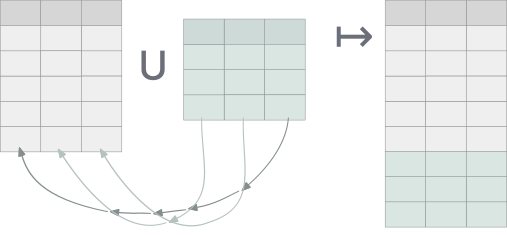
It is a somewhat interesting corner of SQL as nowhere else (with the exception of the occasional group by 2) does SQL use the ordinality of a relation’s columns.
Delightql, of course, supports all of these operators but opens up the door to other functionality by
- relaxing the same number requirement and permitting ragged unions and intersects
- having a preference for naming-based access
To make this more concrete, consider delightql’s UNION CORRESPONDING:
users(*) ; users_2024(*)
The semicolon sigil ; of UNION CORRESPONDING separates two tables much like a comma would for joining. With this operator columns are matched by their names and a super set of both tables’ columns are synthesized.
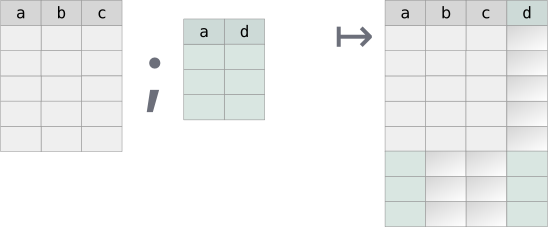
Delightql re-introducesThe SQL standard actually defines a CORRESPONDING BY clause (SQL-92 (ISO/IEC 9075:1992)) that can be used with INTERSECT, UNION, and EXCEPT, though, as usual, few actually implemented it. It’s even a reserved word. this CORRESPONDING name-based alignment mode as an alternative to SQL’s normal UNION-like ordinal alignment. Delightql prefers name-based alignment but still offers ordinal alignment for backwards compatibility.
Delightql’s UNION-like operators are the following:
| Mode | Sigil | Alignment | Schema requirement |
|---|---|---|---|
| Corresponding | ; |
By name | Any (NULL-padded) |
| Smart | |;| |
By name | Identical names and same column count |
| Positional | || |
By ordinal | Same column count |
Set operator alignment modes
Union All Corresponding (;)
Aligns by name, NULL-padding missing columns. Output schema: first relation’s columns, then non-overlapping columns from the second.This is closer in definition to OUTER UNION. The few SQLs that implement UNION ALL CORRESPONDING do so by outputting the intersection of the two column sets, instead of the union of the two column sets that delightql favors.
_( a,b,c
-------
1,2,3;
4,5,6)
;
_( d, a,b
-------
"foo",10,20;
"bar",40,50)
| a | b | c | d |
|---|---|---|---|
| 1 | 2 | 3 | NULL |
| 4 | 5 | 6 | NULL |
| 10 | 20 | NULL | foo |
| 40 | 50 | NULL | bar |
Union All Corresponding is a ragged union.
Smart Union All (|;|)
Aligns by name, but requires both relations to have identical column count and names. Unlike SQL’s UNION/UNION-ALL position is irrelevant. The resulting schema is adopted from the first relation:
employee_2019(*)
|;| employee_2018(*)
|;| employee_2018(*)
SELECT
EmployeeId, LastName,
FirstName, Title, ReportsTo,
BirthDate, HireDate,
Address, City, State,
Country, PostalCode, Phone,
Fax, Email
FROM employee_2019
UNION ALL
SELECT
EmployeeId, LastName,
FirstName, Title, ReportsTo,
BirthDate, HireDate,
Address, City, State,
Country, PostalCode, Phone,
Fax, Email
FROM employee_2018
UNION ALL
SELECT
EmployeeId, LastName,
FirstName, Title, ReportsTo,
BirthDate, HireDate,
Address, City, State,
Country, PostalCode, Phone,
Fax, Email
FROM employee_2018;
Positional Union All (||)
Aligns by position. Requires identical column count. Useful for intentional realignment.The below example uses interior relations to shape each relation prior to the UNION ALL.:
users_2024(|> (last_name,first_name,age))
||
users_2023(|> (LastName,First,Age))
Set Semantics vs Multiset Semantics
All of delightql set operators are actually multiset operators inasmuch as they preserve duplicates. In other words, all set operators are ALL-flavored.
If set semantics are required, use DISTINCT ALL via |> %(*).
employee_2019(*) |;| employee_2018(*) |> %(*)
SELECT
EmployeeId, LastName,
FirstName, Title, ReportsTo,
BirthDate, HireDate,
Address, City, State,
Country, PostalCode, Phone,
Fax, Email
FROM employee_2019
UNION --- NOT UNION ALL
SELECT
EmployeeId, LastName,
FirstName, Title, ReportsTo,
BirthDate, HireDate,
Address, City, State,
Country, PostalCode, Phone,
Fax, Email
FROM employee_2018;
which is equivalent to
SELECT DISTINCT * FROM
(SELECT
EmployeeId, LastName,
FirstName, Title, ReportsTo,
BirthDate, HireDate,
Address, City, State,
Country, PostalCode, Phone,
Fax, Email
FROM employee_2019
UNION ALL
SELECT
EmployeeId, LastName,
FirstName, Title, ReportsTo,
BirthDate, HireDate,
Address, City, State,
Country, PostalCode, Phone,
Fax, Email
FROM employee_2018)
;
Intersects via correlation
Having introduced the operators above, one would assume that a new sigil for intersects is in the offing. Instead delightql chooses to reuse the same syntax for correlations to represent a statement of which columns to intersect on.
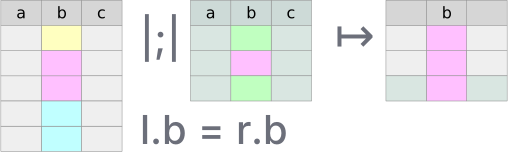
After any union-flavored multiset operator, conjoin a condition that correlates the previous relations together. From such a union an intersection results:
employee_2019(*) as e1 |;|
employee_2018(*) as e2,
e1.EmployeeId = e2.EmployeeId
SQL’s INTERSECT only matches on the entire tuple, it lacks an INTERSECT ON/BY parameterization. Delightql’s correlation syntax lets you choose which columns to match on – a per-column intersection that SQL cannot express without rewriting the query as a pair of EXISTS subqueries.
Correlation syntax matches alignment mode
The correlation condition should use the same addressing schema as the alignment:
- Name-based modes (
;,|;|) use name-based correlation:x.col = y.colorx.* = y.* - Positional mode (
||) uses positional correlation:x|1| = y|1|orx|*| = y|*|
The full-tuple shorthand x.* = y.* means “match on all column names that appear in both x and y.” Columns present on only one side are ignored for matching. Under |;| this distinction is moot since the schemas are identical. Under ; the schemas may be different, and matching on the intersection of names is the only natural reading.
The positional shorthand x|*| = y|*| means “match on all column positions.”
| DQL | Equivalent SQL concept |
|---|---|
|
INTERSECT ALL CORRESPONDING |
|
INTERSECT ALL (Name safe) |
|
INTERSECT ALL (positional, = SQL’s |
|
INTERSECT ALL (positional, = SQL’s |
|
Per-column intersection (no SQL equivalent) |
To belabor a point, intersection re-purposes correlation syntax that is seen most often with joins to be useful for intersection. To see the difference between a join and an intersection look at how the two tables prior are combined:
| Correlation as JOIN ON | Correlation as INTERSECT ON |
|---|---|
|
|
, between the two tables produces a join (rows are paired). |
|;| between the two tables produces an intersection (rows are filtered). |
Equality and NULL-safety. The
=in both columns above looks identical, but the compilation differs. In join position (left column),=compiles to SQL=– NULLs do not match, because NULL-to-NULL matching in a join can explode row counts . In set correlation position (right column),=compiles toIS NOT DISTINCT FROM– NULLs match. This is safe because set correlation filters viaEXISTS, which tests for the presence of a matching row without multiplying output.How intersection is executed in SQL.
Example:
users_2023(*) as u23 ; users_2024(*) as u24, u23.email = u24.emailSELECT id, first_name, last_name, email, age, status, country, balance, NULL, NULL, NULL FROM users_2023 AS u23 WHERE EXISTS (SELECT 1 FROM ( SELECT id, first_name, last_name, email, NULL, status, NULL, NULL, department, salary, created_at FROM users_2024 AS u24 ) AS t1 WHERE outer_0.email IS NOT DISTINCT FROM t1.email) UNION ALL SELECT id, first_name, last_name, email, NULL, status, NULL, NULL, department, salary, created_at FROM users_2024 AS u24 WHERE EXISTS (SELECT 1 FROM ( SELECT id, first_name, last_name, email, age, status, country, balance, NULL, NULL, NULL FROM users_2023 AS u23 ) AS t0 WHERE t0.email IS NOT DISTINCT FROM outer_1.email)
Minus (Except)
Minus returns rows from the first relation that have no match in the second. A single operator - aligns by name:
employee_current(*) - employee_terminated(*)
Rows in employee_current with no corresponding row (by name) in employee_terminated. Schemas must align – if column names differ, rename first:
employee_current(*) - employee_terminated(|> *(emp_id as id))
Interior Relations and Lateral Joins
Interior relations unify EXISTS, NOT EXISTS, scalar subqueries, and lateral joins under one syntax.
An interior relation is a query continuation inside a functor’s parentheses:
users(|> (last_name,first_name))
Query Continuation
A query continuation extends a complete query rightward.
users(*)‸ , age<50‸ |> (department)‸After
users(*), the continuation, age>50 |> (department)is valid becauseusers(*)alone is already meaningful. Likewise,|> (department)is valid becauseusers(*), age>50is already meaningful.
Interior relations appear wherever tables are allowed. When uncorrelated, they’re equivalent to exterior execution:
users(*) |> (last_name,first_name)
// equivalent to: users(|> (last_name,first_name))
Consider positional union all || where interiority crafts the proper alignment and projection:
users_2024(|> (last_name,first_name,age))
||
users_2023(|> (LastName,First,Age))
Interior relations are used in the following:
- scalar subqueries (regardless of correlation)
EXISTSandNOT EXISTS- simple shadowing subqueries
- correlated (non-scalar) subqueries – i.e. lateral joins
Scalar subqueries
Scalar subqueries use interior notation:
employee(*) as e
|> (FirstName,
LastName,
Salary,
employee:( ~> avg:(Salary)) as AvgSalary,
employee:( , DepartmentName=e.DepartmentName
~> avg:(Salary)) as AvgSalaryInDept)
In the above example, two query continuations started with ~> and , execute an uncorrelated and correlated scalar subquery respectively.
EXISTS and NOT EXISTS
The + and \+ prefixes with interior notation create (NOT) EXISTS:
users(*), orders(*),
users.id = orders.user_id,
\+order_items(, orders.id = order_items.order_id)
Simple Shadowing
Uncorrelated interior relations are simple shadowing – useful for reshaping before set operations:
users(|> (last_name,first_name))
but especially for set operators:
users_2024(|> (last_name,first_name,age))
||
users_2023(|> (LastName,First,Age))
users_2024(|> *(last_name as LastName,first_name as First,age as Age))
|;|
users_2023(*)
users_2024(; users_2023(*)) as combined,
org(*), combined.departments=org.dept
|> (last_name,org.dept)
Correlated Table (Lateral Join)
Any table with interiority and correlation to other tables in the same query is a lateral join.
Lateral joins may be broken down into three sub-types:
- simple
- aggregate
- top-N
Simple Lateral. A join without aggregation or limits. Replaces multiple scalar subqueries; rarely advantageous over a regular join.
orders(*) ,
users(, users.id=user_id
|> (last_name,first_name,email)) as u
|> (orders.*,last_name,first_name,email)
SELECT orders.*, last_name , first_name , email
FROM (
SELECT *
FROM orders
INNER JOIN (
SELECT last_name , first_name , email ,
id -- promote out of subquery for joining
FROM users
) AS users ON users.id IS NOT DISTINCT FROM user_id
);
Aggregate Lateral. Replaces multiple aggregate scalar subqueries. Advantageous when the aggregate key matches the join key.
users(*) as u,
orders(, orders.user_id = u.id |>
%(user_id
~> sum:(total) as total_spent,
sum:(tax_amount) as total_tax_amount))
SELECT
*
FROM users AS u
INNER JOIN (
SELECT user_id , sum(total) AS total_spent, sum(tax_amount) AS total_tax_amount
FROM orders
GROUP BY user_id
) AS orders
ON orders.user_id IS NOT DISTINCT FROM u.id;
Top-N Lateral. Returns the top N correlated rows per outer row, avoiding explicit window functions.
users(*) as u,
orders(, orders.user_id = u.id |> #(total desc), #<3)
SELECT *
FROM users AS u
JOIN (SELECT
id, order_id, user_id, customer_id, total,
tax_amount, shipping_cost, status, created_at,
shipped_at, delivered_at
FROM (SELECT
id, order_id, user_id, customer_id, total,
tax_amount, shipping_cost, status, created_at,
shipped_at, delivered_at,
ROW_NUMBER() OVER (
PARTITION BY
user_id
ORDER BY total DESC
) AS __dql_rn
FROM orders) AS orders_with_rn
WHERE
orders_with_rn.__dql_rn <= 3) AS orders
ON orders.user_id IS NOT DISTINCT FROM u.id;
Note how the windowing function above partitions by the correlation join condition.
Summary
The below diagram describes the hierarchy of all places where delightql uses interiority.
Only the tree labeled interior relations consists of expressions that are used as actual relations/tables.
Interiority:
├── interior relations:
│ ├── correlated (lateral):
│ │ ├── top-N
│ │ ├── simple/multi
│ │ └── aggregate
│ └── uncorrelated
├── (not) exists
└── scalar subqueries
├── correlated
└── uncorrelated
Higher-Order Pipes
The R-PIPE |> passes a relation into a unary operator:
employee(*), Salary > 5000
|> ( LastName )
The fundamental unary operators – projection, distinct, group by – have dedicated syntax covered in earlier sections:
foo(*) |> ( LastName )
foo(*) |> -( FirstName, LastName )
foo(*) |> +( length:(LastName) as length_last_name )
foo(*) |> %( FirstName, LastName )
foo(*) |> %( FirstName, LastName ~> count:(*) )
Higher-order predicates extend this pattern. A programmer-defined higher-order predicate can appear as the pipe target:
employee(*)
|> summarize(*)
Given this definition in assertion mode:
summarize(T(*))(*) :-
T(*)
~> ( count:(%LastName) as distinct_last_name_count,
count:(%Department) as distinct_department_count,
count:(*) as total_count,
avg:(Salary) as average_salary )
the expression employee(*) |> summarize(*) expands to:
employee(*)
~> ( count:(%LastName) as distinct_last_name_count,
count:(%Department) as distinct_department_count,
count:(*) as total_count,
avg:(Salary) as average_salary )
Piped vs. Direct Invocation
Higher-order predicates can be invoked directly, passing full functor expressions:
clean_employees(batch.employee_2019(*))(*)
This is equivalent to:
batch.employee_2019(*)
|> clean_employees(*)
Direct invocation accepts any relation expression, including filters and projections:
clean_employees(batch.employee_2019(*, Salary > 50000))(*)
The piped form’s advantage is composability with other pipe operators:
batch.employee_2019(*), Salary > 50000,
Department = "Engineering"
|> clean_employees(*)
Multi-Parameter Piped Invocation
When the piped relation is not the first parameter, use @ (the f-param placeholder) to mark where it goes — borrowing function-pipe syntax:
-- Definition: scalar first, table second
tagged(label, T(*))(*) :- T(*), ...
-- Piped with @:
users(*) |> tagged("young", @)(*)
Without @, the piped relation fills the first parameter by default. When the first parameter is a scalar, this fails. The @ placeholder makes the target position explicit.
Pivot and Melt
Melting and pivoting are inverse transformations between two table shapes containing the same data. The “long skinny” table stores attributes as data – normalized, often resembling key-value pairs. The “short wide” table lifts attributes to metadata – they become column names. 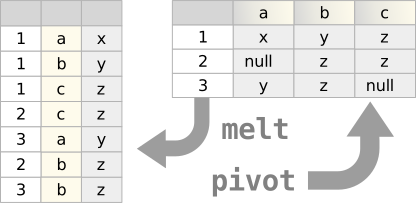
Both transformations are possible in pure SQL given:
- Support for compound data (JSON objects, arrays)
- Ability to join against compound data (
unnest,json_each) - For pivoting: attribute values must be known at query-write time to become column names
Melt
Melting normalizes denormalized data. A common case: data transfers between organizations where a single row contains multiple relations.
Consider claim_header with four diagnosis columns that should be normalized into separate rows:
claim_header(*), _( Diagnosis, Description, DiagnosisNumber
-------------------------------------
diag_1, diag_description1, 1;
diag_2, diag_description2, 2;
diag_3, diag_description3, 3;
diag_4, diag_description4, 4 )
|> (claim_id, DiagnosisNumber, Diagnosis, Description)
The anonymous table (lines 1–5) maps each source column set to a row. Joining it to claim_header with no condition produces one output row per diagnosis per claim – four times the original cardinality. The projection (line 6) retains only the normalized columns.
The transpiled SQL uses JSON as an intermediate representation: The use of JSON functions is an implementation detail – arrays with unnest would work equally. The result contains no JSON; it is a normal table.
WITH
_premelt_claim_header AS (
SELECT
claim_id,
json_array(
json_array(
diagnosis_1,
diagnosis_1_description,
1
),
json_array(
diagnosis_2,
diagnosis_2_description,
2
),
json_array(
diagnosis_3,
diagnosis_3_description,
3
),
json_array(
diagnosis_4,
diagnosis_4_description,
4
)
) AS _melt_packet
FROM claim_header
)
SELECT
claim_id,
json_extract(j.value, "$[2]") AS DiagnosisNumber,
json_extract(j.value, "$[0]") AS Diagnosis,
json_extract(j.value, "$[1]") AS Description
FROM _premelt_claim_header
JOIN json_each(_melt_packet) AS j;
Pivot
Pivoting is a GROUP BY that rotates row-oriented data into columns. The group key defines the entity; an attribute column becomes column names; a value column fills them.
Given student_scores:
| lastname | firstname | subject | evaluation_result | evaluation_day |
|---|---|---|---|---|
| Smith | John | Music | 7.0 | 2016-03-01 |
| Smith | John | Maths | 4.0 | 2016-03-01 |
| Smith | John | History | 9.0 | 2016-03-22 |
| Smith | John | Language | 7.0 | 2016-03-15 |
| Smith | John | Geography | 9.0 | 2016-03-04 |
| Gabriel | Peter | Music | 2.0 | 2016-03-01 |
| Gabriel | Peter | Maths | 10.0 | 2016-03-01 |
| Gabriel | Peter | History | 7.0 | 2016-03-22 |
| Gabriel | Peter | Language | 4.0 | 2016-03-15 |
| Gabriel | Peter | Geography | 10.0 | 2016-03-04 |
Sample student_scores data
A pivot on subject produces:
| lastname | firstname | geography | history | maths | music | language |
|---|---|---|---|---|---|---|
| Gabriel | Peter | 10.0 | 7.0 | 10.0 | 2.0 | 4.0 |
| Smith | John | 9.0 | 9.0 | 4.0 | 7.0 | 7.0 |
Pivoted result – subjects become columns
student_scores(*),
subject in ("Music"; "Maths"; "History"; "Language"; "Geography")
|> %( firstname, lastname
~>
evaluation_result of subject )
- Line 3:
firstname, lastnamedefines the entity (group key), determining output cardinality - Line 2: the
inclause constrains which attribute values become columns - Line 5:
evaluation_result of subjectrotates values into attribute-named columns
The in clause is required. Pivoting has compile-time semantics – the output schema is determined by the query, not the data. Without a fixed set of attribute values, the column names would be unknowable.
The transpiled SQL:
WITH _prepivot_student_scores AS (
SELECT
lastname,
firstname,
json_group_object(
subject,
json_object('evaluation_result', evaluation_result)
) AS _pivot_packet
FROM student_scores
GROUP BY lastname, firstname
)
SELECT
lastname,
firstname,
json_extract(_pivot_packet, '$.Geography.evaluation_result') AS geography,
json_extract(_pivot_packet, '$.History.evaluation_result') AS history,
json_extract(_pivot_packet, '$.Maths.evaluation_result') AS maths,
json_extract(_pivot_packet, '$.Music.evaluation_result') AS music,
json_extract(_pivot_packet, '$.Language.evaluation_result') AS language
FROM _prepivot_student_scores;
Multiple Value Columns
The source table included evaluation_day, unused above. Multiple of clauses pivot additional columns:
| lastname | firstname | geography | geography_day | history | history_day | … |
|---|---|---|---|---|---|---|
| Gabriel | Peter | 10.0 | 2016-03-04 | 7.0 | 2016-03-22 | |
| Smith | John | 9.0 | 2016-03-04 | 9.0 | 2016-03-22 |
Pivot with multiple value columns
student_scores(*),
subject in ("Music"; "Maths"; "History"; "Language"; "Geography")
|> %( firstname, lastname
~>
evaluation_result of subject,
evaluation_day of :"{subject}_day" )
Lines 5–6 introduce two pivot column sets. The second uses a format function to distinguish column names (Music_day, Maths_day, etc.). When pivoting multiple value columns, the attribute expression after of must differ – here, subject versus :"{subject}_day".
Pivot Syntax
The of keyword rotates values into attribute-named columns. The grammar:
<value_column> of <attribute_column>
<value_column> of :<format_string>
The attribute column must be constrained by an in clause. When pivoting multiple value columns, each of expression must produce distinct column names – hence the format string option.
Tree Groups
Tree grouping transforms flat relations into nested JSON structures. Each nesting level corresponds to a GROUP BY – the tree’s shape reflects the grouping hierarchy.
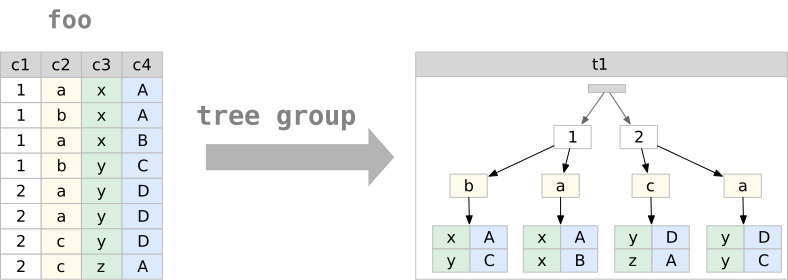 Delightql provides this capability through compound data constructors (
{ }, [ ]) used in reduction positions. The resulting JSON is not general-purpose – it maps relations to a tree normal form where each level represents a distinct grouping context.
Two forms exist:
- Data-oriented: produces arrays of objects; grouping columns become object fields
- Metadata-oriented: produces objects with data values as keys; a single column’s values become the key names
Full JSON functionality remains available through the target SQL’s native functions (json_object, json_array, etc.).
Compound Data Constructors (Recap)
| Constructor | Scalar Position | Aggregate Position |
|---|---|---|
{ } |
Record (string-indexed) | Table of records |
[ ] |
Tuple (numeric-indexed) | Table of tuples |
Compound data constructors by position (recap)
Tree Group Syntax
Nested tree groups are created by nesting compound constructors with ~> introducing each level:
employee(*)
~> { Title,
"people": ~> {FirstName, LastName},
State } as people_by_title_and_state
Reading the syntax. The ~> marks tree group boundaries. Columns between a ~> and either the next ~> or a closing enclyph (}, ], )) belong to that level’s group:
// level 1 level 2 L2 end L1 end
// start start
// ↳ ↳ ↱ ↱
~> { Title, "people": ~> {FirstName, LastName}, State }
TitleandStatebelong to level 1 (the top-level tree group)FirstNameandLastNamebelong to level 2 (nested within level 1)
The grouping is hierarchical: level 2 groups are computed within each distinct combination of level 1 columns.
Terminology
- tree group: The set of columns whose distinct combinations form one level of the tree
- tree group variables: The columns belonging to a tree group
- nested tree group: A tree group inside another tree group
- tree group induction: Using a compound constructor in reduction position to create an interior table
Data-Oriented Tree Grouping
Data-oriented tree grouping uses ~> followed by a compound constructor. The result is an array of objects (or tuples), one per distinct combination of tree group variables.
Simple example:
employee(*)
~> { Title, State } as title_and_state
Returns one row containing an array of all distinct {Title, State} combinations.
Nested example:
employee(*)
~> { Title,
"people": ~> {FirstName, LastName},
State } as people_by_title_and_state
Returns a single-row, single-column table:
| people_by_title_and_state |
|---|
|
Transpilation. Tree grouping uses JSON aggregation functions as intermediates:
SELECT
json_group_array(
json_object(
'Title', Title,
'State', State,
'people', people
)
) AS people_by_title_and_state
FROM (
SELECT
Title,
State,
json_group_array(
json_object('FirstName', FirstName, 'LastName', LastName)
) AS people
FROM employee
GROUP BY Title, State
);
The nested GROUP BY mirrors the nested ~>. Each tree group level becomes a subquery with its own grouping and JSON aggregation. The JSON functions are implementation details – the result is a standard column containing structured data.
Three-level example:
employee(*)
~> { Title,
"people_by_state":
~> { State,
"people": ~> {FirstName, LastName} } }
as people_by_state_within_title
Groups first by Title, then within each title by State, then collects people within each state.
Sibling tree groups:
Multiple nested groups at the same level share their parent’s context but are otherwise independent:
employee(*)
~> { Title,
"people_by_state": ~> { State, "people": ~> {FirstName, LastName} },
"cities": ~> [City] }
as nested_with_siblings
The people_by_state and cities tree groups are siblings – both nested within Title, neither containing the other.
Sibling tree groups share their parent’s context but aggregate independently. The relationship between siblings—which person was in which city – is not preserved. This is inherent to the structure: siblings represent independent projections of the grouped data. Trees with siblings satisfy TNF-G but not TNF-R; they cannot round-trip losslessly. (See Appendix A.)
Metadata-Oriented Tree Grouping
Metadata-oriented tree grouping elevates data values to JSON keys. A column’s distinct values become the keys of a single object rather than elements of an array.
The syntax uses :~> after a bare identifier:
employee(*)
~> Title: ~> {FirstName, LastName} as people_by_title
The result is an interior record (one object), not an interior table (array of objects):
{
"General Manager": [
{ "FirstName": "Andrew", "LastName": "Adams" }
],
"IT Manager": [
{ "FirstName": "Michael", "LastName": "Mitchell" }
],
"Sales Manager": [
{ "FirstName": "Nancy", "LastName": "Edwards" }
]
}
Distinguishing syntax:
- Normal keys are quoted strings:
"people": - Metadata keys are bare identifiers followed by
:~>:Title: ~>
Restriction: Only one column can serve as a metadata key per level – the object can have only one set of keys. This constraint reflects JSON’s structure: two metadata-keyed objects with the same key type would create ambiguous destructuring. Metadata-oriented trees satisfy TNF-M. (See Appendix A.)
Within a regular group by:
employee(*)
|> %( State
~>
Title: ~> {FirstName, LastName} as people_by_title )
Returns one row per state, each containing an object keyed by title.
Tree Distinction
Tree structures can serve as grouping columns, enabling aggregation alongside hierarchical output:
employee(*)
|> %( { Title,
"people": ~> {FirstName, LastName},
State } as people_by_title_and_state
~>
sum:(Salary), count:(*) )
Restriction: Columns referenced in nested tree groups cannot also appear as explicit grouping columns:
// INVALID: LastName appears in tree group and as grouping column
employee(*)
|> %( { Title, "people": ~> {FirstName, LastName}, State } as tree,
LastName
~>
sum:(Salary) )
Columns not referenced in the tree may be added:
employee(*)
|> %( { Title, "people": ~> {FirstName, LastName}, State } as tree,
DepartmentId
~>
sum:(Salary), count:(*) )
Tree Destructuring
Tree destructuring is the inverse of tree grouping – it flattens nested JSON back into rows.
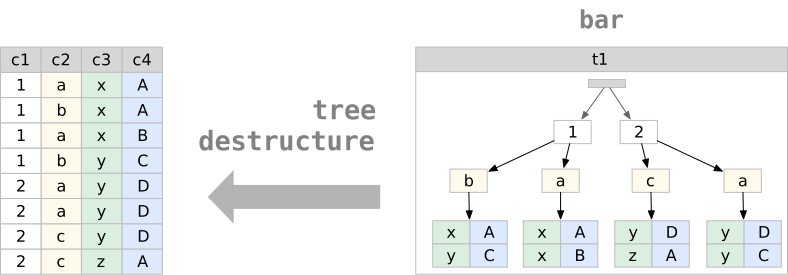
The TREE-UNIFY sigil ~= matches a JSON column against a destructuring pattern:
table_with_json(*)
, people_by_state_within_title ~= ~> { Title,
"people_by_state":
~> { State,
"people": ~> {FirstName, LastName} } }
|> -(people_by_state_within_title)
The pattern syntax mirrors construction syntax. Each ~> level multiplies rows – the result is the Cartesian product of all nested arrays.
Array vs object matching:
// Matches an ARRAY of objects -- multiplies rows by array length
p ~= ~> { Title, State }
// Matches a single OBJECT -- extracts fields, no multiplication
p ~= { Title, State }
The ~> in destructuring means “iterate over this array,” just as in construction it means “aggregate into this array.”
Renaming during destructuring:
The string key matches the JSON; the identifier after : names the output column:
, people_by_state_within_title ~= ~> { Title,
"people_by_state": ~> { State, "people": peeps } }
Here "people" matches the JSON key; peeps becomes the column name. The peeps column contains the nested array as-is, not destructured.
Staged destructuring:
Destructure incrementally by chaining ~= operations:
table_with_json(*)
, nested ~= ~> {country, "users": sub_users}
, sub_users ~= ~> {FirstName, LastName}
|> -(nested)
The first ~= extracts country and keeps sub_users as a JSON array. The second destructures sub_users into individual rows. Stop at any level to preserve nested structure.
Metadata-oriented destructuring:
The :~> syntax works symmetrically – object keys become column values:
temp(*), json_col ~= ~> country: ~> {FirstName, LastName}
|> -(json_col)
Given an object keyed by country names, this extracts the key into a country column and iterates the nested arrays.
Binding semantics:
Column names in the pattern match JSON keys by name. If the pattern says FirstName and the JSON has "FirstName", they bind. A mismatched name produces nulls – there is no compile-time validation against JSON structure.
Pathing in Tree Patterns
Destructuring patterns support direct pathing, eliminating the need to match intermediate structure. The pathing syntax (.path.to.field) reaches into nested JSON without declaring every level.
Basic pathing:
_(json @ {"name": "app", "config": {"server": {"port": 3000}}})
|> (json:{.config.server.port})
The path .config.server.port extracts the value directly.
Pathing in destructuring:
Instead of matching the full structure:
j ~= { name, "config": { "server": { port, host }, "database": { url } } }
Path directly to what you need:
j ~= {
name,
.config.server.port,
.config.server.host,
.config.database.url
}
Pathing with rename:
Combine pathing with as to name the output column:
user_data ~= ~> {
country,
.name_info.last_name as ln,
.name_info.first_name as fn
}
Mixed matching and pathing:
Structural matching and pathing can combine in a single pattern:
j ~= {
name,
version,
.dependencies.react,
.dependencies.next
}
Here name and version match top-level keys directly; the .dependencies.* paths reach into nested structure.
Pathing in projection:
Pathing works outside destructuring patterns, in normal projection:
_(json @ {"name": "app", "scripts": {"dev": "next dev", "build": "next build"}})
|> ({
"name": json:{.name},
"scripts": json:{.scripts}
})
Interior Drill-Down
Tree destructuring with ~= requires the user to spell out the interior schema – every level of nesting must be declared in the pattern. When the schema is statically known (tree groups from a view, CTE, or inline query), .column(*) provides a shorter, self-documenting alternative.
Syntax. .column_name(*) as a suffix on any relation expression. The (*) means “all columns of the interior relation.” Specific columns are also supported: .entities(name, type). The operator is chainable: .entities(*).columns(*).
Context carry-forward. Outer columns remain available after a drill-down. .entities(*) produces entity-level columns plus all columns from the enclosing level, minus the exploded column itself. This is lateral-join semantics – each interior row inherits the context of its parent row.
Example – CTE drill-down:
users(*) |> %(country ~> {first_name, last_name} as people) : by_country
by_country(*).people(*)
This produces one row per person, with country carried forward from the grouping level.
Example – chained drill-down:
main::(*).entities(*).columns(*)
, entity_name = "users"
Each .name(*) step explodes one level of nesting. Columns from all prior levels remain available for filtering.
Equivalence with ~=. The same query written both ways:
// Drill-down form:
main::(*) |> (entities) .entities(*)
// Equivalent ~= form:
main::(*)
, entities ~= ~> {name, type, doc, "columns": ~> {col_name, col_type, col_pos}}
|> -(entities)
The drill-down form does not require the user to know the interior schema.
Narrowing Destructure
The ~= operator and interior drill-down both carry context forward – outer columns survive into the result. This is the correct default for relational composition, but it requires projecting out the intermediate columns when they are no longer needed:
j(*), j ~= {.packages} |> -(j)
, packages ~= ~> {.version, .name, .description} |> -(packages)
When the intent is to drill into a column, extract fields, and discard everything else, the .column{...} operator expresses this more efficiently:
j(*)
|> .j{.packages}
|> .packages{.version, .name, .description}
Each step replaces the current row with the destructured result.
When to use which.
| Form | Carries context | Use case |
|---|---|---|
~= pattern |
Yes | General relational destructuring; join with outer columns |
.col(*) |
Yes | Drill-down when schema is known; outer columns needed |
.col{...} |
No | Navigate into nested JSON; only interior fields matter |
Example – cargo metadata:
j(*)
|> (j:{.packages} as packages)
|> .packages{.version, .name, .description}
The path extraction j:{.packages} pulls the packages array out of the top-level object; then .packages{...} iterates and extracts fields. The result is a flat table with version, name, and description columns – no intermediate columns to clean up.
Null Elision in Tree Groups
When an outer join feeds into a tree group, the join pads unmatched rows with NULLs. In a flat relation this is the only way to represent “no match” – NULL serves as a sentinel for absence. Trees have no such limitation: an empty array [] directly represents “no children.”
Tree groups decode this flat-world encoding. When all value columns in a contributing row are NULL, the row is elided from the array. The result is [], not [{"col": null, ...}].
Example:
parents(*) : _(id, name ---- 1, "Alice"; 2, "Bob"; 3, "Charlie")
children(*) : _(parent_id, toy ---- 1, "doll"; 1, "ball"; 2, "car")
parents(*), children?(*), parents.id = children.parent_id
|> %(name ~> {toy} as toys)
Charlie has no children. The outer join produces (3, "Charlie", NULL). Without null elision, the tree group would produce:
| name | toys |
|---|---|
| Alice | [{“toy”:“doll”},{“toy”:“ball”}] |
| Bob | [{“toy”:“car”}] |
| Charlie | [{“toy”:null}] |
With null elision:
| name | toys |
|---|---|
| Alice | [{“toy”:“doll”},{“toy”:“ball”}] |
| Bob | [{“toy”:“car”}] |
| Charlie | [] |
Scope. Null elision applies to both forms:
~> {a, b, c}– curly (object) tree groups~> [a, b, c]– bracket (tuple) tree groups
The elision rule. A row is elided when every value column in the constructor is NULL. If any value column is non-null, the row is preserved. This means a row like {"name": "Alice", "age": null} survives – only fully-null rows (the signature of outer-join padding) are dropped.
Parent entity preservation. Null elision never removes the parent entity. Charlie still appears in the result – only the contents of the nested array change (from [{"toy":null}] to []). The GROUP BY produces a row for Charlie’s grouping key; the aggregate column becomes an empty array rather than an array containing a null-valued object.
Round-trip behavior. Destructuring an empty array produces zero rows. After null elision, destructuring Charlie’s [] eliminates Charlie from the flat result – which is the same behavior as an inner join.
Meta-ize Operator
The meta-ize operator reifies a relation’s schema as a relation – each column becomes a row. Where * inside a functor returns all data rows, ^ returns all columns as rows of metadata.
Schema as Relation (^)
users(^)
This returns one row per column in users:
| colname | colposition | coltype |
|---|---|---|
| id | 1 | INTEGER |
| first_name | 2 | TEXT |
| last_name | 3 | TEXT |
| age | 4 | INTEGER |
| 5 | TEXT |
Output of users(^)
The ^ operator belongs to the continuation operator family – unary operators that transform table access:
| Operator | Meaning |
|---|---|
* |
Qualify column names (data access) |
() |
Unqualified columns (natural join candidate) |
.(cols) |
USING semantics on specific columns |
^ |
Column metadata as rows |
^^ |
Full DDL metadata as rows |
Table continuation operators
These operators compose freely: users(*.(id)) means “qualified + USING on id.”
Postfix Form
users(^) is sugar for users(*) ^. The postfix form works on any relational expression, not just base tables:
-- schema of a projection (2 rows)
users(*) |> (first_name, age) ^
-- schema of a join
users(*), products(*) ^
-- schema of an aggregation
users(*) |> %(country ~> count:(*) as n) ^
The postfix ^ applies to the entire expression to its left, returning its schema as a relation.
Composability
Because ^ produces a regular relation, all DQL operations apply – filtering, projection, pipes, joins, and set operators:
-- text columns only
users(^), coltype = "TEXT" |> (colname)
-- columns shared between two year-partitioned tables
users_2024(^) |;| users_2023(^), x.* = y.*
-- filter schema of an optionally-joined table
department?(^), coltype = "TEXT"
The output of
^is itself a relation with a fixed schema (colname, colposition, coltype). Applying^to a^result would return the schema of the metadata relation – three rows describing colname, colposition, and coltype themselves.