Appendix: Tree Normal Form
Tree grouping bridges two worlds: the relational (flat, tabular, join-oriented) and the hierarchical (nested, tree-structured, document-oriented). Not all JSON has a sensible relational interpretation – arbitrary nesting can be too irregular to map cleanly. But some trees do, and understanding which ones helps clarify what tree grouping actually computes.
This appendix defines tree normal forms – a vocabulary for describing JSON structure and its relational interpretation. Unlike database normal forms (which form a linear hierarchy), tree normal forms are organized as a graph. Nodes are forms; edges are constraints or interpretations. Some edges restrict structure; others assign meaning to nesting.
The Graph
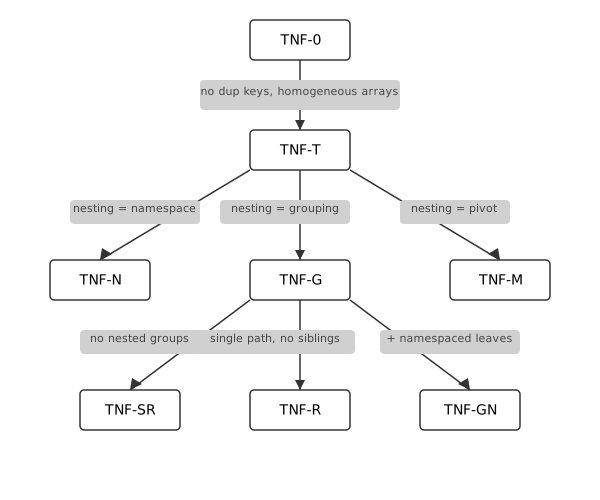
Edges represent:
| Edge | Type | Meaning |
|---|---|---|
| TNF-0 → TNF-T | Restriction | Structural hygiene |
| TNF-T → TNF-N | Interpretation | Nesting means namespacing |
| TNF-T → TNF-G | Interpretation | Nesting means grouping |
| TNF-T → TNF-M | Interpretation | Nesting means pivot |
| TNF-G → TNF-SR | Restriction | No nested groups (flat) |
| TNF-G → TNF-R | Restriction | Single path, no siblings |
| TNF-G → TNF-GN | Combination | Grouping with namespaced leaves |
Tree normal form edge types
The graph admits extension. New forms slot in by defining their edges.
The Forms
TNF-0: Valid JSON
The baseline: any valid JSON per RFC 7159.
- Keys may be duplicated
- Arrays may be heterogeneous
- Top-level value may be a scalar
- Objects may be empty
42
[ 1, [], "a string", true, {},
  { "a": [2, 3], "a": [2, 3] },
  [ 2, 3, [ 4, 5 ] ]
]
Relational interpretation: None guaranteed. This is raw material. But it’s still queryable – pathing and json_each work on any valid JSON.
TNF-T: Well-Typed JSON
Restriction from TNF-0: no duplicate keys, homogeneous arrays, non-empty objects, array or object at top level.
{
  "name": "Alice",
  "scores": [95, 87, 91]
}
Relational interpretation: Arrays can be interpreted as collections; objects as records. Pathing is unambiguous. But nesting semantics are not yet defined – is a nested object a namespace? A grouped row? A pivot?
TNF-T is the foundation for the interpretive forms that follow.
TNF-N: Namespaced
Interpretation from TNF-T: nesting means semantic organization.
Nested objects group related fields – structure, not data rows.
{
  "LastName": "eklund",
  "address": {
    "City": "boston",
    "State": "MA"
  }
}
The address object is a namespace. The tree is semantically equivalent to:
{
  "LastName": "eklund",
  "address_City": "boston",
  "address_State": "MA"
}
Relational interpretation: Namespaced trees flatten to a single row. Pathing (.address.City) navigates the namespace.
Trade-off: More expressive (preserves semantic grouping) but less directly relational (requires flattening).
TNF-G: Grouped
Interpretation from TNF-T: nesting means aggregation.
Arrays represent grouped rows – the result of GROUP BY.
[
  { "Title": "Engineer",
    "people": [
      { "FirstName": "Alice", "LastName": "Smith" },
      { "FirstName": "Bob", "LastName": "Jones" }
    ]
  },
  { "Title": "Manager",
    "people": [
      { "FirstName": "Carol", "LastName": "White" }
    ]
  }
]
Each nesting level is a grouping context. The outer array groups by Title; the inner people array collects rows within each title.
Relational interpretation: Direct correspondence to GROUP BY. Construction compresses cardinality; destructuring expands it.
TNF-M: Metadata-Keyed
Interpretation from TNF-T: nesting means pivot.
Data values become object keys.
{
  "Engineer": [
    { "FirstName": "Alice", "LastName": "Smith" }
  ],
  "Manager": [
    { "FirstName": "Carol", "LastName": "White" }
  ]
}
The keys (Engineer, Manager) are data values lifted to metadata.
Relational interpretation: Keys map to a column; values map to grouped rows. Destructuring recovers the key as a column value.
Trade-off: Convenient for lookup but constrained – only one column can serve as keys per level. Two metadata-keyed objects with the same key type create ambiguous destructuring.
TNF-SR: Simply Relational
Restriction from TNF-G: no nested groups.
A flat array of homogeneous objects – the simplest grouped form.
[
  { "Title": "Engineer", "FirstName": "Alice", "LastName": "Smith" },
  { "Title": "Engineer", "FirstName": "Bob", "LastName": "Jones" },
  { "Title": "Manager", "FirstName": "Carol", "LastName": "White" }
]
No nested arrays. Each object is a row; the array is a table.
Relational interpretation: Direct. The JSON is a table in array-of-objects form. No grouping, no hierarchy – just rows.
TNF-R: Round-Trippable
Restriction from TNF-G: single path from root to deepest leaf, no sibling groups.
[
  { "Title": "Engineer",
    "State": "CA",
    "people": [
      { "FirstName": "Alice", "LastName": "Smith" }
    ]
  }
]
Relational interpretation: Lossless. relation → tree → relation recovers the original data (modulo column order).
Why siblings break round-tripping:
employee(*) ~> { Title,
                 "people": ~> {FirstName, LastName},
                 "cities": ~> [City] }
Siblings aggregate independently. The join – which person was in which city – is not preserved. Destructuring recovers each path independently:
Title,FirstName,LastName(viapeople)Title,City(viacities)
But not the original four-column row. This is TNF-G but not TNF-R.
TNF-GN: Grouped with Namespaced Leaves
Combination of TNF-G and TNF-N: grouping structure with namespaced leaf objects.
[
  { "Title": "Engineer",
    "people": [
      { "name": { "first": "Alice", "last": "Smith" },
        "contact": { "email": "[email protected]", "phone": "555-1234" }
      }
    ]
  }
]
The outer structure is grouped (array of objects with nested arrays). The leaf objects use namespacing (name, contact).
Relational interpretation: Destructure the grouping levels; flatten the namespaced leaves. The result has columns Title, name_first, name_last, contact_email, contact_phone.
Mixing Forms
Real trees often combine forms at different levels. The graph shows which combinations make sense:
{
  "metadata": {
    "generated": "2024-01-15",
    "version": "1.0"
  },
  "data": [
    { "Title": "Engineer",
      "people": [
        { "FirstName": "Alice", "LastName": "Smith" }
      ]
    }
  ]
}
metadatais TNF-N (namespacing)datais TNF-G (grouping)
The relational interpretation:
- Flatten
metadata.generated,metadata.versionto columns - Destructure
data→data.peopleto rows - Result: one row per person, metadata fields repeated
Understanding which form applies where clarifies what operations make sense.
Edge Types
The graph has two kinds of edges:
Restriction edges add structural constraints: - TNF-0 → TNF-T: hygiene (no dup keys, homogeneous arrays) - TNF-G → TNF-SR: flatness (no nested groups) - TNF-G → TNF-R: single-path (no siblings)
Interpretation edges assign meaning to structure: - TNF-T → TNF-N: nesting is namespacing - TNF-T → TNF-G: nesting is grouping - TNF-T → TNF-M: nesting is pivot
Restriction edges constrain what trees are valid. Interpretation edges determine how to read them relationally.
Summary
| Form | Key Property | Relational Interpretation |
|---|---|---|
| TNF-0 | Valid JSON | None guaranteed; queryable via pathing |
| TNF-T | Well-typed | Arrays are collections; objects are records |
| TNF-N | Namespaced | Flatten to single row |
| TNF-G | Grouped | GROUP BY; destructure to rows |
| TNF-M | Metadata-keyed | Pivot; keys become column values |
| TNF-SR | Simply relational | Direct table (array of flat objects) |
| TNF-R | Round-trippable | Lossless construction/destruction |
| TNF-GN | Grouped + namespaced | Destructure groups, flatten namespaces |
Summary of tree normal forms
The forms answer different questions:
- TNF-0 / TNF-T: Is this JSON structurally sound?
- TNF-N / TNF-G / TNF-M: What does nesting mean here?
- TNF-SR / TNF-R: How constrained is the grouping?
- TNF-GN: Can I mix interpretations?
Tree normal forms are not prescriptive – TNF-0 is sometimes exactly what you need. They are a vocabulary for understanding what your tree structure means relationally, and what operations it supports.
Extending the Graph
The graph admits new forms by defining edges. Examples:
- TNF-MR (metadata-keyed, round-trippable): TNF-M + single-path constraint
- TNF-SN (simply namespaced): TNF-N + flat (no nested namespaces)
- TNF-GM (grouped + metadata): grouping with metadata-keyed intermediate levels
Each new form names a useful combination.
Guiding Principles
-
Trees and tables mix. Trees have a valid relational interpretation under certain structural constraints.
-
Start with relations. The cleanest trees arise from grouping relations, not from arbitrary JSON. Construction informs understanding.
-
Arrays are rows; objects are records. Arrays represent homogeneous collections (multiple rows of the same shape). Objects represent heterogeneous structure (named fields, like columns).
-
Grouping compresses; destructuring expands. Construction decreases cardinality (many rows → fewer rows with nested arrays). Destructuring increases cardinality (nested arrays → many rows).
-
Siblings lose information. Sibling tree groups aggregate independently. The relationship between siblings – which person was in which city – is not preserved. This is inherent, not a bug.
-
Metadata-oriented trees are pivots. When data values become object keys, the structure resembles a pivot table. This helps with the object-relational impedance mismatch but introduces constraints.
-
Zeroth normal form has its place. Arbitrary JSON can still be queried via
json_eachand pathing. Tree normal forms define what’s cleanly relational, not what’s queryable at all.
Appendix: Error URI Taxonomy
Every compilation error carries a hierarchical URI that identifies the error category. Error hooks use these URIs for prefix matching:
-- matches any DQL semantic error
users(*) |> (foo.*) (~~error://dql/semantic ~~)

-- matches only table resolution failures
nonexistent_table(*) (~~error://dql/semantic/resolution/table ~~)

-- matches any error at all
bad_query(*) (~~error ~~)
The URI is a stable identifier independent of the error message text. It doubles as the canonical reference for documentation, tooling, and diagnostics.
Design Principles
-
Domain first. The top level identifies the language being processed:
dql/,ddl/,dml/. Users know whether they wrote a query or a definition. -
Parse vs semantic. The second level is the classic compiler split. Parse errors mean the source text is structurally invalid. Semantic errors mean the structure is valid but the meaning is wrong.
-
Prefix matching does the work. Each level narrows usefully:
error://dqlcatches any DQL error.error://dql/semanticcatches any semantic error.error://dql/semantic/resolutioncatches any name binding failure. -
No
validation. The term is too vague.semanticsays what the category is.constraint,arity,resolutionsay what went wrong.
Prefix Matching
Error hooks match by prefix. An expected URI of dql/semantic matches any actual URI that starts with dql/semantic/:
| Expected | Matches |
|---|---|
error://dql |
any DQL error (parse or semantic) |
error://dql/semantic |
any semantic error |
error://dql/semantic/resolution |
resolution/table, resolution/column, resolution/ambiguous, etc. |
error://dql/semantic/resolution/table |
table resolution failures only |
error://dql/parse |
any parse failure |
| (bare) | any error |
URI Hierarchy
dql/parse/ — Structural Failures
The source text does not form a valid CST, or CST-to-AST conversion finds malformed structure. The problem is syntactic.
| URI | Condition | Trigger |
|---|---|---|
dql/parse |
Any parse failure | |
dql/parse/tree_sitter |
Tree-sitter library error | |
dql/parse/literal |
Malformed literal | 0xGG, 0o89 |
dql/parse/expression |
Malformed expression | x +, empty expression |
dql/parse/anon |
Malformed anonymous table | _(a @ 2, 3) |
dql/parse/pipe |
Malformed pipe expression | x /-> |
dql/parse/function |
Malformed function call | missing name, lambda body |
dql/parse/case |
Malformed CASE expression | missing arm, missing result |
dql/parse/window |
Malformed window spec | invalid frame mode |
dql/parse/json_path |
Malformed JSON path | [name], {42} |
dql/parse/projection |
Empty or invalid projection | \|> -(*) |
dql/parse/subquery |
Malformed scalar subquery | missing table, missing continuation |
dql/parse/pattern |
Malformed pattern literal | invalid /pattern/ format |
Fine-grained leaves (e.g. dql/parse/literal/hex) can be added later. The second level is the useful grain for error hooks.
dql/semantic/ — Semantic Failures
The structure is valid but the meaning is wrong. Names do not resolve, arities do not match, or domain constraints are violated.
dql/semantic/resolution/ — Name Binding Failures
| URI | Condition | Trigger |
|---|---|---|
dql/semantic/resolution |
Any name binding failure | |
dql/semantic/resolution/table |
Table or view not found | nonexistent(*) |
dql/semantic/resolution/column |
Column cannot be resolved | \|> (bad_col) |
dql/semantic/resolution/function |
Function or HO view not found | |
dql/semantic/resolution/sigma |
Sigma predicate not found | |
dql/semantic/resolution/ambiguous |
Name matches multiple entities | cross-join with shared column |
dql/semantic/resolution/scope |
Name exists but unreachable | column behind pipe barrier, post-group leak |
Why ambiguous lives under resolution. Ambiguity is the dual of not-found: resolution fails because there are zero matches (not found) or multiple matches (ambiguous). Both are failures of name binding.
Why scope lives under resolution. The name exists in the schema, but the current scope cannot see it. The column is behind a pipe barrier, or a group-by reduced the visible columns. It is a resolution failure with a specific cause.
dql/semantic/arity/ — Wrong Argument Count
| URI | Condition | Trigger |
|---|---|---|
dql/semantic/arity |
Wrong argument count (general) | |
dql/semantic/arity/function |
Function call arity | |
dql/semantic/arity/predicate |
Predicate arity | +between(1, age) |
dql/semantic/arity/sigma |
Sigma predicate arity | |
dql/semantic/arity/pattern |
Positional pattern element count | users(a, b, c) |
Why arity is separate from resolution. Resolution is about finding the entity. Arity is about calling it. A function can resolve successfully and still fail on arity. These are different failure modes with different fixes: “did you spell it right?” vs “did you pass the right number of arguments?”
dql/semantic/constraint/ — Domain Rule Violations
The query is valid and all names resolve with correct arity, but a domain-specific rule is violated.
| URI | Condition | Trigger |
|---|---|---|
dql/semantic/constraint |
Any constraint violation | |
dql/semantic/constraint/pivot |
Pivot requirements not met | missing IN predicate, duplicate column |
dql/semantic/constraint/destructuring |
Destructuring rule violated | multiple ~>, comparison in pattern |
dql/semantic/constraint/join |
Join constraint violated | multiple full outer, missing condition |
dql/semantic/constraint/context |
Context-aware function misuse | typo, wrong args, missing marker |
dql/semantic/constraint/unsupported |
Construct not supported in this position | IN in projection, EXISTS in CASE |
Why constraint replaces validation. The word constraint names what went wrong: a domain rule was violated. Pivot requires an IN predicate. Destructuring forbids comparisons. Full outer join cannot have multiple targets. These are specific rules, not generic “validation.”
dql/semantic/limitation/ — Known Limitations
| URI | Condition |
|---|---|
dql/semantic/limitation |
Any known limitation |
dql/semantic/limitation/qualified_name_ambiguity |
Grammar ambiguity with qualified names ending in . |
dql/semantic/limitation/not_implemented |
Feature not yet implemented |
ddl/ — DDL Errors
DDL errors are structurally similar to DQL errors but fewer in number.
| URI | Condition |
|---|---|
ddl/parse |
DDL syntax failure |
ddl/semantic/resolution |
Referenced entity not found |
ddl/semantic/constraint |
DDL rule violated (circular dependency, duplicate definition) |
dml/ — DML Errors
| URI | Condition |
|---|---|
dml/parse |
DML syntax failure |
dml/semantic/resolution |
Target entity not found |
dml/semantic/constraint |
DML rule violated |
database/ and io/ — Runtime Errors
These errors occur during query execution, not compilation. They do not belong to a language domain.
| URI | Condition |
|---|---|
database |
Any database operation error |
database/connection |
Connection lock poisoned |
io |
I/O error |
Implementation Notes
The current implementation derives subcategories from error message keywords for ValidationError, TransformationError, and TranspilationError. Stable, static error types (TableNotFoundError, ColumnNotFoundError) already carry precise URIs. A planned refactor will add explicit subcategory fields to all dynamic error types, making URIs independent of message text.
Appendix: Danger URI Taxonomy
Certain behaviors are safe in most contexts but dangerous in others. Rather than forbid them outright, delightql gates them behind danger URIs – named safety boundaries that are closed by default and opened explicitly per-query.
-- open a specific danger for one query
employee(*) as e (~~danger://dql/cardinality/nulljoin ON~~),
  department(*) as d,
  e.DepartmentId = d.DepartmentId

-- the danger auto-closes at query end
employee(*) as e, department(*) as d,
  e.DepartmentId = d.DepartmentId
-- this query uses safe defaults again
The URI is a stable identifier. It doubles as the canonical reference for documentation, tooling, and diagnostics – the same role that error URIs serve for compilation errors.
Design Principles
-
Off by default. Every danger starts OFF. The safe behavior is active unless the programmer explicitly requests otherwise.
-
Domain first. The top level identifies the language domain:
dql/,ddl/,dml/. This mirrors the error URI hierarchy. -
What-goes-wrong second. The second level names the category of harm:
cardinality/(row-count blowup),termination/(non-halting computation),precision/(silent data loss). Where error URIs use what phase failed (parse, semantic), danger URIs use what goes wrong – because dangers are not phase-specific. -
Prefix matching does the work. Each level narrows usefully.
danger://dqlcatches any DQL danger.danger://dql/cardinalitycatches any cardinality blowup.danger://dql/cardinality/nulljoincatches only that specific case. -
No bare form.
(~~danger://dql/cardinality/nulljoin~~)withoutONorOFFis an error. Being explicit about the toggle is the entire point. -
Query-scoped. A danger gate opens for one query and auto-closes at query end. It does not leak into subsequent queries.
-
The URI is the documentation. The danger URI in source code is also the canonical reference for what the danger means and why it exists.
Syntax
employee(*) as e (~~danger://dql/cardinality/nulljoin ON~~),
  department(*) as d,
  e.DepartmentId = d.DepartmentId
The annotation lives inside the annotation delimiters (~~ ... ~~) and attaches at a continuation point (after a relation). It is an annotation that travels with the query but is not part of the relational algebra.
| Component | Meaning |
|---|---|
danger:// |
URI scheme identifying a danger gate |
dql/cardinality/nulljoin |
Hierarchical path to the specific danger |
ON |
Enable the dangerous behavior for this query |
OFF |
Restore the safe default (useful to override a CLI baseline) |
ALLOW |
Permit but do not force – the compiler may use the dangerous path if needed |
1–9 |
Graduated severity levels for host-defined behavior |
Toggle Values
ON and OFF are the common cases. They are binary: the dangerous behavior is either active or not.
ALLOW is a middle ground. It tells the compiler that the dangerous behavior is acceptable but not required. The compiler may choose the safe path when it can and the dangerous path when it must. This is useful for queries where the programmer has verified that the data does not trigger the danger but wants the compiler to retain latitude.
The severity levels 1 through 9 exist for host-defined policies where binary on/off is too coarse. The language defines no semantics for specific levels – the host interprets them. Example uses:
- A linter that warns at level 3 but errors at level 7
- A monitoring system that logs at level 1 but alerts at level 5
- A deployment pipeline that permits level 1-4 in staging but only level 1-2 in production
The severity levels are ordered: higher numbers indicate greater willingness to accept the danger. A tool checking “is danger level at least N?” can compare numerically.
Multiple dangers may be opened for the same query:
employee(*) as e
  (~~danger://dql/cardinality/nulljoin ON~~)
  (~~danger://dql/cardinality/cartesian ON~~),
  department(*) as d,
  e.DepartmentId = d.DepartmentId
Defaults and Overrides
The program starts with a default table where every danger is OFF:
danger://dql/cardinality/nulljoin            OFF
danger://dql/cardinality/cartesian           OFF
danger://dql/termination/unbounded           OFF
danger://dql/semantics/min_multiplicity      OFF
Override Scopes
Not all dangers accept overrides from the same places. The scope at which a danger can be overridden depends on whether it changes language semantics or execution guardrails:
| URI | Inline | File | CLI | Category |
|---|---|---|---|---|
dql/cardinality/nulljoin |
yes | yes | no | semantic |
dql/cardinality/cartesian |
yes | yes | yes | guardrail |
dql/termination/unbounded |
yes | yes | yes | guardrail |
dql/semantics/min_multiplicity |
yes | yes | no | semantic |
Semantic dangers change what operators mean. The nulljoin gate redefines = in join position from SQL = to IS NOT DISTINCT FROM. A DQL script should mean the same thing regardless of who runs it and what CLI flags they pass. Semantic overrides must live in the source text – either inline on the query or at the top of the file – so the script is self-documenting.
Guardrail dangers control whether the engine permits certain operations. They do not change expression semantics. Cartesian product rejection and unbounded recursion prevention are resource limits, not language redefinitions. These may be overridden at any scope, including the CLI.
The guiding principle: operator semantics are fixed by the source text. CLI flags may change SQL shape (via option://) or execution policy (via guardrail danger://), but never language meaning.
Session Baseline (CLI)
The CLI can shift the baseline for guardrail dangers:
dql query --danger dql/cardinality/cartesian=ON --db test.db "..."
Attempting to override a semantic danger from the CLI is an error:
# REJECTED: nulljoin is a semantic danger -- use inline annotation
dql query --danger dql/cardinality/nulljoin=ON --db test.db "..."
Override Precedence
Per-query annotations override the file-level directive. The file-level directive overrides the session baseline. At query end, the danger reverts to the file-level or session-level value:
CLI baseline  ---->  file directive  ---->  per-query  ---->  revert
    OFF                   ON                   OFF             ON
Prefix Matching
Danger hooks match by prefix, identically to error hooks:
| Expected | Matches |
|---|---|
danger://dql |
any DQL danger |
danger://dql/cardinality |
nulljoin, cartesian, any future cardinality danger |
danger://dql/cardinality/nulljoin |
null-join only |
danger://dql/termination |
unbounded, any future termination danger |
URI Hierarchy
dql/cardinality/ — Row-Count Blowups
The query may produce far more rows than the programmer expects. These dangers guard against silent multiplicative explosions in result cardinality.
| URI | Default | Condition | What happens when ON |
|---|---|---|---|
dql/cardinality/nulljoin |
OFF | = in join position compiles to SQL = |
= in join position compiles to IS NOT DISTINCT FROM. NULL keys match each other, producing a cartesian product of all NULL rows. |
dql/cardinality/cartesian |
OFF | Cross joins without an explicit condition are rejected | Cross joins without conditions are permitted. |
Why nulljoin is a cardinality danger. The NULL-by-NULL cross product is a multiplicative blowup. Five NULLs on the left and three on the right produce fifteen matched rows. The danger is not that NULLs participate in the join – it is that they participate combinatorially.
Why cartesian is a cardinality danger. A cross join of two million-row tables produces a trillion rows. Explicit cross joins are sometimes intended (for generating combinations), but an accidental cross join – one caused by a missing join condition – is one of the most common and costly SQL mistakes.
dql/termination/ — Non-Halting Computation
The query may not terminate.
| URI | Default | Condition | What happens when ON |
|---|---|---|---|
dql/termination/unbounded |
OFF | Recursive CTEs must include a termination condition | Recursive CTEs without termination conditions are permitted. |
Why unbounded is a termination danger. A recursive CTE without a termination condition produces an infinite result. In practice, the database engine will hit a resource limit and error – but only after consuming significant time and memory. The compiler can detect the absence of a termination condition statically and reject it early.
dql/semantics/ — Operator Semantics
The query’s meaning changes. These dangers alter what an operator computes, not merely whether it is permitted. They are semantic dangers: inline-only, never CLI-overridable.
| URI | Default | Condition | What happens when ON |
|---|---|---|---|
dql/semantics/min_multiplicity |
OFF | Intersection-via-correlation uses bidirectional semijoin (UNION ALL of EXISTS-filtered operands), producing m+n copies of matching tuples | Intersection-via-correlation uses ROW_NUMBER + equi-join, producing min(m,n) copies – true INTERSECT ALL multiplicity. |
Why min_multiplicity is a semantic danger. The bidirectional semijoin and the ROW_NUMBER path compute different multisets for duplicate tuples. Three copies in the left operand and two in the right yield five rows under bidirectional semijoin but two under min-multiplicity. The difference only surfaces with genuinely duplicate tuples, but it changes what the operator means – the same query produces different results. This is a semantic redefinition, so it must live in the source text.
Future Categories
The hierarchy is designed to grow. Possible future categories:
dql/precision/ — Silent Data Loss
| URI | Condition |
|---|---|
dql/precision/implicit_cast |
Implicit type coercion that loses information |
dql/precision/truncation |
String or numeric truncation without warning |
dml/destructive/ — Irreversible Mutations
| URI | Condition |
|---|---|
dml/destructive/unfiltered_update |
UPDATE without a WHERE condition |
dml/destructive/unfiltered_delete |
DELETE without a WHERE condition |
Relationship to Error URIs
Danger URIs and error URIs are sibling systems:
| Error URIs | Danger URIs | |
|---|---|---|
| Scheme | error:// |
danger:// |
| When | After compilation fails | Before compilation (gate check) |
| Mechanism | Prefix matching for error hooks | Prefix matching for gate control |
| Top level | Domain (dql/, ddl/, dml/) |
Domain (dql/, ddl/, dml/) |
| Second level | Phase (parse/, semantic/) |
What goes wrong (cardinality/, termination/) |
| Default | Errors always fire | Dangers always off |
Both use hierarchical URIs. Both support prefix matching. Both serve as stable identifiers for documentation and tooling. The difference is directional: error URIs report what went wrong; danger URIs prevent what could go wrong.
Namespace Directives
The image
A DQL session is a filesystem. You mount databases, install libraries, create directories. When you close the lid, the state persists. When you reopen it, everything is where you left it.
~::                             -- your home directory
├── data::wh                    -- a mounted database
├── analytics                   -- a consulted DDL library
│   └── helpers                 -- the library's internal dependency
├── analytics::grounded         -- library bound to data
└── scratch                     -- a namespace you made
~:: is home. :: is root (where sys and std live). Directives are the shell commands that shape this tree. Queries run inside it.
The image is a SQLite file – the bootstrap database serialized to disk. Not a replay script, but the actual state: namespace tree, entity definitions, connection metadata, timestamps, history. Since DQL already uses SQLite for its internal state, the image format is the system’s own storage format. Dogfooding.
# Ephemeral (default) -- fresh home, dies on exit
echo 'users(*)' | dql query --db warehouse.db

# Persistent -- your laptop
dql --session workspace.db --db warehouse.db -i
> mount!("ref.db", "data::ref")
> consult!("analytics.dql", "analytics")
> weekly_report(*)
> .quit                        # state saved to workspace.db

# Next day -- everything is where you left it
dql --session workspace.db -i
> weekly_report(*)             # just works
The image is queryable. mount!("old_session.db", "prev") and browse what you had last week. Diff two environments by joining their bootstrap tables. The session IS a database.
This is the Smalltalk image model applied to a query environment. Smalltalk’s images were opaque heap dumps. Jupyter notebooks improved this with ordered cells, but introduced a desync problem – run cells out of order and the kernel diverges from what the notebook shows. A DQL image has neither problem: it’s inspectable (it’s SQLite) and it’s the actual state (not a recipe that might diverge).
Directives
Queries transpile to SQL. Directives shape the environment in which queries run. mount! doesn’t produce SQL – it connects a database. consult! loads view definitions. enlist! makes names visible.
Every directive produces, consumes, borrows, or transforms a namespace.
Produce
mount!("warehouse.db", "data::wh")        -- connect database → DataNs
consult!("analytics.dql", "analytics")     -- load DDL file → LibNs
copy!("subset")                            -- pipe terminal: create from entity metadata → LibNs
consult_tree!("models/", "lib")            -- directory tree → nested LibNs
mount_tree!("postgres://host/db", "data")  -- database catalog → nested DataNs
The _tree variants mirror an external hierarchy (filesystem or database catalog) into the namespace tree. The caller names the root; the source names the branches. models/util/greet.dql becomes lib::util::greet.
Consume
unmount!("data::wh")
unconsult!("analytics")
imprint!("analytics", "data::wh")         -- materializes views as tables, consumes LibNs
imprint! is linear – the library namespace is consumed. This prevents ghost duality (abstract definitions alongside concrete tables that inevitably drift).
Borrow
ground!("data::wh", "analytics", "analytics::g")   -- bind lib to data → GroundedNs
serialize!("analytics", "backup.dql")               -- write to file
Transform
refresh!("data::wh")           -- re-introspect schema
reconsult!("analytics")        -- reload from file
Scope-local (visibility)
enlist!("analytics")           -- bare names visible in my scope
alias!("data::wh", "wh")      -- wh.users(*) shorthand
delist!("analytics")           -- remove enlistment + alias
Scope-local operations are saved/restored at DDL boundaries. A DDL that enlists a namespace doesn’t pollute its caller.
Scratch namespaces
Inline DDL ((~~ddl:"name" ~~)) creates scratch namespaces that are ambient – they automatically bind to the database they were created under. A consulted library needs explicit ground! to connect its table references to data. A scratch namespace doesn’t – you’re defining views against the database that’s right here, and the system captures that binding at creation time.
(~~ddl:"helpers"
  young(*) :- users(*), age < 20
~~)
enlist!("helpers")
young(*)        -- users resolves against the current database
See book/design/inline-ddl.md for details on ambient binding, provenance, and the relationship between scratch and consulted namespaces.
Execution
play!("setup.dql")                  -- execute in my scope (source)
exec!("report.dql") |> (total)      -- execute, return last expression
run!("job.dql", "sandbox")          -- isolated sub-session
save!()                             -- persist ~:: to session file
Pipe schemas
Every directive produces one unnamed positional column: the namespace it affected. No status column – rows mean success, errors mean failure.
consult!("a.dql","ns1";"b.dql","ns2")(*) |> enlist!()
lib::(*) |> pick("view1";"view2") |> copy!("subset")
mount!("a.db","da";"b.db","db")(*) |> enlist!()
Scalar-lifted arguments (; between pairs) produce multiple rows. Pipe terminals read the single column positionally.
Nesting
DDL files don’t know their own name. The caller chooses:
consult!("analytics.dql", "analytics")   -- caller's choice
consult!("analytics.dql", "reports")     -- different caller, different name
A DDL that needs helpers cannot self-nest – it doesn’t have crate:: or __name__. Auto-nesting solves this: directives inside a DDL are prefixed under the DDL’s namespace automatically.
-- Inside analytics.dql:
consult!("helpers.dql", "helpers")     -- becomes analytics::helpers
consult!("shared.dql", "::shared")    -- :: escapes to global root
| Prefix | Target | Unix analogy |
|---|---|---|
| (bare) | relative to current DDL | ./ |
~:: |
session root | ~/ |
:: |
global root | / |
When two DDLs consult the same file, the namespace tree has two entries. The engine shares resources behind the scenes (connections are ref-counted by URI). The semantics are value-level copies; the implementation shares structure. Functional data structures.
Ownership
Namespace directives have ownership semantics. Each directive either produces, consumes, borrows, or transforms a namespace resource.
Key rules: - Can’t unmount! a DataNs that’s borrowed by a ground! - Can’t unconsult! a LibNs that’s borrowed by a ground! - imprint! consumes the LibNs – use-after-imprint is an error - delist! drops both enlistments and aliases - Destroying a parent namespace cascades to children
These enforce real invariants (no dangling views, no stale groundings) through the type system rather than programmer discipline.
Full directive signatures with ownership annotations are in DESIGN-namespace-directives.md.