DelightQL Language Reference
Introduction

Delightql is a logic-inspired query language that transpiles to SQL. This document provides a reference to the language via an enumeration of all of its features.
Each feature comes with at least one example and a short description to motivate usage. While structured like an introduction by beginning with foundations and growing from there, this reference is not a beginner’s text and presupposes a familiarity with SQL. A reader with such a background will find features easier to locate and to understand.
The reference is organized into sections familiar to SQL users: DQL, DDL, and DML.
- Data Querying Language (DQL): Any feature that is used to return a result via querying. All examples here may be directly run in the delightql read-eval-print loop (REPL).
- Data Definition Language (DDL): Any feature that is used to create or drop tables, views or functions. These correspond to SQL DDL statements and to Prolog assertion-mode rules.
- Data Manipulation Language (DML): Any feature that is used to modify an existing set of data, i.e.
update,delete, orinsert. - Keywords, Identifiers, and Ground Terms: An index of lexicographical syntax needed to identify identifiers, constant (ground) values, and keywords.
- Precedence: The precedence rules for parsing operators and expressions, both at the level of table expressions and of domain expressions.
- Directives: An index of the special pseudo-relations and operators used to configure the language, and attach databases.
- System Tables: A listing of the system tables available to introspect code, execution, and the state of the databases.
Throughout this reference, examples of SQL illustrate how a delightql expression could be transpiled. Such SQL examples should be read as both descriptive of translation semantics and rigorous to final results. Actual SQL from these delightql examples may differ – for one, different SQL targets The term target indicates the dialect of SQL which will be the transpile target for the delightql transpiler. will likely have different implementations.
As an example of this point, consider the following SQL for an OUTER JOIN.
  SELECT *
  FROM employee FULL OUTER JOIN department
    ON employee.DepartmentId = department.DepartmentId;
Some SQL dialects do not have this native syntax, but can achieve the same result, with a lot of ceremony – example copied from:.
SELECT
  employee.LastName,
  employee.DepartmentId,
  department.DepartmentName,
  department.DepartmentId
FROM employee
JOIN department
  ON employee.DepartmentId = department.DepartmentId
UNION ALL
SELECT
  employee.LastName,
  employee.DepartmentId,
  CAST(NULL AS varchar(20)),
  CAST(NULL AS integer)
FROM employee
WHERE
  NOT EXISTS (
    SELECT *
    FROM department
    WHERE
      employee.DepartmentId = department.DepartmentId
  )
UNION ALL
SELECT
  CAST(NULL AS varchar(20)),
  CAST(NULL AS integer),
  department.DepartmentName,
  department.DepartmentId
FROM department
WHERE
  NOT EXISTS (
    SELECT *
    FROM employee
    WHERE
      employee.DepartmentId = department.DepartmentId
  );
Both the above queries execute a full outer join with significantly different syntax while capturing the same semanticsIt is operationally easy to define semantic equality in our discussions: if two different queries under all circumstances produce the exact same table (same schema, same cardinality), then they are semantically equivalent. In such circumstances, this reference will choose the simplest and clearest SQL.
Terminology
Delightql takes inspiration from the logic programming world as well as from SQL, so there will be many places in this reference where terminology from both may be used.
As a mini-tutorial for those unfamiliar, consider the following table of terminology equivalences:
| SQL | logic programming |
|---|---|
| database | database |
| query | query |
| query | goal |
| query execution | unification and resolution |
| table | relation |
| table | predicate |
| table | relation/predicate of only ground terms (extensional) |
| view | predicate rule (intensional) |
| view with recursive CTE | predicate rule with multiple clauses and recursion |
| column | dimension |
| column | logic variable (LVar) |
| row | fact |
| tuple | fact |
| value | ground term |
| table definition | rule |
| view definition | rule |
| join | logical and |
| join | conjunction |
| exists (semijoin) | provable |
| not exists (antijoin) | not provable |
| union | logical or |
| union | disjunction |
| union | predicate rule with multiple clauses |
| insert row | assert a fact |
| delete row | retract a fact |
| update row | retract and assert fact |
| number of columns | predicate arity |
| number of columns | predicate dimensionality |
| table-valued function | higher order predicate |
SQL and logic programming terminology equivalences
This table is neither complete nor free of caveats. There is no noveltyin the nothing new under the sun sense to this congruence as Codd and Kowalski both showed how relational algebra query languages and Prolog respectively could be built from predicate calculus. Many disciplines starting in the 1970s continue to examine the ways in which these technologies are two sides of the same coin, but may still yet inform the other.A notable example of this cross-pollination is how the academic research from deductive databases and Datalog provided the semantics – and permission – for SQL to adopt recursive common table expressions
Some features from one area have no equivalence in the other. For instance, the SQL NULL has no logic programming analog, and features that derive from this distinction (like outer joins) likewise find no purchase.
Core Terminology
Some terms in this reference are used often enough to warrant the following few early paragraphs. These terms are
- domain
- functor
- predicate and relation and their distinction
- sigilization
Domain
The term domain is used throughout this book much in the same way it is used throughout mathematics, as the set of possible values for a given quantity. In SQL parlance, this is not to be confused with type, as the domain of heights should not be confused with the domain of Kelvin temperatures even though both could be modeled as positive real numbers.
Highlighting the term domain is done to create an emphasis on non-domain things. Delightql makes this distinction by asserting that things are either domain values or predicate values, either domain expressions or predicate expressions.
This is a somewhat artificial delineation as tables/predicates being cartesian products have their own very real input space and domain.
To be concrete:
- Domain values include
1,"roger", andtrue; domain expressions include1+2andupper("roger"). - Predicate values include
employee; predicate expressions includegenerate_series(1,10)or(select i_am_a_subquery from inner) as newtable.
Functor Form, or just Functor
A functor form is an identifier followed by a pair of parentheses and the arguments contained within. This definition is syntactic only, and has no assigned semantics until we establish a context. With apologies to Prolog, we shorten the term functor form to just functor.
Within the context of delightql a functor is usually understood to be a table and always understood to be a predicate (as predicates generalize tables).
// Access the table foo and its three columns
// which we call a,b, and c
foo(a,b,c)
// Access the table bar and all its columns
bar(*)
In the context of delightql and most logic languages, the functor notation is self-denoting. This means several things, but practically we can say the following:
- With functor notation, traditional notions of inputs and outputs are blurred, and often meaningless (each argument may be either input or output).
- A functor cannot be assigned to a (scalar) variable because it denotes itself as a relation, and not as a scalar (domain value).
In contrast, most other programming languages use functor syntax to denote a function and/or (perhaps) a subroutine.
foo(a,b,c)
implies
- if a subroutine: an execution/call only
- if a function: an execution/call and substitution by the domain value that it produces.
Under these languages, arguments are passed into a function (a, b, and c) and are consumed. Here, the function syntax is operationally equivalent to the value it returns, and thus can be assigned to domain variables.
That delightql, like Prolog, assigns the concept of a predicate/relation to the functor does not mean the absence of functions.
In Prolog, functions re-use the predicate functor syntax via the designation of a known argument (called a mode) to be the output. Prolog has additional nuances about functions which we will sidestep.
Delightql provides a special syntax that remains reminiscent of a relation: a functor with a colon : between the identifier and the pair of parentheses, which we will call a function functor.
    count:(*)
    length:(last_name)
    foo:(x,y,z)
The colon asks us to read foo of x and y and z or length of last_name.
Predicate vs Relation vs Table
The terms predicate, relation, and table lack any universal authority, yet each carries emphasis depending on whom you’re talking to. This section exists not for philosophy but because Prolog, SQL, and therefore delightql all take different positions at different times on whether these are separate concepts, and how strongly to emphasize the chosen mental model.
A predicate/relation/table can be viewed as:
- An arbitrary subset of a Cartesian product (the mathematical view)
- A named storage entity for data queries (the database view)
- A named evaluator of truth in logical statements (the logic view)
- A generalization of functions (the relational view delightql emphasizes)
SQL treats relation and table as interchangeable, embracing the first two definitions. It reserves predicate for built-in truth evaluators over traditional domains like numbers and strings – as in where age>20 and last_name like "%son", where two predicates compose into one.
Prolog favors predicate, with occasional references to relation and rare references to table. But it maps its term to all three definitions above. A Prolog predicate can be stored data, a logical assertion, or a computable relationship.
Delightql uses these terms interchangeably, with some deliberate emphasis. It borrows from Prolog in favoring predicate for tables (extensional data), views (intensional data derived from extensional data), and built-in domain predicates like =, <, >, and like.
Like Prolog, delightql recognizes an operational difference between predicates resolvable from ground truths (finitary – backed by actual stored tuples) and those expressing relations over infinities. To wit, there is no table enumerating all pairs where one number is less than another. Prolog restricts such non-Herbrand expressions via moding. Delightql similarly won’t let you write the equivalent of select left_hand from ">" where right_hand=3.
There is one more definition worth surfacing:
- A predicate is a function of truth – given a tuple, it returns membership (true/false)
This is just a restatement of “named evaluator of truth,” but the framing foregrounds the boolean nature of predicates. In such situations, we ask not what data they contain, but whether a given tuple belongs. Delightql emphasizes this framing for what SQL calls semi-joins (EXISTS queries) and what Prolog expresses through provability contexts like negation-as-failure (\+). In these cases, we don’t care what the predicate returns – only whether it succeeds.
Sigilization
Delightql has few keywords compared to SQL. Where SQL uses words, delightql uses symbols.
Throughout this reference, the term sigilization describes delightql’s practice of representing operators with non-alphanumeric symbols rather than keywords.
For example, delightql sigilizes the DISTINCT relational operator with a % symbol followed by parentheses:
users(*) |> %(last_name)
// SQL: SELECT DISTINCT last_name FROM users
To continue this example, delightql recognizes that GROUP BY is simply DISTINCT extended with aggregation. The same % sigil handles both – separate grouping columns from aggregate functions with ~> to get the equivalent of SQL’s GROUP BY:
users(*) |> %(last_name ~> count:(*), sum:(salary) as salary_by_last_name)
// SQL: SELECT count(*), sum(salary) as salary_by_last_name FROM users GROUP BY last_name
Formatting
All code examples will be inset within colored text boxes, annotated with the primary language. These annotations are located atop the upper right corner of the code box.
- Boxes annotated with
Sqlare explanatory transpilations - Boxes annotated with
delightqlare delightql examples of query expressions that are available during query mode - Boxes annotated with
delightql AMare delightql examples of assertion mode constructs, for defining rules, tables, updates, etc. (DDL and DML).
The below example shows a simple query in query mode:
employee(*)
and the next shows assertion mode:
 /* Sigma Rule, column is moded to require instantiation */
 empty(column) :- {}=column
 empty(column) :- trim:(column)=""
 empty(column) :- +no_data(column)
Inline text follows the following typography convention:
-
Sql keyword syntax is italicized in fixed-width font code blocks, such as
update, orselectordrop. -
Identifiers (regardless of language) are styled as monospace code (e.g.
employee, orlast_name) and are not italicized. -
Delightql sigils are bounded by double parentheses, (⸨ ⸩). This is done to prevent confusion by separating the punctuation belonging to the language from the punctuation of the reference. Examples:
,, or|>. To repeat: only the syntax within the double parentheses (⸨ ⸩) is valid delightql syntax. -
Delightql sigils are often accompanied by their sigil name in a capitalized bold font. These names provide easier search values within the reference. Examples: R-PIPE for
|>, GROUP-MODULO for%(◌). Both the sigils and the sigil are found in the [DqlVoc] section of this reference. -
Certain phrases will be italicized, indicating that there is a formal definition for this phrase and found in a glossary at the end of the reference. Examples:
-
stacked notation
- sigma clauses
- column ordinality
- current piped relation
- etc.
Data Query Language (DQL)
The heart of both delightql and SQL is the query expression, also called a table expression. A query expression is a unit of code that returns exactly one table. Here, table is synonymous with predicate or relation, regardless of whether the data is persisted via CREATE TABLE. More typically, these results are anonymous and ephemeral – the output of execution within the REPL.
The majority of delightql lives in this section; mastering it is prerequisite to understanding DDL and DML.
A query’s meaning is identical to the table it produces. This substitutability is key to composability: through subqueries and CTEs, query expressions become recursively inductive to any depth. Delightql encourages a particular style of composition that will become evident within a few pages – pipelining a relation through transformations, left to right, with consistent associativity and scoping.
From
Every delightql query begins with a source: one or more tables from which to draw data. SQL calls this selection In contrast to Codd’s original paper, where selection (σ) denoted row filtering–what SQL now calls WHERE., but we will call this access or sourcing.
All Columns
employee(*)
* The glob * in argument position requests all columns from a table – equivalent to SELECT * FROM employee. This is the most common way to source data in delightql.
Argumentative Access
Arguments within the functor bring columns into scope by position.
employee(EmployeeId  , LastName ,
         FirstName   , Title    , ReportsTo,
         BirthDate   , HireDate , Address, City,
         State       , Country  , PostalCode,
         Phone       , Fax      , Email )
This binds each identifier to the column at that ordinal position in the table definition. The arity must match exactly – if employee has 15 columns, the functor must have 15 arguments.
The identifiers you choose become the column names in scope of the position having the identifier.
employee(a, b,  c,  d,
        e,   f, g,   h, i,
        j,  k,   l, m,   n,  o )
This makes argumentative access error-prone for wide tables. Prefer named access (covered later) when arity exceeds a handful of columns.
Case insensitivity
Delightql is case-insensitive. In contrast to Prolog, where capitalization distinguishes variables from atoms. The following all refer to the same identifier:
employeeidEmployeeIdEMPLOYEEID
Stropping
When a name collides with a keyword or contains illegal characters (spaces, for instance), delimit it with backticks: `Employee Id`.
For more information on identifiers, and keywords and constants, see Keywords, identifiers and Ground Terms.
Aliasing a Table
employee(*) as e
The as keyword assigns an alias to a table. Once aliased, columns must be accessed through the alias – the original table name leaves scope.
select * from employee as e;
Aliases are often a convenience, but become necessary in contexts like self-joins.
Table Namespacing
hr.employee(*) as e
A dot-prefixed identifier namespaces the table. Here, employee lives within the namespace hr. What this namespace represents – schema in some databases, database in others – is implementation-dependent.
select * from hr.employee as e;
The namespace is the entire syntax before the dot and may include nesting using ::. Namespaces are nested like file-system folders.
client1::production::hr.employee(*) as e
In the above example, client1::production::hr is the namespace where client1 contains production which contains hr.
Namespaces are elements of the delightql runtime. The delightql programmer chooses the hierarchy and maps these to source structures. For more information, see the namespacing section of DDL.
Anonymous Table
_(1,2,3)
The underscore functor _( ) declares a table inline, with literal values. Commas separate columns. This is equivalent to:
select 1,2,3;

select * from (values (1,2,3));
The underscore is the FULL sigil – a name for “no name.” The name FULL plays against NULL: where NULL matches nothing and has null potency, FULL matches everything and is full of potential.
Note the two anonymous tables in play: the inline table declared with _( ) and the result table returned by the query itself. The term anonymous table in this reference denotes the former – tables whose values are defined inline and whose names are discarded. An anonymous table is a query-mode construct, despite its syntactic resemblance to assertion-mode fact instantiation.
Stacked Notation and Multiple Rows
Multiple rows are expressed with the SEMI-OR sigil ;, a disjunction operator:
_(1,2;10,20)
select 1,2
  UNION ALL
select 10,20;
Semicolon binds looser than comma, so rows stack naturally without parentheses. This stacked notation appears throughout delightql – anywhere multiple clauses or rows would otherwise require repeating functor syntax. Stacked notation is essentially syntactic sugar: it reduces redundant functor notation in both assertion mode and anonymous tables. See the glossary for examples.
Naming the Columns of Anonymous Tables
The columns in the examples so far have been positional – they have ordinal positions but no names. Delightql allows positional-only access, but also provides syntax for naming columns.
_( first, second @ 1,2;10,20;100,200)
select 1 as first ,2 as second
  UNION ALL
select 10,20
  UNION ALL
select 100,200;
The ATOP sigil @ separates column names (comma-delimited) from the stacked data that follows. This three-row, two-column table now has columns named first and second.
ATOP has an alternate form: three or more dashes. The following are all equivalent:
@---------------------------------
The dashed form enables formatted table literals:
_(
 id,first_name   , last_name , email
 ----------------------------------------------------
 0,"Gusti"       , "Parlor"  , "[email protected]"  ;
 1,"Diane-marie" , "McHenry" , "[email protected]"  ;
 2,"Ced"         , "Mainds"  , "[email protected]" ;
 3,"Bren"        , "Berndsen", "[email protected]"
)
Sparse Anonymous Tables
When most columns in a wide anonymous table are NULL, data rows become verbose and error-prone. Sparse columns solve this: mark optional columns with ? in the header, then fill only the ones you need per row.
_(column, type, nullable?, default?, check?, primary_key?, unique?
  ---------------------------------------------------------------
  "id",     "INT",    _(primary_key @ "true") ;
  "name",   "TEXT" ;
  "email",  "TEXT",   _(unique @ "true") ;
  "salary", "DECIMAL",_(check @ "salary>0"))
Columns without ? are positional – every row must supply them, in order. Columns with ? are sparse – unfilled sparse columns default to NULL. If sparse columns are used, they must come after the required columns.
Sparse fills
A sparse fill uses anonymous table syntax _(col @ val) to assign a value to a named sparse column. Fills appear after the positional values in a data row:
// Single fill
"id", "INT", _(primary_key @ "true")

// Multiple separate fills
"id", "INT", _(primary_key @ "true"), _(nullable @ "false")

// Combined fill: multiple sparse columns in one expression
"id", "INT", _(primary_key, nullable @ "true", "false")
In a combined fill, column names and values are matched positionally: primary_key gets "true", nullable gets "false".
No fills
When a row supplies no fills, all sparse columns are NULL:
_(a, b?, c?
  --------
  1 ;
  2 ;
  3)
This is equivalent to _(a, b, c @ 1, null, null; 2, null, null; 3, null, null).
All sparse
A table may have no positional columns at all:
_(x?, y?
  ------
  _(x @ 1) ;
  _(y @ 2) ;
  _(x, y @ 3, 4))
Higher-Order Predicates
Delightql supports higher-order predicates–predicates that accept tables (or scalars) as parameters and return a table. SQL calls these table-valued functions.
clean_employees(hr.employee(*))(*)
Here, clean_employees is a higher-order predicate that takes hr.employee(*) as its parameter.
The transpiled SQL depends on how the predicate was defined. Defining higher-order rules is covered in the DDL section. Given this definition:
clean_employees(T(*))( * ) :-
  T(*) as t
    |> $(trim:())( t.LastName, t.FirstName)
    |> $(to_iso:())( t.BirthDate, t.HireDate)
    |> -( SSN)
the query clean_employees(hr.employee(*))(*) produces:
select
    EmployeeId,
    trim(LastName)    as LastName,
    trim(FirstName)   as FirstName,
    Title,
    ReportsTo,
    to_iso(BirthDate) as BirthDate,
    to_iso(HireDate)  as HireDate,
    Address,
    City,
    State,
    Country,
    PostalCode,
    Phone,
    Fax,
    Email
from employee;
Higher-order predicates are structurally typed by the columns they reference. This resembles duck typing: delightql has no formal type layer, but detects which columns the predicate body requires. Any table providing those columns is a valid argument. In this example, any table with LastName, FirstName, BirthDate, HireDate, and SSN qualifies:
clean_employees(batch.employee_2019(*))(*)
The pipeline form (covered later) is equivalent:
batch.employee_2019(*)
    |> clean_employees(*)
Order By
Delightql, like SQL, has order by. The ORDER-BY operator is an octothorpe-prefixed functor #() applied after a pipe:
employee(*)
    |>  #(FirstName,LastName)
select
  *
from employee order by FirstName, LastName;
Columns appear in the SQL in the order given. Collation modifiers work as in SQL–with keywords:
employee(*)
    |>  #(Salary descending,LastName ascending)
select
  *
from employee order by Salary desc, LastName asc;
Order Byhas no meaning in pure relational algebra, where relations are unordered sets. SQL has never been true to theory; delightql is equally cavalier. To admit order-by as a first-class relational operator, delightql takes two positions:
- Relations are ordered sequences of tuples, not sets. A sequence captures this notion.
- A parametric mechanism maps domain orderings onto tuple orderings. We can imagine every tuple contains a hidden column
#. Absent an explicit ordering, this column holds arbitrary values. Givenorder by my_column, the tuples reorder and # recalculates accordingly.
Limit
Limit the number of tuples returned using the TUPLE-ORDINAL sigil # in a predicate position:
employee(*) , # < 20
select * from employee limit 20;
Read this as: “all columns of employee where the implicit row ordinal is less than 20.”
Limit affects only cardinality, not schema.
Order of operations matters. Delightql evaluates left to right, so these two queries differ:
employee(*), department(*.(DepartmentName)), #<20
select
  *
from employee join department using(DepartmentName)
  limit 20;
employee(*), #<20, department(*.(DepartmentName))
select
  *
from (select * from employee limit 20)
  join department using(DepartmentName);
Projection
Projection retains a subset of columns from a relation. In SQL, this is the list between SELECT and FROM.
Project Retain
employee(*)
  |>  (FirstName , LastName)
select
  FirstName,
  LastName
from employee;
The R-PIPE |> passes a relation to the PROJECT operator ( ). Columns listed inside are retained; all others are discarded.
The pipe creates a scope barrier: columns to the left are no longer in scope after the projection. Only the projected columns continue forward.
Projections can be chained:
employee(*)
  |>  (FirstName , LastName)
  |>  (FirstName )
select FirstName from employee;
-- -- optimized from:
-- select FirstName
--   from (
--     select
--       FirstName,
--       LastName
--     from employee);
Delightql (and SQL optimizers) will simplify redundant intermediate projections. But scope is enforced at each step–this will not work:
// Error: FirstName not in scope
employee(*)
  |>  (LastName)
  |>  (FirstName)
After line 2, only LastName exists in the piped relation.
Rename
Rename a column during projection with as:
employee(*)
  |>  (FirstName as f, LastName)
select
  FirstName as f,
  LastName
from employee;
Generalized Projection
Columns can be transformed during projection using domain functions:
employee(*)
    |>  ( upper:(FirstName) as f,
          upper:(LastName) as LastName,
          3 + Salary as salary_plus_three)
select
  upper(FirstName) as f,
  upper(LastName) as LastName,
  3 + Salary as salary_plus_three
from employee;
Note the colon in upper:(FirstName). This distinguishes functions from relations – foo(A,B) is a relation; foo:(A) is a function.
Aggregate functions are not permitted in projection. See the sections on
distinctandgroup byfor aggregate usage. Delightql will reject known aggregates, but cannot detect user-defined aggregates–these will transpile as if scalar.
Other functions – ‘case’, ‘case select’, concatenation, windowing/analytic functions, and operators – are covered in the function chapter of this reference.
Argumentative Projection
Columns can be projected by position using argumentative access. The FULL sigil _ discards unwanted positions:
employee(EmployeeId , LastName , _ , _ ,
        _ , _ , _ , _ , _ ,
        _ , _ , _ , _ , _ , _ )
select
  EmployeeId,
  LastName
from employee;
Only the first two columns are retained; the rest are projected away. The identifiers EmployeeId and LastName name the columns in the result – matching the underlying column names here, though positional access can also rename by using a different identifier.
As with argumentative positional access, this notation is brittle for wide tables – prefer named projection when arity exceeds a handful of columns (see Argumentative Positional Access).
Project Out
The PROJECT-OUT operator -(◌) subtracts columns from a relation:
employee(*)
  |> -(BirthDate, Email)
select
    EmployeeId,
    LastName,
    FirstName,
    Title,
    ReportsTo,
    --  BirthDate, -- column projected out
    HireDate,
    Address,
    City,
    State,
    Country,
    PostalCode,
    Phone,
    Fax,
    -- Email
from employee;
All columns except BirthDate and Email are retained. This is particularly useful for wide tables where listing retained columns would be tedious.
Map Covering
The MAP-COVER operator $( · )( · ) applies a function across specified columns while preserving all others:
employee(*)
  |> $(upper:())( LastName, FirstName, Title, ReportsTo)
select
    EmployeeId,
    upper(LastName)  as  LastName,
    upper(FirstName) as  FirstName,
    upper(Title)     as  Title,
    upper(ReportsTo) as  ReportsTo,
    BirthDate,
    HireDate,
    Address,
    City,
    State,
    Country,
    PostalCode,
    Phone,
    Fax,
    Email
from employee;
The first parentheses contain the function; the second lists the target columns. The function upper:() is written as arity-0 – a curried form where the column value fills the implicit first argument. This notation borrows from Elixir’s pipe conventions.
Map covering:
- Applies the function to each listed column
- Renames results to their original column names
- Passes through unlisted columns unchanged
- Preserves column ordinality
Because unlisted columns pass through, transformations can be chained:
employee(*)
  |> $(upper:())( LastName, FirstName, Title, ReportsTo)
  |> $(to_iso:())( BirthDate, HireDate)
Composing functions. When multiple functions apply to the same columns, three options exist:
Chained covers (repetitive but clear):
employee(*)
  |>  $(upper:())(FirstName,LastName)
  |>  $(trim:())(FirstName,LastName)
Containment composition using F-PARAM @ as a placeholder:
employee(*)
  |>  $(trim:(upper:(@)) )(FirstName,LastName)
Pipe composition using F-PIPE /->:
employee(*)
 |>  $(upper:() /-> trim:() )(FirstName,LastName)
All three produce:
select
    EmployeeId,
    trim(upper(LastName))  as  LastName,
    trim(upper(FirstName)) as  FirstName,
    Title,
    ReportsTo,
    BirthDate,
    HireDate,
    Address,
    City,
    State,
    Country,
    PostalCode,
    Phone,
    Fax,
    Email
from employee;
Basic Dimension Covering
The BASIC-COVER operator $$( ) transforms individual columns without the curried function syntax:
employee(*)
  |> $$( "--------" as Phone, upper:(State) as State)
select
    EmployeeId,
    LastName,
    FirstName,
    Title,
    ReportsTo,
    BirthDate,
    HireDate,
    Address,
    City,
    upper(State) as State,
    Country,
    PostalCode,
    '--------' as Phone,
    Fax,
    Email
from employee;
Each transformed column requires an as modifier – this identifies which columns are being replaced. Unlisted columns pass through in their original ordinality. Referencing a nonexistent column is an error.
Conditional Covering (If-Only)
The IF-ONLY sigil | constrains which rows a cover applies to. Rows not matching the predicate pass through unchanged.
Map-cover with if-only:
employee(*)
  |> $(upper:())(LastName, FirstName | Department = "Executive")
SELECT
  EmployeeId,
  CASE
    WHEN Department = 'Executive' THEN upper(
      LastName
    )
    ELSE LastName
  END AS LastName,
  CASE
    WHEN Department = 'Executive' THEN upper(
      FirstName
    )
    ELSE FirstName
  END AS FirstName,
  Title,
  Department,
  ReportsTo,
  BirthDate,
  HireDate,
  Address,
  City,
  State,
  Country,
  PostalCode,
  Phone,
  Fax,
  Email
FROM employee;
The predicate follows the column list, separated by |. This mirrors the aggregate if-only count:(col | pred) — the | always sits between the operands and the condition.
Without if-only, the function applies to all rows. With if-only, the function applies only to matching rows; non-matching rows retain their original values.
Basic-cover with if-only:
employee(*)
  |> $$("REDACTED" as Phone, "---" as Fax | Department = "Executive")
select
    EmployeeId,
    LastName,
    FirstName,
    Title,
    Department,
    ReportsTo,
    BirthDate,
    HireDate,
    Address,
    City,
    State,
    Country,
    PostalCode,
    case when Department = 'Executive'
         then 'REDACTED' else Phone end as Phone,
    case when Department = 'Executive'
         then '---' else Fax end        as Fax,
    Email
from employee;
The predicate goes at the end of the item list, after the last as target.
Composability. If-only composes with function composition and chaining:
employee(*)
  |> $(upper:() /-> trim:())(FirstName, LastName | Country = "USA")
If-only is syntactic sugar over CASE expressions. The equivalent without if-only:
employee(*)
  |> $$( _:(Department = "Executive" -> upper:(LastName);  _ -> LastName)  as LastName,
         _:(Department = "Executive" -> upper:(FirstName); _ -> FirstName) as FirstName)
Regular Expression Column Addressing
A regular expression can select columns by name pattern:
employee(*)
  |> ( /Date/ )
select
    BirthDate,   -- matches Regex /Date/
    HireDate     -- matches Regex /Date/
from employee;
Both BirthDate and HireDate match the pattern /Date/. The regex applies only to column names (not namespaces or indexes). Delightql uses UNIX BRE syntax within the REGEX sigil / /. Append i for case-insensitive matching: /date/i.
Restrictions. Regex column addressing may only appear in PROJECT-IN, PROJECT-OUT, or the second parentheses of MAP-COVER. It cannot:
- Be followed by
as - Be passed directly to a function
- Appear in EMBED
+( ), BASIC-COVER$$( ),RENAME-COVER*( ), or GROUP-MODULO
Rename Cover
The RENAME-COVER operator *( ) renames specified columns while passing all others through:
employee_2019(*)
  |> *( FamilyName as LastName)
select
    EmployeeId,
    FamilyName as LastName,
    FirstName,
    Title,
    ReportsTo,
    BirthDate,
    HireDate,
    Address,
    City,
    State,
    Country,
    PostalCode,
    Phone,
    Fax,
    Email
from employee_2019;
Rename cover preserves column count and column ordinality – only the names change.
Embedding
The EMBED operator +( ) adds a new column to a relation, placed after existing columns:
employee_2019(*)
  |> +(  strftime:('%Y',BirthDate) - 2 as two_years_before_birth )
select
    *,
    strftime('%Y',BirthDate) - 2 as two_years_before_birth
from employee;
This is equivalent to |> (*, expr as name). The embed syntax makes the intent explicit: the relation is unchanged except for the added column.
Map Embedding
The EMBED-MAP operator +$( )( ) applies a function across columns and creates new columns from the results (rather than replacing the originals):
f_to_c:(f) :- (f - 32.0)*0.5556
f_to_k:(f) :- f_to_c:(f)+273.15

?- boston_temps(*)
     |> +$(f_to_c:() as :"{@}_c")( /_temp/ )
     |> +$(f_to_k:() as :"{@}_k")( /_temp/ )
SELECT
  month,
  daily_max_temp,
  daily_min_temp,
  daily_avg_temp,
  (daily_max_temp - 32.0) * 0.5556 AS daily_max_temp_c,
  (daily_min_temp - 32.0) * 0.5556 AS daily_min_temp_c,
  (daily_avg_temp - 32.0) * 0.5556 AS daily_avg_temp_c,
  (daily_max_temp - 32.0) * 0.5556
  + 273.15 AS daily_max_temp_k,
  (daily_min_temp - 32.0) * 0.5556
  + 273.15 AS daily_min_temp_k,
  (daily_avg_temp - 32.0) * 0.5556
  + 273.15 AS daily_avg_temp_k
FROM boston_temps;
The first parentheses contain the function and an as qualifier with an F-STRING. The F-PARAM sigil @ stands in for the column name, generating daily_max_temp_c, daily_min_temp_c, etc. The second parentheses specify the target columns–here, all columns matching /_temp/.
Unlike MAP-COVER, which replaces columns in place, EMBED-MAP preserves the originals and appends the transformed columns.
Projection Summary
The operators introduced so far are all unary – they transform a single relation. The following qualities characterize their behavior:
- Column Cardinality Preserved: The number of columns remains unchanged.
- Column Ordinality Preserved: Columns retain their relative order, with no intercalation of new columns among existing ones.
- Column Names Preserved: Existing columns keep their names (new columns do not affect this).
- Table Cardinality Preserved: The number of rows remains unchanged.
- Table Ordinality Preserved: Rows retain their order.
A quality is marked Y only if it holds under all circumstances; N if any case violates it.
( ) |
-( ) |
$( )( ) |
$$( ) |
|
|---|---|---|---|---|
| Project | Project Out | Map Cover | Basic Map Cover | |
| Column Ordinality Preserved | N | Y | Y | Y |
| Column Cardinality Preserved | N | N | Y | Y |
| Column Names Preserved | N | Y | Y | Y |
| Table Cardinality Preserved | Y | Y | Y | Y |
| Table Ordinality Preserved | Y | Y | Y | Y |
Preservation properties of Project, ProjectOut, MapCover, and BasicMapCover
*( ) |
#( ) |
%( ) |
|
|---|---|---|---|
| Rename | Order By | Group Modulo | |
| Column Ordinality Preserved | Y | Y | N |
| Column Cardinality Preserved | Y | Y | N |
| Column Names Preserved | N | Y | N |
| Table Cardinality Preserved | Y | Y | N |
| Table Ordinality Preserved | Y | N | N* |
Preservation properties of Rename, OrderBy, and GroupModulo
+( ) |
+$( ) |
|
|---|---|---|
| Embed | Map Embed | |
| Column Ordinality Preserved | Y | Y |
| Column Cardinality Preserved | N | N |
| Column Names Preserved | Y | Y |
| Table Cardinality Preserved | Y | Y |
| Table Ordinality Preserved | Y | Y |
Preservation properties of Embed and MapEmbed
One operator stands apart: GROUP-MODULO %( ) preserves none of these qualities unconditionally. It captures both DISTINCT and GROUP BY, and is the subject of the next chapter.
Distinct and Group By
Distinct and group by are congruent operations. Their similarity is often a source of confusion:
select
  Department
from employee
  group by Department;

-- Produces the same result as:

select
  distinct Department
from employee;
Delightql reflects this congruence with unified syntax.
Distinct
The GROUP-MODULO operator %( ) returns distinct combinations of the specified columns:
employee(*)
  |> %(Department)
select
  distinct Department
from employee;
Multiple columns return distinct combinations:
employee(*)
  |> %(Department, State)
  |> #(Department,State descending)
select
  distinct Department, State
from employee
    order by Department asc, State desc;
To deduplicate all columns – converting a multiset (bag) into a set:
employee(*)
  |> %(*)  //returns unique rows and removes duplicates
Group By
Group by extends distinct with aggregation. The AGG-AND sigil ~> separates grouping columns (left) from reduced columns (right):
employee(*)
  |> %(Department ~>  count:(*) , sum:(Salary) )
select
  Department,  -- grouping column
  count(*),    -- reduced column
  sum(Salary)  -- reduced column
from employee
  group by Department;
Grouping columns may be expressions:
employee(*)
    |> %( Salary > 50000  as high_low,
          upper:(Department) ~>
            count:(*) ,
            avg:(Salary) )
select
  Salary > 50000 as high_low, -- grouping column
  upper(Department),  -- grouping column
  count(*),    -- reduced column
  avg(Salary)  -- reduced column
from employee
  group by upper(Department), (Salary > 50000) ;
Unsafe Reduced Column
Some SQL dialects prohibit non-aggregated columns in a group by, since the result would be arbitrary:
select
  Department,  -- grouping column
  LastName,    -- arbitrary reduced column
  FirstName   -- arbitrary reduced column
from employee
  group by Department;
The ACCEPT-ARB sigil ~? explicitly requests such columns:
  employee(*)
    |> %(Department ~? LastName, FirstName)
This is most useful when an aggregate function creates natural affinity to a specific row. SQLite provides useful semantics when the aggregate is max() or min() – it returns values from the row containing the max or min.
  employee(*)
    |> %(Department
          ~>
        max:(Salary)
          ~?
        LastName, FirstName)
Whole-Group Aggregate Functions
To aggregate without grouping, omit the grouping columns:
employee(*)
  |>  %( ~>  count:(*) , sum:(Salary) )
  select
    count(*),
    sum(Salary)
  from employee;
The GROUP-PIPE ~> provides a shorter form for a single aggregate:
employee(*) ~> count:(*)
Note. The GROUP-PIPE is different from the AGG-AND. This form replaces the |> pipe. It is pure sugar.
Internal Distinct
Some aggregates accept a distinct modifier on their input. The INNER-MODULO sigil % prefixes the column:
employee(*)
    |>  %( Department ~>
            count:(%LastName) ,
            count:(%BirthDate))
select
  Department,
  count(distinct LastName),
  count(distinct BirthDate)
from employee
  group by Department;
Filter Clauses
The IF-ONLY sigil | constrains which values enter an aggregate:
employee(*)
  |>  %( Department ~>
         count:(%LastName) ,
         count:(%BirthDate),
         count:(LastName | length:(LastName) > 10)
            as long_lastname_count)
For dialects supporting FILTER:
select
  Department,
  count(distinct LastName),
  count(distinct BirthDate),
  count(LastName)
    filter
      (where length(LastName) > 10) as long_lastname_count
from employee
  group by Department;
For dialects without FILTER, delightql emits a CASE expression:
select
  Department,
  count(distinct LastName),
  count(distinct BirthDate),
  count(case when length(LastName) > 10
            then LastName else null) as  long_lastname_count
from employee
  group by Department;
Having
Filter on reduced columns by placing a predicate after the group by:
employee(*)
  |> %( Department ~> count:(*) as employee_count)
      ,  employee_count > 50
Read this as: “group employees by Department, count each group, then keep only groups with more than 50 rows.”
select
  Department,
  count(*) as employee_count
from employee
  group by Department
    having count(*) > 50;
Why does SQL have both WHERE and HAVING?
SQL has an implicit order of operations.
WHEREfilters rows before grouping;HAVINGfilters groups after aggregation. The two keywords signal this distinction. For a historical reflection on this issue, see .The abstraction is leaky – most programmers soon recognize that
HAVINGis equivalent to wrapping in a subquery and filtering withWHERE:SELECT Department, count(*) AS employee_count FROM employee GROUP BY Department HAVING count(*) > 50; -- equivalent to: SELECT * FROM ( SELECT Department, count(*) AS employee_count FROM employee GROUP BY Department ) WHERE employee_count > 50;Because delightql has explicit order of operations, no separate syntax is needed. The predicate simply follows the group by:
employee(*)
|> %(Department ~> count:(*) as employee_count),
employee_count > 50
Placing the filter earlier would be an error,
employee_countdoes not exist until after the aggregation.
Domain Functions
Functions on domains are ordinary functions–what most programming languages simply call “functions.” The qualifier “on domains” distinguishes them from functions on relations (table-valued functions, covered elsewhere). Here, “domain” means data type: the addition function + in SELECT Salary + bonus FROM employee expects numeric operands.
SQL provides several syntaxes for functions: standard functor notation, infix operators, and CASE expressions. This section covers how to call domain functions in delightql. For defining functions, see Function Definition.
Domain functions can appear anywhere a column is valid – they are substitutable for the value they compute:
- During projection, as a transformation of a column
- During selection, as a transformation prior to comparison
- During grouping, as a transformation prior to grouping
- During aggregation, as a reduction of multiple values
Delightql’s default function syntax incorporates a colon: foo:(x) rather than foo(x). This functional functor notation distinguishes functions from relations. Delightql’s syntax derives from Prolog, where foo(x,y) denotes a relation. Functional functor notation marks the subset of relations that are functions – mappings that return exactly one value per input.
Standard Function Invocation
employee(*),
  length:(LastName) > 5
  |> +( trim:(upper:(LastName)) as CapitalizedLastName)
Three functions appear in two contexts:
length:()in a predicate (sigma clause)trim:()andupper:()in an embed, using containment composition
The colon signals to both compiler and programmer that the functor returns a domain value, not a relation.
Function Pipe Composition
The F-PIPE sigil /-> composes functions left to right:
employee(*), length:(LastName) > 5
  |> +( LastName /-> upper:() |-> trim:() as CapitalizedLastName)
The pipe begins with a domain expression (a column, literal, or function call). Each subsequent function is in curried form – the piped value fills the first argument.
When the value belongs in a different argument position, use the F-PARAM sigil @:
employee(*), length:(LastName) > 5
  |> +(  BirthDate /-> strftime:("%Y",@) as BirthYear )
The LAMBDA sigil :( ) creates an inline function. The @ marks where the piped value is placed.
employee(*), length:(LastName) > 5
    |> +(  BirthDate /-> strftime:("%Y",@) |-> :( @ + 2) as BirthYearPlusTwo,
           BirthDate /-> strftime:("%Y",@) |-> sqrt:() as SqrtOfBirthYear)
Domain Operators
Delightql supports standard arithmetic operators:
| Sigil | Name | Arity |
|---|---|---|
* |
OP-MULT | Binary |
+ |
OP-PLUS | Binary |
- |
OP-MINUS | Binary |
- |
OP-NEGATIVE | Unary |
/ |
OP-DIV | Binary |
% |
OP-MODULO | Binary |
Arithmetic domain operators
No implicit precedence. Delightql requires explicit parentheses when mixing operators. There is no PEMDAS. See “Order of Operations” for the conventional rules delightql declines to adopt. This is a deliberate design choice favoring clarity over convention.
_(first,second,third @ 1.3,20,30)
    |> ( 1 + (first / third),
        -third / ((first * second) / 23.33),
        (third % 11) - 42)
select
  1+(first/third),
  -third / ((first*second)/23.33),
  (third % 11) - 42
from (select 1.3 as first, 20 as second, 30 as third);
--  1.04333333333333|-26.9192307692308|-34
Case Simple
SQL’s CASE expression serves as a switch statement. Delightql represents it as what it is: a function, and therefore a relation.
employee(*)
    |> +(  _:(Department @
            "engineering"  -> "tech";
            "data science" -> "tech";
            _              -> "other") as kind )
select
  *,
  case Department
    when 'engineering' then 'tech'
    when 'data science' then 'tech'
    else 'other'
  end as kind
from employee;
The ANON-FUNC sigil _:( ) creates an anonymous case function. The F-AND sigil -> separates input patterns (left) from output values (right). The SEMI-OR sigil ; separates cases. The header Department @ binds the input to the Department column.
This is stacked notation applied to functions: the -> acts as a special comma that declares a functional dependency – columns left of the arrow are inputs, columns right are outputs.
Named case functions. The same notation defines reusable functions in assertion mode:
department_kind(
  Department     -> kind
  ------------------
  "engineering"  -> "tech";
  "data science" -> "tech";
  _              -> "other"
)

?- employee(*)
  |> +(  department_kind:(Department) as kind )
The predicate department_kind is both a table (two columns, three rows) and a function (input determines output). The -> tells the compiler which column is the input when invoked as a function.
Without ->, the predicate is valid but not callable as a function:
//WILL NOT WORK!! (at least if you want to use it for function calls)
//    .. it is a perfectly acceptable predicate
department_kind("engineering"  , "tech")
department_kind("data science" , "tech")
department_kind( _             , "other")
Prolog calls these input/output declarations modes or adornments. Delightql’s -> serves the same purpose: columns left of the arrow must be instantiated inputs.
Case Search Function
Case search evaluates conditions rather than matching values. Two syntaxes exist.
Condition-first notation uses -> pointing to the return value:
students(*)
    |> %(  _:( grade > 90              ->  "A";
            grade > 80, grade <=90  ->  "B";
            grade > 70, grade <=80  ->  "C";
            grade > 60, grade <=70  ->  "D";
            _                       ->  "F") as score
            ~> count:(*) )
    |>  #(score)
Conditions can be conjoined with , (and). For disjunction, use the keyword or:
students(*)
    |> %(  _:( grade > 90  or apple_given="true" -> "A";
              grade > 80, grade <=90            -> "B";
              grade > 70, grade <=80            -> "C";
              grade > 60, grade <=70            -> "D";
              _                                 -> "F") as score
            ~> count:(*) )
    |>  #(score)
Like SQL’s CASE, the first matching clause wins.
members(*)
    |> (  profile_nm,
          account_nm,
          location,
          _:(
             "north india m" | location in ("in";"rajkot"), profile_nm="sally";
             "north india f" | location in ("in";"rajkot");
             "pakistan f"    | location in ("pk"; "france"), profile_nm="sally";
             "pakistan m"    | location in ("in";"rajkot")
          ) as continent )
    |>  #(profile_nm,account_nm)
Format Function and Strings
Format strings interpolate column values into text. The F-STRING sigil : prefixes a string literal:
employee(*)
  |> +( :"{LastName}, {FirstName} making ${Salary}" as readable)
select
    EmployeeId,
    LastName,
    FirstName,
    Title,
    ReportsTo,
    BirthDate,
    HireDate,
    Salary,
    Address,
    City,
    State,
    Country,
    PostalCode,
    Phone,
    Fax,
    Email,
    LatName || ', ' || FirstName || ' making $' || Salary as readable
from employee;
Braces { } enclose column names. Format strings also permit the usage of the following escape sequences:
| escape sequence | meaning |
|---|---|
\n |
newline |
\t |
tab |
\\ |
backslash |
\q |
single quote (') |
\Q |
double quote (") |
Strings in delightql are only double-quoted. Any double-quoted string without a colon is a raw string and accepts neither interpolation nor escape sequences. Delightql also uses the triple-double-quotes to make for easier embedding of double quotes. These too may be used as string interpolators with a preceding colon.
_(1) |> ("""
  This is a banner and
  has no \n as a newline escape
  but the ones you typed are
  there because they are the bytes
  you typed
  """)
_(1) |> (:"""
  This is a banner and
  HAS the \n as a newline escape
  AND the ones you typed are
  there because they are the bytes
  you typed.  Also, you can type a
  double-quote as " or \Q and a
  single-quote as ' or \q
  """)
Window/Analytic Functions
Window functions combine aggregation with per-row results. They aggregate over a dynamic window but return one value per row – still scalar functions by definition. Array languages are the closest analog in other programming paradigms.
employee(*)
    |> (EmployeeId,
        DepartmentId,
        Salary,
        dense_rank:( <~ %(DepartmentId),#(Salary)) as ranking )
SELECT
  EmployeeId,
  DepartmentId,
  Salary,
  dense_rank() OVER (
    PARTITION BY
      DepartmentId
    ORDER BY Salary
  ) AS ranking
FROM employee;
The F-OVER sigil <~ introduces the window specification. Everything before <~ is passed to the function; everything after defines the window frame.
Window specification syntax. Comma-separated, all optional:
%( )– partition clause (one allowed)#( )– order clause (one allowed)rows(from, to),range(from, to), orgroups(from, to)– frame specification (one allowed)
Frame Bounds:
| Syntax | Meaning |
|---|---|
. |
current row |
_ |
unbounded |
| n | n preceding |
+n |
n following |
-n |
n preceding (explicit) |
Window frame bound syntax
Examples:
  ntile:( 10  <~  %(DepartmentId),#(-Salary), groups(_,_))
  ntile:( 10  <~  %(DepartmentId),#(-Salary), groups(+1,_))
  ntile:( 10  <~  %(DepartmentId),#(-Salary), rows(1,.))
  ntile:( 10  <~  %(DepartmentId),#(-Salary), rows(_,-(upto*2)))
  ntile:( 10  <~  %(DepartmentId),#(-Salary), range(.,upto*2) )
  ntile(10) over
    ( partition by DepartmentId order by Salary desc
      groups between
        unbounded preceding and unbounded following)
  ntile(10) over
    ( partition by DepartmentId order by Salary desc
      groups between 1 following and unbounded following)
  ntile(10) over
    ( partition by DepartmentId order by Salary desc
      rows between 1 preceding and current row)
  ntile(10) over
    ( partition by DepartmentId order by Salary desc
      rows between unbounded preceding and (upto*2) preceding)
  ntile(10) over
    ( partition by DepartmentId order by Salary desc
      range between current row and (upto*2) following)
Default window. For an empty window specification, use <~ with nothing following:
  employee(*)
    |> +(  row_number:( <~ ) as row_number )
select
  *,
  row_number() over () as row_number
from employee;
Scalar Subquery
Scalar subqueries return a single value (one row, one column) usable anywhere a column is valid. Delightql transforms a relation into a scalar subquery by postfixing its name with : and using interior notation.
Uncorrelated. The subquery is independent of the outer query:
employee(*)
    |> (FirstName,
        LastName,
        Salary,
        employee:( ~> avg:(Salary)) as AvgSalary)
select
  FirstName,
  LastName,
  Salary,
  (select avg(Salary) from employee) as AvgSalary
from employee;
The F-COLON sigil : after the relation name signals a scalar subquery. The interior notation–here ~> avg:(Salary) – must produce exactly one row and one column.
Correlated. The subquery references values from the outer query. Use an explicit condition to correlate on a column:
employee(*) as e
    |> (FirstName,
        LastName,
        Salary,
        employee:( ~> avg:(Salary)) as AvgSalary,
        employee:( , DepartmentName = e.DepartmentName ~> avg:(Salary)) as AvgSalaryInDept)
select
  FirstName,
  LastName,
  Salary,
  (select avg(Salary) from employee) as AvgSalary,
  (select avg(Salary) from employee
      where DepartmentName = e.DepartmentName) as AvgSalaryInDept
from employee e;
Context-Aware Functions
A context-aware function closes over columns from its invocation context rather than receiving them as explicit parameters.
employee(*)
  |> ( cost_of_living:(..) as col_adjusted_salary)
The UP-CONTEXT sigil .. signals that the function references columns from the surrounding scope. It is required – a reminder that the function is never truly nullary.
Context-aware functions are defined with .. in their signature:
// only works within the context of a
//  relation that has 'City' and 'Salary' columns

cost_of_living:( .. ) :-
  _:(  City in ("San Francisco";"Boston";"New York")
          -> Salary*0.8;
      City in ("Amarillo"; "Knoxville")
          -> Salary*1.45;
      _ -> Salary)
This function can be invoked on any relation with City and Salary columns – the free variables in its body. These columns are bound at the call site, not passed explicitly.
Context-aware functions have no SQL counterpart; they are expanded inline during transpilation.
Boolean Expressions as Columns
Predicates – what delightql calls sigma clauses – can appear in column position, returning boolean values. Some SQL dialects lack a boolean type; these transpile to 1 and 0.
employee(*)
    |> +( DepartmentCity="San Francisco"
            and Title!="Engineer"
                AS san_fran_engineer,
          DepartmentCity="San Francisco"
                AS san_fran,
          Salary > 150000
            or BonusPercentage > 200
                AS well_compensated,
          Title!="Engineer"
                AS is_engineer)
  select
    *,
    DepartmentCity = 'San Francisco' and Title != 'Engineer' as san_fran_engineer,
    DepartmentCity = 'San Francisco' as san_fran,
    Salary > 150000 or BonusPercentage > 200 as well_compensated,
    Title != 'Engineer' as is_engineer
  from employee;
Compound predicates must use keywords (and, or) rather than sigils ( , , ;) when appearing as column expressions.
Existence tests. Semi-joins and anti-joins also return booleans when used in column position:
employee(*)
 |> +( +department(,
         department.DepartmentId
          =employee.DepartmentId),
      \+ department(,
         department.DepartmentId
          =employee.DepartmentId),
      +between(Salary,50000,75000))
  select
    *,
    --
    exists (select 1 from department
      where department.DepartmentId=employee.DepartmentId),
    --
    not exists (select 1 from department
      where department.DepartmentId=employee.DepartmentId),
    --
    Salary between 50000 and 75000
  from employee;
Compound Data Constructors
The enclyphs { } and [ ] construct compound data–records and tuples. They are functions, though they look like syntax. Their behavior depends on context:
| Position | { } |
[ ] |
|---|---|---|
| Scalar (non-reduction) | interior record | interior tuple |
Aggregate (after ~>) |
table of records | table of tuples |
Compound data constructor behavior by position
-- scalar constructors
employee(*) |>
  ( [LastName,FirstName] as interior_tuple )
employee(*) |>
  ( {LastName,FirstName} as interior_record )

-- aggregate constructors
employee(*)
  |> ( Department
        ~>
      [LastName,FirstName] as table_of_tuples )
employee(*)
  |> ( Department
        ~>
      { LastName,FirstName } as table_of_records )
These constructors transpile to JSON in most SQL dialects. SQLite and Postgres both provide JSON as a data type with supporting functions. See SQLite JSON1. But the concept is not about JSON per se but about nested structure.
The compound data types introduced here provide groundwork for pivots, melts, and tree-grouping (covered later). Programmers needing arbitrary JSON manipulation can call SQL’s JSON functions directly:
json_array:(last_name, first_name).
Scalar Interior Record
The INTERIOR-RECORD enclyph { } creates a nested row addressable by name:
employee(*)
  |> (Department , { LastName,FirstName } as name  )
| Department | name |
| Accounting | {"FirstName":"Erhard","LastName":"Moorrud"} |
| Product Management | {"FirstName":"Anson","LastName":"Woodall"} |
Scalar interior record result
Column names become keys. To specify different keys:
employee(*)
  |> (Department ,
      { "FirstName": FirstName ,
        "LastName" : LastName} as name  )
Access nested fields with JSON-access notation (see next section).
employee(*)
  |> (Department ,
      { "FirstName": FirstName ,
        "LastName" : LastName} as name  )
  |> ( Department, name:{.FirstName})
with
    _cpr0 as (
        select
          Department,
          json_object('FirstName',FirstName,
                      'LastName' ,LastName) as name
        from employee)
    select
        Department,
        name ->> "$.FirstName" as FirstName
    from _cpr0;
Aggregate Interior Record
In a reduction position, { } collects multiple records into a table:
employee(*)
  |> %(Department ~> { LastName,FirstName } as name )
| Department | name |
|---|---|
|
|
|
|
The outer [ ] in the JSON represents multiplicity – a list of rows. The interior table has a uniform schema of named columns represented as objects.
Scalar Interior Tuple
The INTERIOR-TUPLE enclyph [ ] creates a nested row addressable by position:
employee(*)
  |> (Department , [LastName,FirstName] as name )
| Department | name |
| Accounting | ["Erhard","Moorrud"] |
| Product Management | ["Anson","Woodall"] |
Scalar interior tuple result
Access elements by index:
employee(*)
  |> (Department , [LastName,FirstName] as name )
  |> ( Department, name:[1] as first_name)
Aggregate Interior Tuple
In a reduction position, [ ] collects multiple tuples into a table:
employee(*)
  |> %(Department ~> [ LastName,FirstName ] as name )
| Department | name |
|---|---|
| Accounting | |
| Business Development | |
JSON’s [ ] does double duty here: the outer brackets indicate multiple rows; the inner brackets indicate tuples. This is a syntactic limitation of JSON, not a semantic ambiguity. If JSON had a distinct tuple syntax – perhaps parentheses – this overloading would not exist.
Nesting
The power of these constructors emerges when nested:
employee(*)
  ~>  {  Title ,
           "people_by_state":
             ~>{ State ,
                "people" : ~>{FirstName, LastName} } }
                  as people_by_state_within_title
This tree-structured output is covered in detail in the Tree Groups section.
Compound Data Pathing
Once compound data has been constructed, access its contents via pathing syntax.
Array access. Name the column, followed by a colon, the [ ] enclyph, and a 0-indexed position:
employee(*)
  |> (Department , [LastName,FirstName] as name )
  |> ( Department, name:[0] as first_name)
Record access. Name the column, followed by a colon, the { } enclyph, and a dot-prefixed key:
employee(*)
  |> (Department ,
      { "FirstName": FirstName ,
        "LastName" : LastName} as name  )
  |> ( Department, name:{.FirstName})
Nested access. Chain steps with dots to descend into nested structures:
users(*)
  |> ( {last_name, "hardcoded" : [ 1,'x'] } as packet)
  |> ( packet:{.hardcoded.1})
// returns 'x' for as many records as there are users
_(x @ [ 1 , 2 , {"hardcoded" : {"deeper": [ 2 , 3]}}]) as named_anon_table
  |> (x:[2.hardcoded.deeper.0])
Uniform dot notation. Unlike most languages, delightql does not alternate between .key and [index] when pathing. All steps – whether into a record or an array – use dot separation: key.1.nested.0 rather than key[1].nested[0]. The enclyph at the start ({ } or [ ]) establishes the top-level type; thereafter, dots suffice.
Addressing Columns by Index
Named columns are preferred for clarity, but some schemas resist naming–wide CSVs, auto-generated headers, legacy tables with hundreds of columns. For these, delightql provides index notation.
employee(*)
  |> ( |1|, |2|, |3| )
select
    EmployeeId, -- at position 1
    LastName,   -- at position 2
    FirstName   -- at position 3
from employee;
The INDEX enclyph | | encloses an integer literal (no expressions). Indices are 1-based; negative indices count from the end.
employee(*)
  |> (|-3|, |-2|, |-1|)
SELECT
  Phone,  -- position -3
  Fax,    -- position -2
  Email   -- position -1
FROM employee;
Indexing conventions. Column indices are 1-based, following SQL’s ORDER BY 1 convention. Array pathing is 0-based, following JSON/JavaScript convention. The first column is
|1|; the first array element is[0].
Column Ranges
A COLUMN RANGE |start:end| selects a contiguous slice of columns by position. Both bounds are inclusive and 1-based.
users(*)
  |> ( |1:3| )
SELECT id, first_name, last_name
FROM users;
Either bound may be omitted. An open start means “from the first column”; an open end means “through the last column”:
users(*)
  |> ( |:3| )           -- first three columns
SELECT id, first_name, last_name
FROM users;
users(*)
  |> ( |5:| )           -- fifth column onward
SELECT age, status, country, created_at, last_login, balance
FROM users;
Negative indices count from the end, following the same convention as single ordinals:
users(*)
  |> ( |-3:-1| )        -- last three columns
SELECT created_at, last_login, balance
FROM users;
users(*)
  |> ( |:-2| )          -- all but the last column
SELECT id, first_name, last_name, email, age, status, country, created_at, last_login
FROM users;
Ranges can be scoped to a table alias, just like single ordinals:
users(*) as u
  |> ( u|1:3|, u|5:7| )
SELECT id, first_name, last_name, age, status, country
FROM users AS u;
Ranges compose with other operators. For example, EMBED-MAP can apply a function across a range of columns:
users(*)
  |> +$(:( @ + 100) as :"{@}_offset")(|2:5|)
| Syntax | Meaning |
|---|---|
|1:3| |
Columns 1 through 3 |
|5:| |
Column 5 through last |
|:3| |
First through column 3 |
|-3:-1| |
Third-to-last through last |
|:-2| |
First through second-to-last |
u|1:3| |
Columns 1–3 of alias u |
Column range syntax summary
When ranges break down. The same caveats as single ordinals apply: schema changes silently shift what a range covers. Prefer named columns for stable queries; reserve ranges for exploration and hostile schemas.
Index notation works with PROJECT-OUT, RENAME-COVER, MAP-COVER, GROUP-MODULO, and other operators:
employee(*)
  |> -( |1|, |2| , |-2| )
Scoped Index Notation
In joins, indices can be scoped to a table alias:
employee(*) as e,
  department(*) as d, d.DepartmentName=e.DepartmentName
  |> (  |14| as email,
        e|1| as EmployeeId,
        d|-4| as DepartmentName)
Unscoped indices refer to the total column order across all joined tables. The following addressing schemes are available:
| Scheme | Example | Meaning |
|---|---|---|
| Total | |14| |
14th column overall |
| Total reverse | |-5| |
5th from end overall |
| Scoped | e|1| |
1st column of e |
| Scoped reverse | e|-1| |
Last column of e |
| Named | e.Email |
By name |
Index addressing schemes
When index notation breaks down. Total indexing across joins depends on column counts and join order. For this reason, it’s probably wise to reserve index notation for exploration, and managing hostile schemas.
Reposition Operator
The REPOSITION operator *[column as position] moves columns to specific positions without removing any columns.
users(*) |> *[email as 1]
SELECT email, id, first_name, last_name, age FROM users;
-- Before: (id, first_name, last_name, email, age)
-- After:  (email, id, first_name, last_name, age)
The column email moves to position 1; all other columns shift to accommodate.
Positive and Negative Positions
Positions are 1-indexed. Negative positions count from the end:
| Position | Meaning |
|---|---|
1 |
First |
2 |
Second |
-1 |
Last |
-2 |
Second-to-last |
Position meanings for the reposition operator
users(*) |> *[id as -1]
Moves id to the last position:
Before: (id, first_name, last_name, email, age)
After:  (first_name, last_name, email, age, id)
Multiple Repositions
Multiple columns can be repositioned in a single operation:
users(*) |> *[email as 1, age as 2]
Before: (id, first_name, last_name, email, age)
After:  (email, age, id, first_name, last_name)
Columns are placed in the order specified; remaining columns fill the gaps.
Common Expressions
Delightql has two forms of common expression: the traditional common table expression, and a delightql-specific common function expression.
Common Table Expressions
Create a common table expression (CTE) by naming a functor with a glob, followed by a :, also known as SHADOW-NECK, followed by the query that is assigned to that name. This syntax is called pre-labeling.
Once, a common table expression is defined, it is sufficient to query from that as if it were a table.
adults(*) : users(*), age > 30
adults(*)
WITH "adults" AS (
  SELECT *
  FROM "users"
  WHERE "age" > 30
)
SELECT *
FROM "adults";
An alternate syntax, called post-labeling, allows the CTE to be named after the query by postfixing a valid query with the SHADOW-NECK : and a simple identifier:
users(*), age > 30 : adults
adults(*)
These syntaxes may be intermixed:
us_users(*): users(*), country = 'USA'
orders(*), status = 'completed' : completed_orders
us_users(*), completed_orders(*)
WITH "us_users" AS (
  SELECT *
  FROM "users"
  WHERE "country" IS NOT DISTINCT FROM 'USA'
),
"completed_orders" AS (
  SELECT *
  FROM "orders"
  WHERE "status" IS NOT DISTINCT FROM 'completed'
)
SELECT *
FROM "us_users"
CROSS JOIN "completed_orders";
Common Function Expressions
Create common function expressions (CFEs) – functions whose name is created for the duration of the query – by pre-labeling with a functional functor. A functional functor is a functor with a colon separating the identifier from the opening parenthesis. The SHADOW-NECK separates the functional functor on the left from any valid domain expression on the right. CFEs may only be created by pre-labeling.
enweirden:(age) :
  age /-> :(@ - 18) /-> max:(0) /-> min:(100)

users(*) |> (enweirden:(age) as silly, age)
SELECT
  min(max("age" - 18, 0), 100) AS "silly",
  "age" AS "age"
FROM "users";
CTEs and CFEs may be intermixed:
double:(x) : (x * 2)
users(*), age > 25 : adults
triple:(y) : (y * 3)
young_adults(*): adults(*), age < 40
young_adults(*)
  |> ( id,
      first_name,
      age,
      double:(age) as doubled,
      age /-> double:() /-> double:() as quadrupled,
      triple:(age) as tripled,
      double:(triple:(age)) as sextupled)
WITH adults AS (
    SELECT
        *
    FROM users
    WHERE age > 25
),
young_adults AS (
    SELECT
        *
    FROM adults
    WHERE age < 40
)
SELECT
    id,
    first_name,
    age,
    (age * 2) AS doubled,
    ((age * 2) * 2) AS quadrupled,
    (age * 3) AS tripled,
    ((age * 3) * 2) AS sextupled
FROM
    young_adults;
Recursive Common Table Expressions
A common table expression becomes recursive when one of its defining clauses references the CTE being defined. Delightql detects this self-reference and emits WITH RECURSIVE.
Sequence generation:
_(n @ 1) : nums
nums(*), n < 100 |> (n + 1 as n) : nums
nums(*) ~> sum:(n)
WITH RECURSIVE nums(n) AS (
    SELECT 1 AS n
    UNION ALL
    SELECT n + 1 FROM nums WHERE n < 100
)
SELECT sum(n) FROM nums;
The first clause seeds the CTE with 1. The second clause references nums and increments until the condition fails. This is the standard pattern: base case, then recursive case with termination condition.
Multiple clauses accumulate:
Non-recursive CTEs can have multiple clauses that combine via UNION ALL:
users_2022(*) |> (first_name, last_name) : names
users_2023(*) |> (first_name, last_name) : names
users_2024(*) |> (first_name, last_name) : names
names(*)
When any clause references the CTE name, the entire CTE becomes recursive:
_(x @ 1) : nums
_(x @ 100) : nums
nums(*), x < 200 |> (x + 1 as x) : nums
nums(*)
Here, two anchor clauses (starting at 1 and 100) seed the recursion. Both sequences grow until reaching 200.
Where
Selection (σ in Codd’s relational algebra, WHERE in SQL) filters rows without changing schema. SQL’s use of “select” for projection is unfortunate – Codd used “select” for row filtering. Delightql follows Codd’s terminology.
Delightql uses the comma (conjunction) to attach predicates to relations. This is the same syntax as joins and comes directly from Prolog.
Domain Predicates
employee(*), Salary > 50000
select * from employee where Salary > 50000;
Multiple predicates conjoin naturally:
  employee(*), Salary > 50000,
    trim:(lower:(Department))="engineering"
select * from employee
  where Salary > 50000
    and trim(lower(Department))
      IS NOT DISTINCT FROM 'engineering';
Scope restricts commutativity. Predicates can only reference columns already in scope. This is invalid:
// WONT WORK because Salary is not yet in scope
  Salary > 50000,
    trim:(lower:(Department))="engineering",
    employee(*)
But once columns are in scope, predicates may be reordered:
employee(*),
  Salary > 50000,
  trim:(lower:(Department))="engineering"

// commutativity allowed when all LVars are in scope

employee(*),
  trim:(lower:(Department))="engineering",
  Salary > 50000
Null-safe vs Null-dangerous equality. Delightql reserves the = sigil for the SQL comparison operator IS NOT DISTINCT FROM. To use the traditional (dangerous) equality in SQL, use delightql’s == sigil.
employee(*), Salary > 50000,
    trim:(lower:(Department))="engineering",
    LastName=="John"
select * from employee
  where Salary > 50000
    and trim(lower(Department))
      IS NOT DISTINCT FROM 'engineering'
    and LastName='John';
Three-Valued Logic
Null has been with databases since the very beginning and so has the debate about its semantics and danger.
SQL provides ‘good enough’ semantics for its usage in the set operations of distinct, grouping, union and intersect, but it can be a foot-gun in other circumstances.
The simplest display of its behavior below:
select
    null=null,
    null is null,
    null is not null,
    1=null,
    1 is null,
    1 is not null,
    1 in (select null union all select 2),
    1 not in (select null union select 2),
    1 in (select null union all select 1),
    1 not in (select null union select 1)
;
shows many odd results
null=null                              =  null
null is null                           =  1
null is not null                       =  0
1=null                                 =  null
1 is null                              =  0
1 is not null                          =  1
1 in (select null union all select 2)  =  null
1 not in (select null union select 2)  =  null
1 in (select null union all select 1)  =  1
1 not in (select null union select 1)  =  0
| Sigil | Name | SQL Equivalent |
|---|---|---|
= |
NULL-SAFE-GROUND-EQ | IS NOT DISTINCT FROM |
== |
TRAD-GROUND-EQ | = or == |
> |
GROUND-GT | > |
< |
GROUND-LT | < |
>= |
GROUND-GTE | >= |
<= |
GROUND-LTE | <= |
!= |
NULL-SAFE-NOT-EQ | IS DISTINCT FROM |
!== |
TRAD-NOT-EQ | != |
Infix domain predicates
The join-position exception.
The table above describes equality in filter position – conditions referencing columns from zero or one relation. In join position – conditions correlating columns from two or more relations – both
=and==compile to SQL=.This is the safe default for joins as
IS NOT DISTINCT FROMin a join condition would treat NULL as a matchable value. The NULL-by-NULL cartesian product is almost never intended and can explode cardinality.Joins establish structural correspondence – “these rows belong together.” NULL means absence, and absence does not make a correspondence. Filters test value equality, where null-safety matters because rows should not silently disappear.
The compiler already distinguishes these contexts: a condition referencing two relations becomes an ON clause; a condition referencing one relation becomes a WHERE clause. The equality semantics ride on this same distinction.
To opt into null-matching joins (the rare case where NULL-to-NULL correspondence is desired), use a danger gate:
employee(*) as e (~~danger://dql/cardinality/nulljoin ON~~),
  department(*) as d,
  e.DepartmentId = d.DepartmentId
Argumentative Grounding
When using argumentative functor notation, a ground term in argument position induces selection:
stock_ownership(1,stock_id,stock_name,quantity)
select
  stock_id,
  stock_name,
  quantity
from stock_ownership where people_id IS NOT DISTINCT FROM 1;
All argumentative grounding uses null-safe equality.
The grounded column (people_id IS NOT DISTINCT FROM 1) filters rows and is excluded from projection. Multiple grounds compound:
stock_ownership(people_id,5,stock_name,120)
SELECT people_id, stock_name
FROM stock_ownership
WHERE
  stock_id IS NOT DISTINCT FROM 5
  AND quantity IS NOT DISTINCT FROM 120;
Any domain expression that reduces to a ground term may also be used in argumentative position:
stock_ownership(people_id,(4 + 1),upper:("msft"),120)
select
  people_id
from stock_ownership where stock_id IS NOT DISTINCT FROM (4+1) and quantity IS NOT DISTINCT FROM 120 and stock_name IS NOT DISTINCT FROM upper('msft');
The Prolog heritage is evident in this syntax and extends to joins – covered in a later section.
Semi-Joins and Anti-Joins
Semi-joins (∃ or ⋉) and anti-joins (∄ or ▷) test for existence without contributing columns. They ask “can you prove this?” rather than “give me this data.”
The PROVE sigil + prefixes a semi-join:
employee(*) as e, +fired_employees(, e.EmployeeId=id)
SELECT *
FROM employee AS e
WHERE
  EXISTS (
    SELECT 1
    FROM fired_employees
    WHERE
      id IS NOT DISTINCT FROM e.EmployeeId
  );
The DISPROVE sigil \+ prefixes an anti-join: This syntax comes directly from Prolog’s negation-as-failure.
employee(*) as e, \+ fired_employees(, e.EmployeeId=f.id)
select
  *
from employee e
  where not exists (select 1 from fired_employees
                      where id IS NOT DISTINCT FROM e.EmployeeId);
The join condition(s) appears inside the parentheses – this is called interior notation. The relation is tested for provability, not joined for data.
The in Predicate
employee(*), +_(State@"MA";"TX";"AK";"AR")
Syntactic sugar provides the familiar form:
employee(*), State in ("MA";"TX";"AK";"AR")
Both transpile to:
select
  *
from employee where State in ('MA','TX','AK','AR');
The unsugared form generalizes to multi-column comparisons:
employee(*), +_( State, Department @
                 "MA","Engineering";
                 "TX","Engineering";
                 "CA","Sales")
SELECT *
FROM employee
WHERE
  ('MA' IS NOT DISTINCT FROM State
  AND 'Engineering' IS NOT DISTINCT FROM Department)
  OR ('TX' IS NOT DISTINCT FROM State
  AND 'Engineering' IS NOT DISTINCT FROM Department)
  OR ('CA' IS NOT DISTINCT FROM State
  AND 'Sales' IS NOT DISTINCT FROM Department);
Relational in
The literal form tests membership in a fixed list. The relational form tests membership in the result of a query — SQL’s IN (SELECT ...).
The right-hand side is any DQL relation (a table access, a pipe chain, or an anonymous table):
employee(*), DepartmentId in department(|> (DepartmentId))
SELECT * FROM employee
  WHERE DepartmentId IN (SELECT DepartmentId FROM department);
When the relation already has exactly one column, projection is unnecessary:
employee(*), State in valid_states(*)
SELECT * FROM employee
  WHERE State IN (SELECT State FROM valid_states);
Tuple relational in
Multi-column matching extends the tuple in syntax ((x,y) in (1,2;3,4)) to relations. The relation must produce exactly as many columns as the left-hand tuple:
employee(*), (State, Department) in valid_combos(|> (State, Department))
SELECT * FROM employee
  WHERE (State, Department) IN
    (SELECT State, Department FROM valid_combos);
Negation: not in
employee(*), DepartmentId not in terminated_depts(|> (DepartmentId))
SELECT * FROM employee
  WHERE DepartmentId NOT IN (SELECT DepartmentId FROM terminated_depts);
Arity rule
The relation must produce exactly as many columns as the left side has elements — one for a scalar, N for an N-tuple. A mismatch is a compile-time error.
Relation to semi-joins
Relational
inis syntactic sugar over the semi-join notation introduced above.col in R(|> (c))desugars to+R(, col = c);col not in R(|> (c))desugars to\+R(, col = c).
Inverted In
The anonymous semi-join syntax permits an inversion – ground the header, vary the rows:
people(*),
    +_("MA" @
      birth_state;
      death_state;
      work_state;
      marriage_state)
select
  *
from people
  where birth_state IS NOT DISTINCT FROM 'MA'
    or death_state IS NOT DISTINCT FROM 'MA'
    or work_state IS NOT DISTINCT FROM 'MA'
    or marriage_state IS NOT DISTINCT FROM 'MA';
This asks: “does ‘MA’ appear in any of these columns?” The columns become the rows of the anonymous table; the constant becomes the match target.
SQL supports Inverted In
Though it might be a revelation to some – including the author! – the inverted in is standard SQL and is fully supported by all dialects:
select
  *
from people
  where 'MA' in
    (birth_state,death_state,work_state,marriage_state);
Similarly, to test if one column equals any of several others:
people(*), +_(birth_state @ death_state; work_state; marriage_state)
select
  *
from people
  where birth_state IS NOT DISTINCT FROM death_state
    or birth_state IS NOT DISTINCT FROM work_state
    or birth_state IS NOT DISTINCT FROM marriage_state;
Sigma Predicates
Predicates can be defined and reused. A sigma predicate is a rule that expands into selection criteria: Defining sigma predicates is covered in DDL.
 no_data("NA";"N/A";"UNKNOWN")

 empty(column) :- null=column
 empty(column) :- trim:(column)==""
 empty(column) :- +no_data(upper:(column))
Use with semi-join or anti-join syntax:Delightql applies De Morgan’s laws, distributing negation across disjunctive clauses.
employee(*),
\+empty(LastName),
\+empty(FirstName)
SELECT *
FROM employee
WHERE
LastName IS NOT null
AND '' != trim(LastName)
AND upper(LastName) NOT IN (
'NA',
'N/ A',
'UNKNOWN'
)
AND (FirstName IS NOT null
AND '' != trim(FirstName)
AND upper(FirstName) NOT IN (
'NA',
'N/ A',
'UNKNOWN'
));
Like and Between
SQL’s LIKE and BETWEEN have special syntax. Delightql maps functor notation to these constructs:
employee(*), +like(Email,"%.com"), \+between(Salary,10000,100000)
The above delightql transpiles to the following Sql.
select
*
from employee
where
Email like '%.com' and
Salary not between 10000 and 100000;
Disjunction
Two syntaxes express OR:
Keyword form (recommended). The or keyword binds predicates within a sigma clause:
employee(*)
, trim:(lower:(Department)) = "executive"
or Salary > 120000
, Title != "Engineer"
|> %( DepartmentCity
~>
count:(*) as employee_count,
avg:(Salary) )
Sigil form. The SEMI-OR sigil ; requires parentheses to capture scope:
employee(*)
, (trim:(lower:(Department)) = "executive"
; Salary > 120000 )
, Title != "Engineer"
|> %( DepartmentCity
~>
count:(*) as employee_count,
avg:(Salary) )
Prefer the keyword form – it reads more clearly and avoids parenthesis errors. See “Precedence and Scoping” for details.
Join
Joins extend a relation’s schema by combining columns from multiple sources. Every join is a filtered cross product – the join condition determines which pairings survive.
Delightql evaluates joins left to right. Each table must be in scope before its columns can be referenced.
Cross Join
employee(*), department(*)
SELECT * FROM employee CROSS JOIN department;
Two relations joined with no condition produce a Cartesian product. The resulting cardinality is the product of both input cardinalities. This is rarely intended.
Inner Join
employee(*), department(*), employee.DepartmentId = department.DepartmentId
SELECT * FROM employee
JOIN department ON employee.DepartmentId = department.DepartmentId;
The join condition follows the tables it correlates. Multiple conditions conjoin naturally:
employee(*), department(*),
employee.DepartmentId = department.DepartmentId,
employee.Location = department.Location
Scope is left to right. This is an error:
// INVALID: department not yet in scope
employee(*), department.DepartmentId = employee.DepartmentId, department(*)
USING Shorthand
The .(cols) operator specifies USING columns:
employee(*), department(*.(DepartmentId))
SELECT * FROM employee JOIN department USING (DepartmentId);
Multiple columns are comma-separated:
employee(*), department(*.(DepartmentId, LocationId))
SELECT * FROM employee JOIN department USING (DepartmentId, LocationId);
USING and explicit ON differ operationally: USING retains one copy of the matched column; ON retains both.
USING may combine with explicit conditions:
employee(*), department(*.(DepartmentId)), employee.StartDate > department.Founded
Multi-Table Joins
Joins chain left to right. Each table enters scope upon appearance:
employee(*),
department(*.(DepartmentId)),
location(*.(LocationId)),
employee.StartDate > "2020-01-01"
SELECT * FROM employee
JOIN department USING (DepartmentId)
JOIN location USING (LocationId)
WHERE employee.StartDate > '2020-01-01';
After the third table, columns from all three are in scope.
Self-Join
Aliases distinguish multiple references to the same table:
employee(*) as e, employee(*) as mgr, e.ManagerId = mgr.Id
|> (e.Name as Employee, mgr.Name as Manager)
SELECT e.Name AS Employee, mgr.Name AS Manager
FROM employee e
JOIN employee mgr ON e.ManagerId = mgr.Id;
Argumentative Join
Shared identifiers across functors induce join conditions – Prolog-style unification:
employee(Name, Department), department(Department, location)
SELECT employee.Name, employee.Department, department.location
FROM employee
JOIN department ON employee.Department = department.Department;
The variable Department appears in both functors, unifying the columns.
Multi-table example:
people(people_id, _, last_name),
stock_ownership(people_id, stock_id, quantity),
stocks(stock_id, stock_name),
quantity < 200
|> (last_name, stock_name)
Argumentative joins are idiomatic in Prolog. Delightql supports them but recommends .(cols) or explicit conditions for wide tables where positional notation becomes error-prone.
Outer Joins
The OUTER-IND sigil ? marks a relation as optional – it may contribute nulls when no match exists.
Left outer (right table optional):
employee(*), department?(*.(DepartmentId))
SELECT * FROM employee LEFT OUTER JOIN department USING (DepartmentId);
Right outer (left table optional):
employee?(*), department(*.(DepartmentId))
Full outer (either optional):
employee?(*), department?(*.(DepartmentId))
Outer joins work with explicit conditions:
employee(*), department?(*), employee.DepartmentId = department.DepartmentId
SELECT * FROM employee
LEFT OUTER JOIN department ON employee.DepartmentId = department.DepartmentId;
ON vs WHERE Inference
For inner joins, the placement of conditions in ON versus WHERE is semantically equivalent. For outer joins, it differs: ON conditions govern the match while preserving nulls; WHERE conditions filter the result and eliminate nulls.
Delightql infers placement from column references:
- Condition references multiple tables →
ON - Condition references one table →
WHERE
employee(*), department?(*),
employee.DepartmentId = department.DepartmentId, -- two tables → ON
department.Status = "active" -- one table → WHERE
SELECT * FROM employee
LEFT OUTER JOIN department
ON employee.DepartmentId = department.DepartmentId
WHERE department.Status = 'active';
The multi-table condition (employee.DepartmentId = department.DepartmentId) becomes the join’s ON clause. The single-table condition (department.Status = 'active') becomes a WHERE filter – employees with null or inactive departments are excluded.
Semi-Join and Anti-Join
Semi-joins and anti-joins test existence without adding columns – they are predicates, not joins. See Where.
Lateral Joins
Correlated subqueries that return multiple columns use interior relation syntax. See Interior Relations.
ER-Context Joins
When join relationships are defined via ER-context-rules (see DDL), the & and && operators provide concise join syntax:
under normal:
users(*) & orders(*)
Equivalent to:
users(*), orders(*), users.id = orders.user_id
The & operator performs direct lookup; && finds a path through the ER-graph:
under normal: users(*) && items(*)
// Compiler finds: users -> orders -> items
ER-context joins compose with all other features—filters, projections, aggregations, additional explicit joins.
For defining ER-rules and contexts, see DDL: ER-Context Rules.
Unification and Logical Variables
Delightql inherits from Prolog a simple rule: identifiers unify when their names match exactly. To unify means to insist on equality and via such a simple semantic we can provide an alternate form to joining and filtering.
Unlike Prolog, however, delightql’s identifiers are qualified by their table names.
How Names Are Introduced
The way you access a table determines the names of its columns in scope:
| Access Pattern | Columns Introduced |
|---|---|
users(id, name, status, _) |
id, name, status |
users(*) |
users.id, users.name, users.status |
users(*) as u |
u.id, u.name, u.status |
Columns introduced by access pattern
Argumentative access introduces unqualified names – bare identifiers. Wildcard access introduces qualified names – prefixed by table name or alias.
This distinction is the source of most unification behavior.
Unification Creates Joins
When the same name appears in multiple places, unification creates a join condition:
users(user_id, name, _), orders(order_id, user_id, total, _)
Both introduce user_id. Unification produces:
SELECT users.name, orders.order_id, orders.total
FROM users, orders
WHERE users.user_id = orders.user_id;
No explicit join condition is needed here – the shared name insists on it. This is argumentative joining, covered in the Join chapter.
Wildcard Access and Qualification
users(*), orders(*)
This introduces users.user_id and orders.user_id – different names. No unification occurs; the result is a cross join.
To join with wildcard access, use explicit conditions:
users(*), orders(*), users.user_id = orders.user_id
Or use the USING operator .(cols):
users(*), orders(*.(user_id))
Qualified References in Argumentative Access
Argumentative patterns can reference lvars from other tables:
users(*) as u, orders(order_id, u.user_id, total, _)
The u.user_id in positional access matches the u.user_id from users(*) as u, creating unification. This mixes styles: wildcard for one table, positional for another, with explicit cross-reference.
A more elaborate example:
users(*) as u,
reviews(*) as r,
products(product_id, u.user_id, r.rating, _)
Here products unifies with users on u.user_id and with reviews on r.rating – a three-way join through positional cross-references.
Literals and Constraints
Ground terms in positional access create WHERE conditions:
users(user_id, name, "active", _)
The positional grounding filters rows where the third column equals "active". The column status has been unified with the ground value "active".
SELECT user_id, name FROM users WHERE status = 'active';
Self-Unification
The same name repeated in positional access forces equality:
users(user_id, name, user_id, _)
Columns 1 and 3 both bind to user_id. This filters to rows where those columns are equal:
SELECT user_id, name FROM users WHERE column1 = column3;
Anonymous Tables and Unification
Anonymous tables participate in unification through their header names:
users(user_id, name, status, _),
_(status @ "active"; "pending"; "suspended")
The anonymous table introduces status. This matches status from users, creating:
SELECT user_id, name, status
FROM users
WHERE status IN ('active', 'pending', 'suspended');
With wildcard access, qualification is required:
users(*) as u,
_(u.status @ "active"; "pending"; "suspended")
Without the u. prefix, no unification occurs – the anonymous table’s status wouldn’t match u.status.
Lvars as Data in Anonymous Tables
Anonymous tables can use lvars as data values, not just in headers.
Constraint: An lvar cannot appear both in a header and in the data rows of the same anonymous table.
Inverted IN Pattern
users(*) as u,
_("happy" @ u.status; u.feelings; u.worldview)
Find users where "happy" appears in any of these columns:
SELECT * FROM users u
WHERE 'happy' IN (u.status, u.feelings, u.worldview);
Or equivalently:
SELECT * FROM users u
WHERE u.status = 'happy'
OR u.feelings = 'happy'
OR u.worldview = 'happy';
The anonymous table’s header is a literal ("happy"); the data rows are lvars from users. This inverts the typical IN pattern.
EAV Transformation
users(*) as u,
_(attribute, value @
"name", u.name;
"email", u.email;
"status", u.status;
"created", u.created_at)
This is the melt pattern discussed in a later chapter.
Row-Wise Correspondence
users(*) as u,
orders(*) as o,
_(u.status, o.priority @
u.feelings, o.urgency;
u.mood, "high";
"active", "rush")
Each row in the anonymous table represents a valid combination. The result includes only rows where (u.status, o.priority) matches one of the specified pairs:
SELECT *
FROM users u, orders o
WHERE (u.status = u.feelings AND o.priority = o.urgency)
OR (u.status = u.mood AND o.priority = 'high')
OR (u.status = 'active' AND o.priority = 'rush');
Summary of Unification Rules
| Pattern | Names Introduced | Unifies With |
|---|---|---|
t(a, b, c) |
a, b, c |
Any a, b, c |
t(*) |
t.a, t.b, t.c |
Only t.a, t.b, t.c |
t(*) as x |
x.a, x.b, x.c |
Only x.a, x.b, x.c |
t(x.a, b, _) |
x.a, b |
x.a from alias x; any b |
_("lit" @ v1; v2) |
(none – header is literal) | Filters where lit matches v1 or v2 |
_(col @ "a"; "b") |
col |
Any col |
Summary of unification rules
Set Operators
SQL’s set operators UNION, INTERSECT and EXCEPT all operate on union-compatible schemas with ordinality-based matching. This means that to use these operators in SQL you need to arrange an enumeration of columns from each table via position and type only, and that the number of columns must be the same.
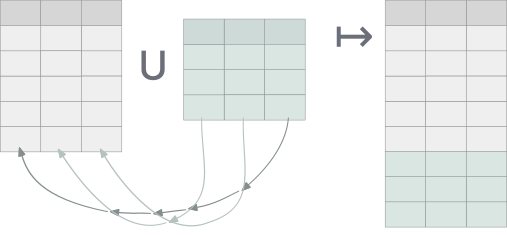
It is a somewhat interesting corner of SQL as nowhere else (with the exception of the occasional group by 2) does SQL use the ordinality of a relation’s columns.
Delightql, of course, supports all of these operators but opens up the door to other functionality by
- relaxing the same number requirement and permitting ragged unions and intersects
- having a preference for naming-based access
To make this more concrete, consider delightql’s UNION CORRESPONDING:
users(*) ; users_2024(*)
The semicolon sigil ; of UNION CORRESPONDING separates two tables much like a comma would for joining. With this operator columns are matched by their names and a super set of both tables’ columns are synthesized.
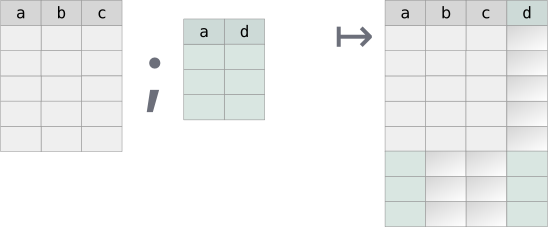
Delightql re-introducesThe SQL standard actually defines a CORRESPONDING BY clause (SQL-92 (ISO/IEC 9075:1992)) that can be used with INTERSECT, UNION, and EXCEPT, though, as usual, few actually implemented it. It’s even a reserved word. this CORRESPONDING name-based alignment mode as an alternative to SQL’s normal UNION-like ordinal alignment. Delightql prefers name-based alignment but still offers ordinal alignment for backwards compatibility.
Delightql’s UNION-like operators are the following:
| Mode | Sigil | Alignment | Schema requirement |
|---|---|---|---|
| Corresponding | ; |
By name | Any (NULL-padded) |
| Smart | |;| |
By name | Identical names and same column count |
| Positional | || |
By ordinal | Same column count |
Set operator alignment modes
Union All Corresponding (;)
Aligns by name, NULL-padding missing columns. Output schema: first relation’s columns, then non-overlapping columns from the second.This is closer in definition to OUTER UNION. The few SQLs that implement UNION ALL CORRESPONDING do so by outputting the intersection of the two column sets, instead of the union of the two column sets that delightql favors.
_( a,b,c
-------
1,2,3;
4,5,6)
;
_( d, a,b
-------
"foo",10,20;
"bar",40,50)
| a | b | c | d |
|---|---|---|---|
| 1 | 2 | 3 | NULL |
| 4 | 5 | 6 | NULL |
| 10 | 20 | NULL | foo |
| 40 | 50 | NULL | bar |
Union All Corresponding is a ragged union.
Smart Union All (|;|)
Aligns by name, but requires both relations to have identical column count and names. Unlike SQL’s UNION/UNION-ALL position is irrelevant. The resulting schema is adopted from the first relation:
employee_2019(*)
|;| employee_2018(*)
|;| employee_2018(*)
SELECT
EmployeeId, LastName,
FirstName, Title, ReportsTo,
BirthDate, HireDate,
Address, City, State,
Country, PostalCode, Phone,
Fax, Email
FROM employee_2019
UNION ALL
SELECT
EmployeeId, LastName,
FirstName, Title, ReportsTo,
BirthDate, HireDate,
Address, City, State,
Country, PostalCode, Phone,
Fax, Email
FROM employee_2018
UNION ALL
SELECT
EmployeeId, LastName,
FirstName, Title, ReportsTo,
BirthDate, HireDate,
Address, City, State,
Country, PostalCode, Phone,
Fax, Email
FROM employee_2018;
Positional Union All (||)
Aligns by position. Requires identical column count. Useful for intentional realignment.The below example uses interior relations to shape each relation prior to the UNION ALL.:
users_2024(|> (last_name,first_name,age))
||
users_2023(|> (LastName,First,Age))
Set Semantics vs Multiset Semantics
All of delightql set operators are actually multiset operators inasmuch as they preserve duplicates. In other words, all set operators are ALL-flavored.
If set semantics are required, use DISTINCT ALL via |> %(*).
employee_2019(*) |;| employee_2018(*) |> %(*)
SELECT
EmployeeId, LastName,
FirstName, Title, ReportsTo,
BirthDate, HireDate,
Address, City, State,
Country, PostalCode, Phone,
Fax, Email
FROM employee_2019
UNION --- NOT UNION ALL
SELECT
EmployeeId, LastName,
FirstName, Title, ReportsTo,
BirthDate, HireDate,
Address, City, State,
Country, PostalCode, Phone,
Fax, Email
FROM employee_2018;
which is equivalent to
SELECT DISTINCT * FROM
(SELECT
EmployeeId, LastName,
FirstName, Title, ReportsTo,
BirthDate, HireDate,
Address, City, State,
Country, PostalCode, Phone,
Fax, Email
FROM employee_2019
UNION ALL
SELECT
EmployeeId, LastName,
FirstName, Title, ReportsTo,
BirthDate, HireDate,
Address, City, State,
Country, PostalCode, Phone,
Fax, Email
FROM employee_2018)
;
Intersects via correlation
Having introduced the operators above, one would assume that a new sigil for intersects is in the offing. Instead delightql chooses to reuse the same syntax for correlations to represent a statement of which columns to intersect on.
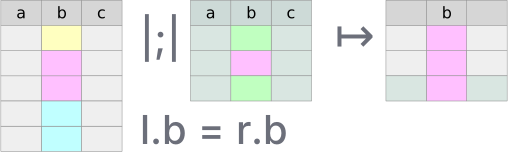
After any union-flavored multiset operator, conjoin a condition that correlates the previous relations together. From such a union an intersection results:
employee_2019(*) as e1 |;|
employee_2018(*) as e2,
e1.EmployeeId = e2.EmployeeId
SQL’s INTERSECT only matches on the entire tuple, it lacks an INTERSECT ON/BY parameterization. Delightql’s correlation syntax lets you choose which columns to match on – a per-column intersection that SQL cannot express without rewriting the query as a pair of EXISTS subqueries.
Correlation syntax matches alignment mode
The correlation condition should use the same addressing schema as the alignment:
- Name-based modes (
;,|;|) use name-based correlation:x.col = y.colorx.* = y.* - Positional mode (
||) uses positional correlation:x|1| = y|1|orx|*| = y|*|
The full-tuple shorthand x.* = y.* means “match on all column names that appear in both x and y.” Columns present on only one side are ignored for matching. Under |;| this distinction is moot since the schemas are identical. Under ; the schemas may be different, and matching on the intersection of names is the only natural reading.
The positional shorthand x|*| = y|*| means “match on all column positions.”
| DQL | Equivalent SQL concept |
|---|---|
|
INTERSECT ALL CORRESPONDING |
|
INTERSECT ALL (Name safe) |
|
INTERSECT ALL (positional, = SQL’s |
|
INTERSECT ALL (positional, = SQL’s |
|
Per-column intersection (no SQL equivalent) |
To belabor a point, intersection re-purposes correlation syntax that is seen most often with joins to be useful for intersection. To see the difference between a join and an intersection look at how the two tables prior are combined:
| Correlation as JOIN ON | Correlation as INTERSECT ON |
|---|---|
|
|
, between the two tables produces a join (rows are paired). |
|;| between the two tables produces an intersection (rows are filtered). |
Equality and NULL-safety. The
=in both columns above looks identical, but the compilation differs. In join position (left column),=compiles to SQL=– NULLs do not match, because NULL-to-NULL matching in a join can explode row counts . In set correlation position (right column),=compiles toIS NOT DISTINCT FROM– NULLs match. This is safe because set correlation filters viaEXISTS, which tests for the presence of a matching row without multiplying output.How intersection is executed in SQL.
Example:
users_2023(*) as u23 ; users_2024(*) as u24, u23.email = u24.emailSELECT id, first_name, last_name, email, age, status, country, balance, NULL, NULL, NULL FROM users_2023 AS u23 WHERE EXISTS (SELECT 1 FROM ( SELECT id, first_name, last_name, email, NULL, status, NULL, NULL, department, salary, created_at FROM users_2024 AS u24 ) AS t1 WHERE outer_0.email IS NOT DISTINCT FROM t1.email) UNION ALL SELECT id, first_name, last_name, email, NULL, status, NULL, NULL, department, salary, created_at FROM users_2024 AS u24 WHERE EXISTS (SELECT 1 FROM ( SELECT id, first_name, last_name, email, age, status, country, balance, NULL, NULL, NULL FROM users_2023 AS u23 ) AS t0 WHERE t0.email IS NOT DISTINCT FROM outer_1.email)
Minus (Except)
Minus returns rows from the first relation that have no match in the second. A single operator - aligns by name:
employee_current(*) - employee_terminated(*)
Rows in employee_current with no corresponding row (by name) in employee_terminated. Schemas must align – if column names differ, rename first:
employee_current(*) - employee_terminated(|> *(emp_id as id))
Interior Relations and Lateral Joins
Interior relations unify EXISTS, NOT EXISTS, scalar subqueries, and lateral joins under one syntax.
An interior relation is a query continuation inside a functor’s parentheses:
users(|> (last_name,first_name))
Query Continuation
A query continuation extends a complete query rightward.
users(*)‸ , age<50‸ |> (department)‸After
users(*), the continuation, age>50 |> (department)is valid becauseusers(*)alone is already meaningful. Likewise,|> (department)is valid becauseusers(*), age>50is already meaningful.
Interior relations appear wherever tables are allowed. When uncorrelated, they’re equivalent to exterior execution:
users(*) |> (last_name,first_name)
// equivalent to: users(|> (last_name,first_name))
Consider positional union all || where interiority crafts the proper alignment and projection:
users_2024(|> (last_name,first_name,age))
||
users_2023(|> (LastName,First,Age))
Interior relations are used in the following:
- scalar subqueries (regardless of correlation)
EXISTSandNOT EXISTS- simple shadowing subqueries
- correlated (non-scalar) subqueries – i.e. lateral joins
Scalar subqueries
Scalar subqueries use interior notation:
employee(*) as e
|> (FirstName,
LastName,
Salary,
employee:( ~> avg:(Salary)) as AvgSalary,
employee:( , DepartmentName=e.DepartmentName
~> avg:(Salary)) as AvgSalaryInDept)
In the above example, two query continuations started with ~> and , execute an uncorrelated and correlated scalar subquery respectively.
EXISTS and NOT EXISTS
The + and \+ prefixes with interior notation create (NOT) EXISTS:
users(*), orders(*),
users.id = orders.user_id,
\+order_items(, orders.id = order_items.order_id)
Simple Shadowing
Uncorrelated interior relations are simple shadowing – useful for reshaping before set operations:
users(|> (last_name,first_name))
but especially for set operators:
users_2024(|> (last_name,first_name,age))
||
users_2023(|> (LastName,First,Age))
users_2024(|> *(last_name as LastName,first_name as First,age as Age))
|;|
users_2023(*)
users_2024(; users_2023(*)) as combined,
org(*), combined.departments=org.dept
|> (last_name,org.dept)
Correlated Table (Lateral Join)
Any table with interiority and correlation to other tables in the same query is a lateral join.
Lateral joins may be broken down into three sub-types:
- simple
- aggregate
- top-N
Simple Lateral. A join without aggregation or limits. Replaces multiple scalar subqueries; rarely advantageous over a regular join.
orders(*) ,
users(, users.id=user_id
|> (last_name,first_name,email)) as u
|> (orders.*,last_name,first_name,email)
SELECT orders.*, last_name , first_name , email
FROM (
SELECT *
FROM orders
INNER JOIN (
SELECT last_name , first_name , email ,
id -- promote out of subquery for joining
FROM users
) AS users ON users.id IS NOT DISTINCT FROM user_id
);
Aggregate Lateral. Replaces multiple aggregate scalar subqueries. Advantageous when the aggregate key matches the join key.
users(*) as u,
orders(, orders.user_id = u.id |>
%(user_id
~> sum:(total) as total_spent,
sum:(tax_amount) as total_tax_amount))
SELECT
*
FROM users AS u
INNER JOIN (
SELECT user_id , sum(total) AS total_spent, sum(tax_amount) AS total_tax_amount
FROM orders
GROUP BY user_id
) AS orders
ON orders.user_id IS NOT DISTINCT FROM u.id;
Top-N Lateral. Returns the top N correlated rows per outer row, avoiding explicit window functions.
users(*) as u,
orders(, orders.user_id = u.id |> #(total desc), #<3)
SELECT *
FROM users AS u
JOIN (SELECT
id, order_id, user_id, customer_id, total,
tax_amount, shipping_cost, status, created_at,
shipped_at, delivered_at
FROM (SELECT
id, order_id, user_id, customer_id, total,
tax_amount, shipping_cost, status, created_at,
shipped_at, delivered_at,
ROW_NUMBER() OVER (
PARTITION BY
user_id
ORDER BY total DESC
) AS __dql_rn
FROM orders) AS orders_with_rn
WHERE
orders_with_rn.__dql_rn <= 3) AS orders
ON orders.user_id IS NOT DISTINCT FROM u.id;
Note how the windowing function above partitions by the correlation join condition.
Summary
The below diagram describes the hierarchy of all places where delightql uses interiority.
Only the tree labeled interior relations consists of expressions that are used as actual relations/tables.
Interiority:
├── interior relations:
│ ├── correlated (lateral):
│ │ ├── top-N
│ │ ├── simple/multi
│ │ └── aggregate
│ └── uncorrelated
├── (not) exists
└── scalar subqueries
├── correlated
└── uncorrelated
Higher-Order Pipes
The R-PIPE |> passes a relation into a unary operator:
employee(*), Salary > 5000
|> ( LastName )
The fundamental unary operators – projection, distinct, group by – have dedicated syntax covered in earlier sections:
foo(*) |> ( LastName )
foo(*) |> -( FirstName, LastName )
foo(*) |> +( length:(LastName) as length_last_name )
foo(*) |> %( FirstName, LastName )
foo(*) |> %( FirstName, LastName ~> count:(*) )
Higher-order predicates extend this pattern. A programmer-defined higher-order predicate can appear as the pipe target:
employee(*)
|> summarize(*)
Given this definition in assertion mode:
summarize(T(*))(*) :-
T(*)
~> ( count:(%LastName) as distinct_last_name_count,
count:(%Department) as distinct_department_count,
count:(*) as total_count,
avg:(Salary) as average_salary )
the expression employee(*) |> summarize(*) expands to:
employee(*)
~> ( count:(%LastName) as distinct_last_name_count,
count:(%Department) as distinct_department_count,
count:(*) as total_count,
avg:(Salary) as average_salary )
Piped vs. Direct Invocation
Higher-order predicates can be invoked directly, passing full functor expressions:
clean_employees(batch.employee_2019(*))(*)
This is equivalent to:
batch.employee_2019(*)
|> clean_employees(*)
Direct invocation accepts any relation expression, including filters and projections:
clean_employees(batch.employee_2019(*, Salary > 50000))(*)
The piped form’s advantage is composability with other pipe operators:
batch.employee_2019(*), Salary > 50000,
Department = "Engineering"
|> clean_employees(*)
Multi-Parameter Piped Invocation
When the piped relation is not the first parameter, use @ (the f-param placeholder) to mark where it goes — borrowing function-pipe syntax:
-- Definition: scalar first, table second
tagged(label, T(*))(*) :- T(*), ...
-- Piped with @:
users(*) |> tagged("young", @)(*)
Without @, the piped relation fills the first parameter by default. When the first parameter is a scalar, this fails. The @ placeholder makes the target position explicit.
Pivot and Melt
Melting and pivoting are inverse transformations between two table shapes containing the same data. The “long skinny” table stores attributes as data – normalized, often resembling key-value pairs. The “short wide” table lifts attributes to metadata – they become column names. 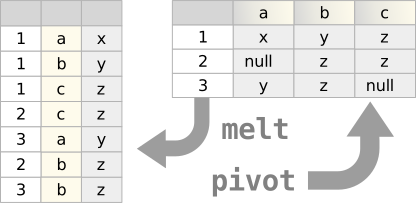
Both transformations are possible in pure SQL given:
- Support for compound data (JSON objects, arrays)
- Ability to join against compound data (
unnest,json_each) - For pivoting: attribute values must be known at query-write time to become column names
Melt
Melting normalizes denormalized data. A common case: data transfers between organizations where a single row contains multiple relations.
Consider claim_header with four diagnosis columns that should be normalized into separate rows:
claim_header(*), _( Diagnosis, Description, DiagnosisNumber
-------------------------------------
diag_1, diag_description1, 1;
diag_2, diag_description2, 2;
diag_3, diag_description3, 3;
diag_4, diag_description4, 4 )
|> (claim_id, DiagnosisNumber, Diagnosis, Description)
The anonymous table (lines 1–5) maps each source column set to a row. Joining it to claim_header with no condition produces one output row per diagnosis per claim – four times the original cardinality. The projection (line 6) retains only the normalized columns.
The transpiled SQL uses JSON as an intermediate representation: The use of JSON functions is an implementation detail – arrays with unnest would work equally. The result contains no JSON; it is a normal table.
WITH
_premelt_claim_header AS (
SELECT
claim_id,
json_array(
json_array(
diagnosis_1,
diagnosis_1_description,
1
),
json_array(
diagnosis_2,
diagnosis_2_description,
2
),
json_array(
diagnosis_3,
diagnosis_3_description,
3
),
json_array(
diagnosis_4,
diagnosis_4_description,
4
)
) AS _melt_packet
FROM claim_header
)
SELECT
claim_id,
json_extract(j.value, "$[2]") AS DiagnosisNumber,
json_extract(j.value, "$[0]") AS Diagnosis,
json_extract(j.value, "$[1]") AS Description
FROM _premelt_claim_header
JOIN json_each(_melt_packet) AS j;
Pivot
Pivoting is a GROUP BY that rotates row-oriented data into columns. The group key defines the entity; an attribute column becomes column names; a value column fills them.
Given student_scores:
| lastname | firstname | subject | evaluation_result | evaluation_day |
|---|---|---|---|---|
| Smith | John | Music | 7.0 | 2016-03-01 |
| Smith | John | Maths | 4.0 | 2016-03-01 |
| Smith | John | History | 9.0 | 2016-03-22 |
| Smith | John | Language | 7.0 | 2016-03-15 |
| Smith | John | Geography | 9.0 | 2016-03-04 |
| Gabriel | Peter | Music | 2.0 | 2016-03-01 |
| Gabriel | Peter | Maths | 10.0 | 2016-03-01 |
| Gabriel | Peter | History | 7.0 | 2016-03-22 |
| Gabriel | Peter | Language | 4.0 | 2016-03-15 |
| Gabriel | Peter | Geography | 10.0 | 2016-03-04 |
Sample student_scores data
A pivot on subject produces:
| lastname | firstname | geography | history | maths | music | language |
|---|---|---|---|---|---|---|
| Gabriel | Peter | 10.0 | 7.0 | 10.0 | 2.0 | 4.0 |
| Smith | John | 9.0 | 9.0 | 4.0 | 7.0 | 7.0 |
Pivoted result – subjects become columns
student_scores(*),
subject in ("Music"; "Maths"; "History"; "Language"; "Geography")
|> %( firstname, lastname
~>
evaluation_result of subject )
- Line 3:
firstname, lastnamedefines the entity (group key), determining output cardinality - Line 2: the
inclause constrains which attribute values become columns - Line 5:
evaluation_result of subjectrotates values into attribute-named columns
The in clause is required. Pivoting has compile-time semantics – the output schema is determined by the query, not the data. Without a fixed set of attribute values, the column names would be unknowable.
The transpiled SQL:
WITH _prepivot_student_scores AS (
SELECT
lastname,
firstname,
json_group_object(
subject,
json_object('evaluation_result', evaluation_result)
) AS _pivot_packet
FROM student_scores
GROUP BY lastname, firstname
)
SELECT
lastname,
firstname,
json_extract(_pivot_packet, '$.Geography.evaluation_result') AS geography,
json_extract(_pivot_packet, '$.History.evaluation_result') AS history,
json_extract(_pivot_packet, '$.Maths.evaluation_result') AS maths,
json_extract(_pivot_packet, '$.Music.evaluation_result') AS music,
json_extract(_pivot_packet, '$.Language.evaluation_result') AS language
FROM _prepivot_student_scores;
Multiple Value Columns
The source table included evaluation_day, unused above. Multiple of clauses pivot additional columns:
| lastname | firstname | geography | geography_day | history | history_day | … |
|---|---|---|---|---|---|---|
| Gabriel | Peter | 10.0 | 2016-03-04 | 7.0 | 2016-03-22 | |
| Smith | John | 9.0 | 2016-03-04 | 9.0 | 2016-03-22 |
Pivot with multiple value columns
student_scores(*),
subject in ("Music"; "Maths"; "History"; "Language"; "Geography")
|> %( firstname, lastname
~>
evaluation_result of subject,
evaluation_day of :"{subject}_day" )
Lines 5–6 introduce two pivot column sets. The second uses a format function to distinguish column names (Music_day, Maths_day, etc.). When pivoting multiple value columns, the attribute expression after of must differ – here, subject versus :"{subject}_day".
Pivot Syntax
The of keyword rotates values into attribute-named columns. The grammar:
<value_column> of <attribute_column>
<value_column> of :<format_string>
The attribute column must be constrained by an in clause. When pivoting multiple value columns, each of expression must produce distinct column names – hence the format string option.
Tree Groups
Tree grouping transforms flat relations into nested JSON structures. Each nesting level corresponds to a GROUP BY – the tree’s shape reflects the grouping hierarchy.
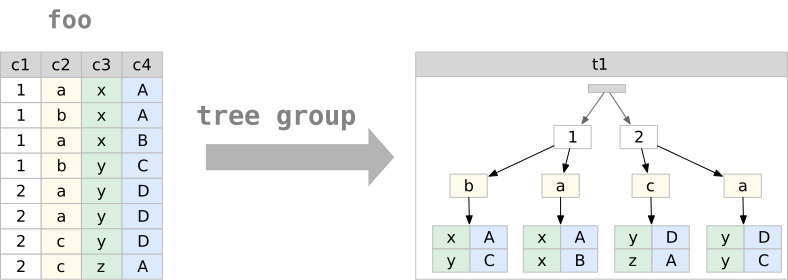 Delightql provides this capability through compound data constructors (
{ }, [ ]) used in reduction positions. The resulting JSON is not general-purpose – it maps relations to a tree normal form where each level represents a distinct grouping context.
Two forms exist:
- Data-oriented: produces arrays of objects; grouping columns become object fields
- Metadata-oriented: produces objects with data values as keys; a single column’s values become the key names
Full JSON functionality remains available through the target SQL’s native functions (json_object, json_array, etc.).
Compound Data Constructors (Recap)
| Constructor | Scalar Position | Aggregate Position |
|---|---|---|
{ } |
Record (string-indexed) | Table of records |
[ ] |
Tuple (numeric-indexed) | Table of tuples |
Compound data constructors by position (recap)
Tree Group Syntax
Nested tree groups are created by nesting compound constructors with ~> introducing each level:
employee(*)
~> { Title,
"people": ~> {FirstName, LastName},
State } as people_by_title_and_state
Reading the syntax. The ~> marks tree group boundaries. Columns between a ~> and either the next ~> or a closing enclyph (}, ], )) belong to that level’s group:
// level 1 level 2 L2 end L1 end
// start start
// ↳ ↳ ↱ ↱
~> { Title, "people": ~> {FirstName, LastName}, State }
TitleandStatebelong to level 1 (the top-level tree group)FirstNameandLastNamebelong to level 2 (nested within level 1)
The grouping is hierarchical: level 2 groups are computed within each distinct combination of level 1 columns.
Terminology
- tree group: The set of columns whose distinct combinations form one level of the tree
- tree group variables: The columns belonging to a tree group
- nested tree group: A tree group inside another tree group
- tree group induction: Using a compound constructor in reduction position to create an interior table
Data-Oriented Tree Grouping
Data-oriented tree grouping uses ~> followed by a compound constructor. The result is an array of objects (or tuples), one per distinct combination of tree group variables.
Simple example:
employee(*)
~> { Title, State } as title_and_state
Returns one row containing an array of all distinct {Title, State} combinations.
Nested example:
employee(*)
~> { Title,
"people": ~> {FirstName, LastName},
State } as people_by_title_and_state
Returns a single-row, single-column table:
| people_by_title_and_state |
|---|
|
Transpilation. Tree grouping uses JSON aggregation functions as intermediates:
SELECT
json_group_array(
json_object(
'Title', Title,
'State', State,
'people', people
)
) AS people_by_title_and_state
FROM (
SELECT
Title,
State,
json_group_array(
json_object('FirstName', FirstName, 'LastName', LastName)
) AS people
FROM employee
GROUP BY Title, State
);
The nested GROUP BY mirrors the nested ~>. Each tree group level becomes a subquery with its own grouping and JSON aggregation. The JSON functions are implementation details – the result is a standard column containing structured data.
Three-level example:
employee(*)
~> { Title,
"people_by_state":
~> { State,
"people": ~> {FirstName, LastName} } }
as people_by_state_within_title
Groups first by Title, then within each title by State, then collects people within each state.
Sibling tree groups:
Multiple nested groups at the same level share their parent’s context but are otherwise independent:
employee(*)
~> { Title,
"people_by_state": ~> { State, "people": ~> {FirstName, LastName} },
"cities": ~> [City] }
as nested_with_siblings
The people_by_state and cities tree groups are siblings – both nested within Title, neither containing the other.
Sibling tree groups share their parent’s context but aggregate independently. The relationship between siblings—which person was in which city – is not preserved. This is inherent to the structure: siblings represent independent projections of the grouped data. Trees with siblings satisfy TNF-G but not TNF-R; they cannot round-trip losslessly. (See Appendix A.)
Metadata-Oriented Tree Grouping
Metadata-oriented tree grouping elevates data values to JSON keys. A column’s distinct values become the keys of a single object rather than elements of an array.
The syntax uses :~> after a bare identifier:
employee(*)
~> Title: ~> {FirstName, LastName} as people_by_title
The result is an interior record (one object), not an interior table (array of objects):
{
"General Manager": [
{ "FirstName": "Andrew", "LastName": "Adams" }
],
"IT Manager": [
{ "FirstName": "Michael", "LastName": "Mitchell" }
],
"Sales Manager": [
{ "FirstName": "Nancy", "LastName": "Edwards" }
]
}
Distinguishing syntax:
- Normal keys are quoted strings:
"people": - Metadata keys are bare identifiers followed by
:~>:Title: ~>
Restriction: Only one column can serve as a metadata key per level – the object can have only one set of keys. This constraint reflects JSON’s structure: two metadata-keyed objects with the same key type would create ambiguous destructuring. Metadata-oriented trees satisfy TNF-M. (See Appendix A.)
Within a regular group by:
employee(*)
|> %( State
~>
Title: ~> {FirstName, LastName} as people_by_title )
Returns one row per state, each containing an object keyed by title.
Tree Distinction
Tree structures can serve as grouping columns, enabling aggregation alongside hierarchical output:
employee(*)
|> %( { Title,
"people": ~> {FirstName, LastName},
State } as people_by_title_and_state
~>
sum:(Salary), count:(*) )
Restriction: Columns referenced in nested tree groups cannot also appear as explicit grouping columns:
// INVALID: LastName appears in tree group and as grouping column
employee(*)
|> %( { Title, "people": ~> {FirstName, LastName}, State } as tree,
LastName
~>
sum:(Salary) )
Columns not referenced in the tree may be added:
employee(*)
|> %( { Title, "people": ~> {FirstName, LastName}, State } as tree,
DepartmentId
~>
sum:(Salary), count:(*) )
Tree Destructuring
Tree destructuring is the inverse of tree grouping – it flattens nested JSON back into rows.
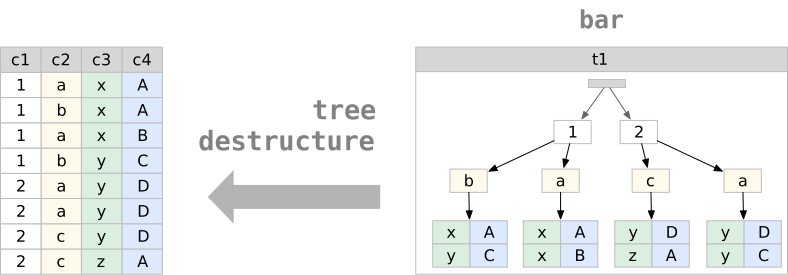
The TREE-UNIFY sigil ~= matches a JSON column against a destructuring pattern:
table_with_json(*)
, people_by_state_within_title ~= ~> { Title,
"people_by_state":
~> { State,
"people": ~> {FirstName, LastName} } }
|> -(people_by_state_within_title)
The pattern syntax mirrors construction syntax. Each ~> level multiplies rows – the result is the Cartesian product of all nested arrays.
Array vs object matching:
// Matches an ARRAY of objects -- multiplies rows by array length
p ~= ~> { Title, State }
// Matches a single OBJECT -- extracts fields, no multiplication
p ~= { Title, State }
The ~> in destructuring means “iterate over this array,” just as in construction it means “aggregate into this array.”
Renaming during destructuring:
The string key matches the JSON; the identifier after : names the output column:
, people_by_state_within_title ~= ~> { Title,
"people_by_state": ~> { State, "people": peeps } }
Here "people" matches the JSON key; peeps becomes the column name. The peeps column contains the nested array as-is, not destructured.
Staged destructuring:
Destructure incrementally by chaining ~= operations:
table_with_json(*)
, nested ~= ~> {country, "users": sub_users}
, sub_users ~= ~> {FirstName, LastName}
|> -(nested)
The first ~= extracts country and keeps sub_users as a JSON array. The second destructures sub_users into individual rows. Stop at any level to preserve nested structure.
Metadata-oriented destructuring:
The :~> syntax works symmetrically – object keys become column values:
temp(*), json_col ~= ~> country: ~> {FirstName, LastName}
|> -(json_col)
Given an object keyed by country names, this extracts the key into a country column and iterates the nested arrays.
Binding semantics:
Column names in the pattern match JSON keys by name. If the pattern says FirstName and the JSON has "FirstName", they bind. A mismatched name produces nulls – there is no compile-time validation against JSON structure.
Pathing in Tree Patterns
Destructuring patterns support direct pathing, eliminating the need to match intermediate structure. The pathing syntax (.path.to.field) reaches into nested JSON without declaring every level.
Basic pathing:
_(json @ {"name": "app", "config": {"server": {"port": 3000}}})
|> (json:{.config.server.port})
The path .config.server.port extracts the value directly.
Pathing in destructuring:
Instead of matching the full structure:
j ~= { name, "config": { "server": { port, host }, "database": { url } } }
Path directly to what you need:
j ~= {
name,
.config.server.port,
.config.server.host,
.config.database.url
}
Pathing with rename:
Combine pathing with as to name the output column:
user_data ~= ~> {
country,
.name_info.last_name as ln,
.name_info.first_name as fn
}
Mixed matching and pathing:
Structural matching and pathing can combine in a single pattern:
j ~= {
name,
version,
.dependencies.react,
.dependencies.next
}
Here name and version match top-level keys directly; the .dependencies.* paths reach into nested structure.
Pathing in projection:
Pathing works outside destructuring patterns, in normal projection:
_(json @ {"name": "app", "scripts": {"dev": "next dev", "build": "next build"}})
|> ({
"name": json:{.name},
"scripts": json:{.scripts}
})
Interior Drill-Down
Tree destructuring with ~= requires the user to spell out the interior schema – every level of nesting must be declared in the pattern. When the schema is statically known (tree groups from a view, CTE, or inline query), .column(*) provides a shorter, self-documenting alternative.
Syntax. .column_name(*) as a suffix on any relation expression. The (*) means “all columns of the interior relation.” Specific columns are also supported: .entities(name, type). The operator is chainable: .entities(*).columns(*).
Context carry-forward. Outer columns remain available after a drill-down. .entities(*) produces entity-level columns plus all columns from the enclosing level, minus the exploded column itself. This is lateral-join semantics – each interior row inherits the context of its parent row.
Example – CTE drill-down:
users(*) |> %(country ~> {first_name, last_name} as people) : by_country
by_country(*).people(*)
This produces one row per person, with country carried forward from the grouping level.
Example – chained drill-down:
main::(*).entities(*).columns(*)
, entity_name = "users"
Each .name(*) step explodes one level of nesting. Columns from all prior levels remain available for filtering.
Equivalence with ~=. The same query written both ways:
// Drill-down form:
main::(*) |> (entities) .entities(*)
// Equivalent ~= form:
main::(*)
, entities ~= ~> {name, type, doc, "columns": ~> {col_name, col_type, col_pos}}
|> -(entities)
The drill-down form does not require the user to know the interior schema.
Narrowing Destructure
The ~= operator and interior drill-down both carry context forward – outer columns survive into the result. This is the correct default for relational composition, but it requires projecting out the intermediate columns when they are no longer needed:
j(*), j ~= {.packages} |> -(j)
, packages ~= ~> {.version, .name, .description} |> -(packages)
When the intent is to drill into a column, extract fields, and discard everything else, the .column{...} operator expresses this more efficiently:
j(*)
|> .j{.packages}
|> .packages{.version, .name, .description}
Each step replaces the current row with the destructured result.
When to use which.
| Form | Carries context | Use case |
|---|---|---|
~= pattern |
Yes | General relational destructuring; join with outer columns |
.col(*) |
Yes | Drill-down when schema is known; outer columns needed |
.col{...} |
No | Navigate into nested JSON; only interior fields matter |
Example – cargo metadata:
j(*)
|> (j:{.packages} as packages)
|> .packages{.version, .name, .description}
The path extraction j:{.packages} pulls the packages array out of the top-level object; then .packages{...} iterates and extracts fields. The result is a flat table with version, name, and description columns – no intermediate columns to clean up.
Null Elision in Tree Groups
When an outer join feeds into a tree group, the join pads unmatched rows with NULLs. In a flat relation this is the only way to represent “no match” – NULL serves as a sentinel for absence. Trees have no such limitation: an empty array [] directly represents “no children.”
Tree groups decode this flat-world encoding. When all value columns in a contributing row are NULL, the row is elided from the array. The result is [], not [{"col": null, ...}].
Example:
parents(*) : _(id, name ---- 1, "Alice"; 2, "Bob"; 3, "Charlie")
children(*) : _(parent_id, toy ---- 1, "doll"; 1, "ball"; 2, "car")
parents(*), children?(*), parents.id = children.parent_id
|> %(name ~> {toy} as toys)
Charlie has no children. The outer join produces (3, "Charlie", NULL). Without null elision, the tree group would produce:
| name | toys |
|---|---|
| Alice | [{“toy”:“doll”},{“toy”:“ball”}] |
| Bob | [{“toy”:“car”}] |
| Charlie | [{“toy”:null}] |
With null elision:
| name | toys |
|---|---|
| Alice | [{“toy”:“doll”},{“toy”:“ball”}] |
| Bob | [{“toy”:“car”}] |
| Charlie | [] |
Scope. Null elision applies to both forms:
~> {a, b, c}– curly (object) tree groups~> [a, b, c]– bracket (tuple) tree groups
The elision rule. A row is elided when every value column in the constructor is NULL. If any value column is non-null, the row is preserved. This means a row like {"name": "Alice", "age": null} survives – only fully-null rows (the signature of outer-join padding) are dropped.
Parent entity preservation. Null elision never removes the parent entity. Charlie still appears in the result – only the contents of the nested array change (from [{"toy":null}] to []). The GROUP BY produces a row for Charlie’s grouping key; the aggregate column becomes an empty array rather than an array containing a null-valued object.
Round-trip behavior. Destructuring an empty array produces zero rows. After null elision, destructuring Charlie’s [] eliminates Charlie from the flat result – which is the same behavior as an inner join.
Meta-ize Operator
The meta-ize operator reifies a relation’s schema as a relation – each column becomes a row. Where * inside a functor returns all data rows, ^ returns all columns as rows of metadata.
Schema as Relation (^)
users(^)
This returns one row per column in users:
| colname | colposition | coltype |
|---|---|---|
| id | 1 | INTEGER |
| first_name | 2 | TEXT |
| last_name | 3 | TEXT |
| age | 4 | INTEGER |
| 5 | TEXT |
Output of users(^)
The ^ operator belongs to the continuation operator family – unary operators that transform table access:
| Operator | Meaning |
|---|---|
* |
Qualify column names (data access) |
() |
Unqualified columns (natural join candidate) |
.(cols) |
USING semantics on specific columns |
^ |
Column metadata as rows |
^^ |
Full DDL metadata as rows |
Table continuation operators
These operators compose freely: users(*.(id)) means “qualified + USING on id.”
Postfix Form
users(^) is sugar for users(*) ^. The postfix form works on any relational expression, not just base tables:
-- schema of a projection (2 rows)
users(*) |> (first_name, age) ^
-- schema of a join
users(*), products(*) ^
-- schema of an aggregation
users(*) |> %(country ~> count:(*) as n) ^
The postfix ^ applies to the entire expression to its left, returning its schema as a relation.
Composability
Because ^ produces a regular relation, all DQL operations apply – filtering, projection, pipes, joins, and set operators:
-- text columns only
users(^), coltype = "TEXT" |> (colname)
-- columns shared between two year-partitioned tables
users_2024(^) |;| users_2023(^), x.* = y.*
-- filter schema of an optionally-joined table
department?(^), coltype = "TEXT"
The output of
^is itself a relation with a fixed schema (colname, colposition, coltype). Applying^to a^result would return the schema of the metadata relation – three rows describing colname, colposition, and coltype themselves.
Data Definition Language (DDL)
DDL creates shape. In SQL, DDL is the set of features that create, modify, or delete schema entities—tables, views, functions. DML mutates data within those entities.
Delightql’s DDL encompasses SQL’s DDL, some of SQL’s DML, and features with no direct SQL mapping (higher-order predicates, ER-context rules). The thematic concern is reusability: definitions, tables, and data that can be authored, loaded, and referenced.
This section covers:
- Relational rules. Views, higher-order views, ER-context rules, and sigma predicates.
- Function rules. Reusable domain functions.
- Facts. Axiomatic ground data.
- Macro rules. Textual substitution for dialect-specific SQL.
- Namespaces. Organization and visibility of all the above.
Assertion mode vs query mode. Delightql, inspired by Prolog, distinguishes two programming modes:
- Query mode. Expressions entered into a REPL execute immediately.
- Assertion mode. Files contain definitions for later use.
The features in this section are assertion-mode constructs.
Basics
Assertion mode has two general syntactic forms: rules and facts.
Rules
The general form of a rule is
<HEAD> <NECK> <BODY>
The HEAD names the rule. The NECK indicates scope. The BODY is any query expression.
young_users(*) :- adults(*), age < 20
In the above example:
young_users(*)is the HEAD:-is the NECKadults(*), age <20is the BODY. The body may use any DQL feature—the entire previous book applies here.
Facts
The general form:
<functor>
A functor with ground terms and no glob:
parent("Abraham", "Isaac")
Facts define extensional data – axiomatic truths with no derivation.
The Two Necks
The neck separates a rule’s head from its body. Delightql has two necks, each defining different scope:
| Neck | Name | Mode | Creates |
|---|---|---|---|
: |
Shadow neck | query | Inline expansion |
:- |
Rule neck | assertion | View |
The two neck operators
Extent vs Scope
Extent is temporal lifetime:
- Query-scoped (
:) – exists only for the duration of one query - Session-scoped (
:-) – exists for the duration of the connection - Permanent – persists after disconnection (requires
imprint!())
Scope refers to the spatial visibility of a definition.
Shadow Neck :
The shadow neck creates an inline expansion, like a CTE. The definition exists only for the single query in which it appears:
young(x) : users(x), age < 30
young(*)
A shadow-neck definition may shadow an existing table or view of the same name for the duration of the query. This scoping behavior is unique to the shadow neck.
Shadow-neck definitions are not DDL – they are reviewed here for syntactic similarity to rules.
Rule Neck (:-)
The rule neck creates session-scoped entities by default:
young_users(*) :- valid_users(*), age < 30
The rule neck (:-) creates a view via CREATE TEMP VIEW. Views compute on demand. To create permanent entities, use imprint!(). See [Imprinting].
Head Semantics
The head of a rule names the entity and declares what it exposes. How the head is written determines the output schema and how multi-clause entities combine.
Two Head Forms
Glob head
young(*) :- people(*), age > 20
The glob * passes through whatever the body produces. The entity inherits its schema from the body. This is the permissive form – the head makes no claim about column names or count.
Argumentative head
young(name, age) :- people(*), age > 20
The head declares the entity’s output schema: exactly name and age, in that order. Every clause must satisfy this contract – the body must produce columns with those names (among possibly others).
The body may be wider than the head. The head selects from the body by name, so wide source tables need not be narrowed in the body before the head can name a subset. If the body does not produce a column named in the head, that is an error.
This mirrors query-side argumentative access: young(name, age) as a query means “give me these columns from young.” The head means the same thing – “this entity exposes these columns.”
Implementation note. The compiler enforces the contract by translating each clause to a glob-head definition with an appended projection. young(name, age) :- body compiles as if it were young(*) :- body |> (name, age). This is the enforcement mechanism, not the semantics. The semantics are: the head is a schema contract, and the projection is how that contract is applied to the body.
Ground Terms in the Head
A head position can hold a ground term (a literal) instead of a free variable (a column name). The ground term is a constant injected into every row of that clause’s output.
bracket("old", last_name, first_name) :- people(*), age > 40
bracket("toddler", last_name, first_name) :- people(*), age < 4
bracket("other", last_name, first_name) :- people(*)
Each clause produces three columns. The first is a constant string; the second and third are projected from the body. Querying bracket(category, last_name, first_name) gives all rows with the constant as the first column.
Ground terms in the head inject constants into the output. Ground terms at the query site filter. They compose: the definition injects "old" into position 1, and a query grounding that position to "old" selects exactly those rows.
bracket(category, last_name, first_name) -- all rows, 3 columns
bracket("old", last_name, first_name) -- only "old" rows, 2 columns
The same position can hold a ground term in one clause and a free variable in another:
bracket("old", last_name, first_name) :- people(*), age > 40
bracket("toddler", last_name, first_name) :- people(*), age < 4
bracket(category, last_name, first_name) :- people(*)
Clause 3 projects the category column from people into position 1. Querying bracket("old", last_name, first_name) filters the UNION ALL to rows where position 1 equals "old" – all of clause 1’s rows, plus any clause 3 rows where people.category happens to be "old".
Multi-Clause Rules
Head form consistency
All clauses of the same entity must use the same head form – either all glob or all argumentative. Mixing is an error:
-- OK: all glob
data(*) :- source_a(*)
data(*) :- source_b(*)
-- OK: all argumentative
data(x, y) :- source_a(*)
data(x, y) :- source_b(*)
-- ERROR: mixed head forms
data(*) :- source_a(*)
data(x, y) :- source_b(*)
A glob clause might produce 15 columns while an argumentative clause produces 2. Silently reconciling these would surprise the programmer.
Union strategies by head form
Glob heads and argumentative heads use different union strategies:
| Strategy | Arity | Names | Alignment |
|---|---|---|---|
| Glob head (smart union corresponding) | can differ | used for alignment | by name, NULLs for gaps |
| Argumentative head | must match | must match | positional AND by name |
Glob heads use smart union corresponding: columns align by name across clauses, and columns missing from a clause are filled with NULL. This permits clauses with different source tables and column sets.
Argumentative heads require strict agreement: every clause must have the same number of positions, and free variables at each position must use the same name across all clauses. If clause 1 has (name, age) and clause 2 has (age, name) – same names, swapped positions – that is an error.
Column naming with ground terms
Ground terms (constants) are nameless – they do not contribute a column name for a position. Free variables provide names. The rules:
- If a position has free variables in one or more clauses, all those free variables must use the same name. Constants in other clauses are compatible (they provide a value but no name).
- If a position is ground in every clause, the column needs a name. At least one clause should include a free variable to name it.
- Conflicting names at the same position is an error.
-- OK: "category" names position 1; constants in other clauses are compatible
bracket("old", last_name, first_name) :- people(*), age > 40
bracket("toddler", last_name, first_name) :- people(*), age < 4
bracket(category, last_name, first_name) :- people(*)
-- ERROR: position 1 named "motto" in one clause, "city" in another
bracket("old", last_name, first_name) :- people(*), age > 40
bracket(motto, last_name, first_name) :- people(*)
bracket(city, last_name, first_name) :- people(*)
Rules
The syntax of rules obey the general form:
<HEAD> <NECK> <BODY>
In delightql these rules may be used for any of the following:
- Views
- Tables
- Higher-order views
- ER-contexts
- Sigma predicates
- Transpilation macros
- Functions
All of these use the :- neck. The first five define relations; functions define the special subset of relations that are functions.
Arity and Naming
Note. This section is early in the reference so that it can prematurely advise on functor name overloading.
A rule’s arity is the number of arguments in its head.
Definitions invoked with explicit arguments – functions, sigma predicates, higher-order rules – may share a name with different arities. The call site disambiguates:
add:(x) :- x + 1
add:(x, y) :- x + y
// Invocation is unambiguous
add:(5) // add/1
add:(5, 3) // add/2
Definitions queried with the glob – views, tables, facts – must have fixed arity. The glob presumes a single schema:
employee(id, name) :- ...
employee(*) // expects one schema
The principle: if you can write foo(*), all foo definitions must agree on arity. With argumentative heads, agreement is stricter: same arity AND same names at each position. See Head Semantics for the full rules.
Views Rules
Views are the default rule type – computed relations evaluated on demand.
Basic Syntax
<head> :- <body>
Simple view:
high_paid_employees(*) :-
employee(*), Salary > 50000
View combining tables:
employee(*) :-
employee_2019(*)
|;| employee_2018(*)
|;| employee_2017(*)
View with aggregation:
// View with aggregation
department_employee_count(department, employee_count) :-
employee(*), department(*.(DepartmentId))
|> %(department ~> count:(*) as employee_count)
Disjunctive Clauses
Multiple clauses with the same head create a union:
employee(*) :- employee_2019(*)
employee(*) :- employee_2018(*)
employee(*) :- employee_2017(*)
With glob heads, this uses smart union corresponding – columns align by name across clauses, with ordinality determined by the first clause. Columns present in some clauses but absent from others are filled with NULL.
With argumentative heads, all clauses must agree on arity and column names at each position. This is stricter than smart union corresponding. See Head Semantics for the full rules, including ground terms in heads and column naming across clauses.
All clauses must use the same head form – either all glob or all argumentative. Mixing is an error.
-- SMART UNION ALL uses the ordinality of the first
-- table to determine initial alignment
select EmployeeId , LastName, FirstName, Title,
ReportsTo , BirthDate, HireDate, Address, City,
State , Country, PostalCode, Phone, Fax, Email
from employee_2019
union all
select EmployeeId , LastName, FirstName, Title,
ReportsTo , BirthDate, HireDate, Address, City,
State , Country, PostalCode, Phone, Fax, Email
from employee_2018
union all
select EmployeeId , LastName, FirstName, Title,
ReportsTo , BirthDate, HireDate, Address, City,
State , Country, PostalCode, Phone, Fax, Email
from employee_2017;
Column Specification
Views can explicitly name output columns. An argumentative head acts as an implicit projection – the body may produce additional columns, and the head selects from them by name:
department_summary(department, employee_count, avg_salary) :-
employee(*), department(*.(DepartmentId))
|> %(department ~>
count:(*) as employee_count,
avg:(Salary) as avg_salary)
Or use the glob to inherit column structure:
active_employees(*) :- employee(*), status = "active"
Ordinality warning. With explicit column names, the functor’s argument order determines output ordinality – not the query’s column order. The query must produce columns matching the functor’s names exactly, but their order in the query is ignored:
department_summary(department, employee_count, avg_salary) :-
employee(*), department(*.(DepartmentId))
|> %(department ~>
avg:(Salary) as avg_salary,
count:(*) as employee_count )
// Query has avg_salary before employee_count,
// but output follows functor order
With the glob, query ordinality is preserved.
Common Expressions in Rules
Common expressions (CTEs and CFEs defined with :) are valid within a rule’s body:
young_adults_with_ages(*) :-
double:(x) : (x * 2)
users(*), age > 25 : adults
triple:(y) : (y * 3)
young_adults(*): adults(*), age < 40
young_adults(*)
|> ( id,
first_name,
age,
double:(age) as doubled,
age /-> double:()
/-> double:() as quadrupled,
triple:(age) as tripled,
double:(triple:(age)) as sextupled)
Everything after :- is a valid query expression.
Table Materialization
Tables are created by declaring entities in the _internal manifest namespace and deploying with imprint!. The := data neck has been eliminated — all definitions use :-.
See [Namespaces] for the imprinting workflow.
Higher-Order Rules
Higher-order rules accept tables or scalars as parameters. SQL calls these table-valued functions; Prolog would call them higher-order predicates.
Syntax
Two sets of parentheses in the head: the first for parameters, the second for output columns.
department_employee_count(E(*), D(*))(department, employee_count) :-
E(*), D(*.(DepartmentId))
|> %(D.department ~> count:(*) as employee_count)
The parameters E(*) and D(*) are inner glob functors – they accept whatever tables are passed at invocation. The (*) signals that the body references columns by name (duck typing).
Direct Invocation
Pass tables as functor expressions:
department_employee_count(employee_2019(*), department_2019(*))(*)
The call site mirrors the definition head: each table parameter is a full functor expression. This makes the call self-documenting – you can see which arguments are tables and which are scalars without looking up the definition.
Because call-site arguments are relation expressions, they compose:
department_employee_count(
employee_2019(*, Salary > 50000),
department_2019(*)
)(*)
Here the first argument is a filtered relation – only high earners are counted. Any valid DQL relation expression is accepted: filters, projections, aliases, even piped transformations.
Piped Invocation
Pipes can be used on any higher-order predicate that takes a table-valued parameter:
clean_employees(T(*))(*) :-
T(*) as t
|> $(trim:())(t.LastName, t.FirstName)
|> $(to_iso:())(t.BirthDate, t.HireDate)
employee_2019(*)
|> clean_employees(*)
The piped relation fills the first parameter. The (*) after the rule name is the output schema, not an input functor.
Chaining is possible:
mask_ssn(T(*), mask_value)(*) :-
T(*) |> $$(mask_value as ssn)
employee_2019(*)
|;| employee_2018(*)
|;| employee_2017(*)
|> clean_employees(*)
|> mask_ssn("***-**-****")(*)
Note. As with function pipes, the relation is piped into the first parameter of the higher-order predicate. If the higher-order predicate has multiple parameters, the other values must be set.
Multi-parameter piped invocation. When the piped relation is not the first parameter, use @ (the f-param placeholder) to mark where it goes — the same syntax as function pipes:
-- Definition: scalar first, table second
tagged(label, T(*))(*) :- T(*), ...
-- Direct invocation (always works):
tagged("young", users(*))(*)
-- Piped invocation with @:
users(*) |> tagged("young", @)(*)
The @ tells the compiler which parameter receives the piped relation. Without @, the piped relation fills the first parameter by default — which fails when the first parameter is a scalar.
Inner Functors
Higher-order parameters come in four kinds, distinguished by syntax in the definition head:
| Form | Kind | Name |
|---|---|---|
T(*) |
table, structurally typed | inner glob functor |
T(a, b) |
table, positionally typed | inner argumentative functor |
n |
scalar value | scalar parameter |
::ns |
namespace path | namespace parameter |
The syntax alone tells the language what each parameter accepts. Capitalization is conventional – many programmers uppercase table parameters and lowercase scalars for readability, but the language does not require it.
Inner Glob Functors
An inner glob functor T(*) is structurally typed: the body references columns by name, and any table that has those columns is accepted regardless of width.
clean_employees(T(*))(*) :-
T(*) as t
|> $(trim:())(t.LastName, t.FirstName)
|> $(to_iso:())(t.BirthDate, t.HireDate)
The parameter T(*) accepts any table with LastName, FirstName, BirthDate, and HireDate columns – it may have other columns too. This is duck typing: if it has the right columns, it fits.
An inner glob functor accepts functor expressions and piped relations, but not inline scalars – there is no positional contract to lift against.
Inner Argumentative Functors
An inner argumentative functor T(a, b) is positionally typed: the input must have exactly two columns, and they are renamed to a and b inside the body. The caller’s original column names are overwritten.
foo(T(label, value))(*) :-
T(*), value > 10 |> (label)
The names label and value are column aliases available in the body. The definition simultaneously declares the arity (two columns) and provides names for positional access.
The advantage of the argumentative functor is in the calling convention, called scalar lifting. Because the definition declares a positional contract, a call site may pass bare scalars instead of a table:
foo("first", 2)(*)
The scalars are positionally matched to the declared columns label and value and lifted into a one-row table. This cascades to stacked notation:
foo("first", 2; "second", 20)(*)
which sugars explicit anonymous tables:
foo(_("first", 2; "second", 20))(*)
but still allows pipe invocation:
two_column_table(*)
|> foo(*)
Or explicit functor invocation:
foo(two_column_table(*))(*)
Scalar lifting requires a positional contract – an inner glob functor cannot accept inline scalars because there is no declared arity to match against.
Scalar Parameters
A bare identifier without parentheses is a scalar parameter. It binds a single value used directly in body expressions:
high_earners(T(*), salary_floor, min_count)(*) :-
T(*), Salary > salary_floor,
department(*.(DepartmentId))
|> %(department ~> count:(*) as employee_count),
employee_count > min_count
high_earners(employee(*), 50000, 10)(*)
Scalar parameters accept single values only – not tables, not pipes, not multi-row inline data. Functor expressions are visually distinct from scalar literals, so comma separation is unambiguous.
Namespace Parameters
A :: prefix declares a namespace parameter – a parameter that accepts a literal namespace path. In the body, the parameter name can only appear in namespace positions (before :: in path expressions):
create_table!(::ns, name, Cols(col_name, col_type, nullable, primary))(*) :-
ns::(*).entities!!(*)
|;| _(name, type, columns @ name, "table", Cols)
|> insert!(*)
create_table!(data::production, "customers", _(
"id", "INTEGER", false, true;
"name", "TEXT", false, false;
"email", "TEXT", true, false))(*)
With functor syntax, each argument is visually distinct: namespace path, scalar string, anonymous table. No & is needed – the functor parentheses disambiguate the argumentative functor from the other parameters. Compare with the scalar-lifting form that still requires & (see below).
Namespace arguments are literal paths only – the caller must provide a concrete namespace like data::production, not a computed or parameterized path. This restriction keeps namespace resolution a compile-time operation.
Namespace parameters are primarily useful for DDL rules that operate on namespace metadata. See the Schema Modification chapter for the full create_table! example and the metadata-as-relations design that motivates it.
Summary
| Kind | Typing | Width | Tables | Inline scalars | Pipeable |
|---|---|---|---|---|---|
T(*)glob |
structural (duck) |
any | yes | no | yes |
T(a, b)argumentative |
positional | exact | yes (rename) |
yes (scalar lift) |
yes |
nscalar |
— | — | no | scalar only | no |
::nsnamespace |
— | — | no | literal path only |
no |
The & Rule
& is required only when using scalar lifting with an argumentative functor alongside other parameters.
When every table argument is passed as a functor expression, the parentheses disambiguate each argument. Commas separate parameters as usual – no & needed. & is the cost of the scalar-lifting shorthand: when bare scalars fill an argumentative functor, & marks where one argument ends and the next begins.
| Definition | Functor call site | &? |
|---|---|---|
f(T(*), V(*)) |
f(users(*), orders(*))(*) |
no |
f(T(*), V(*)) |
users(*) \|> f(orders(*))(*) |
no |
f(T(*), n) |
f(users(*), 10)(*) |
no |
f(T(*), V(*), n) |
f(users(*), orders(*), 10)(*) |
no |
f(T(x, y)) |
f(data(col1, col2))(*) |
no |
f(T(x, y)) |
f(_(1, 2; 10, 20))(*) |
no |
f(T(x, y)) |
_(1, 2; 10, 20) \|> f(*) |
no |
f(T(*), V(x, y)) |
f(users(*), _(1, 2))(*) |
no |
f(T(*), V(x, y)) |
f(users(*), data(col1, col2))(*) |
no |
f(T(*), V(x, y)) |
users(*) \|> f(_(1, 2))(*) |
no |
f(T(*), V(x, y), n) |
f(users(*), _(1, 2), 10)(*) |
no |
f(T(*), V(x, y), n) |
f(users(*), _(1, 2; 10, 20), 10)(*) |
no |
f(::ns, n, V(x, y)) |
f(data::prod, "t", _(1, 2))(*) |
no |
| Scalar lifting (shorthand) | ||
f(T(x, y)) (single) |
f(1, 2)(*) |
no |
f(T(x, y)) |
f(1, 2; 10, 20)(*) |
no |
f(T(*), V(x, y)) |
f(users(*) & 1, 2)(*) |
yes |
f(T(*), V(x, y)) |
f(users(*) & 1, 2; 10, 20)(*) |
yes |
f(T(x, y), n) |
f("a", "b" & 10)(*) |
yes |
f(T(x, y), V(a, b)) |
f(1, 2 & 3, 4)(*) |
yes |
f(::ns, n, V(x, y)) |
f(data::prod & "t" & 1, 2)(*) |
yes |
The table is divided into two regions. In the top region, every table argument uses functor syntax – & is never needed. In the bottom region (scalar lifting), bare scalars fill argumentative functors and & marks the boundaries.
Functor syntax is always available and always unambiguous. Scalar lifting is an optional shorthand for inline data – use & when you use it, or wrap in _() to avoid it.
Parameter Grounding and Multi-Clause HO Entities
The two parentheses partition a single relation into “positions the caller sets” and “columns the body produces.” Both sets follow the same head semantics (see Head Semantics), applied independently.
First parentheses: always argumentative. The parameter parentheses must explicitly declare parameters. Glob (*) in the parameter position is prohibited – if you have no parameters, write a single-parentheses entity.
Second parentheses: any head form. The output parentheses follow all standard head rules: glob or argumentative, consistent across clauses, smart union corresponding for globs, strict positional+name agreement for argumentative.
Parameter modes
Table parameters are input-moded – they must be grounded because the body computes over them. There is no way to enumerate “all tables.” Scalar parameters are bidirectional – they can be grounded (filter to matching clauses) or left free (project as a column).
| Parameter kind | Mode | Free | Ground |
|---|---|---|---|
| Scalar | bidirectional | project as column | filter to matching clause |
| Table | input-only | not possible | substitute and compute |
When “left free” is valid. A scalar parameter can be left free (unbound at the call site) only when that position is PureGroundParam – every clause has a ground term at that position. The ground constants define the enumeration domain: schema(entity)(*) enumerates "employees" and "departments" because those are the constants in the clauses. No clause has a free variable at that position, so there is nothing to invent.
If any clause has a free variable at that position (MixedGroundParam), the caller must provide a concrete value – either a literal or a variable bound from context (a pipe, CTE, join, etc.). Leaving a MixedGroundParam position unbound is a compile-time error: there is no domain to enumerate from, and the free-in-DDL clause would produce a column alias collision rather than a meaningful parameter binding.
Scalar parameters as discriminators
When a HO entity has multiple clauses with different ground scalar values in a parameter position, invocation with a matching ground term selects the relevant clauses. This is clause selection via equality – the same mechanism as argumentative grounding.
schema("employees")(name, type) :-
_(name, type ---- "id", "INT"; "name", "TEXT")
schema("departments")(name, type) :-
_(name, type ---- "dept_id", "INT"; "dept_name", "TEXT")
Grounded query – filter:
schema("employees")(*)
The ground term "employees" selects the matching clause. Output: (name, type) – two columns. The ground parameter filters but does not project.
Free query – project:
schema(entity)(*)
The first position is free. All clauses contribute (UNION ALL). The free parameter appears as a column:
entity | name | type
------------|----------|--------
employees | id | INT
employees | name | TEXT
departments | dept_id | INT
departments | dept_name| TEXT
This is the same behavior as argumentative grounding on regular relations: stock_ownership(1, stock_id, ...) filters on position 1 and drops it from the output.
Mixed parameters: table + scalar
Table and scalar parameters compose independently:
analyze(T(*), "count")(metric) :- T(*) ~> count:(*) as metric
analyze(T(*), "sum")(metric) :- T(*) ~> sum:(amount) as metric
The table parameter must always be grounded. The scalar parameter can be grounded (select one clause) or free (project as a column across all clauses):
analyze(employees(*), "count")(*) -- both ground: one result
analyze(employees(*), metric)(*) -- table ground, scalar free: UNION ALL
Mixed ground/free across clauses
The same scalar position can be ground in some clauses and free in others. This follows standard relational semantics: every clause that matches contributes rows.
foo("a", y)(*) :- ... -- pos 1 ground, pos 2 free (parameter)
foo("b", y)(*) :- ... -- pos 1 ground, pos 2 free (parameter)
foo(x, "c")(*) :- ... -- pos 1 free (parameter), pos 2 ground
Invocation:
_(z ---- "c"; "d"; "e") |> foo("a", z)(*)
For each row, both positions are concrete. Each clause either matches or doesn’t:
- Clause 1:
"a"matches"a",ybinds toz. Selected. - Clause 2:
"a"doesn’t match"b". Excluded. - Clause 3:
xbinds to"a",zmust equal"c". Selected for that row only.
There is no ambiguous dispatch. The relational world has no “which clause wins?” conflict – every matching clause contributes rows. Multiple matches produce more rows. Zero matches produce an empty result.
Higher-Order Functions
Functions are inherently higher-order. Any function can accept other functions as parameters without special declaration syntax. Function parameters are marked with colon-functor syntax in the signature:
apply:(f:(), x) :- f:(x)
Invocation is a regular function call – no double parentheses:
users(*) |> (apply:(upper:(), first_name) as formatted)
Why functions don’t use double parentheses
Higher-order views use two sets of parentheses:
clean(T(*), threshold)(*)
──────────────── ───
left: input right: columns
The left parens accept things that can be input-only. Tables are inherently input-only: you pass them in, you don’t get them back. The right parens hold columns, which are bidirectional in the relational sense: they can be bound or free, projected, filtered, grouped.
This modal distinction is real and necessary for views. The two parens groups reflect two fundamentally different kinds of things.
Functions don’t have this distinction. They take values in and return a scalar. There are no columns, no bidirectionality, no output schema to declare. A function parameter that happens to be a curried function is still just a value. Single parentheses are the natural shape:
-- View: two modal categories → two parens groups
clean(T(*), threshold)(*) :- T(*), score > threshold |> $(trim:())(name)
-- Function: one category (values) → one parens group
apply:(f:(), x) :- f:(x)
The design rule: double parens = left is input, right is columns. Single parens = no modal split needed.
Parameter markers
Function parameters are distinguished from scalar parameters by the colon-functor marker f:() in the definition head. This is the function analogue of T(*) for table parameters in views:
| Context | Table param | Function param | Scalar param |
|---|---|---|---|
| View | T(*) |
n/a | col |
| Function | n/a | f:() |
x |
The marker is explicit at the definition site. At the call site, curried functions (upper:(), :(@ * 2)) and scalar values (first_name, 42) are visually distinct without additional annotation.
Sigma Rules
Sigma rules encapsulate reusable boolean logic:
is_high_value(amount) :- amount > 1000
orders(*),
+is_high_value(total),
+like(description, '%ipod')
Disjunctive Clauses
Multiple clauses with the same head are OR-ed together:
no_data("NA"; "N/A"; "UNKNOWN")
empty(column) :- null = column
empty(column) :- trim:(column) = ""
empty(column) :- +no_data(upper:(column))
employee(*),
+empty(LastName),
+empty(FirstName)
SELECT *
FROM employee
WHERE (LastName IS NULL
OR trim(LastName) = ''
OR upper(LastName)
IN ('NA', 'N/A', 'UNKNOWN'))
AND (FirstName IS NULL
OR trim(FirstName) = ''
OR upper(FirstName)
IN ('NA', 'N/A', 'UNKNOWN'));
Requirements.
To create a sigma rule:
- The head is a relational functor with arguments
- The neck is
:- - The body consists of conjoined sigma predicates
- Each parameter must appear at least once in the body
- In disjunctive form, each clause must reference at least one parameter
Sigma predicates include:
- Infix comparisons:
age < 20,LastName = 'Johnson'- Functor predicates:
+like(description, 'ipod%'),+between(Salary, 50000, 100000)instatements:state in ("MA"; "TX"; "CA")- Existence tests:
+other_table(...),\+other_table(...)
ER-Context Rules
Normalized schemas encode relationships with foreign keys but a query expression cannot take advantage of these.A query execution can, however.
SQL requires repeating join conditions in every query – unaware of DDL constraints:
users(*), orders(*),
users.id = orders.user_id |> %(...)
users(*), orders(*),
users.id = orders.user_id,
status = 'completed' |> %(...)
users(*), orders(*),
users.id = orders.user_id,
items(*), orders.id = items.order_id
|> %(...)
ER-context rules are an answer to the question: what if we could define entity relationships that inform queries?
ER-context rules define these relationships once. The & and && operators reference them concisely.
Defining Relationships
An ER-rule declares how two tables join. The head uses & between table names; the body is the join expression:
users&orders(*) within normal :-
users(*), orders(*), users.id = orders.user_id
orders&items(*) within normal :-
orders(*), items(*), orders.id = items.order_id
items&products(*) within normal :-
items(*), products(*), items.product_id = products.id
The within clause assigns the rule to a named context.
Multiple Contexts
The same table pair can have different join semantics in different contexts:
users&orders(*) within normal :-
users(*), orders(*), users.id = orders.user_id
users&orders(*) within audit :-
users(*), orders(*), users.id = orders.created_by
orders&audit_log(*) within audit :-
orders(*), audit_log(*), orders.id = audit_log.order_id
The context name is any valid identifier.
Using Contexts
The under directive activates a context. It must be the first token in the query:
under normal: users(*) & orders(*)
under audit: users(*) & orders(*)
The directive applies to the entire query scope. Mixing contexts in one query is not permitted.
Direct Join (&)
The & operator performs a direct lookup in the current context:
under normal: users(*) & orders(*)
Equivalent to:
users(*), orders(*), users.id = orders.user_id
Multiple & operators chain left-to-right. Each consecutive pair must have a defined ER-rule:
under normal: users(*) & orders(*) & items(*)
Compiles to:
users(*), orders(*), items(*),
users.id = orders.user_id,
orders.id = items.order_id
Transitive Join (&&)
The && operator finds a path through the ER-graph:
under normal: users(*) && products(*)
No direct users&products rule exists, but the path does: users -> orders -> items -> products.
Ambiguity is an error. If multiple paths exist, the query fails:
users&orders(*) within normal :- ...
orders&items(*) within normal :- ...
users&items(*) within normal :- ... // creates a cycle
under normal: users(*) && items(*)
// Error: Ambiguous join path from 'users' to 'items':
// Path 1: users -> orders -> items
// Path 2: users -> items (direct)
Recursion in Rules
Recursion in delightql emerges from self-reference. When a predicate’s definition includes a clause that references the predicate itself, the definition is recursive. When a common table expression includes a clause that references the CTE itself, the CTE is recursive. Both transpile to SQL’s WITH RECURSIVE construct.
This chapter covers the semantics of recursion in delightql, how it maps to SQL’s execution model, and the constraints that model imposes.
Two Forms of Recursion
Delightql supports recursion in two contexts:
Recursive rules are defined in assertion mode and persist as reusable predicates:
ancestor(person, anc) :- parent(person, anc)
ancestor(person, anc) :- parent(person, p), ancestor(p, anc)
Recursive CTEs are defined inline in query mode, scoped to a single query:
parent(*) |> (person, parent as anc) : ancestor
parent(*) as p, ancestor(*) as a, p.parent = a.person
|> (p.person, a.anc) : ancestor
ancestor(*)
Both forms transpile to WITH RECURSIVE. The choice depends on whether the recursive logic is reusable (rule) or ad-hoc (CTE).
The Anatomy of Recursion
Every recursive definition has two components:
Base clauses provide initial rows without self-reference. These are SQL’s “anchor members”:
_(n @ 1) : counter // literal base case
org(*), title = "CEO" : mgmt // filtered base case
edge(*) |> (origin, dest) : reachable // projected base case
Recursive clauses reference the predicate or CTE being defined. These are SQL’s “recursive members”:
counter(*), n < 100 |> (n + 1 as n) : counter
mgmt(*) as m, org(*) as o, o.boss = m.name : mgmt
reachable(*) as r, edge(*) as e, r.dest = e.origin
|> (r.origin, e.dest) : reachable
Delightql does not require base clauses to precede recursive clauses in source order. The transpiler identifies which clauses are recursive (they reference the target name) and emits them in the order SQL requires.
Evaluation Model
SQL’s recursive CTEs evaluate using a working table algorithm:
- Execute all base clauses; their results form the initial working table
- Execute the recursive clause with the working table as input
- The output becomes the new working table
- Repeat until the working table is empty
- Return the union of all iterations
This is bottom-up or co-recursive evaluation: starting from known facts, derive new facts, repeat until fixed point. It resembles dynamic programming more than classical recursion.
The critical implication: the recursive clause sees only the previous iteration’s rows, not the full accumulated result. This is why certain operations are prohibited — they would require access to rows that haven’t been computed yet or have already been consumed.
Iteration 0: [base case rows] → working table
Iteration 1: [derived from iteration 0] → working table
Iteration 2: [derived from iteration 1] → working table
...
Final: UNION ALL of all iterations
Each iteration’s working table is a sliding window. Rows from earlier iterations are gone (merged into the final output). Rows from later iterations don’t exist yet.
What Recursion Can Express
SQL’s recursive model handles a well-defined class of problems:
Hierarchical traversal — org charts, bill of materials, folder structures:
folders(*), parent_id = null |> (id, name, 0 as depth) : tree
folders(*) as f, tree(*) as t, f.parent_id = t.id
|> (f.id, f.name, t.depth + 1) : tree
tree(*)
Transitive closure — reachability, ancestry, dependency graphs:
edge(*) |> (origin, dest) : reachable
reachable(*) as r, edge(*) as e, r.dest = e.origin
|> (r.origin, e.dest) : reachable
reachable(*) |> %(*) // deduplicate
Sequence generation — numeric ranges, date series, iteration:
_(d @ date:(2024, 1, 1)) : dates
dates(*), d < date:(2024, 12, 31)
|> (d + interval:(1, 'day') as d) : dates
dates(*)
Iterative computation — any algorithm expressible as “given previous state, compute next state”:
_(iter @ 0, x @ 1.0, target @ 2.0) : newton
newton(*), abs:(x*x - target) > 0.0001, iter < 100
|> (iter + 1, (x + target/x) / 2.0 as x, target) : newton
newton(*) |> %(target ~> max:(x) as sqrt)
What Recursion Cannot Express
The working-table model imposes fundamental limitations. These are not arbitrary restrictions — they follow from the evaluation semantics.
No Aggregation in Recursive Clauses
Aggregation requires access to multiple rows. The recursive clause sees only the working table (previous iteration), not the full accumulated result.
// INVALID — cannot aggregate within recursion
subtree(*) as s, node(*) as n, n.parent = s.id
|> (n.id, s.total + n.value as total) : subtree // seems ok?
// But this fails:
subtree(*) as s, node(*) as n, n.parent = s.id
~> (s.id, sum:(n.value) as total) : subtree // aggregation — NOT ALLOWED
Workaround: Compute the recursive relation fully, then aggregate afterward:
node(*), parent_id = null |> (id, id as root) : descendants
node(*) as n, descendants(*) as d, n.parent_id = d.id
|> (n.id, d.root) : descendants
descendants(*) |> %(root ~> count:(*) as subtree_size)
No Subqueries Referencing the Recursive Target
A subquery inside the recursive clause cannot reference the CTE being defined:
// INVALID — subquery references 'paths'
edge(*) as e, paths(*) as p, e.origin = p.dest,
\+ paths(*, e.dest = dest) // "dest not already reached" — NOT ALLOWED
|> (p.origin, e.dest) : paths
The subquery paths(*, ...) would need to see all accumulated rows, which aren’t available.
Workaround: Carry visited state in a column (path tracking):
edge(*) |> (origin, dest, ',' || origin || ',' || dest || ',' as path) : paths
edge(*) as e, paths(*) as p, e.origin = p.dest,
path not like '%,' || e.dest || ',%'
|> (p.origin, e.dest, p.path || e.dest || ',') : paths
paths(*) |> (origin, dest)
No Mutual Recursion
Two predicates cannot reference each other:
// INVALID — mutual recursion
even(0)
even(n) :- odd(m), n = m + 1
odd(n) :- even(m), n = m + 1
SQL’s WITH RECURSIVE processes one CTE at a time. There’s no mechanism for two CTEs to co-evolve.
Workaround: Combine into a single predicate with a discriminator column:
_(n @ 0, parity @ 'even') : nums
nums(*), n < 100
|> (n + 1,
_:(parity = 'even' -> 'odd'; _ -> 'even') as parity) : nums
nums(*), parity = 'even' |> (n)
Single Self-Reference
The recursive clause may reference the target exactly once:
// INVALID — two self-references
paths(*) as p1, paths(*) as p2, p1.dest = p2.origin
|> (p1.origin, p2.dest) : paths
This would require joining the working table against itself, which SQL doesn’t support in recursive CTEs.
Workaround: Chain single-step expansions and iterate longer:
edge(*) |> (origin, dest) : paths
edge(*) as e, paths(*) as p, p.dest = e.origin
|> (p.origin, e.dest) : paths
paths(*) // will eventually find multi-hop paths
Termination
Recursive CTEs terminate when the recursive clause produces no new rows. This happens when:
- A
WHEREcondition filters out all candidates - A join finds no matches
- The depth limit (
#) is reached - The data is exhausted (finite traversal)
Ensuring termination:
For sequence generation, always include a bound:
nums(*), n < 1000 |> (n + 1 as n) : nums // terminates at 1000
For graph traversal over potentially cyclic data, track visited nodes:
edge(*) |> (origin, dest, ',' || origin || ',' as visited) : paths
edge(*) as e, paths(*) as p, p.dest = e.origin,
p.visited not like '%,' || e.dest || ',%'
|> (p.origin, e.dest, p.visited || e.dest || ',') : paths
For unknown depth, use # as a safety limit:
tree(*) as t, node(*) as n, n.parent = t.id, # < 100
|> (...) : tree
Database limits:
Each database imposes a maximum recursion depth:
| Database | Default Limit | Configuration |
|---|---|---|
| PostgreSQL | None | — |
| SQLite | None | — |
| MySQL | 1000 | cte_max_recursion_depth |
| SQL Server | 100 | OPTION (MAXRECURSION n) |
Database recursion limits
Queries exceeding these limits will error. Use explicit termination conditions rather than relying on database limits.
UNION vs UNION ALL
By default, delightql emits UNION ALL — duplicates across iterations are preserved. This is efficient and correct for most traversals.
For graph traversal where the same node may be reached via multiple paths, duplicates accumulate. To deduplicate the final result:
edge(*) |> (origin, dest) : reachable
edge(*) as e, reachable(*) as r, r.dest = e.origin
|> (r.origin, e.dest) : reachable
reachable(*) |> %(*) // deduplicate at the end
Some databases support UNION (deduplicating) within the recursive CTE itself. This can prevent infinite loops on cyclic graphs by not re-adding already-seen rows to the working table. However, SQL Server requires UNION ALL — the UNION variant will fail.
Higher-Order Recursive Predicates
Recursive rules can be parameterized, deferring the base case:
reports_to(boss)(name) :- employee(*), name = boss.
reports_to(boss)(name) :-
employee(*) as e,
reports_to(boss)(*) as r,
e.manager = r.name
|> (e.name).
Each invocation monomorphizes to a concrete WITH RECURSIVE:
reports_to("Alice")(*) // who reports to Alice?
reports_to("Bob")(*) // who reports to Bob?
The higher-order parameter boss is inlined into the anchor clause at query time. The recursive structure itself doesn’t change — only the starting point.
Example: Mandelbrot Set
This example demonstrates sequence generation, computational iteration, and post-recursion aggregation working together:
_([email protected]) : xaxis
xaxis(*), x < 1.2
|> (x + 0.05 as x) : xaxis
_([email protected]) : yaxis
yaxis(*), y < 1.0
|> (y + 0.1 as y) : yaxis
sq:(x):
x * x
xaxis(*), yaxis(*)
|> (0 as iter,
x as cx,
y as cy,
0.0 as x,
0.0 as y) : m
m(*), (sq:(x) + sq:(y)) < 4.0,
iter < 28
|> (iter + 1 as iter,
cx as cx,
cy as cy,
(sq:(x) - sq:(y)) + cx as x,
((2.0 * x) * y) + cy as y) : m
m(*)
|> %(cx,cy ~> max:(iter) as iter ) : m2
m2(*)
|> %(cy
~>
group_concat:(substr:(" .+*#", 1+min:(iter/7,4), 1), "") as t)
: a
a(*)
~> group_concat:(rtrim:(t),char:(0x0a))
The query generates a coordinate grid, runs the escape-time algorithm via recursive iteration, then aggregates the results into ASCII art — all in a single delightql expression.
Why These Limitations Exist
SQL’s recursive CTEs were designed for hierarchical traversal, not general fixed-point computation. The working-table algorithm is simple and efficient for its intended purpose:
- Seed with roots
- Expand one level
- Repeat until exhausted
This is breadth-first, bottom-up evaluation. Each iteration processes all nodes at the current depth before any node at the next depth.
The fundamental constraint: the recursive clause sees only the previous iteration’s working table, not the full accumulated result. This design choice makes tree traversal efficient but precludes patterns requiring access to the complete derived set.
A true fixed-point engine — like those in Datalog systems — would maintain the full set of derived facts and allow each iteration to query against it. SQL chose a simpler model. The restrictions on aggregation, subqueries, and mutual recursion all follow from this choice.
Delightql inherits these limitations because it transpiles to SQL. The syntax can be cleaner, but the semantics remain bound by the target. Where SQL’s recursive CTEs fall short — self-similar tree construction, recursive aggregation, shortest-path computation — delightql falls short as well.
The gap between what delightql can express syntactically and what SQL can execute is narrowest here, at the boundary of recursion. The language points toward what should be possible; the implementation reflects what is possible today.
Function Rules
Functions are relations with a functional dependency between input and output columns. Where a relation may have many outputs for a given input, a function has exactly one. Delightql supports several syntactic forms for defining functions, each suited to different use cases.
Stacked Notation (Named Case)
The stacked form defines functions as lookup tables with explicit input-output mappings:
department_kind(
department -> kind
------------------
"engineering" -> "tech";
"data science" -> "tech";
_ -> "other"
)
The -> separates inputs (left) from outputs (right). The header row names the columns; subsequent rows provide the mappings. The _ matches any input not explicitly listed.
Despite the visual similarity to anonymous table stacked notation, this is an assertion-mode construct – it defines a reusable function, not inline data.
Invocation:
employee(*) |> +(department_kind:(Department) as kind)
SELECT *,
CASE Department
WHEN 'engineering' THEN 'tech'
WHEN 'data science' THEN 'tech'
ELSE 'other'
END AS kind
FROM employee;
Multi-column inputs:
tax_rate(
state, category -> rate
--------------------------
"CA", "food" -> 0.0;
"CA", "electronics" -> 0.0825;
"TX", "food" -> 0.0;
"TX", "electronics" -> 0.0625;
_, _ -> 0.05
)
products(*) |> +(tax_rate:(state, category) as tax)
Tuple-valued outputs:
Functions can return multiple values:
city_info(
city -> country, continent
--------------------------
"Austin" -> "USA", "North America";
"Vienna" -> "Austria", "Europe";
_ -> "Unknown", "Unknown"
)
Access individual outputs with column-qualified invocation:
locations(*) |> (
city,
city_info:country:(city) as country,
city_info:continent:(city) as continent
)
This invocation is of the form:
<function-name>:<column-selector>:(<input-list>)
where the <column-selector> must match one of the names defined after the ->. Positional selectors also work:
city_info:0:(city) as country,
city_info:1:(city) as continent
Rule Form
For computed functions, use the rule form:
plus_two:(x) :- x + 2
numbers(*) |> +(plus_two:(value) as incremented)
SELECT *, value + 2 AS incremented FROM numbers;
The body is any domain expression. The function returns its evaluation.
Multi-argument functions:
hypotenuse:(a, b) :- sqrt:((a * a) + (b * b))
With intermediate computation:
discount_price:(price, pct) :-
adj : price * (1 - pct)
round:(adj, 2)
The shadow neck : introduces a local binding; the final expression is the return value.
Disjunctive Clauses
Multiple clauses create conditional functions. Clauses are evaluated top-to-bottom; first match wins:
fizzbuzz:(n | n % 15 = 0) :- "fizzbuzz"
fizzbuzz:(n | n % 3 = 0) :- "fizz"
fizzbuzz:(n | n % 5 = 0) :- "buzz"
fizzbuzz:(n) :- n
The guard condition follows | in the head. If the guard fails, the next clause is tried.
generate_series(1, 100)(*) |> (fizzbuzz:(value) as result)
SELECT
CASE
WHEN value % 15 = 0 THEN 'fizzbuzz'
WHEN value % 3 = 0 THEN 'fizz'
WHEN value % 5 = 0 THEN 'buzz'
ELSE CAST(value AS TEXT)
END AS result
FROM generate_series(1, 100);
Hailstone sequence example:
next_hailstone:(x | x % 2 = 0) :- x / 2
next_hailstone:(x) :- (x * 3) + 1
Composition Notation
Point-free function composition uses the F-PIPE sigil:
clean:(@) :- trim:() /-> upper:()
Equivalent to:
clean:(x) :- upper:(trim:(x))
The piped form reads left-to-right, matching data flow. Use it when the transformation is a chain of existing functions.
With placeholder:
birth_year:(@) :- strftime:("%Y", @) /-> cast:(@ as int)
The @ marks where the piped value is inserted when the function takes multiple arguments.
Higher-Order Functions
Functions are inherently higher-order: any function can accept other functions as parameters. Mark function parameters with colon-functor syntax f:() in the signature to distinguish them from scalar parameters:
apply:(f:(), x) :- f:(x)
The f:() declares that the first parameter is a function. The body calls whatever function was passed in. Scalar parameters are bare names as usual.
Invocation:
users(*) |> (apply:(upper:(), first_name) as formatted)
The call site passes upper:() (a curried function) and first_name (a column) as two arguments. Arity matching works the same as regular functions: apply has arity 2, and the call provides 2 arguments.
Multiple function parameters:
chain:(f:(), g:(), x) :- x /-> f:() /-> g:()
users(*) |> (chain:(upper:(), trim:(), first_name) as cleaned)
Lambda as function argument:
apply_twice:(f:(), x) :- x /-> f:() /-> f:()
users(*) |> (apply_twice:(:(@ * 2), age) as quadrupled)
Mixed function and scalar parameters:
transform_and_compute:(f:(), g:(), value, multiplier) :-
f:(value) /-> g:() /-> :(@ * multiplier)
With conditional logic:
apply_if_long:(f:(), value) :-
_:(length:(value) > 5 -> f:(value); _ -> value)
No double parentheses. Unlike higher-order views, higher-order functions use a single set of parentheses. Views need double parens because they operate on two modal categories — input-only parameters (tables) and bidirectional columns. Functions have no such distinction: everything is a value in, scalar out. See Higher-Order Rules for the full rationale.
Contextual Functions
The .. sigil indicates a function that captures variables from its invocation context:
excess_index:(..) :-
(1 + total - (interest_rate / 252))
/-> greatest:(0.01)
/-> ln:()
/-> :(@ * 2)
/-> sum:(<~ #(date))
/-> exp:()
prices(*) |> (excess_index:(..) as idx)
The function analyzes its body for free variables (total, interest_rate, date) and expects them from the calling relation. This is structural typing for functions – any relation with those columns can use the function.
Mixed parameters:
Combine context capture with explicit arguments:
scaled_index:(.., scale_factor) :-
(1 + total - (interest_rate / 252))
/-> greatest:(0.01)
/-> ln:()
/-> :(@ * scale_factor)
/-> exp:()
prices(*) |> (
scaled_index:(.., 2) as double_scaled,
scaled_index:(.., 0.5) as half_scaled
)
Named context:
Explicitly declare captured variables:
scaled_index:(..{total, interest_rate}, scale_factor) :-
(1 + total - (interest_rate / 252))
/-> greatest:(0.01)
/-> :(@ * scale_factor)
/-> exp:()
This makes dependencies visible in the signature and allows overriding context with explicit values:
prices(*) |> (
scaled_index:(.., 2) as from_context,
scaled_index:(manual_total, manual_rate, 2) as explicit
)
Fact Form
Individual facts define point mappings:
department_kind:("engineering" -> "tech")
department_kind:("data science" -> "tech")
department_kind:(_ -> "other")
This is equivalent to the stacked form but spread across statements. Use it when mappings are added incrementally or loaded from external sources.
Restrictions
- Stacked notation and rule form cannot be mixed for the same function
- Stacked notation and individual facts cannot be mixed for the same function
- Disjunctive clauses (multiple rules with the same head) must be co-located in the source
- Textual order determines evaluation order for disjunctive clauses
Facts
Facts are body-less rules that define ground data. In Prolog terms, they represent the extensional (axiomatic) portion of a program – truths asserted without derivation.
Standard Facts
The notation matches Prolog (minus the terminating period):
person(0, "Gusti", "Parlor", "[email protected]")
person(1, "Diane-marie", "McHenry", "[email protected]")
person(2, "Ced", "Mainds", "[email protected]")
person(3, "Bren", "Berndsen", "[email protected]")
Standard facts sharing the same functor name must be co-located – no other definitions may appear between them.
Stacked Facts
Define tabular data with headers:
employee(
EmployeeId , FirstName , LastName
-------------------
0 , "Gusti" , "Parlor" ;
1 , "Diane-marie" , "McHenry" ;
2 , "Ced" , "Mainds"
)
The syntax mirrors anonymous tables, but the context differs: anonymous tables are query-mode constructs (inline data); stacked facts are assertion-mode constructs (persistent definitions).
// Anonymous table (query mode)
_(first_name, last_name
--------------
"Gusti" , "Parlor" ;
"Diane-marie" , "McHenry"
)
// Stacked fact (assertion mode)
names(first_name, last_name
--------------
"Gusti" , "Parlor" ;
"Diane-marie" , "McHenry"
)
Default Implementation as Views
Delightql implements facts as views by default, not tables:
employee(
EmployeeId , FirstName , LastName
-------------------
0 , "Gusti" , "Parlor" ;
1 , "Diane-marie" , "McHenry" ;
2 , "Ced" , "Mainds"
)
CREATE TEMP VIEW employee AS
SELECT 0 AS EmployeeId, 'Gusti' AS FirstName, 'Parlor' AS LastName
UNION ALL SELECT 1, 'Diane-marie', 'McHenry'
UNION ALL SELECT 2, 'Ced', 'Mainds';
This seems counterintuitive – facts are data, so why not tables? The justification: typical delightql files contain only a handful of facts (test fixtures, configuration, lookup tables). For small datasets, the difference between a view over literal values and a table with inserted rows is negligible. Views avoid the overhead of table creation and cleanup.
Sparse Stacked Facts
Stacked facts support the same sparse column syntax as anonymous tables. Mark optional columns with ? in the header, then use _(col @ val) fills in data rows:
config(
key, value, description?, deprecated?
--------------------------------------
"timeout", 30 ;
"retries", 3, _(description @ "max retry count") ;
"legacy", 1, _(deprecated @ "true")
)
This is equivalent to the fully-expanded form:
config(
key, value, description, deprecated
------------------------------------
"timeout", 30, null, null ;
"retries", 3, "max retry count", null ;
"legacy", 1, null, "true"
)
Sparse columns reduce noise in metadata definitions and configuration facts where most rows only set a few optional properties.
DDL Metadata (Schema, Constraints, Defaults)
DDL metadata — schema, constraints, defaults, materialization intent — is expressed as ordinary DQL definitions inside an _internal child namespace using existing (~~ddl:"_internal" ~~) blocks. No new grammar. No new operators.
See EPOCH-manifest-ddl.md for the full design. This chapter will be written when the implementation is complete.
Namespaces
Namespaces organize definitions and data. They provide isolation, qualification, and a mechanism for code reuse across databases.
What Namespaces Are
A namespace is a container for entities – tables, views, rules, functions. Every entity lives in exactly one namespace.
Namespaces are hierarchical, separated by :::
data::production
lib::analytics
scripts::etl
Entities within a namespace are accessed with the period .:
data::production.users(*)
lib::analytics.clean_name:(text)
scripts::etl.daily_load!(*)
The :: separates namespace parts. The . separates namespace from entity.
Namespace Types
Namespaces fall into four categories based on what they contain and how they’re used.
Pure Rules Namespaces
Contain functions, sigma predicates, transpilation rules, and higher-order views with no external references. Portable – they don’t depend on any database – but may depend on other pure namespaces.
// In lib::string
clean_name:(text) :- text /-> trim:() /-> upper:()
format_email:(name, domain) :- name ++ "@" ++ domain
Pure namespaces can be used anywhere. They have no data dependencies to resolve.
Derived Rules Namespaces
Contain rules that reference external tables. These namespaces come in two forms:
Groundable – has free variables (unqualified table references):
// In lib::analytics (groundable)
young_users(*) :- users(*), age < 30 // 'users' is a free variable
The reference to users must be resolved before use. See Grounding.
Pre-grounded – all references are qualified:
// In lib::analytics (pre-grounded)
young_users(*) :- data::production.users(*), age < 30
No free variables. Ready to use immediately, but tied to a specific data namespace.
Executive Namespaces
Contain scripts that perform mutations – pseudo-predicates, DML workflows, ETL pipelines.
// In scripts::etl
daily_load!(*) :-
staging!!(*)
|;| extract_new_records(*)
|> insert!(*) @> loaded(*)
Executive namespaces typically reference both pure rules (for transformations) and data namespaces (for mutation targets).
Data Namespaces
Map to physical database connections. Contain tables and views introspected from the database.
mount!("sales.db", "data::sales")
// Now: data::sales.orders(*), data::sales.customers(*)
Data namespaces are the ground truth – they hold actual data.
Namespace Classification
A namespace’s type is determined by its contents, not its path:
| If it contains… | It’s classified as… |
|---|---|
| Only functions, sigma predicates, pure HO-views | Pure |
| Any rule referencing external tables | Derived |
Any mutation (!!, insert!(), etc.) |
Executive |
Namespace classification by contents
Classification follows subsumption: an Executive namespace is also Derived (it references tables) and also contains Pure elements. The type reflects the “most powerful” construct present.
Pure ⊂ Derived ⊂ Executive
A namespace can always use namespaces of equal or lesser power:
- Pure can use: Pure
- Derived can use: Pure, Derived, Data (for grounding)
- Executive can use: Pure, Derived, Executive, Data
Data namespaces are separate – they’re created by mount!() and contain database tables, not rules. They’re the target of grounding, not the subject.
Conventional Prefixes
By convention, namespace paths indicate their type:
| Prefix | Intended for | Typically created by |
|---|---|---|
data:: |
Database connections | mount!() |
lib:: |
Pure and derived rules | consult!() |
scripts:: |
Executive namespaces | consult!() |
main |
Default working namespace | Implicit |
Conventional namespace path prefixes
These are conventions, not constraints. The system determines namespace type by analyzing contents, independent of path. Following the convention makes code self-documenting; violating it is allowed but discouraged.
Built-in Namespaces
Several namespaces exist automatically.
main
The default working namespace for the REPL. When you use the REPL interactively, you’re operating in main:
active_users(*) :- users(*), status = "active"
// Equivalent to: main.active_users(*)
When you engage!() a namespace in the REPL, you’re making its entities available in main without qualification.
More generally, every execution context has a working namespace. In the REPL, it’s main. During consult!("file.dql", "lib::foo"), the working context is lib::foo—definitions in that file go into lib::foo. During run!("file.dql"), the working context inherits from the caller.
lib::std::prelude
Core pseudo-predicates, universally available. This is a partial list – see [Standard Library Reference] for the complete set.
| Pseudo-predicate | Purpose |
|---|---|
mount!() |
Load database connection |
consult!() |
Load DQL rules file |
engage!() |
Enable unqualified access |
part!() |
Remove engaged namespace |
run!() |
Execute query file |
Core pseudo-predicates in lib::std::prelude
The DML pseudo-predicates (insert!(), update!(), delete!()) are covered in [DML] and [Scripted Mutations].
No explicit engage needed – these are available everywhere.
The pseudo-predicates that load and inspect namespaces are themselves defined in a namespace. This circularity is intentional – the system is self-describing. You can query sys::entities.entity(*) to see all built-in entities, including these pseudo-predicates.
lib::std::predicates
Built-in sigma predicates, universally available:
users(*), +like(name, "A%"), +between(age, 18, 65)
See [Standard Library Reference] for the complete list.
sys::* (Introspection)
Metadata namespaces for system introspection:
| Namespace | Contains |
|---|---|
sys::ns |
Namespaces, engaged relationships, activated entities |
sys::entities |
Entities, types, references, resolutions |
sys::cartridges |
Cartridges, source types, connections |
System introspection namespaces
Not auto-engaged. Query explicitly when needed:
sys::ns.namespace(*)
sys::entities.entity(*), type = 10 // database tables
sys::cartridges.cartridge(*)
Loading
mount!() – Database Connections
Opens a database and introspects its tables:
mount!("sales.db", "data::sales")
Side effects:
- Creates namespace
data::sales - Introspects tables and views
- Registers entities in namespace
After mounting, tables are accessible:
data::sales.orders(*)
data::sales.customers(*)
consult!() – DQL Rules
Loads a .dql file containing rules:
consult!("analytics.dql", "lib::analytics")
The file contains rule definitions:
// analytics.dql
young_users(*) :- users(*), age < 30
high_value(*) :- orders(*), total > 1000
Side effects:
- Creates namespace
lib::analytics - Parses file
- Creates session views/functions
- Registers entities in namespace
Rules are now accessible (qualified or via engage):
lib::analytics.young_users(*)
engage!() – Unqualified Access
Makes a namespace’s entities available without qualification:
engage!("lib::analytics")
// Now can write:
young_users(*)
// Instead of:
lib::analytics.young_users(*)
Engaging doesn’t load anything – the namespace must already exist.
part!() – Remove Engaged Namespace
Removes a namespace from engaged scope:
part!("lib::analytics")
young_users(*) // Error: not found
lib::analytics.young_users(*) // Still works (qualified)
run!() – Execute Query File
Executes a .dql file as sequential statements:
run!("setup.dql")
The file contains queries and pseudo-predicates:
// setup.dql
mount!("sales.db", "data::sales")
engage!("lib::analytics")
data::sales.orders(*), #10
Each statement executes in order. Side effects accumulate.
Grounding
Groundable namespaces have free variables – references to tables that aren’t defined in the namespace. Grounding binds those variables to a data namespace.
Formal Rule
In the expression F^S.e(*):
- Only entities of S are visible. The entity
emust be defined in S. - F is never directly accessible. It supplies bindings for free variables inside S’s entity bodies.
- Grounding does not grant ambient access to S’s other entities (e.g., functions defined in S are not made available in pipe expressions). Functions must be accessed via qualification (
S.func:(x)) orengage!("S").
Put differently: F^S.e(*) means “from S, give me e, and when e’s body references tables, find them in F.” It does not mean “merge F and S together.”
The Problem
// In lib::analytics (groundable)
young_users(*) :- users(*), age < 30
users is referenced but not defined. This namespace can’t be used until users is bound to an actual table.
Query-Time Grounding
Use ^ to ground at the point of use:
data::production^lib::analytics.young_users(*)
This binds users to data::production.users for this query.
Query-time grounding uses lazy validation – only the accessed entity and its dependencies are checked. Other entities in the namespace may have unresolved references; they won’t cause failure unless you use them.
// lib::analytics has:
// young_users(*) :- users(*), age < 30 // OK; users exists in production
// revenue_report(*) :- sales(*), amount > 0 // FAIL; sales doesn't exist
data::production^lib::analytics.young_users(*) // OK
data::production^lib::analytics.revenue_report(*) // FAIL: sales not found
This supports incremental development – use what works, fix the rest later.
Engage-Time Grounding
Ground when engaging for stricter validation:
engage!(data::production^lib::analytics) as analytics
Engage-time grounding uses strict validation – the entire namespace is checked. If any entity has unresolved references, the engage fails.
// lib::analytics has unresolved 'sales' reference
engage!(data::production^lib::analytics) as analytics
// FAIL: Cannot ground lib::analytics against data::production
// Missing: sales
This ensures that once engaged, all entities in the namespace are usable.
Permanent Grounding
Query-time and engage-time grounding are temporary. For a permanent binding, use ground_into!():
ground_into!(data::production, lib::analytics, "lib::analytics_prod")
All three arguments are required. The first two are namespace paths; the third is a string literal naming the new namespace.
This:
- Validates all entities in
lib::analyticsagainstdata::production(strict validation). If any entity has an unresolved table reference, the entire operation fails – nothing is created. - Creates a new namespace
lib::analytics_prod - Copies all entities with free variables bound to
data::production - The new namespace is pre-grounded – no
^operator needed
The result is a new namespace, not a mutation of the original. This prevents stateful bugs and makes the operation idempotent.
ground_into!() returns a status table:
| status | namespace | definitions |
|---|---|---|
| grounded | lib::analytics_prod | 5 |
ground_into!() output
// Before: verbose grounding on every use
data::production^lib::analytics.young_users(*)
data::production^lib::analytics.revenue_report(*)
// After: ground once, use simply
ground_into!(data::production, lib::analytics, "lib::analytics_prod")
engage!("lib::analytics_prod")
young_users(*)
revenue_report(*)
Chained Grounding
Ground through multiple layers:
data::production^lib::base^lib::extended.final_view(*)
Each ^ binds the namespace to its right against the accumulated context to its left.
Grounding as Inverse Engage
Another way to think about grounding: engage!() brings a namespace’s entities into your scope; grounding injects bindings into a namespace’s scope.
// Engage: bring lib::analytics INTO main
engage!("lib::analytics")
// Ground: inject data::production INTO lib::analytics
data::production^lib::analytics
Grounding reaches into the groundable namespace and says “when you reference users, you mean data::production.users.”
Validation Summary
| Operation | Validation | Persistence |
|---|---|---|
data::ns^lib::ns.entity(*) |
Lazy (just this entity) | Query only |
engage!(data::ns^lib::ns) |
Strict (whole namespace) | Engage scope |
ground_into!(data, lib, "new") |
Strict (whole namespace) | Permanent (new namespace) |
Grounding validation summary
Constraints
No intersection. The ground namespace and groundable namespace cannot share entity names. If both define users, grounding is ambiguous and fails.
Same database technology. Cross-database grounding (e.g., SQLite namespace against PostgreSQL namespace) is not supported.
Imprinting
Session-scoped entities (created with :-) disappear when the session ends. Imprinting makes them permanent.
The Problem
consult!("schema.dql", "lib::schema")
// Creates session views
// Session ends... views are gone
The Solution
lib::schema(*) |> imprint!(data::production)
Imprinting:
- Validates that all entities can resolve against the target (strict validation)
- Generates DDL (
CREATE VIEW,CREATE TABLE) - Executes DDL on the target database
- Entities now exist permanently in the data namespace
Grounding and Imprinting
Grounding proves compatibility. Imprinting makes it permanent.
If data::production^lib::analytics is valid grounding, then lib::analytics(*) |> imprint!(data::production) is valid imprinting. The grounding operation proves that the derived namespace can bind against the data namespace. Imprinting persists that binding.
// 1. Load database
mount!("prod.db", "data::production")
// 2. Load groundable rules
consult!("analytics.dql", "lib::analytics")
// 3. Ground and test (lazy validation)
data::production^lib::analytics.young_users(*) |> count:(*)
// 4. Commit to grounding (strict validation)
engage!(data::production^lib::analytics) as analytics
// 5. Work confidently
analytics.young_users(*)
analytics.revenue_report(*)
// 6. Persist (strict validation)
lib::analytics(*) |> imprint!(data::production)
Steps 4 and 6 both perform strict validation. If engage succeeds, imprint will succeed (assuming no concurrent changes).
Selective Imprinting
Filter what gets imprinted:
// Only views
lib::schema(*), type = 'view' |> imprint!(data::production)
// Only specific entities
lib::schema(*), name in ('users', 'orders') |> imprint!(data::production)
Constraints
Strict validation. All entities being imprinted must resolve against the target namespace. Imprinting always validates the entire set, even without a prior engage.
Dependencies. If view A references view B, both must be imprinted together, or B must already exist in the target.
Single database. Cross-database imprinting is not supported. All referenced tables must exist in (or be resolvable from) the target database.
No intersection. Source and target cannot have entities with the same name, unless explicitly replacing.
The Other DDL? ALTER/DROP/CREATE
DROP and ALTER are valid and important DDL that have not been discussed in this chapter, nor will they. Their introduction first requires understanding DML (data manipulation language) – the subject of the next chapter.
Data Manipulation Language (DML)
Delightql supports SQL’s tree mutation operations through four destructively sigilized pipe targets:
update!(T(*))(*)– modify existing rowsinsert!(T(*))(*)– add new rowsdelete!(T(*))(*)– remove rowskeep!(T(*))(*)– keep rows, deleting others
The T(*) is the mutation target – a functor expression identifying which relation to mutate.
The !! Marker
For update!, delete!, and keep!, the source relation is also the mutation target – the rows being sourced are the rows being mutated. Mark the source with !! to make this explicit:
hr.employee!!(*) // !! = "these rows will be mutated"
, Department = "Executive"
|> delete!(hr.employee(*))(*)
The !! marker is required when the source is the mutation target. The compiler verifies that the !!-marked relation matches the terminal target.
For insert!, the source rows are read-only input – even when the source table happens to be the same as the target. Do not use !! on insert sources:
employees(*) // no !! -- these rows are read-only
, department = "Engineering"
|> (id + 10 as id, name, department, age, salary)
|> insert!(employees(*))(*)
| Terminal | Source has !!? |
Reason |
|---|---|---|
update! |
Yes | Source rows are modified in place |
delete! |
Yes | Source rows are removed |
keep! |
Yes | Source rows are the universe being pruned |
insert! |
No | Source rows are read-only input |
Update
To update a table, pipe a matching schema into update! pseudo-predicate. The name of the table to be updated must be the higher-order parameter – this is the mutation target. Note that this implies that the DML pseudo-predicate accepts two higher-order parameters: the contents of the query before the pipe and the table targeted. The mutation target must be the source of the data as well.
hr.employee!!(*)
, Department = "Executive"
|> $$("-------" as ssn)
|> update!(hr.employee(*))(*)
UPDATE hr.employee
SET ssn = '-------'
WHERE Department = 'Executive';
Delete
To delete from a table, use predication to select the rows that should be removed. The mutation target must also be the source table and the schemas must match.
hr.employee!!(*)
, Department = "Executive"
|> delete!(hr.employee(*))(*)
DELETE FROM hr.employee
WHERE Department = 'Executive';
Without filters, all rows are deleted:
hr.employee!!(*) |> delete!(hr.employee(*))(*)
DELETE FROM hr.employee;
For convenience, you can use inverted predication and declare which tuples you wish to keep.This is a simple enough rewrite and will be compiled into a delete.
hr.employee!!(*)
, Department = "Engineering"
|> keep!(hr.employee(*))(*)
Insert
Use the insert! pseudo-predicate to insert rows. The relation entering the insert! pipe must contain a subset of the schema of the mutation target. Any extra or erroneously named columns are an error.
_(LastName, FirstName, age @ "eklund", "daniel", 20)
|> insert!(employee(*))(*)
INSERT INTO hr.employee (LastName, FirstName, age)
VALUES ('eklund', 'daniel', 20);
You may union tables and prediacte their tuples to provide input tuples:
hr.employee(*)
|;| new_hires(*)
|;| transfers(, effective_date = today:())
|> insert!(employee(*))(*)
candidates(*),
score > 90 |> (name, Department, start_date)
|> insert!(hr.employee(*))(*)
INSERT INTO hr.employee (name, Department, start_date)
SELECT name, Department, start_date
FROM candidates
WHERE score > 90;
DML Rules
A DML rule wraps a mutation for reuse. Define one by:
- Postfixing the head with
! - Using the
:-neck - Ending the body with one of the four DML pseudo-predicates
mask_executive_ssn!(*) :-
hr.employee!!(*)
, Department = "Executive"
|> $$("-------" as ssn)
|> update!(hr.employee(*))(*)
Invoke it like any other predicate:
mask_executive_ssn!(*)
Higher-Order Pseudo-Predicates
Pseudo-predicates can accept parameters via higher-order notation:
mask_ssn!(Dept, Mask)(*) :-
hr.employee!!(*)
, Department = Dept
|> $$(Mask as ssn)
|> update!(hr.employee(*))(*)
mask_ssn!("Executive", "-------")(*)
mask_ssn!("Engineering", "XXX-XX-XXXX")(*)
add_employees!(T(*))(*) :-
T(*) |> (LastName, FirstName, age)
|> insert!(employee(*))(*)
candidate_list(*) |> add_employees!(*)
In this example we pull update values from other tables:
update_from_masks!(T(*))(*) :-
hr.employee!!(*)
, T(*) as t, Department = t.Department
|> $$(t.mask as ssn)
|> update!(hr.employee(*))(*)
_(Department, mask
--------------
"engineering", "##########";
"executive", "$$$$$$$$$$$";
"hr", "-----------")
|> update_from_masks!(*)
This compiles to SQL’s UPDATE ... FROM syntax where supported.
Return Value
All mutation terminals return a result indicating whether rows were affected:
| Result | Meaning |
|---|---|
1 row with goal=1 |
Mutation affected at least one row |
| 0 rows | Mutation affected no rows |
Mutation return value
A mutation that runs but matches nothing returns 0 rows – this is not an error, just an empty result. Database errors (constraint violations, connection failures) raise exceptions.
This return value enables control flow in scripted mutations (see next chapter).
Schema Modification
The previous chapters introduced DDL for defining entities and DML for manipulating row data and together DML on metadata.
A note on terminology: The word “schema” is overloaded in database literature – it means both “a namespace containing tables” and “the column structure of a table.” To avoid confusion, this chapter uses “namespace” for containers and “columns” for table structure. The word “schema” is avoided entirely.
The Insight
Traditional SQL separates DDL and DML:
- DDL:
CREATE,ALTER,DROP - DML:
INSERT,UPDATE,DELETE
But this separation is historical, not fundamental. If metadata were a regular relationMost databases have an information schema, though this is not a bidirectional system – it’s only for reading from, DDL would just be DML on that relation:
| DDL | DML on metadata |
|---|---|
CREATE TABLE |
Insert into entity list |
DROP TABLE |
Delete from entity list |
ALTER TABLE ADD COLUMN |
Insert into column list |
ALTER TABLE DROP COLUMN |
Delete from column list |
ALTER TABLE RENAME |
Update entity name |
DDL operations as DML on metadata
Delightql exposes metadata as relations, making this unification concrete.
Metadata Access
The Namespace Contents Relation: ns::(*)
Every namespace exposes its contents as a single relation via the trailing ::(*) accessor:
data::production::(*)
// name | entities | namespaces
// -----------------|-------------------------|-------------------
// data::production | <interior relation> | <interior relation>
This is a 1-row, 3-column table. The first column is the namespace’s own name. The other two cells hold interior relations – relations inside cells, the same zeroth-normal-form concept used by tree groups:
name– the fully-qualified namespace pathentities– an interior relation listing all entities (tables, views, functions, rules) in the namespacenamespaces– an interior relation listing all child namespaces
Resolution: sys::meta and Dogfooding
The ns::(*) accessor is not special syntax – it resolves to a view in the sys::meta namespace. The view name is the namespace path with a trailing ::, stropped with backticks because the :: characters are not legal in bare identifiers:
data::production::(*) → sys::meta.`data::production::`(*)
The sys::meta namespace is auto-engaged (like std::predicates), so these views are always in scope.
Each view is a regular DQL view whose body queries the bootstrap system tables:
sys::meta.`data::production::`(*) :-
sys::ns.namespace(*) as ns, ns.fq_name = "data::production"
, sys::ns.engaged_entity(*) as ee, ee.namespace_id = ns.id
, sys::entities.entity(*) as e, e.id = ee.entity_id
, sys::entities.entity_type_enum(*) as t, e.type = t.id
, sys::ns.namespace(*) as child_ns, child_ns.pid = ns.id
~> { ns.fq_name as name,
"entities": ~> {e.name, t.variant as type, e.doc},
"namespaces": ~> {child_ns.name, child_ns.fq_name as path} }
These views are auto-created when a namespace is registered – creating a namespace also installs its corresponding sys::meta view. This is inexpensive and keeps the metadata layer fully dogfooded: no special compiler paths, just views over system tables.
Drilling Into Interior Relations: .column(*)
The .column(*) accessor drills into an interior-relation column, expanding it into a proper relation. This is a general mechanism: given a relation where a column holds an interior relation, .column(*) makes that interior relation the current relation.
data::production::(*).entities(*)
// name | type | definition | columns
// -------------|----------|-----------------------------------|--------
// users | table | null | <interior relation>
// orders | table | null | <interior relation>
// active_users | view | "users(*), status = 'active'" | <interior relation>
// clean_name | function | "text /-> trim:() /-> upper:()" | <interior relation>
data::production::(*).namespaces(*)
// name | path
// -----------|------------------
// staging | data::staging
// archive | data::archive
The entities relation is itself zeroth-NF – each entity row has a columns interior relation holding its column metadata. Drill again to reach it:
data::production::(*).entities(*).columns(*)
// entity_name | entity_type | column_name | type | nullable | primary | default | position
// -------------|-------------|-------------|---------|----------|---------|----------|----------
// users | table | id | INTEGER | false | true | null | 1
// users | table | name | TEXT | false | false | null | 2
// users | table | email | TEXT | true | false | null | 3
// orders | table | id | INTEGER | false | true | null | 1
// orders | table | product | TEXT | false | false | null | 2
// ...
Drilling carries context forward – columns from outer levels remain available. This is why you can filter across levels:
data::production::(*).entities(*).columns(*)
, entity_name = "users"
, column_name = "email"
Summary
| Expression | Returns |
|---|---|
ns.foo(*) |
Row data. A typical delightql query. |
ns::(*) |
1-row, 3-column namespace contents (name + interior relations). |
ns::(*).entities(*) |
Entity list within namespace. |
ns::(*).namespaces(*) |
Child namespace list within namespace. |
ns::(*).entities(*).columns(*) |
Column metadata across all entities. |
Metadata access expressions
What follows is the result of marrying DML’s insert, delete and update operators with the metadata relations described above. The key understanding: using DML to
insert,deleteorupdaterows in these metadata abstractions generatescreates,dropsandalters.
DROP as delete!(*)
Drop a Table
data::production::(*).entities!!(*)
, name = "users"
|> delete!(*)
Translates to: DROP TABLE users
Drop a View
data::production::(*).entities!!(*)
, name = "active_users"
|> delete!(*)
Translates to: DROP VIEW active_users
Drop a Sub-Namespace
data::production::(*).namespaces!!(*)
, name = "archive"
|> delete!(*)
Drop a Column
data::production::(*).entities(*).columns!!(*)
, entity_name = "users"
, column_name = "email"
|> delete!(*)
Translates to: ALTER TABLE users DROP COLUMN email
Batch Drop
data::production::(*).entities!!(*)
, +like(name, 'temp_%')
|> delete!(*)
Translates to: Multiple DROP statements for all entities matching temp_%.
Metadata Relation Structures
This section defines the exact structure of each metadata relation.
Namespace Contents: ns::(*)
| Column | Type | Description |
|---|---|---|
name |
TEXT | Fully-qualified namespace path |
entities |
RELATION | Interior relation of entities in this namespace |
namespaces |
RELATION | Interior relation of child namespaces |
Namespace contents structure (1 row, 3 columns)
Entity List: .entities(*)
| Column | Type | Description |
|---|---|---|
name |
TEXT | Entity name |
type |
TEXT | Entity type: ‘table’, ‘view’, ‘function’, ‘rule’ |
definition |
TEXT | Source definition (for views, functions, rules), or null for tables |
columns |
RELATION | Interior relation of column metadata |
Entity list structure
Namespace List: .namespaces(*)
| Column | Type | Description |
|---|---|---|
name |
TEXT | Namespace name (leaf only, not full path) |
path |
TEXT | Full qualified path |
Namespace list structure
Column Metadata: .columns(*) or ?
| Column | Type | Description |
|---|---|---|
column_name |
TEXT | Column name |
type |
TEXT | SQL type (INTEGER, TEXT, VARCHAR(100), etc.) |
nullable |
BOOL | Whether NULL is allowed |
primary |
BOOL | Whether part of primary key |
default |
TEXT | Default value expression, or null |
position |
INT | Ordinal position (1-based) |
Column metadata structure
When reached via the drill-down path ns::(*).entities(*).columns(*), the result also includes entity_name and entity_type columns carried forward from the entity level.
Annotations
Annotations appear at continuation points in a query pipeline, and permit language directives to operate as inline syntactic elements.
The Annotation Framework
Annotations are distinguished by matching PARENOTATES (~~ ~~) followed immediately (no space) by an
(~~<identifier> body ~~) -- annotation with body
(~~<identifier>:instance body ~~) -- annotation with instance name
The identifier after the (~~ is called the ANNOTATION-TYPE.
How the body is parsed within an annotation is a function of the specific ANNOTATION-TYPE. Each recognized type has its own grammar rule:
(~~assert: the body is parsed as a DQL continuation(~~error: no body – just an optional URI which matches with well-known errors(~~danger: a URI and a toggle state(~~option: a URI and a toggle state(~~docs: the body is raw text
A colon form identifier:instance names a specific annotation instance and is also a function of the particular annotation type in question.
users(*)
(~~assert:positive_age , age > 0 |> forall(*) ~~)
Only the annotation types listed above are recognized by the grammar. Unknown annotation names produce a parse error.
Placement
Annotations may appear at any continuation point – before a pipe, before a comma, or at the end of an expression:
users(*)
(~~assert:has_rows |> exists(*) ~~)
, age > 30
(~~emit:filtered ~~)
|> (first_name, email)
Annotations are usually transparent to SQL generation and so the pipeline above produces identical SQL to:
users(*), age > 30 |> (first_name, email)
Multiple annotations at the same point are permitted. They appear as siblings in the CST and are processed in order.
Annotation Types
assert– forks a sub-query, evaluates a predicate, produces a verdict (see Assertions)error– expects compilation to fail, matches the error URI (see Error Assertions)danger– opens or closes a named safety gate for the current query (see Danger Gates)option– selects a strategy or preference for the current query (see Options)docs– attaches documentation to a DDL definition (see Docs)
Assertions
Assertions verify properties of a relation at a given point in a pipeline. They are annotations whose body is parsed as DQL, using interior relation semantics to scope the current relation.
users(*), age > 30
(~~assert , age > 30 |> forall(*) ~~)
|> (first_name, email)
The assertion above verifies that every row has age > 30 at that point in the pipeline. The main pipeline is unaffected – the relation after the assertion is the same as before it.
Assertion Syntax
An assertion uses the annotation syntax with the reserved name assert:
(~~assert <continuation> ~~)
The body after assert is parsed as a DQL continuation – the same syntax used inside functor parentheses for interior relations (see Interior Relations). The (~~assert delimiter scopes a sub-query on the current relation. The leading , or |> is a continuation on the implicit relation, exactly like users(, age > 20).
The sub-query inside the assertion is a fork: it branches from the main pipeline, evaluates independently, and the main pipeline continues with the original relation regardless of the assertion’s outcome.
The assertion body is pure DQL. It may terminate with an assertion view that produces a single-column, single-row boolean relation (see Assertion Views below). If no assertion view is specified, exists(*) is implied – the assertion passes if at least one row survives the body’s filters:
-- these are equivalent
users(*) (~~assert , age > 0 ~~)
users(*) (~~assert , age > 0 |> exists(*) ~~)
The bare form is the common case. An explicit view is only needed for notexists(*), forall(*), or equals(*).
Named Assertions
Assertions may carry a name. The name appears after assert as a colon-delimited string:
(~~assert:"age is positive" , age > 0 |> forall(*) ~~)
(~~assert:"has email" , email != null |> forall(*) ~~)
(~~assert:"at least 3 rows" ~> count:(*) as n, n >= 3 |> exists(*) ~~)
The name should be an author-supplied label that serves as the primary key when recording assertion outcomes. Unnamed assertions still work. They will receive a synthetic key (derived from source location and body hash) but lose cross-run trackability.
Data Assertions
Data assertions check properties of the rows at a point in the pipeline. They end with an assertion view that reduces the relation to a boolean:
-- at least one row with age > 20 exists
users(*) (~~assert , age > 20 |> exists(*) ~~)
-- every row has age > 20
users(*) (~~assert , age > 20 |> forall(*) ~~)
-- no nulls in email
users(*) (~~assert , email is null |> notexists(*) ~~)
-- exactly 3 rows
users(*) (~~assert ~> count:(*) as cnt, cnt == 3 |> exists(*) ~~)
-- id is unique (no duplicates)
users(*) (~~assert ~> %(id ~> count:(*) as n), n > 1 |> notexists(*) ~~)
-- age is always positive
users(*) (~~assert , age > 0 |> forall(*) ~~)
The assertion body is any valid DQL.
Schema Assertions
Schema assertions check structural properties of the relation. They use the meta-ize operator ^ (see Meta-ize Operator) to convert the schema to a queryable relation, then apply standard assertions:
-- column "age" exists
users(*) |> (name, age)
(~~assert ^, colname = "age" |> exists(*) ~~)
-- exactly 3 columns
users(*) |> (a, b, c)
(~~assert ^ ~> count:(*) as n, n == 3 |> exists(*) ~~)
-- no TEXT columns
users(*)
(~~assert ^, coltype = "TEXT" |> notexists(*) ~~)
For exact schema matching, use equals(*) with the reverse pipe <| (see Reverse Pipe) to compare against an expected schema:
users(*)
(~~assert ^ |> equals(*) <| _(colname, colpos
------
"age", 1;
"last_name", 2;
"first_name", 3) ~~)
Relational Equality
The equals(*) view checks bag equality between two relations via the reverse pipe. Bag equality means: same column names in the same order, and the same bag of rows with duplicates and multiplicities preserved.
-- assert query result matches expected rows
users(*), age > 50
(~~assert |> equals(*) <| _(first_name, age
------
"Alice", 55;
"Bob", 62) ~~)
The right operand of <| can be any relational expression – a CTE, a table access, or an anonymous table literal.
Assertion Views
Assertion bodies end with a view from std::prelude that reduces a relation to a single-row, single-column table. The column is named bool and contains true or false. Every assertion view has this same output shape – the runner reads the bool column to determine the verdict.
┌───────┐
│ bool │
├───────┤
│ true │
└───────┘
| View | Semantics | SQL pattern |
|---|---|---|
exists(*) |
At least one row in the input | SELECT EXISTS(...) AS bool |
notexists(*) |
No rows in the input | SELECT NOT EXISTS(...) AS bool |
forall(*) |
All input rows survived filtering | SELECT NOT EXISTS(... WHERE NOT ...) AS bool |
equals(*) |
Bag equality of two relations |
Assertion views (auto-imported from std::prelude)
All four views produce the same relation: one row, one column named bool. This uniformity means the assertion mechanism needs no special dispatch – the pipeline compiles the body, executes it, and reads bool from the single result row.
Error Assertions
Error assertions verify that a query fails compilation or resolution with a specific error. They use a separate annotation with the reserved name error:
(~~error://uri/path ~~)
The URI identifies the expected error category using a hierarchical path. The pipeline attempts to compile the query; if compilation fails and the actual error matches the URI, the assertion passes.
-- should fail: table does not exist
nonexistent_table(*) (~~error://resolution/table_not_found ~~)
-- should fail: column not in scope
users(*) |> (no_such_column) (~~error://resolution/column_not_found ~~)
-- should fail: any validation error (prefix match)
users(*), age in (1,2,3) (~~error://validation ~~)
A bare error annotation with no URI matches any error:
-- should fail with some error, don't care which
bad_query(*) (~~error ~~)
Errors are rarely needed for end users.
URI Prefix Matching
The URI is matched as a prefix against the actual error’s canonical URI. error://resolution matches resolution/table_not_found, resolution/column_not_found, and any future resolution/* error. error://validation/arity matches only validation/arity and its sub-paths.
Error URI Categories
Each DelightQLError variant maps to a canonical URI path. The URI is a stable identifier for the error category, reusable in documentation, tooling, and diagnostics.
| URI | Phase | Meaning |
|---|---|---|
parse |
compile | Syntax-level parse failure |
resolution/table_not_found |
compile | Table not in schema |
resolution/column_not_found |
compile | Column not in scope |
validation/arity |
compile | Wrong number of arguments |
validation/ambiguous |
compile | Ambiguous column reference |
validation/duplicate |
compile | Duplicate name or definition |
build/* |
compile | AST construction errors |
transform/* |
compile | SQL generation errors |
limitation/* |
compile | Known limitations |
runtime/bug |
runtime | Generated SQL rejected by backend (compiler defect) |
runtime/collision |
runtime | Namespace or resource already exists (duplicate mount!/consult!) |
runtime/useafterfree |
runtime | Accessing parted or unavailable resource (use after part!) |
runtime/assertion |
runtime | Data assertion verdict is fail |
Error URI categories
Coexistence with Data Assertions
Error assertions and data assertions can appear in the same file, documenting both correct and incorrect forms:
-- correct: semicolons produce a single-column multi-row relation
users(*), age in (1;2;3)
(~~assert , age > 0 |> exists(*) ~~)
-- incorrect: commas produce a multi-column single-row relation
users(*), age in (1,2,3) (~~error://validation ~~)
Scope
Error assertions are primarily a language development tool. They assert contracts about the compiler’s behavior. End users writing queries against a database should have no use for expected failures. I think
Danger Gates
Certain behaviors are safe in most contexts but dangerous in others. Rather than forbid them outright, delightql gates them behind danger URIs: named safety boundaries that are closed by default and opened explicitly per-query.
Syntax
A danger gate is a danger:// URI inside annotation delimiters:
employee(*) as e (~~danger://dql/cardinality/nulljoin ON~~),
department(*) as d,
e.DepartmentId = d.DepartmentId
The annotation attaches at a continuation point (after a relation). The URI identifies the specific danger. The toggle controls it:
| Toggle | Meaning |
|---|---|
ON |
Enable the dangerous behavior for this query |
OFF |
Restore the safe default (useful to override a CLI baseline) |
1–9 |
Graduated severity levels for host-defined behavior |
A bare form without a toggle is an error:
// INVALID: no toggle
(~~danger://dql/cardinality/nulljoin~~)
Scoping
A danger gate opens for one query and auto-closes at query end. It does not leak into subsequent queries:
-- gate is open for this query
employee(*) as e (~~danger://dql/cardinality/nulljoin ON~~),
department(*) as d,
e.DepartmentId = d.DepartmentId
-- gate is closed again -- safe defaults restored
employee(*) as e, department(*) as d,
e.DepartmentId = d.DepartmentId
Multiple gates may be opened for the same query:
employee(*) as e
(~~danger://dql/cardinality/nulljoin ON~~)
(~~danger://dql/cardinality/cartesian ON~~),
department(*) as d
Session Baseline
The program starts with every danger OFF. A client to the program, lik the CLI, can shift the baseline for guardrail dangers – those that control execution policy (resource limits, safety checks) rather than language semantics:
dql query --danger dql/cardinality/cartesian=ON --db test.db "..."
Dangers that change language semantics (what operators mean) cannot be overridden from the CLI. They must appear in the source text – either as inline per-query annotations.
Per-query annotations override the session baseline. At query end, the danger reverts to the enclosing scope:
Danger URI Reference
The full hierarchy of danger URIs, their defaults, and their semantics is documented in the Danger URI Taxonomy appendix. The initial dangers are:
| URI | What it gates |
|---|---|
dql/cardinality/nulljoin |
NULL-matching joins (= compiles to IS NOT DISTINCT FROM in join position) |
dql/cardinality/cartesian |
Cross joins without explicit conditions |
dql/termination/unbounded |
Recursive CTEs without termination conditions |
Option Annotations
Where danger gates control safety (off by default, opened to permit risky behavior), option annotations control preferences – which code path the compiler uses when multiple paths lead to the same result. A query with an option annotation produces the same logical result regardless of the option state; only the implementation strategy may differ.
Options may be used for non-query reasons too.
Syntax
An option annotation is an option:// URI inside annotation delimiters:
users(*) (~~option://generation/rule/inlining/view ON~~) |> (id, first_name)
The toggle values are identical to danger gates:
| Toggle | Meaning |
|---|---|
ON |
Enable the strategy for this query |
OFF |
Disable the strategy (restore default) |
1–9 |
Graduated preference levels |
Scoping
Like danger gates, option annotations are scoped to a single query and auto-revert at query end. Multiple option annotations may appear on the same query.
Session Baseline
The CLI can shift the baseline for a session:
dql query --option generation/rule/inlining/view=ON --db test.db "..."
Per-query annotations override the session baseline.
Known Options
| URI | Default | What it controls |
|---|---|---|
generation/rule/inlining/view |
OFF | View inlining strategy during SQL generation |
generation/rule/inlining/fact |
OFF | Fact inlining strategy during SQL generation |
Docs
Definitions may carry structured documentation between the neck and the body. The docs block uses the annotation delimiters with the docs identifier:
<HEAD> <NECK> (~~docs ... ~~) <BODY>
Syntax
high_paid_employees(*) :-
(~~docs
Employees with salary above the company median.
Returns:
columns: inherited from employee
cardinality: variable
~~)
employee(*), Salary > 50000
The docs block is a (~~docs ... ~~) annotation. The body is raw text – no DQL parsing is applied. Line breaks, indentation, and blank lines are preserved as written.
The block must appear immediately after the neck, before the first expression of the body. Only one docs block per definition is permitted.
Applicability
The docs block is valid on any rule-form definition:
Views:
active_users(*) :-
(~~docs
Users whose account status is active.
~~)
users(*), status = 'active'
Functions:
tax_amount:(price, rate) :-
(~~docs
Computes tax as price times rate, rounded to two decimal places.
Returns:
type: numeric
~~)
round:(price * rate, 2)
Higher-order rules:
same_schema(T(*), V(*))(*) :-
(~~docs
Compares T's and V's schema for
equality. Equality is reached if the
column names match exactly and are
in the same ordinal position.
Returns:
column: pass
column type: boolean
cardinality: 1
~~)
first_md(*) : T(?)
second_md(*) : V(?)
together(*) :
second_md(*),
first_md(*.(column_name, ordinal))
together(~> count:() as a),
first_md(~> count:() as b),
second_md(~> count:() as c)
|> ( (a == b) and (b == c) as pass)
Sigma predicates:
+is_recent(threshold) :-
(~~docs
Filters to rows where created_at is
within threshold days of today.
~~)
created_at > date:('now', '-' ++ threshold ++ ' days')
The docs block is not valid on facts (which have no neck) or on shadow-neck definitions (which are query-scoped and ephemeral).
Storage
When a definition is loaded via consult!(), the docs text is extracted at parse time and stored alongside the entity in the system catalog.
The docs are queryable through the system metadata:
sys::entities.entities(*)
|> ( name, doc )
Precedence and Scoping
Relational Precedence
All relational operators in delightql are left associative. This creates an explicit order of operations that is understandable and can be analyzed in full piped notation. A rule of thumb is that if the grammar of a language makes it easier for the compiler, then that same grammar will make it easier for the programmer who needs to write and maintain code. As predicates and relational operators are introduced from the left, so do newly scoped variables and transformations become available to the right.
employee(*)
{++} employee_2019(*)
, ? department(*.(DepartmentId))
, trim:(lower:(Department)) != "executive"
|> $( coalesce:(DepartmentCity, "UNKNOWN") as DepartmentCity)
|> %( DepartmentCity ~> count:(*) as employee_count, avg:(Salary) )
The above delightql uses full piped notation where every line represents a relation as it travels through a series of relational operators.
- Line 1 requests a predicate. The current piped relation is the same as the
employeepredicate. - Line 2 uses a
union allbinary relational operator. The current piped relation has the same schema but with additional rows ofemployee_2019, and thus a larger cardinality. - Line 3 uses a binary outer join. The current piped relation has a schema of both predicates and a cardinality of the product of both predicates’ cardinality.
- Line 4 changes the cardinality by issuing a
usingsigma clause. Bothonandusingare semantically the same as awhereclause. The current piped relation has the same schema as before but rows not matching the join condition have been removed. The cardinality is lower-bounded by the cardinality ofemployee union all employee_2019asdepartmentis participating as anouterrelation. - Line 5 uses a sigma clause to remove more rows. The current piped relation has the same schema as the prior two, but now more rows have been removed.
- Line 6 uses a BASIC-COVER to transform a dimension. The current piped relation has a schema with the same names but a transformed column. The cardinality (number of rows) stays the same.
- Line 7 runs a
group byon the previous relation. The current piped relation has a new schema based on the grouping and reduced columns and has a cardinality equal to the unique combinations ofDepartmentCity.
The Problem of or/disjunction
The left-associativity reading of a suite of relational operators has an Achilles heel, the introduction of disjunction or the or operator. In Sql, this is not that big of a problem as the natural language usage of or and judicious usage of parentheses make a clear reading of a sigma selection after a where easy enough to understand.
But because delightql borrows from the syntax of Prolog, and disjunction (via the SEMI-OR) has interesting semantics (and because the L-AND , serves double duty as a join and a where) the following piped notation breaks a left-associative reading. Early attempts at delightql’s sigilization of union and union all tried to make use of the SEMI-OR sigilization ; instead of {+} but the details on unifying union-compatible semantics with more general disjunction were hard to overcome. See the essay “Disjunction and Union and Messy Or”.
employee(*)
, trim:(lower:(Department)) = "executive"
; Salary > 120000
, Title != "Engineer"
|> %( DepartmentCity ~> count:(*) as employee_count, avg:(Salary) )
Line 4, introducing an or Salary > 120000 has an ambiguous reading in regards to the context of the sigma clauses that surround it – should it pre-bind with the sigma-clause to its left as an adverb? and as an exception to left-associative reading where sigilization implies a relational operator?. To solve this, there are two solutions, both of which are possible in delightql (but one of which is recommended)
- the programmer may introduce parentheses and use the classic Prolog symbol SEMI-OR
;, and thus override the associative reading with an explicit order of evaluation. - recommended: the programmer may use the keywords
andandoras a way of building de-sigilized sigma clauses. Delightql has very few keywords. They are only introduced to solve semantic difficulties and where their usage is a massive ergonomic advantage to other mechanisms.
What follows are both of these solutions wherein an intended meaning is assumed.
employee(*)
, (trim:(lower:(Department)) = "executive" ; Salary > 120000 )
, Title != "Engineer"
|> %( DepartmentCity ~> count:(*) as employee_count, avg:(Salary) )
employee(*)
, trim:(lower:(Department)) = "executive" or Salary > 120000
, Title != "Engineer"
|> %( DepartmentCity ~> count:(*) as employee_count, avg:(Salary) )
The de-sigilized sigma clause may be more pleasant to write, but their introduction to the language is critical for solving ambiguities in other locations where domain expressions may be used and where syntactic ambiguity is unavoidable.
Consider the following
employee(*)
|> +( DepartmentCity="San Francisco",
Title!="Engineer",
iif:(DepartmentCity="San Francisco",
Title!="Engineer", 100,20))
Without the introduction of the keywords and and or delightql has no idea if the intended meaning of the above should be one or two columns and whether the iif() sql construct has 3 or 4 parameters. The iif() function in Sql takes a predicate expression (truth expression) as its first argument, as a simplification over the standard case search expression. It was introduced in T-SQL but has been implemented in SQLite.
-- ONE COLUMN, 4-arity??
select
*,
DepartmentCity = 'San Francisco' and Title != 'Engineer',
iff(DepartmentCity = 'San Francisco' , Title != 'Engineer', 100,20)
from employee;
-- TWO COLUMNS??? 3-arity???
select
*,
DepartmentCity = 'San Francisco',
Title != 'Engineer',
iff(DepartmentCity = 'San Francisco' and Title != 'Engineer', 100,20)
from employee;
Thus the introduction of and and or makes an unambiguous reading possible, and the following delightql
employee(*)
|> +( DepartmentCity="San Francisco" and Title!="Engineer",
DepartmentCity="San Francisco", Title!="Engineer",
iif(DepartmentCity="San Francisco" and Title!="Engineer",
100, 20) )
has the Sql transpilation of:
select
*,
DepartmentCity = 'San Francisco' and Title != 'Engineer',
DepartmentCity = 'San Francisco',
Title != 'Engineer',
iff(DepartmentCity = 'San Francisco' and Title != 'Engineer', 100,20)
from employee;
Variable Scoping
There are many places in delightql where variables introduced by an explicit order of operations make the scope of these variables natural and obvious.
There are others, where we will need to make specific explicit explanations.
Operator Precedence
Delightql favors an approach used by the Pony language for operator precedence, namely the removal of memorized rules of operator precedence by an explicit usage of parentheses when domain expressions possess potential ambiguity. Rules like PEMDAS are useful for simple expressions, but their complexity becomes a source of bugs as soon as other operators are accepted. See: . If the compiler needs a memorized table of precedence priorities, so does the human programmer. Being explicit is a
Expressions like the below are explicitly forbidden in delightql, as the expression possesses two operators whose presence creates an ambiguity.
1 + 2 * 4
1 + (2 * 4)
// or
(1 + 2) * 4
Keywords, Identifiers and Ground Terms
Keywords
Delightql has very few keywords. The sum totality of them are
astruefalseandorinnullrowsgroupsrangeofunderwithinqua
A programmer may not use any of these keywords as identifiers for tables, columns, namespaces or functions. The upside of this choice is that reading delightql code makes it very clear what is data and/or metadata. The cost of this choice is that there is a large sigil vocabulary to be aware of.
Reserved Namespaces
original: used for the schema that is being updated in an update DML statement.insert: used for convenience higher-order predicatesdql: for system tablesdqlutil:dqlc: for compiler tablestargetalso known assql.shell
Target
employee(*) , + target.between(50_000,Salary,100_000)
select
*
from employee
where Salary between 50000 and 100000;
Identifiers
Identifiers name tables, columns, functions, namespaces, and other entities.
Basic Identifiers
Basic identifiers follow the pattern: start with a letter or underscore, followed by any number of letters, digits, or underscores.
identifier ::= [a-zA-Z_][a-zA-Z0-9_]*
Examples:
employee
FirstName
_private
user2
Qualified Identifiers
Columns can be qualified with their source table using dot notation:
employee.FirstName
e.Salary
Namespaced Identifiers
Entities from different namespaces use the :: separator:
db::employee(*) // Table from 'db' namespace
std::upper:(name) // Function from 'std' namespace
lib::utils::helper:(x) // Multi-level namespace
Quoted Identifiers
For JSON keys containing special characters, use double quotes within path access:
employee:{."@types/react"} // JSON key with special characters
data:{."server.production"} // JSON key containing a dot
Numeric Ground Terms
Delightql supports several numeric literal formats.
Integer Literals
Plain integers, optionally negative:
42
-17
0
1000000
Decimal Literals
Numbers with a decimal point:
3.14159
-0.5
100.0
Hexadecimal Literals
Prefixed with 0x or 0X:
0xFF
0x0A
0X1a2b
Octal Literals
Prefixed with 0o or 0O:
0o755
0o12
0O644
String Ground Terms
Quoted Strings
Strings use double quotes:
"Hello, World"
"Say hello"
String Templates
String templates allow expression interpolation using :" syntax:
:"Hello, {name}!"
:"Total: {price * quantity}"
:"Employee: {FirstName} {LastName}"
Templates compile to string concatenation in the target SQL.
Pattern Literals
Regular expression patterns for column matching use slashes:
/_name/ // Columns ending in _name
/^id$/ // Column exactly named 'id'
/user.*/ // Columns starting with 'user'
Used in column selection:
employee(*) |> ({/_name/}) // Select all columns matching pattern
Other Ground Terms
Boolean Literals
true
false
Null Literal
null
Path Literals
Path literals access nested data structures (JSON, arrays). They start with .:
.name // Object key
.0 // Array index
.scripts.dev // Nested path
Used with the path access operator:
employee:{.address.city} // JSON path access
data:{.0.name} // Array then object access
Placeholder
The underscore _ is the wildcard placeholder:
employee(_, LastName) // Ignore first column
department_kind(_ -> "other") // Default case in function facts
Sigil Reference
Appendix: Tree Normal Form
Tree grouping bridges two worlds: the relational (flat, tabular, join-oriented) and the hierarchical (nested, tree-structured, document-oriented). Not all JSON has a sensible relational interpretation – arbitrary nesting can be too irregular to map cleanly. But some trees do, and understanding which ones helps clarify what tree grouping actually computes.
This appendix defines tree normal forms – a vocabulary for describing JSON structure and its relational interpretation. Unlike database normal forms (which form a linear hierarchy), tree normal forms are organized as a graph. Nodes are forms; edges are constraints or interpretations. Some edges restrict structure; others assign meaning to nesting.
The Graph
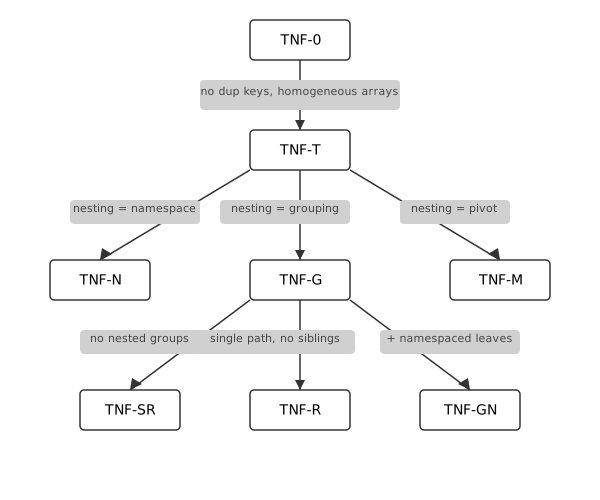
Edges represent:
| Edge | Type | Meaning |
|---|---|---|
| TNF-0 → TNF-T | Restriction | Structural hygiene |
| TNF-T → TNF-N | Interpretation | Nesting means namespacing |
| TNF-T → TNF-G | Interpretation | Nesting means grouping |
| TNF-T → TNF-M | Interpretation | Nesting means pivot |
| TNF-G → TNF-SR | Restriction | No nested groups (flat) |
| TNF-G → TNF-R | Restriction | Single path, no siblings |
| TNF-G → TNF-GN | Combination | Grouping with namespaced leaves |
Tree normal form edge types
The graph admits extension. New forms slot in by defining their edges.
The Forms
TNF-0: Valid JSON
The baseline: any valid JSON per RFC 7159.
- Keys may be duplicated
- Arrays may be heterogeneous
- Top-level value may be a scalar
- Objects may be empty
42
[ 1, [], "a string", true, {},
{ "a": [2, 3], "a": [2, 3] },
[ 2, 3, [ 4, 5 ] ]
]
Relational interpretation: None guaranteed. This is raw material. But it’s still queryable – pathing and json_each work on any valid JSON.
TNF-T: Well-Typed JSON
Restriction from TNF-0: no duplicate keys, homogeneous arrays, non-empty objects, array or object at top level.
{
"name": "Alice",
"scores": [95, 87, 91]
}
Relational interpretation: Arrays can be interpreted as collections; objects as records. Pathing is unambiguous. But nesting semantics are not yet defined – is a nested object a namespace? A grouped row? A pivot?
TNF-T is the foundation for the interpretive forms that follow.
TNF-N: Namespaced
Interpretation from TNF-T: nesting means semantic organization.
Nested objects group related fields – structure, not data rows.
{
"LastName": "eklund",
"address": {
"City": "boston",
"State": "MA"
}
}
The address object is a namespace. The tree is semantically equivalent to:
{
"LastName": "eklund",
"address_City": "boston",
"address_State": "MA"
}
Relational interpretation: Namespaced trees flatten to a single row. Pathing (.address.City) navigates the namespace.
Trade-off: More expressive (preserves semantic grouping) but less directly relational (requires flattening).
TNF-G: Grouped
Interpretation from TNF-T: nesting means aggregation.
Arrays represent grouped rows – the result of GROUP BY.
[
{ "Title": "Engineer",
"people": [
{ "FirstName": "Alice", "LastName": "Smith" },
{ "FirstName": "Bob", "LastName": "Jones" }
]
},
{ "Title": "Manager",
"people": [
{ "FirstName": "Carol", "LastName": "White" }
]
}
]
Each nesting level is a grouping context. The outer array groups by Title; the inner people array collects rows within each title.
Relational interpretation: Direct correspondence to GROUP BY. Construction compresses cardinality; destructuring expands it.
TNF-M: Metadata-Keyed
Interpretation from TNF-T: nesting means pivot.
Data values become object keys.
{
"Engineer": [
{ "FirstName": "Alice", "LastName": "Smith" }
],
"Manager": [
{ "FirstName": "Carol", "LastName": "White" }
]
}
The keys (Engineer, Manager) are data values lifted to metadata.
Relational interpretation: Keys map to a column; values map to grouped rows. Destructuring recovers the key as a column value.
Trade-off: Convenient for lookup but constrained – only one column can serve as keys per level. Two metadata-keyed objects with the same key type create ambiguous destructuring.
TNF-SR: Simply Relational
Restriction from TNF-G: no nested groups.
A flat array of homogeneous objects – the simplest grouped form.
[
{ "Title": "Engineer", "FirstName": "Alice", "LastName": "Smith" },
{ "Title": "Engineer", "FirstName": "Bob", "LastName": "Jones" },
{ "Title": "Manager", "FirstName": "Carol", "LastName": "White" }
]
No nested arrays. Each object is a row; the array is a table.
Relational interpretation: Direct. The JSON is a table in array-of-objects form. No grouping, no hierarchy – just rows.
TNF-R: Round-Trippable
Restriction from TNF-G: single path from root to deepest leaf, no sibling groups.
[
{ "Title": "Engineer",
"State": "CA",
"people": [
{ "FirstName": "Alice", "LastName": "Smith" }
]
}
]
Relational interpretation: Lossless. relation → tree → relation recovers the original data (modulo column order).
Why siblings break round-tripping:
employee(*) ~> { Title,
"people": ~> {FirstName, LastName},
"cities": ~> [City] }
Siblings aggregate independently. The join – which person was in which city – is not preserved. Destructuring recovers each path independently:
Title,FirstName,LastName(viapeople)Title,City(viacities)
But not the original four-column row. This is TNF-G but not TNF-R.
TNF-GN: Grouped with Namespaced Leaves
Combination of TNF-G and TNF-N: grouping structure with namespaced leaf objects.
[
{ "Title": "Engineer",
"people": [
{ "name": { "first": "Alice", "last": "Smith" },
"contact": { "email": "[email protected]", "phone": "555-1234" }
}
]
}
]
The outer structure is grouped (array of objects with nested arrays). The leaf objects use namespacing (name, contact).
Relational interpretation: Destructure the grouping levels; flatten the namespaced leaves. The result has columns Title, name_first, name_last, contact_email, contact_phone.
Mixing Forms
Real trees often combine forms at different levels. The graph shows which combinations make sense:
{
"metadata": {
"generated": "2024-01-15",
"version": "1.0"
},
"data": [
{ "Title": "Engineer",
"people": [
{ "FirstName": "Alice", "LastName": "Smith" }
]
}
]
}
metadatais TNF-N (namespacing)datais TNF-G (grouping)
The relational interpretation:
- Flatten
metadata.generated,metadata.versionto columns - Destructure
data→data.peopleto rows - Result: one row per person, metadata fields repeated
Understanding which form applies where clarifies what operations make sense.
Edge Types
The graph has two kinds of edges:
Restriction edges add structural constraints: - TNF-0 → TNF-T: hygiene (no dup keys, homogeneous arrays) - TNF-G → TNF-SR: flatness (no nested groups) - TNF-G → TNF-R: single-path (no siblings)
Interpretation edges assign meaning to structure: - TNF-T → TNF-N: nesting is namespacing - TNF-T → TNF-G: nesting is grouping - TNF-T → TNF-M: nesting is pivot
Restriction edges constrain what trees are valid. Interpretation edges determine how to read them relationally.
Summary
| Form | Key Property | Relational Interpretation |
|---|---|---|
| TNF-0 | Valid JSON | None guaranteed; queryable via pathing |
| TNF-T | Well-typed | Arrays are collections; objects are records |
| TNF-N | Namespaced | Flatten to single row |
| TNF-G | Grouped | GROUP BY; destructure to rows |
| TNF-M | Metadata-keyed | Pivot; keys become column values |
| TNF-SR | Simply relational | Direct table (array of flat objects) |
| TNF-R | Round-trippable | Lossless construction/destruction |
| TNF-GN | Grouped + namespaced | Destructure groups, flatten namespaces |
Summary of tree normal forms
The forms answer different questions:
- TNF-0 / TNF-T: Is this JSON structurally sound?
- TNF-N / TNF-G / TNF-M: What does nesting mean here?
- TNF-SR / TNF-R: How constrained is the grouping?
- TNF-GN: Can I mix interpretations?
Tree normal forms are not prescriptive – TNF-0 is sometimes exactly what you need. They are a vocabulary for understanding what your tree structure means relationally, and what operations it supports.
Extending the Graph
The graph admits new forms by defining edges. Examples:
- TNF-MR (metadata-keyed, round-trippable): TNF-M + single-path constraint
- TNF-SN (simply namespaced): TNF-N + flat (no nested namespaces)
- TNF-GM (grouped + metadata): grouping with metadata-keyed intermediate levels
Each new form names a useful combination.
Guiding Principles
-
Trees and tables mix. Trees have a valid relational interpretation under certain structural constraints.
-
Start with relations. The cleanest trees arise from grouping relations, not from arbitrary JSON. Construction informs understanding.
-
Arrays are rows; objects are records. Arrays represent homogeneous collections (multiple rows of the same shape). Objects represent heterogeneous structure (named fields, like columns).
-
Grouping compresses; destructuring expands. Construction decreases cardinality (many rows → fewer rows with nested arrays). Destructuring increases cardinality (nested arrays → many rows).
-
Siblings lose information. Sibling tree groups aggregate independently. The relationship between siblings – which person was in which city – is not preserved. This is inherent, not a bug.
-
Metadata-oriented trees are pivots. When data values become object keys, the structure resembles a pivot table. This helps with the object-relational impedance mismatch but introduces constraints.
-
Zeroth normal form has its place. Arbitrary JSON can still be queried via
json_eachand pathing. Tree normal forms define what’s cleanly relational, not what’s queryable at all.
Appendix: Error URI Taxonomy
Every compilation error carries a hierarchical URI that identifies the error category. Error hooks use these URIs for prefix matching:
-- matches any DQL semantic error
users(*) |> (foo.*) (~~error://dql/semantic ~~)
-- matches only table resolution failures
nonexistent_table(*) (~~error://dql/semantic/resolution/table ~~)
-- matches any error at all
bad_query(*) (~~error ~~)
The URI is a stable identifier independent of the error message text. It doubles as the canonical reference for documentation, tooling, and diagnostics.
Design Principles
-
Domain first. The top level identifies the language being processed:
dql/,ddl/,dml/. Users know whether they wrote a query or a definition. -
Parse vs semantic. The second level is the classic compiler split. Parse errors mean the source text is structurally invalid. Semantic errors mean the structure is valid but the meaning is wrong.
-
Prefix matching does the work. Each level narrows usefully:
error://dqlcatches any DQL error.error://dql/semanticcatches any semantic error.error://dql/semantic/resolutioncatches any name binding failure. -
No
validation. The term is too vague.semanticsays what the category is.constraint,arity,resolutionsay what went wrong.
Prefix Matching
Error hooks match by prefix. An expected URI of dql/semantic matches any actual URI that starts with dql/semantic/:
| Expected | Matches |
|---|---|
error://dql |
any DQL error (parse or semantic) |
error://dql/semantic |
any semantic error |
error://dql/semantic/resolution |
resolution/table, resolution/column, resolution/ambiguous, etc. |
error://dql/semantic/resolution/table |
table resolution failures only |
error://dql/parse |
any parse failure |
| (bare) | any error |
URI Hierarchy
dql/parse/ — Structural Failures
The source text does not form a valid CST, or CST-to-AST conversion finds malformed structure. The problem is syntactic.
| URI | Condition | Trigger |
|---|---|---|
dql/parse |
Any parse failure | |
dql/parse/tree_sitter |
Tree-sitter library error | |
dql/parse/literal |
Malformed literal | 0xGG, 0o89 |
dql/parse/expression |
Malformed expression | x +, empty expression |
dql/parse/anon |
Malformed anonymous table | _(a @ 2, 3) |
dql/parse/pipe |
Malformed pipe expression | x /-> |
dql/parse/function |
Malformed function call | missing name, lambda body |
dql/parse/case |
Malformed CASE expression | missing arm, missing result |
dql/parse/window |
Malformed window spec | invalid frame mode |
dql/parse/json_path |
Malformed JSON path | [name], {42} |
dql/parse/projection |
Empty or invalid projection | \|> -(*) |
dql/parse/subquery |
Malformed scalar subquery | missing table, missing continuation |
dql/parse/pattern |
Malformed pattern literal | invalid /pattern/ format |
Fine-grained leaves (e.g. dql/parse/literal/hex) can be added later. The second level is the useful grain for error hooks.
dql/semantic/ — Semantic Failures
The structure is valid but the meaning is wrong. Names do not resolve, arities do not match, or domain constraints are violated.
dql/semantic/resolution/ — Name Binding Failures
| URI | Condition | Trigger |
|---|---|---|
dql/semantic/resolution |
Any name binding failure | |
dql/semantic/resolution/table |
Table or view not found | nonexistent(*) |
dql/semantic/resolution/column |
Column cannot be resolved | \|> (bad_col) |
dql/semantic/resolution/function |
Function or HO view not found | |
dql/semantic/resolution/sigma |
Sigma predicate not found | |
dql/semantic/resolution/ambiguous |
Name matches multiple entities | cross-join with shared column |
dql/semantic/resolution/scope |
Name exists but unreachable | column behind pipe barrier, post-group leak |
Why ambiguous lives under resolution. Ambiguity is the dual of not-found: resolution fails because there are zero matches (not found) or multiple matches (ambiguous). Both are failures of name binding.
Why scope lives under resolution. The name exists in the schema, but the current scope cannot see it. The column is behind a pipe barrier, or a group-by reduced the visible columns. It is a resolution failure with a specific cause.
dql/semantic/arity/ — Wrong Argument Count
| URI | Condition | Trigger |
|---|---|---|
dql/semantic/arity |
Wrong argument count (general) | |
dql/semantic/arity/function |
Function call arity | |
dql/semantic/arity/predicate |
Predicate arity | +between(1, age) |
dql/semantic/arity/sigma |
Sigma predicate arity | |
dql/semantic/arity/pattern |
Positional pattern element count | users(a, b, c) |
Why arity is separate from resolution. Resolution is about finding the entity. Arity is about calling it. A function can resolve successfully and still fail on arity. These are different failure modes with different fixes: “did you spell it right?” vs “did you pass the right number of arguments?”
dql/semantic/constraint/ — Domain Rule Violations
The query is valid and all names resolve with correct arity, but a domain-specific rule is violated.
| URI | Condition | Trigger |
|---|---|---|
dql/semantic/constraint |
Any constraint violation | |
dql/semantic/constraint/pivot |
Pivot requirements not met | missing IN predicate, duplicate column |
dql/semantic/constraint/destructuring |
Destructuring rule violated | multiple ~>, comparison in pattern |
dql/semantic/constraint/join |
Join constraint violated | multiple full outer, missing condition |
dql/semantic/constraint/context |
Context-aware function misuse | typo, wrong args, missing marker |
dql/semantic/constraint/unsupported |
Construct not supported in this position | IN in projection, EXISTS in CASE |
Why constraint replaces validation. The word constraint names what went wrong: a domain rule was violated. Pivot requires an IN predicate. Destructuring forbids comparisons. Full outer join cannot have multiple targets. These are specific rules, not generic “validation.”
dql/semantic/limitation/ — Known Limitations
| URI | Condition |
|---|---|
dql/semantic/limitation |
Any known limitation |
dql/semantic/limitation/qualified_name_ambiguity |
Grammar ambiguity with qualified names ending in . |
dql/semantic/limitation/not_implemented |
Feature not yet implemented |
ddl/ — DDL Errors
DDL errors are structurally similar to DQL errors but fewer in number.
| URI | Condition |
|---|---|
ddl/parse |
DDL syntax failure |
ddl/semantic/resolution |
Referenced entity not found |
ddl/semantic/constraint |
DDL rule violated (circular dependency, duplicate definition) |
dml/ — DML Errors
| URI | Condition |
|---|---|
dml/parse |
DML syntax failure |
dml/semantic/resolution |
Target entity not found |
dml/semantic/constraint |
DML rule violated |
database/ and io/ — Runtime Errors
These errors occur during query execution, not compilation. They do not belong to a language domain.
| URI | Condition |
|---|---|
database |
Any database operation error |
database/connection |
Connection lock poisoned |
io |
I/O error |
Implementation Notes
The current implementation derives subcategories from error message keywords for ValidationError, TransformationError, and TranspilationError. Stable, static error types (TableNotFoundError, ColumnNotFoundError) already carry precise URIs. A planned refactor will add explicit subcategory fields to all dynamic error types, making URIs independent of message text.
Appendix: Danger URI Taxonomy
Certain behaviors are safe in most contexts but dangerous in others. Rather than forbid them outright, delightql gates them behind danger URIs – named safety boundaries that are closed by default and opened explicitly per-query.
-- open a specific danger for one query
employee(*) as e (~~danger://dql/cardinality/nulljoin ON~~),
department(*) as d,
e.DepartmentId = d.DepartmentId
-- the danger auto-closes at query end
employee(*) as e, department(*) as d,
e.DepartmentId = d.DepartmentId
-- this query uses safe defaults again
The URI is a stable identifier. It doubles as the canonical reference for documentation, tooling, and diagnostics – the same role that error URIs serve for compilation errors.
Design Principles
-
Off by default. Every danger starts OFF. The safe behavior is active unless the programmer explicitly requests otherwise.
-
Domain first. The top level identifies the language domain:
dql/,ddl/,dml/. This mirrors the error URI hierarchy. -
What-goes-wrong second. The second level names the category of harm:
cardinality/(row-count blowup),termination/(non-halting computation),precision/(silent data loss). Where error URIs use what phase failed (parse, semantic), danger URIs use what goes wrong – because dangers are not phase-specific. -
Prefix matching does the work. Each level narrows usefully.
danger://dqlcatches any DQL danger.danger://dql/cardinalitycatches any cardinality blowup.danger://dql/cardinality/nulljoincatches only that specific case. -
No bare form.
(~~danger://dql/cardinality/nulljoin~~)withoutONorOFFis an error. Being explicit about the toggle is the entire point. -
Query-scoped. A danger gate opens for one query and auto-closes at query end. It does not leak into subsequent queries.
-
The URI is the documentation. The danger URI in source code is also the canonical reference for what the danger means and why it exists.
Syntax
employee(*) as e (~~danger://dql/cardinality/nulljoin ON~~),
department(*) as d,
e.DepartmentId = d.DepartmentId
The annotation lives inside the annotation delimiters (~~ ... ~~) and attaches at a continuation point (after a relation). It is an annotation that travels with the query but is not part of the relational algebra.
| Component | Meaning |
|---|---|
danger:// |
URI scheme identifying a danger gate |
dql/cardinality/nulljoin |
Hierarchical path to the specific danger |
ON |
Enable the dangerous behavior for this query |
OFF |
Restore the safe default (useful to override a CLI baseline) |
ALLOW |
Permit but do not force – the compiler may use the dangerous path if needed |
1–9 |
Graduated severity levels for host-defined behavior |
Toggle Values
ON and OFF are the common cases. They are binary: the dangerous behavior is either active or not.
ALLOW is a middle ground. It tells the compiler that the dangerous behavior is acceptable but not required. The compiler may choose the safe path when it can and the dangerous path when it must. This is useful for queries where the programmer has verified that the data does not trigger the danger but wants the compiler to retain latitude.
The severity levels 1 through 9 exist for host-defined policies where binary on/off is too coarse. The language defines no semantics for specific levels – the host interprets them. Example uses:
- A linter that warns at level 3 but errors at level 7
- A monitoring system that logs at level 1 but alerts at level 5
- A deployment pipeline that permits level 1-4 in staging but only level 1-2 in production
The severity levels are ordered: higher numbers indicate greater willingness to accept the danger. A tool checking “is danger level at least N?” can compare numerically.
Multiple dangers may be opened for the same query:
employee(*) as e
(~~danger://dql/cardinality/nulljoin ON~~)
(~~danger://dql/cardinality/cartesian ON~~),
department(*) as d,
e.DepartmentId = d.DepartmentId
Defaults and Overrides
The program starts with a default table where every danger is OFF:
danger://dql/cardinality/nulljoin OFF
danger://dql/cardinality/cartesian OFF
danger://dql/termination/unbounded OFF
danger://dql/semantics/min_multiplicity OFF
Override Scopes
Not all dangers accept overrides from the same places. The scope at which a danger can be overridden depends on whether it changes language semantics or execution guardrails:
| URI | Inline | File | CLI | Category |
|---|---|---|---|---|
dql/cardinality/nulljoin |
yes | yes | no | semantic |
dql/cardinality/cartesian |
yes | yes | yes | guardrail |
dql/termination/unbounded |
yes | yes | yes | guardrail |
dql/semantics/min_multiplicity |
yes | yes | no | semantic |
Semantic dangers change what operators mean. The nulljoin gate redefines = in join position from SQL = to IS NOT DISTINCT FROM. A DQL script should mean the same thing regardless of who runs it and what CLI flags they pass. Semantic overrides must live in the source text – either inline on the query or at the top of the file – so the script is self-documenting.
Guardrail dangers control whether the engine permits certain operations. They do not change expression semantics. Cartesian product rejection and unbounded recursion prevention are resource limits, not language redefinitions. These may be overridden at any scope, including the CLI.
The guiding principle: operator semantics are fixed by the source text. CLI flags may change SQL shape (via option://) or execution policy (via guardrail danger://), but never language meaning.
Session Baseline (CLI)
The CLI can shift the baseline for guardrail dangers:
dql query --danger dql/cardinality/cartesian=ON --db test.db "..."
Attempting to override a semantic danger from the CLI is an error:
## REJECTED: nulljoin is a semantic danger -- use inline annotation
dql query --danger dql/cardinality/nulljoin=ON --db test.db "..."
Override Precedence
Per-query annotations override the file-level directive. The file-level directive overrides the session baseline. At query end, the danger reverts to the file-level or session-level value:
CLI baseline ----> file directive ----> per-query ----> revert
OFF ON OFF ON
Prefix Matching
Danger hooks match by prefix, identically to error hooks:
| Expected | Matches |
|---|---|
danger://dql |
any DQL danger |
danger://dql/cardinality |
nulljoin, cartesian, any future cardinality danger |
danger://dql/cardinality/nulljoin |
null-join only |
danger://dql/termination |
unbounded, any future termination danger |
URI Hierarchy
dql/cardinality/ — Row-Count Blowups
The query may produce far more rows than the programmer expects. These dangers guard against silent multiplicative explosions in result cardinality.
| URI | Default | Condition | What happens when ON |
|---|---|---|---|
dql/cardinality/nulljoin |
OFF | = in join position compiles to SQL = |
= in join position compiles to IS NOT DISTINCT FROM. NULL keys match each other, producing a cartesian product of all NULL rows. |
dql/cardinality/cartesian |
OFF | Cross joins without an explicit condition are rejected | Cross joins without conditions are permitted. |
Why nulljoin is a cardinality danger. The NULL-by-NULL cross product is a multiplicative blowup. Five NULLs on the left and three on the right produce fifteen matched rows. The danger is not that NULLs participate in the join – it is that they participate combinatorially.
Why cartesian is a cardinality danger. A cross join of two million-row tables produces a trillion rows. Explicit cross joins are sometimes intended (for generating combinations), but an accidental cross join – one caused by a missing join condition – is one of the most common and costly SQL mistakes.
dql/termination/ — Non-Halting Computation
The query may not terminate.
| URI | Default | Condition | What happens when ON |
|---|---|---|---|
dql/termination/unbounded |
OFF | Recursive CTEs must include a termination condition | Recursive CTEs without termination conditions are permitted. |
Why unbounded is a termination danger. A recursive CTE without a termination condition produces an infinite result. In practice, the database engine will hit a resource limit and error – but only after consuming significant time and memory. The compiler can detect the absence of a termination condition statically and reject it early.
dql/semantics/ — Operator Semantics
The query’s meaning changes. These dangers alter what an operator computes, not merely whether it is permitted. They are semantic dangers: inline-only, never CLI-overridable.
| URI | Default | Condition | What happens when ON |
|---|---|---|---|
dql/semantics/min_multiplicity |
OFF | Intersection-via-correlation uses bidirectional semijoin (UNION ALL of EXISTS-filtered operands), producing m+n copies of matching tuples | Intersection-via-correlation uses ROW_NUMBER + equi-join, producing min(m,n) copies – true INTERSECT ALL multiplicity. |
Why min_multiplicity is a semantic danger. The bidirectional semijoin and the ROW_NUMBER path compute different multisets for duplicate tuples. Three copies in the left operand and two in the right yield five rows under bidirectional semijoin but two under min-multiplicity. The difference only surfaces with genuinely duplicate tuples, but it changes what the operator means – the same query produces different results. This is a semantic redefinition, so it must live in the source text.
Future Categories
The hierarchy is designed to grow. Possible future categories:
dql/precision/ — Silent Data Loss
| URI | Condition |
|---|---|
dql/precision/implicit_cast |
Implicit type coercion that loses information |
dql/precision/truncation |
String or numeric truncation without warning |
dml/destructive/ — Irreversible Mutations
| URI | Condition |
|---|---|
dml/destructive/unfiltered_update |
UPDATE without a WHERE condition |
dml/destructive/unfiltered_delete |
DELETE without a WHERE condition |
Relationship to Error URIs
Danger URIs and error URIs are sibling systems:
| Error URIs | Danger URIs | |
|---|---|---|
| Scheme | error:// |
danger:// |
| When | After compilation fails | Before compilation (gate check) |
| Mechanism | Prefix matching for error hooks | Prefix matching for gate control |
| Top level | Domain (dql/, ddl/, dml/) |
Domain (dql/, ddl/, dml/) |
| Second level | Phase (parse/, semantic/) |
What goes wrong (cardinality/, termination/) |
| Default | Errors always fire | Dangers always off |
Both use hierarchical URIs. Both support prefix matching. Both serve as stable identifiers for documentation and tooling. The difference is directional: error URIs report what went wrong; danger URIs prevent what could go wrong.
Namespace Directives
The image
A DQL session is a filesystem. You mount databases, install libraries, create directories. When you close the lid, the state persists. When you reopen it, everything is where you left it.
~:: -- your home directory
├── data::wh -- a mounted database
├── analytics -- a consulted DDL library
│ └── helpers -- the library's internal dependency
├── analytics::grounded -- library bound to data
└── scratch -- a namespace you made
~:: is home. :: is root (where sys and std live). Directives are the shell commands that shape this tree. Queries run inside it.
The image is a SQLite file — the bootstrap database serialized to disk. Not a replay script, but the actual state: namespace tree, entity definitions, connection metadata, timestamps, history. Since DQL already uses SQLite for its internal state, the image format is the system’s own storage format. Dogfooding.
## Ephemeral (default) — fresh home, dies on exit
echo 'users(*)' | dql query --db warehouse.db
## Persistent — your laptop
dql --session workspace.db --db warehouse.db -i
> mount!("ref.db", "data::ref")
> consult!("analytics.dql", "analytics")
> weekly_report(*)
> .quit # state saved to workspace.db
## Next day — everything is where you left it
dql --session workspace.db -i
> weekly_report(*) # just works
The image is queryable. mount!("old_session.db", "prev") and browse what you had last week. Diff two environments by joining their bootstrap tables. The session IS a database.
This is the Smalltalk image model applied to a query environment. Smalltalk’s images were opaque heap dumps. Jupyter notebooks improved this with ordered cells, but introduced a desync problem — run cells out of order and the kernel diverges from what the notebook shows. A DQL image has neither problem: it’s inspectable (it’s SQLite) and it’s the actual state (not a recipe that might diverge).
Directives
Queries transpile to SQL. Directives shape the environment in which queries run. mount! doesn’t produce SQL — it connects a database. consult! loads view definitions. enlist! makes names visible.
Every directive produces, consumes, borrows, or transforms a namespace.
Produce
mount!("warehouse.db", "data::wh") -- connect database → DataNs
consult!("analytics.dql", "analytics") -- load DDL file → LibNs
copy!("subset") -- pipe terminal: create from entity metadata → LibNs
consult_tree!("models/", "lib") -- directory tree → nested LibNs
mount_tree!("postgres://host/db", "data") -- database catalog → nested DataNs
The _tree variants mirror an external hierarchy (filesystem or database catalog) into the namespace tree. The caller names the root; the source names the branches. models/util/greet.dql becomes lib::util::greet.
Consume
unmount!("data::wh")
unconsult!("analytics")
imprint!("analytics", "data::wh") -- materializes views as tables, consumes LibNs
imprint! is linear — the library namespace is consumed. This prevents ghost duality (abstract definitions alongside concrete tables that inevitably drift).
Borrow
ground!("data::wh", "analytics", "analytics::g") -- bind lib to data → GroundedNs
serialize!("analytics", "backup.dql") -- write to file
Transform
refresh!("data::wh") -- re-introspect schema
reconsult!("analytics") -- reload from file
Scope-local (visibility)
enlist!("analytics") -- bare names visible in my scope
alias!("data::wh", "wh") -- wh.users(*) shorthand
delist!("analytics") -- remove enlistment + alias
Scope-local operations are saved/restored at DDL boundaries. A DDL that enlists a namespace doesn’t pollute its caller.
Scratch namespaces
Inline DDL ((~~ddl:"name" ~~)) creates scratch namespaces that are ambient — they automatically bind to the database they were created under. A consulted library needs explicit ground! to connect its table references to data. A scratch namespace doesn’t — you’re defining views against the database that’s right here, and the system captures that binding at creation time.
(~~ddl:"helpers"
young(*) :- users(*), age < 20
~~)
enlist!("helpers")
young(*) -- users resolves against the current database
See book/design/inline-ddl.md for details on ambient binding, provenance, and the relationship between scratch and consulted namespaces.
Execution
play!("setup.dql") -- execute in my scope (source)
exec!("report.dql") |> (total) -- execute, return last expression
run!("job.dql", "sandbox") -- isolated sub-session
save!() -- persist ~:: to session file
Pipe schemas
Every directive produces one unnamed positional column: the namespace it affected. No status column — rows mean success, errors mean failure.
consult!("a.dql","ns1";"b.dql","ns2")(*) |> enlist!()
lib::(*) |> pick("view1";"view2") |> copy!("subset")
mount!("a.db","da";"b.db","db")(*) |> enlist!()
Scalar-lifted arguments (; between pairs) produce multiple rows. Pipe terminals read the single column positionally.
Nesting
DDL files don’t know their own name. The caller chooses:
consult!("analytics.dql", "analytics") -- caller's choice
consult!("analytics.dql", "reports") -- different caller, different name
A DDL that needs helpers cannot self-nest — it doesn’t have crate:: or __name__. Auto-nesting solves this: directives inside a DDL are prefixed under the DDL’s namespace automatically.
-- Inside analytics.dql:
consult!("helpers.dql", "helpers") -- becomes analytics::helpers
consult!("shared.dql", "::shared") -- :: escapes to global root
| Prefix | Target | Unix analogy |
|---|---|---|
| (bare) | relative to current DDL | ./ |
~:: |
session root | ~/ |
:: |
global root | / |
When two DDLs consult the same file, the namespace tree has two entries. The engine shares resources behind the scenes (connections are ref-counted by URI). The semantics are value-level copies; the implementation shares structure. Functional data structures.
Ownership
Namespace directives have ownership semantics. Each directive either produces, consumes, borrows, or transforms a namespace resource.
Key rules: - Can’t unmount! a DataNs that’s borrowed by a ground! - Can’t unconsult! a LibNs that’s borrowed by a ground! - imprint! consumes the LibNs — use-after-imprint is an error - delist! drops both enlistments and aliases - Destroying a parent namespace cascades to children
These enforce real invariants (no dangling views, no stale groundings) through the type system rather than programmer discipline.
Full directive signatures with ownership annotations are in DESIGN-namespace-directives.md.
Appendix: Standard Library
The standard library provides built-in entities organized into namespaces under std. Most of the stdlib is written in DQL itself – views, higher-order views, rewrite rules, and facts – dogfooding the language to build its own tooling.
Architecture
The stdlib has three implementation tiers:
| Tier | Mechanism | Namespaces |
|---|---|---|
| Bin (Rust) | Pipeline-recognized entities, compiled into the binary | std::prelude, std::predicates, std::assert |
| DQL views / HO-views | Rule definitions over sys::* and the ^ operator |
std::info, std::schema |
| DQL rewrite rules | Quoted-head rules with per-target overrides | std::fns::string, std::fns::date, std::fns::json, std::fns::numeric |
| DQL facts | Static lookup tables expressed as fact rules | std::help |
Implementation tiers
Bin entities exist because they require pipeline cooperation that rewrite rules cannot express – pseudo-predicates perform side effects, sigma predicates have special predicate-position syntax, and assertion views require structural SQL rewrites. Everything else is DQL.
Namespace Tree
std
├── std::prelude bin pseudo-predicates (universal)
├── std::predicates bin sigma predicates (universal)
├── std::assert bin assertion views (pipeline-recognized)
├── std::info dql views over sys::*
├── std::schema dql higher-order views using ^
├── std::help dql facts -- queryable language reference
└── std::fns
├── std::fns::string dql rewrite rules -- string functions
├── std::fns::date dql rewrite rules -- date/time functions
├── std::fns::json dql rewrite rules -- JSON access
└── std::fns::numeric dql rewrite rules -- numeric functions
std::prelude – Pseudo-Predicates
Universal. Available everywhere without engage!().
These are bin entities (implemented in Rust) because they perform side effects – loading databases, creating namespaces, modifying session state.
| Entity | Type | Purpose |
|---|---|---|
mount!(path, namespace) |
pseudo-predicate | Open database, introspect tables |
consult!(path, namespace) |
pseudo-predicate | Load DQL rules file into namespace |
engage!(namespace) |
pseudo-predicate | Enable unqualified access to namespace entities |
part!(namespace) |
pseudo-predicate | Remove unqualified access |
run!(path) |
pseudo-predicate | Execute DQL file as sequential statements |
ground_into!(data, lib, name) |
pseudo-predicate | Permanently ground a library namespace |
std::prelude entities
std::predicates – Sigma Predicates
Universal. Available everywhere without engage!().
Sigma predicates occupy predicate position with the + prefix. They are bin entities because the + syntax requires special parser and resolver support.
| Entity | Type | Purpose |
|---|---|---|
+like(value, pattern) |
sigma predicate | SQL LIKE pattern matching |
+between(value, lo, hi) |
sigma predicate | SQL BETWEEN range check |
std::predicates entities (current)
Future candidates:
| Entity | Purpose |
|---|---|
+matches(value, regex) |
Regex matching (backend-dependent) |
+in_range(value, lo, hi, bounds) |
Inclusive/exclusive range with boundary control |
+is_type(value, type) |
Runtime type check |
std::assert – Assertion Views
Pipeline-recognized. Available in assertion bodies without qualification.
These are bin entities because each view requires a structural SQL rewrite that cannot be expressed as text substitution:
| Entity | Type | SQL Pattern |
|---|---|---|
exists(*) |
view | SELECT EXISTS(...) AS bool |
notexists(*) |
view | SELECT NOT EXISTS(...) AS bool |
forall(*) |
view | SELECT NOT EXISTS(... WHERE NOT ...) AS bool |
equals(*) |
view | Symmetric difference is empty |
std::assert views
All four produce the same shape: one row, one column named bool. See Assertions for usage.
Future candidates (these could be DQL HO-views rather than bin entities):
| Entity | Purpose |
|---|---|
is_unique(T(*), col)(*) |
No duplicate values in column |
no_nulls(T(*), col)(*) |
Column has no NULLs |
is_subset(T(*), V(*))(*) |
Every row in T appears in V |
row_count(T(*))(*) |
Returns count as (n) |
std::info – Information Schema
DQL views over sys::*. These flatten the multi-join bootstrap tables into single-relation views with stable, user-friendly column names.
The distinction from sys::*: sys::* is the implementation (raw tables with integer keys, foreign key joins required). std::info is the interface (denormalized views ready to query).
| Entity | Type | Columns |
|---|---|---|
tables(*) |
view | name, namespace, database, column_count |
columns(*) |
view | table_name, namespace, column_name, data_type, ordinal, is_nullable, default_value |
views(*) |
view | name, namespace, definition, is_ho, param_count |
functions(*) |
view | name, namespace, arity, definition |
predicates(*) |
view | name, namespace, arity |
namespaces(*) |
view | fq_name, parent, classification, entity_count, default_data_ns |
connections(*) |
view | namespace, uri, dialect, connected |
help(*) |
view | namespace, entity, entity_type – flat listing of everything |
std::info views
Example
-- all tables in the data::sales namespace
std::info.tables(*), namespace = "data::sales"
-- columns of the users table
std::info.columns(*), table_name = "users" |> #(ordinal)
-- all higher-order views in the session
std::info.views(*), is_ho = true
std::schema – Schema Introspection
DQL higher-order views using the ^ operator. These provide reusable schema comparison and inspection tools that would require ad-hoc joins in SQL.
| Entity | Type | Output Columns |
|---|---|---|
same_schema(T(*), V(*))(*) |
HO view | pass (boolean) |
schema_diff(T(*), V(*))(*) |
HO view | column_name, in_t, in_v, t_type, v_type, t_ordinal, v_ordinal |
common_columns(T(*), V(*))(*) |
HO view | column_name, t_type, v_type, t_ordinal, v_ordinal |
joinable_on(T(*), V(*))(*) |
HO view | column_name, data_type (same name and compatible type) |
describe(T(*))(*) |
HO view | column_name, data_type, ordinal, is_nullable |
std::schema HO views
Example
-- are two tables schema-compatible?
std::schema.same_schema(users(*), users_backup(*))(*)
-- what columns differ between production and staging?
std::schema.schema_diff(data::prod.orders(*), data::staging.orders(*))(*)
-- what columns can these tables join on?
std::schema.joinable_on(employees(*), departments(*))(*)
same_schema(T(*),V(*)) is implemented and serves as the reference pattern for this namespace.
std::help – Queryable Language Reference
DQL facts – static lookup tables describing the language itself. The data is baked into .dql files as fact rules (: neck).
The distinction from std::info: std::info describes your session (what tables, views, namespaces exist right now). std::help describes the language (what sigils, errors, annotations mean in general).
std::help.errors
Error URI taxonomy. One row per error category.
| Column | Type | Description |
|---|---|---|
uri |
TEXT | Hierarchical error URI |
phase |
TEXT | compile or runtime |
description |
TEXT | Human-readable explanation |
-- find all resolution errors
std::help.errors(*), +like(uri, "resolution%")
-- join against session errors for human-readable messages
sys.errors(*) as e,
std::help.errors(*) as h,
+like(e.uri, h.uri ++ "%")
|> (e.uri, h.description, e.message)
std::help.dangers
Danger URI taxonomy. One row per danger gate.
| Column | Type | Description |
|---|---|---|
uri |
TEXT | Danger URI path |
default_state |
TEXT | OFF (always) |
category |
TEXT | semantic or guardrail |
cli_overridable |
TEXT | Whether --danger flag can override |
description |
TEXT | What the gate controls |
std::help.options
Option URI taxonomy.
| Column | Type | Description |
|---|---|---|
uri |
TEXT | Option URI path |
default_state |
TEXT | Default toggle value |
description |
TEXT | What the option controls |
std::help.sigils
Operator and sigil reference.
| Column | Type | Description |
|---|---|---|
sigil |
TEXT | The sigil text |
name |
TEXT | Human-readable name |
category |
TEXT | pipe, neck, functor, predicate, set, meta |
description |
TEXT | What it does |
Sample rows:
| sigil | name | category | description |
|---|---|---|---|
\|> |
pipe | pipe | Forward pipe operator |
~> |
aggregate pipe | pipe | Aggregate pipe operator |
\|~> |
materialize pipe | pipe | Materialize and aggregate |
<\| |
reverse pipe | pipe | Reverse pipe (right operand) |
/-> |
thread pipe | pipe | Thread expression through function |
:- |
rule neck | neck | Define reusable rule (session) |
:= |
materialized neck | neck | Deprecated — see EPOCH-manifest-ddl.md |
: |
literal neck | neck | Anonymous table / permanent fact |
* |
qualify | functor | All columns |
^ |
meta-ize | functor | Schema as relation |
^^ |
deep meta-ize | functor | Extended metadata |
+ |
sigma prefix | predicate | Sigma predicate application |
\+ |
negated sigma | predicate | Negated sigma predicate |
(~~ ~~) |
parenotate | meta | Annotation delimiters |
% |
group | meta | Grouping operator |
std::help.necks
Neck types and their semantics.
| Column | Type | Description |
|---|---|---|
sigil |
TEXT | Neck sigil |
name |
TEXT | Human-readable name |
persistence |
TEXT | permanent, session, query |
description |
TEXT | What it defines |
std::help.annotations
Annotation types and their parse modes.
| Column | Type | Description |
|---|---|---|
name |
TEXT | Annotation type identifier |
body_mode |
TEXT | dql, uri, uri+toggle, raw |
has_instance_name |
TEXT | Whether :name form is supported |
handler |
TEXT | core or host |
description |
TEXT | What the annotation does |
std::help.keywords
Reserved words and their contexts.
| Column | Type | Description |
|---|---|---|
keyword |
TEXT | The keyword |
context |
TEXT | Where it appears |
description |
TEXT | What it means |
std::fns::string – String Functions
DQL rewrite rules with per-target overrides. Each function is a quoted-head rule that transpiles to backend-appropriate SQL.
-- default rule (Postgres / DuckDB)
"pad_left:(text, width, char)" :-
:"LPAD({text}, {width}, {char})"
-- SQLite override
lib::target::sqlite."pad_left:(text, width, char)" :-
:"SUBSTR(REPLACE(HEX(ZEROBLOB({width})), '00', {char}) || {text}, -{width})"
Searching
| Entity | Signature | Description |
|---|---|---|
contains |
contains:(text, search) |
Text contains substring (no LIKE escaping needed) |
starts_with |
starts_with:(text, prefix) |
Prefix match |
ends_with |
ends_with:(text, suffix) |
Suffix match |
index_of |
index_of:(text, search) |
Position of first occurrence (0 if absent) |
Extraction
| Entity | Signature | Description |
|---|---|---|
slice |
slice:(text, start, len) |
Substring (1-indexed) |
left |
left:(text, n) |
First n characters |
right |
right:(text, n) |
Last n characters |
before |
before:(text, delim) |
Everything before first delimiter |
after |
after:(text, delim) |
Everything after first delimiter |
Transformation
| Entity | Signature | Description |
|---|---|---|
trim |
trim:(text) |
Trim whitespace, both sides |
trim_left |
trim_left:(text) |
Leading whitespace |
trim_right |
trim_right:(text) |
Trailing whitespace |
trim_chars |
trim_chars:(text, chars) |
Trim specific characters |
pad_left |
pad_left:(text, width, char) |
Left-pad to width |
pad_right |
pad_right:(text, width, char) |
Right-pad to width |
repeat |
repeat:(text, n) |
Repeat n times |
reverse |
reverse:(text) |
Reverse string |
replace_all |
replace_all:(text, old, new) |
Replace all occurrences |
Case
| Entity | Signature | Description |
|---|---|---|
upper |
upper:(text) |
Uppercase |
lower |
lower:(text) |
Lowercase |
title_case |
title_case:(text) |
Capitalize each word |
Splitting
| Entity | Signature | Description |
|---|---|---|
split_part |
split_part:(text, delim, n) |
Nth piece after splitting |
word |
word:(text, n) |
Nth whitespace-delimited word |
word_count |
word_count:(text) |
Number of words |
Measurement
| Entity | Signature | Description |
|---|---|---|
length |
length:(text) |
Character length |
std::fns::date – Date/Time Functions
DQL rewrite rules. Date functions are the most backend-divergent area in SQL – SQLite uses date('now', '+7 days'), Postgres uses now() + interval '7 days', DuckDB uses date_add(current_date, 7, 'day'). These rules normalize the interface.
| Entity | Signature | Description |
|---|---|---|
days_between |
days_between:(a, b) |
Integer days between two dates |
add_days |
add_days:(date, n) |
Add n days to date |
add_months |
add_months:(date, n) |
Add n months |
start_of_month |
start_of_month:(date) |
First day of the month |
end_of_month |
end_of_month:(date) |
Last day of the month |
start_of_year |
start_of_year:(date) |
First day of the year |
day_of_week |
day_of_week:(date) |
Day of week (1=Monday) |
format_date |
format_date:(date, pattern) |
Format to string |
parse_date |
parse_date:(text, pattern) |
Parse string to date |
now |
now:() |
Current timestamp |
today |
today:() |
Current date |
std::fns::json – JSON Functions
DQL rewrite rules. JSON support varies between SQLite (json_extract, json_each), Postgres (->, ->>, jsonb_*), and DuckDB (json_extract_string, json_keys).
| Entity | Signature | Description |
|---|---|---|
json_get |
json_get:(json, path) |
Extract value at path |
json_get_text |
json_get_text:(json, path) |
Extract as text |
json_array_length |
json_array_length:(json) |
Number of array elements |
json_keys |
json_keys:(json) |
Array of object keys |
json_type |
json_type:(json, path) |
Type at path |
json_valid |
json_valid:(json) |
Is valid JSON |
std::fns::numeric – Numeric Functions
DQL rewrite rules for numeric gaps across backends.
| Entity | Signature | Description |
|---|---|---|
clamp |
clamp:(val, lo, hi) |
Constrain to range |
sign |
sign:(val) |
-1, 0, or 1 |
is_finite |
is_finite:(val) |
Not NaN or infinity |
div |
div:(a, b) |
Integer division |
mod |
mod:(a, b) |
Modulo (consistent sign behavior) |
log |
log:(val, base) |
Logarithm with base |
pow |
pow:(base, exp) |
Exponentiation |
Delightql and Operational and Denotational Semantics
This discussion treats operational semantics as meaning arising from explicit, stepwise evaluation, and denotational semantics as meaning arising from identification with essence. Where operational semantics is concrete, denotational semantics is platonic. Where operational semantics constructs (compositional in evaluation), denotational semantics proffers (atomic in identity).
Using these two different approaches as a framework, we can highlight certain delightql features that exist closer to each pole. Namely, Delightql’s left-to-right evaluation and scoping order as an operational semantics, and the use of functor syntax for opaque and/or non-finitary predicates as an explicit marriage of syntax to denotational semantics.
Denotational Functors
Delightql, like Prolog, assigns functor notation to the realm of relations, i.e. subsets of cartesian products that can be viewed equally as data (tables or views) or as evaluative oracles to membership and existence (predicates).
In Prolog, the functor stands for itself, denotationally, but also provides operational semantics via SLD resolution from which extensional values may be calculated. Granted, Prolog has a complicated relationship with anything that is not a term within its axiomatized Herbrand universe. This results in a awkward operational grafting of very practical things like numbers and their predicates which, while denotationally of the same kind (cartesian subsets and functions of truth), are operationally hopeless. Denotationally we could posit the existence of a <(X,Y) (i.e. X<Y) which satisfies our intuition about this predicate, but we have no feasible or useful way to either store infinity or build up numbers inductively via Peano style recursion. Nor should we. Prolog merely chooses to state that some predicates are black-boxes and built in – to wit, this is valid Prolog:
adult_user(Name,Age) :- user(Name,Age), >(Age,20).
albeit, with moded restrictions that prevent trying to query infinity. Delightql follows this syntactic consistency.
In contrast, in Sql predicates and relations are two entirely different beasts. Predicates are denizens of the WHERE-clause and always built-in, and relations are the user-defined tables and views of the FROM-clause. Delightql does not follow this syntactic inconsistency.
Lest this seem too grandiose, Delightql is just a SQL transpiler, but it helps to have the first crack at a programmer’s attention and imply a grand-unified theory of predication via syntax.
In the sense that all functors denote predicates regardless of their finite/data/observable or infinite/black-box/escape-hatch nature, Delightql is trying to be as consistent as Prolog and more consistent than Sql.
Any syntax of the form
foo(x,y,z)
denotes a predicate – a container for members, a cartesian subset, a truth-function of membership, or an operational black-box for divulging any subset of dimensions via querying – all equivalent.
Practially, the functor notation could be any of the following:
- an actual table of stored data
- a view calculating data from other views or tables
- a programmer composed predicate (not present in SQL, but available within delightql)
- an opaque built-in provided by the underlying engine (like
like(last_name, "%son")or>(age,2))
That delightql unifies these via syntax means we are appealing to denotation for this corner of our language. The consequences of this extend to composition via conjunction, i.e. the syntactic distinction between a join and a where clause is minor because a JOIN and a WHERE clause are denotationally equivalent.
Operational Semantics and Scope and Evaluation Order
On the other hand, Delightql makes a very strong appeal to operational semantics in how it asks the programmer (and the program) to understand meaning for order of operations and scope both. Delightql borrows from other paradigms: array languages, concatenative languages, and stack languages, in this decision: a snippet of code is meaningful as long as its resources (variables) have already been mentioned or come into scope, but not before.
While, in Prolog, a declative rule like
young_user(Name,Age) :- user(Name,Age), Age < 20.
could be re-written via commutation around the comma (conjunction) as
young_user(Name,Age) :- Age<50,user(Name,Age).
in delightql, the equivalent of the second Prolog form would be meaningless. The operational procedure of consuming text from left to right means that at the point of seeing age<50 we have no grounded source to provide meaning.
young_user(name,age) :- age<50 // the expression CANNOT be continued from here...
This restriction of meaning forces conceptual simplicity at the expense of being a bit odd. This oddness is, of course, relative: to the majority of the programming community, unfamiliar and extra work; to others, simple and easy enough to get used to.
Lost in delightql’s approach is the familiar utility that regular languages provide: forward references, implicit order of operations, and a general sense of convenience (albeit founded on implicit rules).
There are some interesting consequences of this choice:
- if it parses, it means something
- the parsed prefix (left) awaits a continuation of the expression and becomes the input to that continuation
- some SQL-isms become unnecessary (
HAVINGmostly) - implementation is simplified – since scope is positional, the compiler never need guess at references
Delightql also has one extra prohibition: there is no escape hatch via parentheses.
It is worth reiterating how operational this decision is. There is a very simple operational algorithm for deciding scope and application order that is crucial in defining meaning. This operational semantics unwinds Sql’s opaque/implicit order of operations into a mental stack and one memorized rule. It is not, however, as convenient as Prolog and many other declarative languages.
Calling back, we have two traditional approaches to semantics from which to analyze our language-design. Delightql chooses both for different purposes: denotational semantics for conceptual unity, and operational semantics for executive clarity.
In the former, denotational semantics allows us to recognize the equality of all predicates’ essence regardless of finitary/calculable considerations. This recognition is manifest as a language choice: that like kinds will share like syntax. It serves no other purpose than to shape the end-user’s approach to the underlying concepts, though this is not nothing.
In the latter, delightql takes direct aim at Sql’s Gordian evaluation order by appealing to operational considerations: “One rule, left to right, and the meaning follows.”
Author’s Notes
The idea for delightql started in 2017.https://old.reddit.com/r/programming/comments/5hbu9x/naga_datalog_based_rules_engine_in_clojure/daz6r2e/ The book was written starting in 2020 through to 2025.
Various proof of concepts were written between 2017 and 2020 before all effort was placed only into writing the book. The author believed that with a good enough reference, the language would insist on existence.
In mid 2025, coding began on the specifications listed in the book.
The language was originally named datalogite for its obvious datalog inspiration. Its name changed to dliteql but soon clashed with the opensource project dlite. Rather than give up on this train of thought, the author switched to the homophone: delightql.
The Datalog Education System predates delightql significantlyThe first release of DES was 2003 and makes the same connection that underpins all of deligtql: SQL and logic programming are the same. Other SQL transpilers have made similar connections. See: Logica. Many of the ideas around tree-groups found their inspiration from the COGROUP operator in pig latin and from other ‘big data’ relational technologies that were permissive to zeroth-normal form data.
There are other influences in the syntax, the most obvious one being the pipe operator |> via Elixir and before that ML and F#. Syntax aside, pipelining has been an obvious composition technique with job control in UNIX being the glaringly obvious origin.
The author was always humbledIn the ‘cut you down to size’ sense. to discover that many of the ideas or syntax he thought he invented had precedent. In a lot of cases, these might have been latent memories, but at least in one case it felt like obvious co-invention based on obvious principles.See the usage of ; for OR in a fact functor which is also used by AnswerSet programming.
Colophon
Design:
This document uses the following faces:
Quicksandfor pargraph contentiMWritingMono Nerd Font Propofor code content
To thank both for the document and the language implementation:
- typst
- pandoc
- jj
- mise
- uv
- rust
- tree-sitter
- neovim
- UTM
- apple silicon
- claude
- zotero